Fixed-Price Projects
Ideal for well-defined scopes with clear deliverables and predictable timelines.
Ideal for:
- Complete site builds,
- Redesigns with stable requirements.
Hand your approved Figma files to senior WordPress engineers. We build a custom theme or block-based site that matches the design — responsive, fast, and editable.
This is a conversion service, not a one-click Figma-to-WordPress plugin. If your team wants to edit visually in Elementor, see our Figma to Elementor service.

Get a Free Quote
Free proposal, no obligation. Fields marked * are required.
We’ve received your message and will get back to you shortly.
While you wait, feel free to explore:
10+ years
Web development since 2016
30+
5-star reviews on Clutch, Google & Sortlist
350+
completed projects
15+
long-term client relationships
Trusted by 60+ agencies and brands for launches, rebuilds and long-term support.






Figma files are visual blueprints — not production-ready websites. Auto-converter plugins can export a first draft, but they rarely produce a maintainable theme.
Agencies and product teams hire IMADO when the design is approved and the next step is a custom WordPress build: a hand-coded theme or Gutenberg and ACF blocks, not a page-builder export.
Our Figma to WordPress conversion service focuses on:
Every conversion is done manually by experienced WordPress developers. For a visually editable Elementor build, see Figma to Elementor. We also convert Adobe XD, Sketch, and PSD.
Choose fixed-price when the Figma scope is stable, or prepaid Flex hours when the design is still iterating. White-label delivery is available if you are briefing us on behalf of your client.
No visual shortcuts. No page-builder hacks. Just clean, maintainable WordPress code that performs and scales.
Published starting prices (EUR, from /pricing):
Audit add-on if you are replacing an existing theme: technical audit from €690 · 7 business days.
Need a visually editable Elementor build instead? See our Figma to Elementor service. We also convert Adobe XD, Sketch, and PSD. Agencies can brief us under their own brand via white-label WordPress development.
Our Services
Our seasoned developers build robust, custom WordPress websites designed to elevate your brand. We specialize in creating scalable and secure WordPress sites optimized for performance, SEO, and seamless user experiences.
Turn your designs into responsive, pixel-perfect WordPress themes. Our meticulous approach ensures every theme is SEO-friendly, fully responsive, and optimized for speed and conversions, delivering exceptional user engagement across all devices.
Grow your e-commerce potential with custom WooCommerce solutions. IMADO crafts online stores that are highly optimized, secure, and tailored to streamline your operations while maximizing customer satisfaction and sales.
Maintain your peace of mind with our comprehensive WordPress support and maintenance services. We handle everything from security updates and daily backups to performance monitoring, ensuring your site remains fast, secure, and always available.
Accelerate your website with expert performance optimization. We fine-tune your WordPress site, enhancing load times, user experience, and search engine rankings through proven optimization strategies and advanced techniques.
Partner discreetly and confidently with IMADO's white-label WordPress development services. Expand your offerings and impress your clients with our reliable, professional development expertise, fully branded under your name.
We also convert Figma designs into fully functional WooCommerce stores — product, category, cart, and checkout templates included.
The store is implemented to match the design, with a clean architecture that stays editable as the catalogue and traffic grow.
No visual shortcuts. No page-builder hacks. Just clean, maintainable WordPress code that performs and scales.
Our Figma to WooCommerce builds focus on:
The Gutenberg editor is WordPress’s modern, block-based editing system.
Instead of editing entire pages as one large piece of content, Gutenberg lets you build pages using individual blocks - such as headings, text, images, buttons, or custom components.
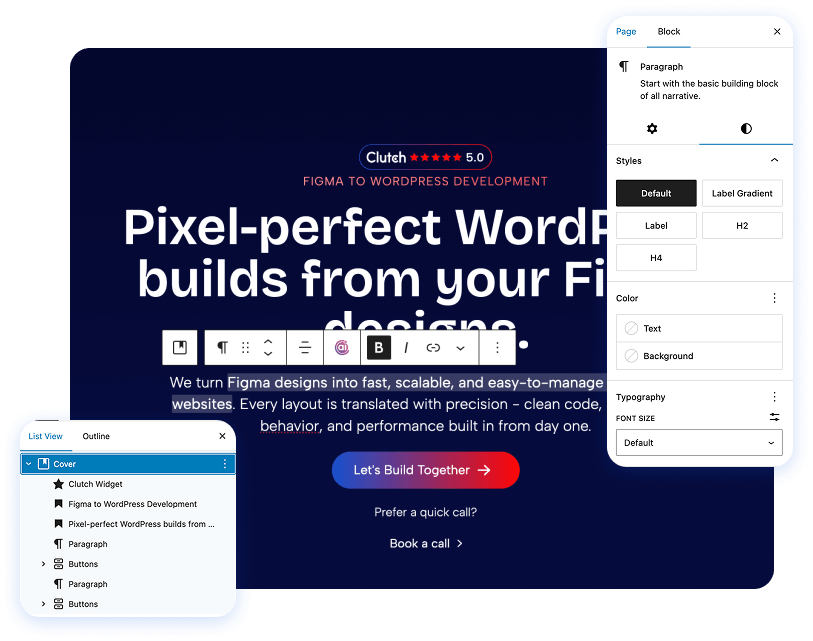
With Gutenberg, pages are built from structured blocks rather than hard-coded layouts. That means your team can update content without touching design or layout logic.
Each block represents a specific content element and can be edited, moved, or reused independently. This makes page management more intuitive, flexible, and significantly safer than traditional editors or page builders.
For Technical Teams
We speak your language - version control and performance budgets are part of our workflow. Every IMADO project follows modern engineering standards for scalability, maintainability, and long-term reliability.
All code is validated through PHP CodeSniffer (PHPCS) with WordPress Coding Standards (WPCS) rulesets applied. This ensures every commit meets consistent, high-quality standards - readable, maintainable, and fully aligned with WordPress core guidelines.
Our modular architecture allows content teams to manage flexible layouts safely - with reusable ACF or Gutenberg blocks following best coding and UX practices.
We use structured Git branching with pull requests, code review, and changelog documentation. Every project is version-controlled and auditable, keeping delivery transparent from start to deployment.
Strict input sanitization, escaping, and nonces ensure safe data handling. We apply least-privilege principles across user roles and API endpoints to minimize attack vectors.
Seamless integration with REST, GraphQL, and external APIs (CRM, ERP, booking, or payment systems) - built for stability and future scalability.
We work extensively with WooCommerce, LearnDash, Woo Subscriptions, WPML, Polylang, BuddyBoss, and other industry-standard plugins. From eCommerce to LMS and community platforms - we ensure smooth integration, scalability, and update safety.
Figma to WordPress conversion service — what agencies ask
You cannot export a finished WordPress site from Figma the way you export a PDF. Plugins and auto-converters can produce a starting layout, but they usually need heavy cleanup for performance, editing, and accessibility. IMADO hand-codes a custom theme or Gutenberg/ACF blocks from your approved Figma file.
This page is our Figma to WordPress conversion service for agencies and product teams hiring IMADO. We do not sell a converter plugin.
Not on this service. Figma to WordPress is a custom theme or block-based build. If you want a visually editable Elementor site, use our Figma to Elementor service.
A Figma link with view or inspect access, fonts, assets, and any notes on breakpoints, hover or active states, and CMS content. After a short review we send a written proposal with scope and a cooperation model — fixed-price, time & materials, or a dedicated developer.
Published starting prices (EUR, from /pricing): WordPress landing page from €2,500; custom marketing website from €5,000; WooCommerce store from €7,000. Flex 20 prepaid hours are €1,000 and usually start within 72 hours. You receive a written estimate before work begins.
Yes. Every Figma to WordPress conversion is tested across modern devices and browsers. We implement semantic HTML, a sensible heading structure, alt text, and performance-minded front-end code so search engines and assistive technologies can read the site.
Yes — WordPress maintenance and support is available, including updates, backups, monitoring, and performance work.
If your Figma design is approved and you need a clean, hand-coded WordPress build — not a plugin export — we are ready to help. Prefer Elementor? See our Figma to Elementor service.