10+ years
WordPress development experience
30+
5-star reviews on Clutch, Google & Sortlist
350+
completed projects
15+
long-term client relationships
Trusted by 60+ agencies and brands for launches, rebuilds and long-term support.



Why Migrate from Drupal to WordPress
Drupal is powerful, but it often requires specialized development resources and ongoing maintenance effort. Many organizations migrate to WordPress to simplify operations while retaining full control and scalability.
Enterprise-Ready WordPress After Migration
Your new WordPress platform is built for:
- large editorial teams
- complex content structures
- multilingual and multi-site setups
- long-term scalability
WordPress becomes a modern enterprise CMS, not a downgrade from Drupal.
Cooperation Models
We adapt to your project size, delivery needs, and internal resources – offering three collaboration models that ensure transparency, predictability, and control.
Fixed-Price Projects
Ideal for well-defined scopes with clear deliverables and predictable timelines.
Ideal for:
- Complete site builds,
- Redesigns with stable requirements.
Time & Materials
Flexible hourly model for continuous improvements, new features, or iterative development.
Ideal for:
- Ongoing development,
- Performance improvements
- Migrations
- Agile teams
Dedicated Developers
Extend your team with senior WordPress engineers who integrate directly into your workflow and tools.
Ideal for:
- Agencies or tech teams that
need extra hands for fast delivery
Not sure which model fits your project?
We’ll help you choose the best approach based on scope, timeline, and budget – keeping delivery predictable and transparent.
Drupal vs WordPress – Cost Comparison
For content-driven and enterprise websites, the cost difference becomes clear over time.
| Cost Area | WordPress | Drupal (Custom / Enterprise) |
|---|---|---|
| License (Annual) | $0 | $0 (but higher dev cost) |
| Development | $40k–$90k | $80k–$200k+ |
| Hosting | $20k+ | $40k–$80k |
| Integrations & Add-ons | $10k–$25k | $25k–$60k |
| Support & Maintenance | $12k–$24k | $30k–$70k |
| Total (Year 1) | $30k–$55k | $70k–$150k+ |
| Total (3 Years) | $150k–$280k | $300k–$600k+ |
Estimates based on enterprise-scale websites. USD pricing, Oct 2024.
Drupal’s higher yearly cost comes mainly from specialized development, higher hosting requirements, and more expensive long-term maintenance.
Our Drupal to WordPress Migration Approach
A successful Drupal migration must protect content integrity, SEO signals, and user experience.
For Technical Teams
Built by engineers, for engineers.
We speak your language – version control and performance budgets are part of our workflow. Every IMADO project follows modern engineering standards for scalability, maintainability, and long-term reliability.
WordPress Coding Standards & PHPCS
All code is validated through PHP CodeSniffer (PHPCS) with WordPress Coding Standards (WPCS) rulesets applied. This ensures every commit meets consistent, high-quality standards – readable, maintainable, and fully aligned with WordPress core guidelines.
Reusable ACF or Gutenberg/FSE Components
Our modular architecture allows content teams to manage flexible layouts safely – with reusable ACF or Gutenberg blocks following best coding and UX practices.
Git-Based Workflow
We use structured Git branching with pull requests, code review, and changelog documentation. Every project is version-controlled and auditable, keeping delivery transparent from start to deployment.
Security Best Practices
Strict input sanitization, escaping, and nonces ensure safe data handling. We apply least-privilege principles across user roles and API endpoints to minimize attack vectors.
API Integrations
Seamless integration with REST, GraphQL, and external APIs (CRM, ERP, booking, or payment systems) – built for stability and future scalability.
Plugin Ecosystem Expertise
We work extensively with WooCommerce, LearnDash, Woo Subscriptions, WPML, Polylang, BuddyBoss, and other industry-standard plugins. From eCommerce to LMS and community platforms – we ensure smooth integration, scalability, and update safety.
How Does the Gutenberg Editor Work?
The Gutenberg editor is WordPress’s modern, block-based editing system.
Instead of editing entire pages as one large piece of content, Gutenberg lets you build pages using individual blocks – such as headings, text, images, buttons, or custom components.
Each block represents a specific content element and can be edited, moved, or reused independently.
This makes page management more intuitive, flexible, and significantly safer than traditional editors or page builders.
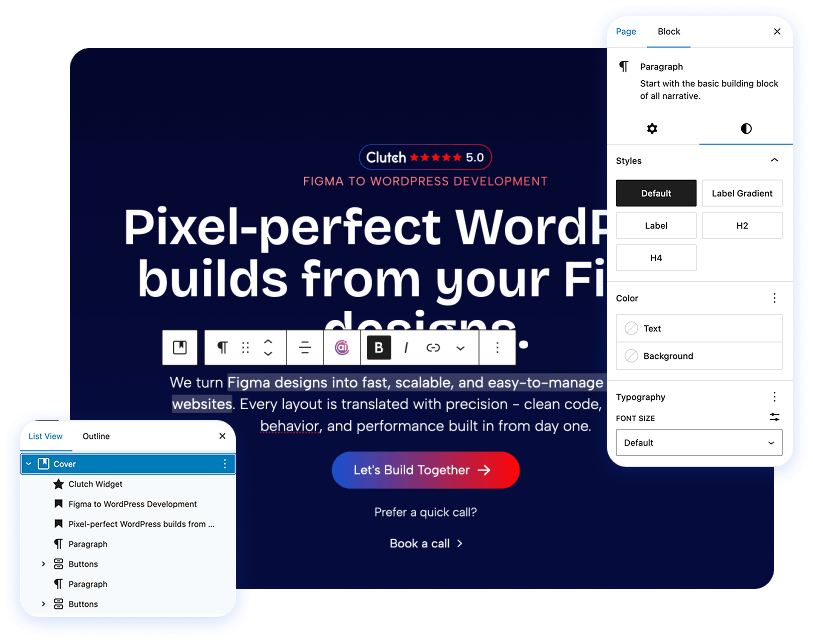
Block-Based Editing Explained
With Gutenberg, pages are built from structured blocks rather than hard-coded layouts.
That means your team can update content without touching design or layout logic.
Each block represents a specific content element and can be edited, moved, or reused independently.
This makes page management more intuitive, flexible, and significantly safer than traditional editors or page builders.
Benefits of Umbraco to WordPress Migration
Why Choose IMADO for Umbraco to WordPress Migration
Frequently Asked Questions
Everything you need to know about migration to WordPress service
Will SEO rankings be preserved after migrating from Drupal?
Yes – our process protects URLs, metadata, and internal linking.
Can you migrate custom Drupal modules?
Yes – functionality is rebuilt cleanly in WordPress.
Is WordPress suitable for enterprise Drupal replacements?
Yes – when architected correctly, WordPress supports enterprise-level requirements.
Do you offer ongoing support?
Yes – maintenance and optimization services are available.
Can we redesign during migration?
Yes – migration and redesign can be combined safely.
 12–18 minutes
to read
Multi-Location Website Design for Franchises: Architecture, Brand Governance, and Local SEO

 13–20 minutes
to read
Franchise Website Best Practices: Engineering for Scale
 14–21 minutes
to read
UI Design Services: A Complete 2026 Buyer’s Guide





Ready to Migrate from Drupal to WordPress?
If you want to move away from Drupal without risking content, SEO, or stability – we’re ready to help.

