 Ask Chatgpt to summarize Best WordPress Real Estate Website Builder: Guide 2026
 Ask Grok to summarize Best WordPress Real Estate Website Builder: Guide 2026
 Ask Claude to summarize Best WordPress Real Estate Website Builder: Guide 2026
 Ask Perplexity to summarize Best WordPress Real Estate Website Builder: Guide 2026
 Ask Gemini to summarize Best WordPress Real Estate Website Builder: Guide 2026

Most advice about a WordPress real estate website builder starts in the wrong place. It starts with demos, drag-and-drop editors, and theme screenshots.
That’s backwards.
A real estate website isn’t a design purchase. It’s operating infrastructure for listings, lead routing, local SEO, CRM workflows, agent management, compliance, and editorial control. If you treat it like a theme decision, you usually end up rebuilding the site right when the business starts to grow.
Beyond the Theme Your Real Estate Platform Starts Here
WordPress became the default foundation for many real estate builders for a reason. It powers 43.5% of all websites, supports more than 200 languages, and its ecosystem includes over 13,000 free themes, which is why so many real estate businesses use it for IDX search, lead capture, and multilingual publishing, according to BuiltWith and the WordPress market data referenced here.
That scale matters, but it also creates confusion. A huge ecosystem means you can launch quickly. It also means you can assemble a fragile stack of plugins that works for a solo agent and breaks down for a brokerage, franchise, or multi-market operation.
The word builder hides the fundamental decision. In practice, a WordPress real estate website builder is not just a theme or a page editor. It’s the combined architecture of your content model, search experience, IDX layer, forms, CRM sync, permissions, and deployment approach.
If you’re comparing platforms across markets, especially multilingual and cross-border experiences, Residaro’s guide to European property is useful because it shows how different buyers expect listing discovery, trust signals, and localized presentation to work.
A real estate site that only looks polished but can’t model listings cleanly, route leads correctly, or scale editorial workflows is still a weak platform.
The practical split is simple. A basic agent site is a marketing brochure with listings attached. An enterprise-grade real estate platform is a system that can support multiple brands, multiple offices, multiple editors, live inventory, and downstream business processes without becoming unmaintainable.
That’s the standard worth designing for.
Architecting for Scale Before You Install a Single Plugin
Most WordPress failures in real estate aren’t caused by WordPress. They’re caused by skipping architecture and jumping straight into plugin shopping.
If the site needs to support office pages, agents, neighborhoods, developments, property listings, saved searches, gated content, and CRM-qualified inquiries, the first decision isn’t visual. It’s structural.
Start with the content model
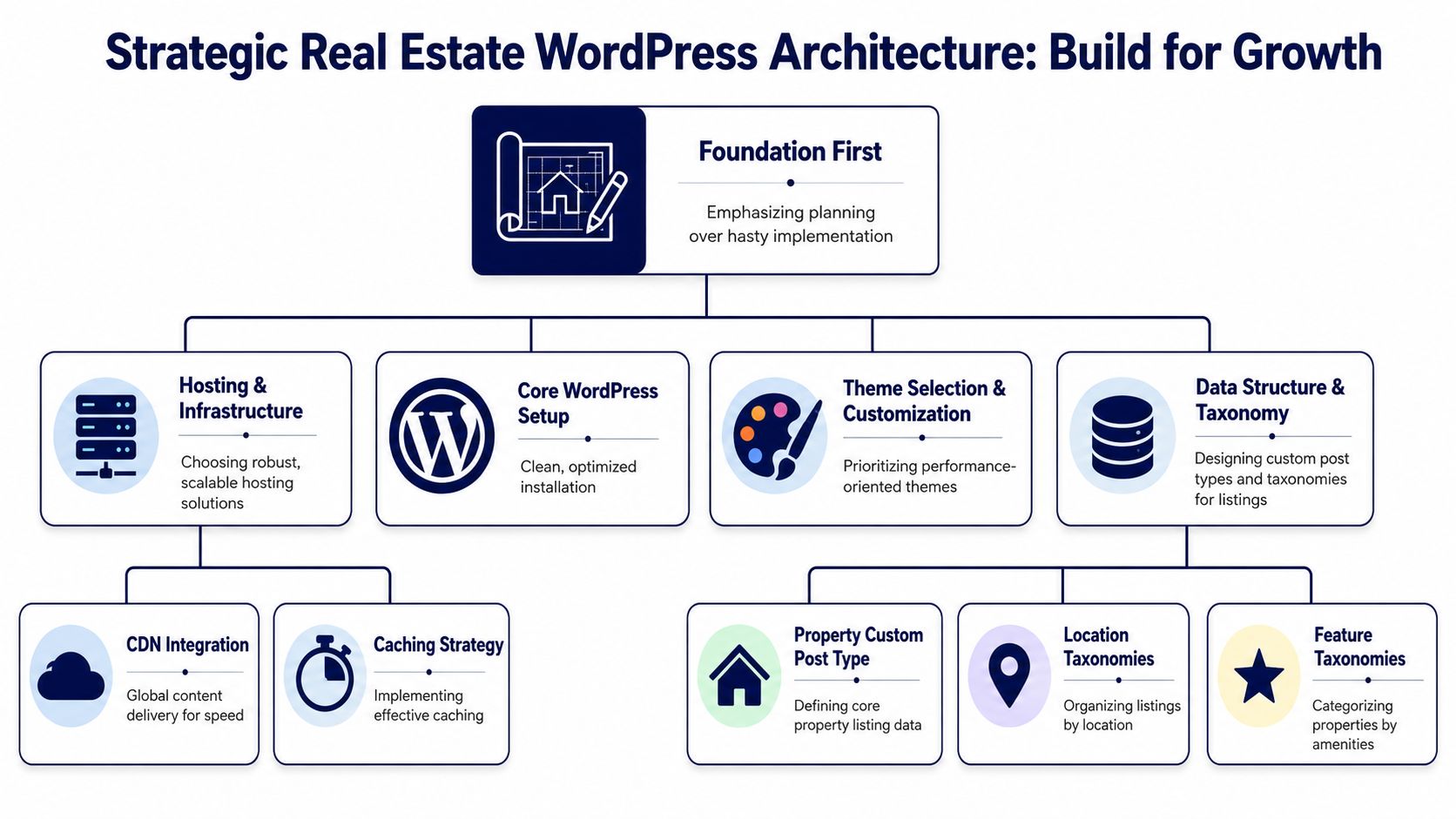
A scalable real estate build usually needs more than “posts” and “pages.” You need to decide what deserves a custom post type, what should be a taxonomy, and what should stay as structured meta attached to listings.
A practical baseline looks like this:
- Property listings as a custom post type: This gives you a dedicated model for listing templates, schema, search filters, and synced MLS fields.
- Locations as taxonomies or dedicated content entities: Cities, neighborhoods, regions, and districts often need both filtering logic and editorial pages. Don’t assume one structure can do both well.
- Agents and offices as separate entities: If agents need profile pages, assigned listings, office relationships, and CRM mapping, they should not be buried as plain text fields inside a page builder.
If you get this wrong early, every future feature becomes harder. Search gets messy. URLs drift. Editors duplicate content. Integrations require workarounds instead of clean mappings.
Map the user journeys before the UI
Real estate teams often focus on the homepage first. That’s rarely where the architecture pressure shows up.
The pressure shows up when different users need different actions:
- Buyers want fast search, map interaction, saved favorites, and clear inquiry paths.
- Sellers want valuation flows, trust pages, and local proof.
- Agents need profile control, listing attribution, and lead visibility.
- Marketing teams need landing page creation without breaking templates.
- Operations teams need clean data flowing into CRM or back-office tools.
That’s why page hierarchy, permissions, and integration rules need to be defined early. If a brokerage has multiple offices, each with localized landing pages and separate lead ownership, that’s an architecture problem long before it becomes a design problem.
Practical rule: If your business model includes franchises, multiple regions, or non-standard lead routing, don’t choose the stack based on who has the nicest demo import.
Know when the builder approach stops being enough
Many builders handle basic IDX and form capture well enough. The problem starts when the business outgrows “one website, one brand, one workflow.” The hard edge appears when you need multisite governance, a headless frontend, or deep API connections into CRM and ERP systems. That’s the strategic breakpoint identified in this analysis of when simple builders stop being sufficient.
For teams at that stage, a custom architecture usually makes more sense than trying to force enterprise requirements through a convenience stack. That may include custom Gutenberg blocks, environment-based deployment, shared component libraries, and platform-level governance. If you need that type of stack, enterprise WordPress solutions are the relevant category, not another all-in-one theme.
Choose constraints on purpose
Good architecture is mostly about choosing constraints that won’t punish you later.
Use this filter before selecting tools:
| Decision Area | Good Early Choice | Risky Shortcut |
|---|---|---|
| Listings model | Structured custom post type | Listings built as generic pages |
| Search filters | Query logic tied to clean fields | Overloaded page builder widgets |
| Office and agent setup | Separate entities with relationships | Manual duplication across pages |
| Content governance | Roles, templates, approval flow | Everyone edits everything |
| Multi-brand expansion | Planned multisite or shared architecture | One install patched repeatedly |
The point isn’t to over-engineer a small site. It’s to avoid building a small-site system for a business that won’t stay small.
Choosing Your Build Strategy Theme vs FSE vs Custom
Once the architecture is clear, the next decision is how you’ll build the presentation layer. At this stage, many confuse convenience with suitability.
A production-grade real estate build follows a layered sequence: establish hosting and a clean starter theme, define the page hierarchy, add initial listings, then integrate MLS or IDX and connect lead forms to a CRM. That order matters because it protects stability and conversion tracking, as outlined in this operational guide to building a real estate site with WordPress.
Premium theme route
Themes like Houzez and RealHomes can get a site online quickly. For a solo agent or a small team with standard requirements, that speed can be useful.
The trade-off is hidden in the bundle. These themes often package listing templates, custom fields, page builders, shortcodes, form logic, and visual options into one product. That feels efficient early on. Later, it creates lock-in.
Common issues include:
- Template dependency: Moving away from the theme often means rebuilding listing templates and page content.
- Code bloat: Large option panels and bundled features can slow editing and frontend delivery.
- Inconsistent standards: Theme-level abstractions don’t always align cleanly with modern Gutenberg workflows.
FSE and Gutenberg block approach
A Full Site Editing stack sits closer to WordPress core. For many serious teams, this is the most balanced option.
Instead of relying on a monolithic theme, you define templates, template parts, reusable blocks, and editorial patterns with cleaner separation between content and presentation. That usually gives marketing teams more control without forcing developers to accept theme lock-in.
This route works well when you want:
- Editorial consistency: Marketing teams can build pages inside controlled block patterns.
- Component reuse: CTAs, listing cards, trust sections, and office modules can be reused safely.
- Longer platform lifespan: Core-aligned architecture tends to age better than proprietary builder logic.
For teams that want that middle ground between convenience and control, custom WordPress theme development is often the right implementation path because it allows FSE or hybrid Gutenberg builds around your actual data model.
Full custom frontend
Full custom development is the right answer when the website is part of a larger digital product, not just a marketing channel.
That usually applies when you need highly customized search UX, granular performance control, custom account areas, advanced permissions, or integration-heavy workflows across offices and systems. You’re not buying a theme at that point. You’re building a platform.
The more your listing experience, agent workflows, or regional operations differ from a standard theme demo, the more expensive the “quick” option becomes over time.
Here’s the decision overview.
| Approach | Best For | Speed to Market | Flexibility | Long-Term Cost |
|---|---|---|---|---|
| Premium real estate theme | Solo agents and small teams with standard needs | Fast | Moderate | Often rises when custom needs pile up |
| FSE with custom blocks | Brokerages and teams that need editorial control | Moderate | High | Usually more predictable |
| Full custom build | Enterprises, franchises, multi-market platforms | Slower | Very high | Higher upfront, lower compromise |
The wrong choice is usually mismatch
The cheapest route isn’t always the theme. It’s the build strategy that matches the business stage.
A small team that pays for a full custom stack too early may overbuild. A growing brokerage that insists on staying inside an all-in-one theme usually accumulates technical debt, editorial friction, and integration constraints.
That’s why “best WordPress real estate website builder” is the wrong question unless you also ask, “Best for what operating model?”
Integrating Live Data with IDX MLS and Advanced Maps
Listings are the engine of the platform. If live property data is handled poorly, everything else suffers. Search quality drops, SEO weakens, and lead capture becomes harder to trust.
The implementation method matters more than is often acknowledged.
Don’t treat IDX as a checkbox
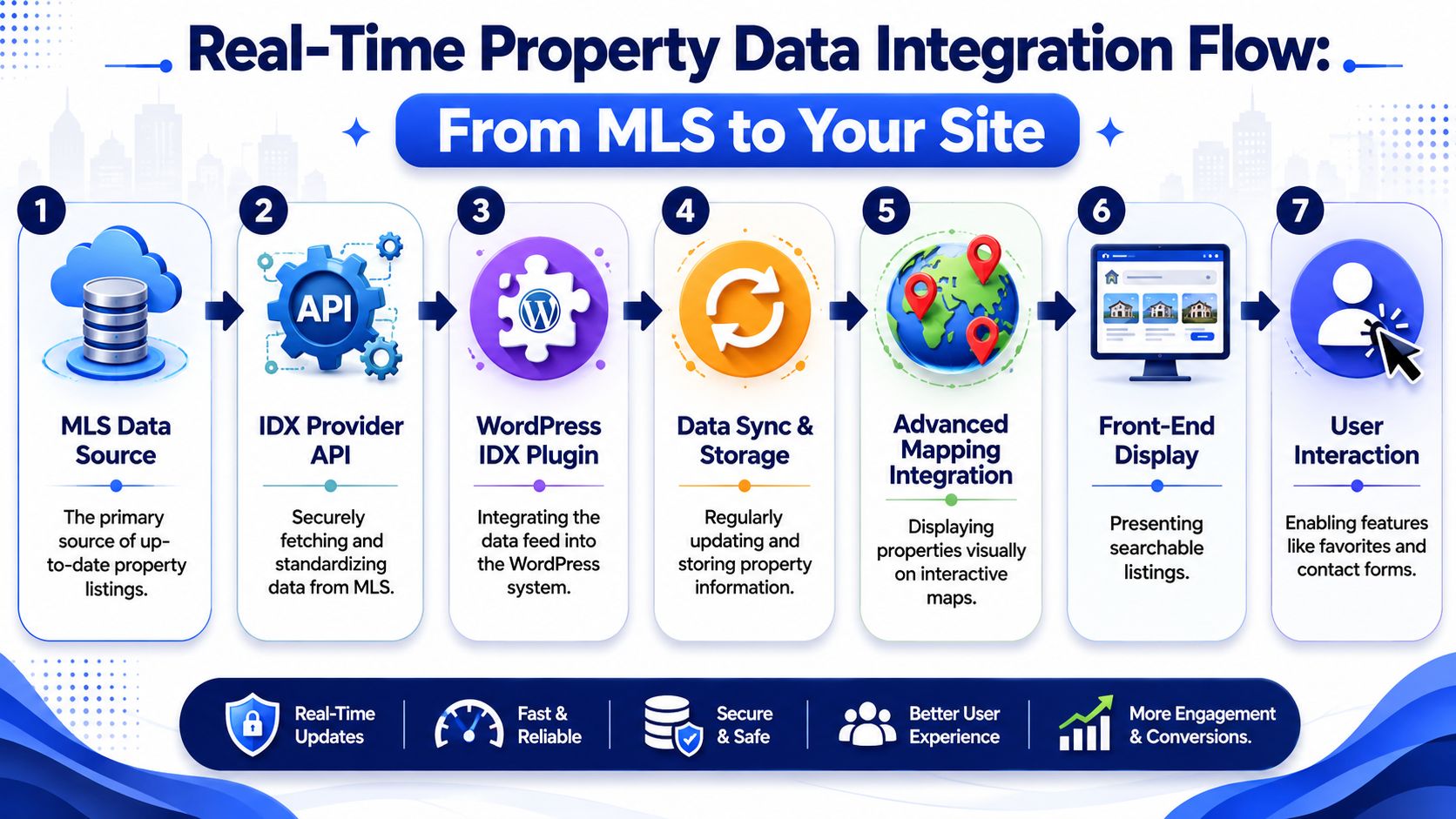
In practice, teams usually encounter several integration models. Some providers rely on embedded views. Others sync listing data into WordPress more directly. The difference affects indexing, template control, and how much ownership you have over the listing experience.
At a technical level, you’ll hear teams discuss older MLS transport methods and newer API-based approaches. The practical decision is simpler: choose an integration path that gives you stable data delivery, clean frontend rendering, and enough control over templates and search behavior to support your long-term SEO and UX goals.
The wrong setup creates familiar problems:
- Thin page ownership: Listing content feels visually present but is hard to control thoroughly.
- Weak template flexibility: You can’t shape listing detail pages around your conversion strategy.
- Search inconsistency: Filter behavior and map results don’t match what users expect.
- Sync opacity: Editors don’t know what data is local, what is remote, and what can be overridden.
For custom platforms, API planning matters. If listings, saved searches, market pages, and inquiry flows all depend on external data sources, the integration layer should be designed like infrastructure, not treated like a plugin setting. Teams needing this depth usually end up working with API integration solutions rather than off-the-shelf defaults alone.
Mapping is part of the product
The map experience isn’t decorative. For many buyers, it is the search interface.
A real estate map layer should answer practical user questions quickly:
- Where is the property?
- What else is nearby in the same search range?
- Can I change filters without losing geographic context?
- Do markers, clusters, and list results stay in sync?
That requires more than dropping in Google Maps or Mapbox. You need to control how filters query listings, how marker clusters load, how viewport changes affect results, and whether map interactions degrade mobile performance.
Choose ownership over convenience where possible
The strongest implementations keep important listing and location logic under your control. That doesn’t mean everything must be built from scratch. It means the architecture should let you own search templates, listing presentation, inquiry triggers, and map behaviors that matter to the business.
If your team can’t explain where listing data lives, how often it syncs, and which layer controls rendering, you don’t have a reliable listing platform yet.
For a brochure site, an embed can be enough. For a real acquisition channel, it usually isn’t.
Advanced Business Integrations CRM ERP and Headless Options
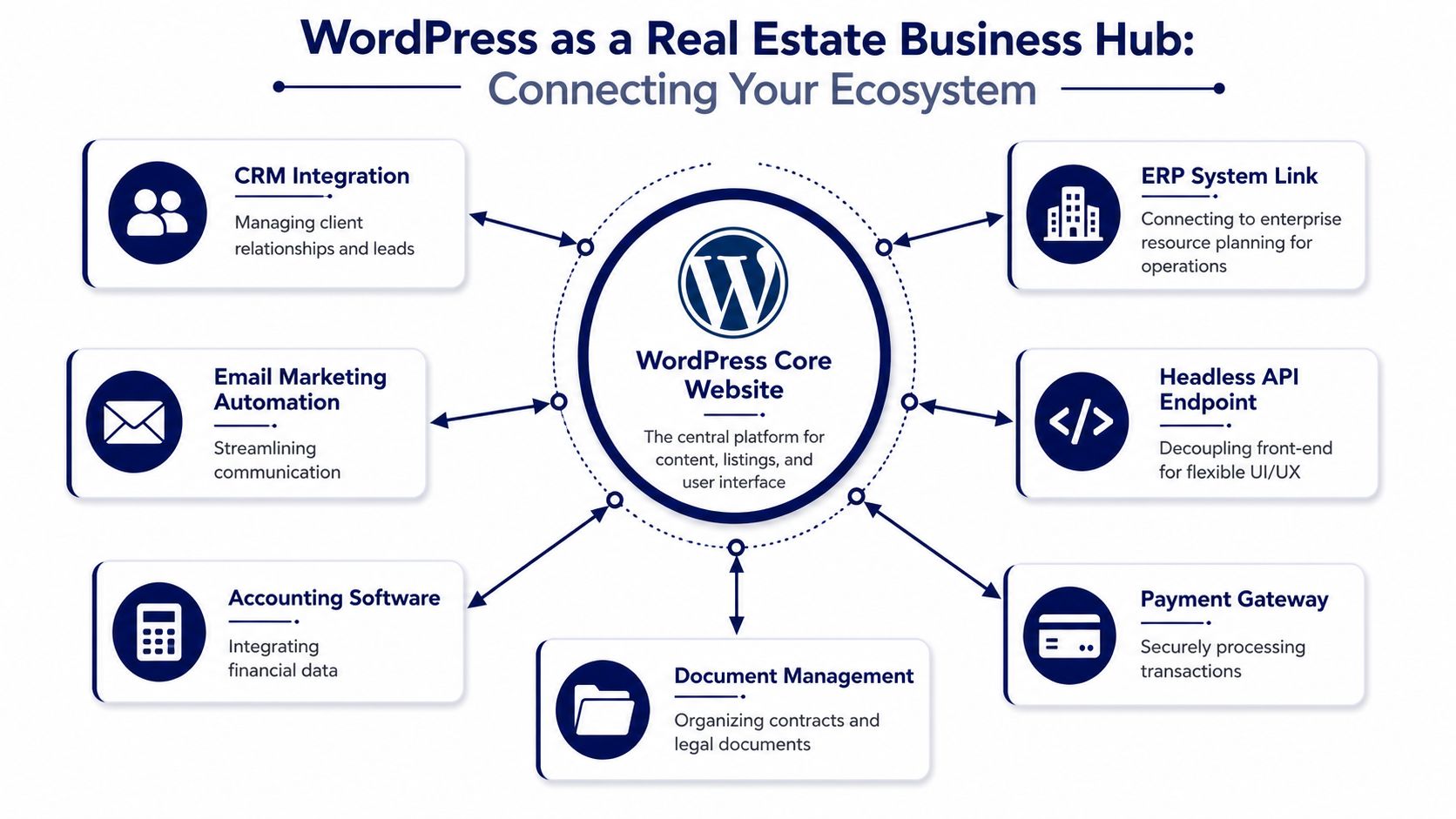
A serious real estate website shouldn’t stop at capturing form submissions. It should push useful data into the systems that run the business.
That includes CRM records, sales pipelines, agent assignments, payment events, document workflows, and in some cases finance or ERP processes. Once those pieces connect cleanly, the website stops being a marketing shell and becomes a working operational layer.
CRM is where most platforms show their limits
A basic builder usually sends leads to an inbox or a generic webhook. That’s fine until routing rules matter.
Brokerages often need the website to decide where a lead goes based on office, territory, language, listing type, budget band, or campaign source. They also need the CRM to receive enough context to make that lead actionable without manual cleanup.
A robust setup usually includes:
- Field normalization: Inquiry forms should map cleanly into CRM objects, not dump everything into a notes field.
- Source attribution: Campaign, page, listing, and referral context should travel with the record.
- Ownership logic: Round-robin routing is different from office-based routing or listing-agent assignment.
- Status feedback: Some teams need the website to react to CRM state changes, not just send data one way.
If your internal process depends on investor pipelines rather than standard residential nurturing, it helps to study adjacent tooling. This overview of investor relations management software from Homebase is a useful reference for understanding how different lead and relationship models change integration requirements.
WordPress can support commerce-style real estate flows
Modern real estate websites increasingly include paid listings, subscriptions, booking funnels, and member-style experiences. WordPress is well suited to that because its ecosystem matured far beyond publishing. Pantheon notes that WordPress market share grew from 27.3% in early 2017 to 43% in January 2026, and frames WooCommerce as a high-scale commercial layer that supports those more advanced conversion flows in the broader ecosystem, as outlined in Pantheon’s WordPress statistics overview.
That matters in real estate because many businesses now monetize through:
- Featured listing packages
- Agent membership tiers
- Pay-to-promote placement
- Consultation or tour booking
- Application and reservation workflows
For that class of site, e-commerce builds on WordPress become relevant even if the company doesn’t think of itself as an online store.
When headless makes sense
Headless WordPress is not the default answer. It adds complexity, and many teams adopt it too early.
It becomes attractive when you need a frontend that behaves more like a product application than a traditional website. Examples include advanced search interfaces, native-app shared data layers, multilingual frontends with unique presentation logic, or design systems spanning multiple digital properties.
Use headless when these conditions are true:
- Frontend performance goals require deeper control than a standard theme can provide.
- Your team has engineering capacity to maintain both WordPress and the frontend application.
- The website is one channel among several, such as web, mobile app, partner portal, or kiosk interface.
- Editorial workflows still matter, and WordPress remains the content hub.
Headless is justified when decoupling solves a real product problem. It’s a poor choice when it’s only being used to make the stack sound more modern.
For many brokerages, a custom Gutenberg or hybrid architecture is enough. For real estate platforms with app-like search and multi-channel delivery, headless becomes easier to defend.
Optimizing for Performance SEO and Accessibility
Fast real estate sites are usually built by removing complexity, not by adding another optimization plugin. The stack choice made earlier matters here. A builder-heavy site with layered widgets, map scripts, and listing add-ons often carries performance debt before content editors publish the first property.
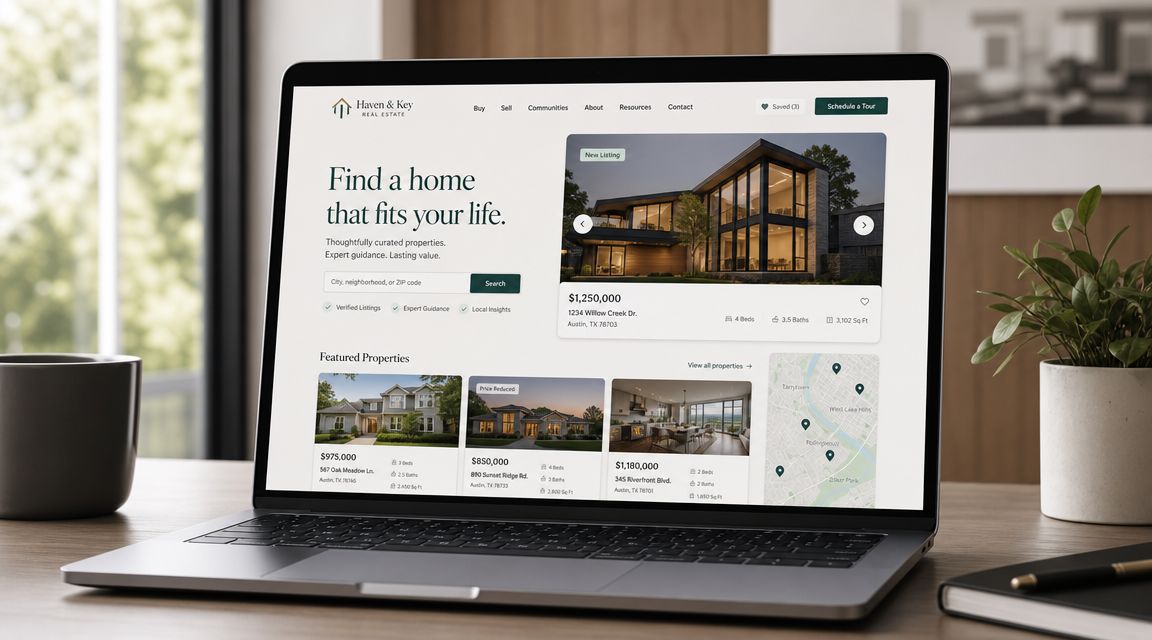
Performance work that affects search, lead flow, and maintainability
Real estate pages are heavy by nature. High-resolution photography, interactive maps, faceted search, mortgage tools, and third-party lead capture all compete for bandwidth and browser time. If the architecture is weak, the listing detail page becomes the bottleneck.
The fixes are usually predictable:
- Control image output: Serve modern formats, generate responsive sizes, and avoid loading full gallery assets above the fold.
- Load maps on intent: Initialize advanced map libraries only on templates that need them, or after a user action.
- Keep property queries disciplined: Search and filter logic should use indexed fields and clear query rules, not expensive catch-all conditions.
- Audit builder output: Nested sections, slider modules, popups, and animation libraries add markup and JavaScript weight quickly.
- Trim third-party scripts: Chat tools, ad pixels, scheduling widgets, and form embeds should earn their place.
I usually review four templates first. Search results, listing detail, neighborhood pages, and office pages reveal most of the performance problems that matter to a brokerage.
SEO for listings and local intent
Real estate SEO breaks when teams treat every property page as a disposable URL. Search engines need stable page structures, clean internal taxonomy, and structured data that matches visible page content. That applies to listings, agents, offices, neighborhoods, and local market pages.
Schema deserves more attention than it gets. Property fields such as price, bedroom count, bathroom count, availability, address data, and images should be mapped carefully and tested in Google’s Rich Results tools before launch. I see rushed implementations fail here often. The page looks fine in the browser, but the structured data is incomplete, conflicting, or missing required fields.
For the marketing side of the equation, these RealEstateCRM insights for realtors are a useful companion because they focus on local visibility, content consistency, and lead capture discipline instead of treating SEO as metadata alone.
Accessibility affects conversion quality
Accessibility problems on a real estate platform are usually tied to interactive features, not static pages. Search filters, map pins, saved search controls, image galleries, calculators, and contact flows all create failure points if they are built only for mouse users.
Focus on the basics that commonly break:
- Keyboard support: Users need to reach filters, sort controls, modals, and inquiry forms without a mouse.
- Clear form behavior: Labels, validation messages, required states, and success feedback should be explicit.
- Readable interface patterns: Status labels, price treatments, and CTA buttons need sufficient contrast.
- Proper page structure: Heading order, landmark regions, and alternative text should help screen readers understand listing pages.
Accessibility also forces better engineering discipline. If a search interface is hard to tab through, it is usually overbuilt. If a modal traps focus or a map blocks access to listings, the problem is not compliance language. The interaction model is weak.
A real estate platform is only doing its job if users can search, compare, and inquire without friction on any device, with any input method.
Launch Maintenance and Total Cost of Ownership
Launch is where weak architecture starts getting expensive.
A basic agent site can survive with manual checks and a few premium plugins. A real estate platform with live listing feeds, lead routing, office stakeholders, and multiple vendors cannot. After go-live, the work shifts from building pages to operating a system. That operating model is what drives total cost of ownership.
What to verify before launch
Pre-launch review should test business operations, not just page rendering. If search works but inquiries route to the wrong office, launch failed. If MLS imports run on staging but stall in production, launch failed. If editors cannot update landing pages without touching listing templates, the stack is too fragile.
Review these areas before go-live:
- Security and access control: Restrict admin access, enforce role boundaries, remove unused plugins and themes, and confirm backup and restore procedures.
- Environment separation: Use staging for updates, feed testing, and template QA. Production should stay stable.
- Lead routing and notifications: Test contact forms, showing requests, valuation flows, saved searches, agent assignment rules, and CRM handoffs.
- Feed and integration reliability: Confirm IDX or MLS sync schedules, retry behavior, duplicate handling, and what happens when an external API times out.
- Template and data validation: Check listing fields, canonical rules, structured data output, and archive behavior on office, agent, and neighborhood pages.
- Operational monitoring: Put uptime alerts, form monitoring, cron visibility, and error logging in place before traffic starts.
That last point gets missed often. Teams add monitoring after a problem. By then, the platform has already dropped leads.
Fast launch usually means deferred risk
Yes, a WordPress real estate site can go live quickly if the scope is narrow. That usually means a prebuilt theme, limited customization, basic feed display, and minimal business logic. It does not mean the platform is ready for scale.
The gap shows up in month two or three. Plugin updates affect search templates. Feed imports create field mismatches. Marketing asks for campaign pages that do not fit the theme structure. Brokerage leadership wants office-level permissions, market-specific landing pages, or CRM routing rules that the original build never planned for.
A site can be online and still be operationally unfinished.
Think in operating cost, not just project cost
The build quote is only one line item. Long-term cost comes from how much effort the stack requires to keep stable, secure, and adaptable.
| Cost Area | What It Covers |
|---|---|
| Hosting and infrastructure | Managed hosting, CDN, backups, staging and production environments |
| Licensing | IDX tools, premium plugins, maps, forms, search tools, vendor subscriptions |
| Maintenance | Core updates, plugin updates, regression testing, feed checks, security review |
| Support | Bug fixes, editor support, incident response, small configuration changes |
| Improvement work | New templates, integrations, workflow changes, search and conversion updates |
Build strategy matters. A builder-heavy setup can be cheaper at the start and more expensive later because every change depends on plugin compatibility and page-level workarounds. A custom theme or block-based system usually costs more upfront, but it lowers maintenance overhead if templates, data models, and integrations are clearly separated.
That trade-off matters more in real estate than in simpler brochure sites. Listing data changes constantly. Lead flows are time-sensitive. Third-party systems fail. If the platform cannot absorb those changes without repeated rework, ownership cost keeps rising.
Frequently Asked Questions
Can I use Elementor or Divi for a serious real estate site?
Yes, but only with discipline. These builders can support marketing pages and some team-managed content workflows well. They become risky when critical listing templates, search logic, and reusable structural components depend too heavily on builder-specific markup or widgets.
For enterprise use, I’d keep page builders away from the most sensitive layers. Let them support campaign pages, not the entire platform architecture.
Is a premium real estate theme enough for a brokerage?
Sometimes. If the brokerage has one brand, a straightforward lead flow, no unusual integrations, and limited editorial complexity, a premium theme can work.
It stops being enough when the business needs granular permissions, office-level governance, advanced routing, or non-standard data relationships. At that point, the theme starts dictating the business instead of supporting it.
What’s the real problem with iframe-style IDX implementations?
The issue isn’t that they always fail visually. It’s that they can limit control over templates, search behavior, and how thoroughly listing content becomes part of your site experience.
For teams that depend on organic visibility and differentiated UX, tighter rendering and data control are usually worth prioritizing.
When does WordPress multisite make sense for real estate?
Multisite makes sense when multiple offices, brands, or franchise entities need shared governance with some local autonomy. It can work well when templates, components, and standards need to be centrally managed while allowing local content teams to publish independently.
It’s a poor fit if every site needs radically different functionality or if the organization lacks clear governance.
Should I go headless for better performance?
Not by default. Headless can improve control, but it also adds development and maintenance overhead.
Choose it when your frontend requirements are product-like and your team can support a decoupled stack over time. If your needs are mostly editorial plus listings, a well-built Gutenberg or hybrid solution is often more sensible.
How many plugins is too many for a WordPress real estate website builder?
There isn’t a magic number. The problem is overlap, poor quality, and unclear ownership.
A lean stack of well-chosen plugins is safer than a cluttered stack where three tools do similar jobs and no one knows which one owns forms, schema, redirects, or custom fields.
What’s the strongest long-term approach?
For most growing real estate businesses, the strongest path is a custom or semi-custom WordPress architecture built around structured listing data, disciplined template control, direct integrations, and a governance model that matches the organization.
That usually beats buying convenience repeatedly.
If your team needs a WordPress real estate platform that goes beyond theme setup, IMADO handles the engineering side of custom builds, Gutenberg and FSE implementation, multisite, headless architecture, API integrations, and long-term maintenance. That’s the right fit when the site has to support business operations, not just publish listings.
Let’s build something exceptional
Tell us about your project – we’ll help you launch a fast, scalable, SEO-optimized WordPress platform built for growth.