 Ask Chatgpt to summarize WordPress Website Maintenance Cost: 2026 Guide
 Ask Grok to summarize WordPress Website Maintenance Cost: 2026 Guide
 Ask Claude to summarize WordPress Website Maintenance Cost: 2026 Guide
 Ask Perplexity to summarize WordPress Website Maintenance Cost: 2026 Guide
 Ask Gemini to summarize WordPress Website Maintenance Cost: 2026 Guide
TL;DR: Most small and medium businesses budget $50 to $500 per month for wordpress website maintenance cost, while the wider market runs from $30 to $5,000+ monthly depending on service tier and complexity. If you’re running a complex WooCommerce or enterprise setup, monthly maintenance can reach $2,000 to $10,000+.
A lot of teams hit the same moment right after launch. The redesign is live, the campaign pages are published, leadership is happy, and then the actual operational question shows up: who keeps this thing stable now?
That’s where wordpress website maintenance cost gets misunderstood. Buyers often compare monthly fees as if they’re buying the same service from every provider. They aren’t. One plan might cover little more than automated updates and backups. Another includes staged testing, performance tuning, malware response, plugin conflict triage, and someone who owns the outcome when the site breaks.
For a CTO, this is a total cost of ownership problem. For a Head of Marketing, it’s a revenue protection problem. In both cases, the monthly fee is only the visible part of the cost. The hidden part lives in staff time, delayed campaigns, incident recovery, lower site performance, and the technical debt that builds when maintenance gets treated like a low-skill admin task.
Table of Contents
Your Guide to WordPress Maintenance Costs in 2026
The short answer is straightforward. By 2026, WordPress maintenance pricing has settled into recognizable tiers, with most small and medium businesses budgeting $50 to $500 per month, while the broader market spans $30 to over $5,000 monthly depending on scope and service model, according to StateWP’s WordPress maintenance cost analysis.
What matters more is why those numbers are so far apart.
A basic site with a modest plugin stack and low change frequency can live comfortably in the lower bands. A business site with active lead generation, custom forms, CRM connections, multilingual content, or regular publishing needs more hands-on maintenance. Then there are WooCommerce builds, membership platforms, multisite networks, and API-heavy environments where one careless plugin update can break checkout, sync the wrong data, or take down a key conversion path.
Practical rule: Budget for the business impact of failure, not just the routine cost of upkeep.
That’s the lens often missed. If the website is only a digital brochure, a light maintenance plan may be enough. If the site supports revenue, paid acquisition, franchise operations, or a sales pipeline, maintenance is closer to operations engineering than housekeeping.
Here’s the useful way to frame it:
- Low-cost plans usually protect basic functionality.
- Mid-range plans usually protect business continuity.
- Premium plans protect revenue, speed, and operational confidence.
The right budget depends less on WordPress itself and more on what your site is expected to do every day without fail.
Understanding WordPress Maintenance Pricing Models
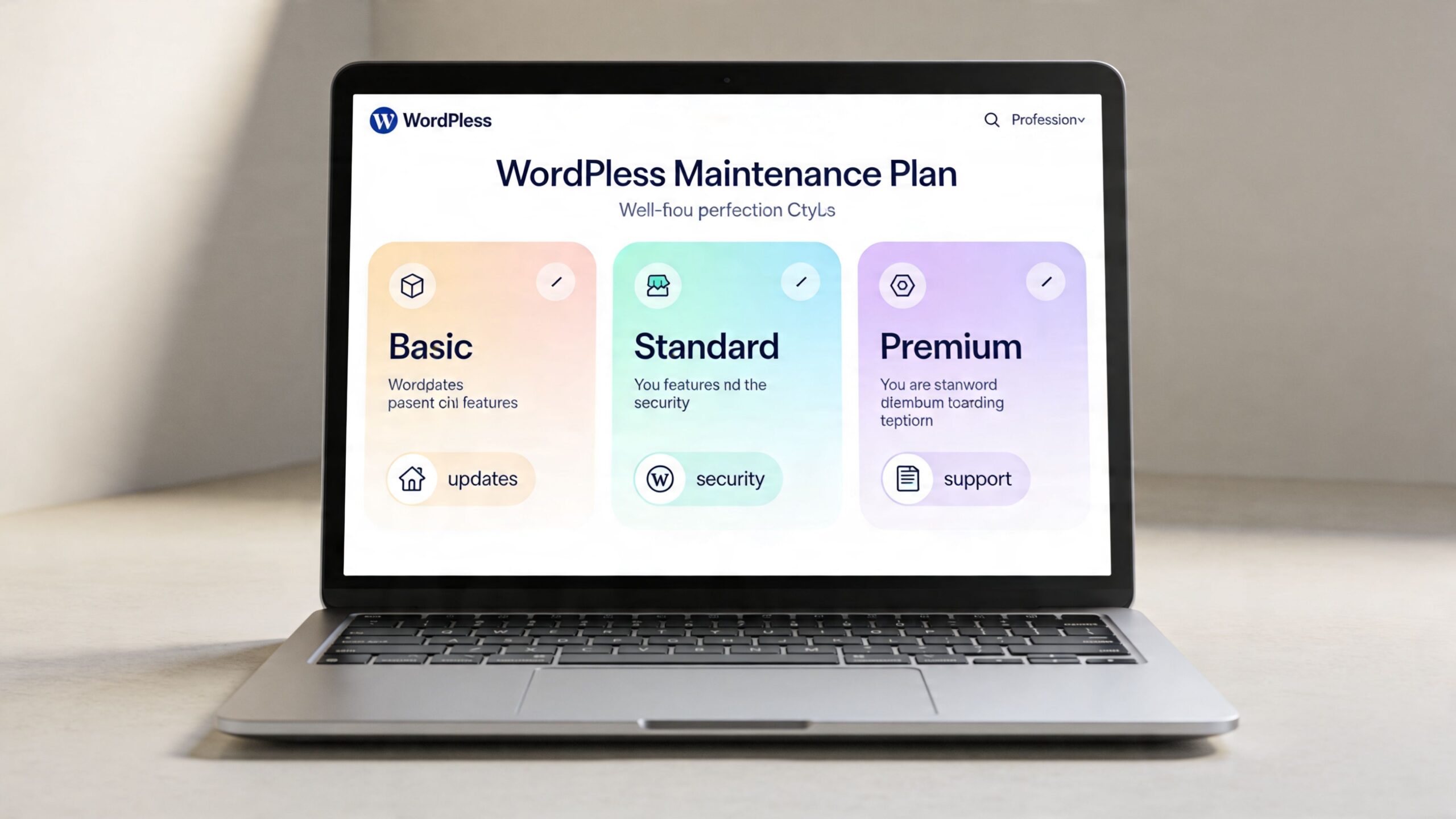
WordPress maintenance is usually sold in three ways. If you don’t separate these models before comparing quotes, pricing looks random when it isn’t.
Monthly retainers
This is the most common model for business websites. You pay a fixed monthly fee for a defined set of recurring services such as core updates, plugin updates, backups, security checks, uptime monitoring, and some amount of support.
Consider it akin to scheduled servicing for a fleet vehicle. You’re paying to reduce surprises. The better retainers also include staging workflows, rollback procedures, and a clear escalation path when something goes wrong.
Retainers work best when your team wants predictable operations and predictable invoices.
Hourly or on-demand support
This model looks cheaper at first because you only pay when work is needed. It resembles calling a mechanic after the engine light comes on. For low-value or rarely changed websites, that may be fine.
For active business sites, hourly support usually becomes expensive in the wrong way. You don’t just pay for repair time. You pay for context switching, emergency prioritization, investigation, and often slower response because no one is proactively watching the site. That delay is part of your real maintenance cost even if it never appears on the invoice.
Bundled maintenance with hosting oversight
This is the closest thing to a full-service operating model. Maintenance is packaged with hosting coordination, environment oversight, and broader accountability across the stack.
That matters because many WordPress problems aren’t purely “WordPress problems.” They sit between application code, caching, CDN behavior, PHP versions, database load, and deployment workflow. When maintenance and hosting are split across vendors, teams lose time in handoffs and finger-pointing.
The cheapest quote often assumes someone else owns the problem once it leaves the dashboard.
A simple way to evaluate proposals is to ask which model you’re really buying:
| Pricing model | Best fit | Main trade-off |
|---|---|---|
| Monthly retainer | Ongoing business sites | Scope must be clearly defined |
| Hourly support | Low-change sites | Reactive, less predictable |
| Bundled maintenance and hosting oversight | Revenue-critical or complex sites | Higher base fee, broader responsibility |
If a proposal doesn’t make the support model obvious, it’s not detailed enough yet.
The Core Cost Drivers Behind Your Monthly Bill
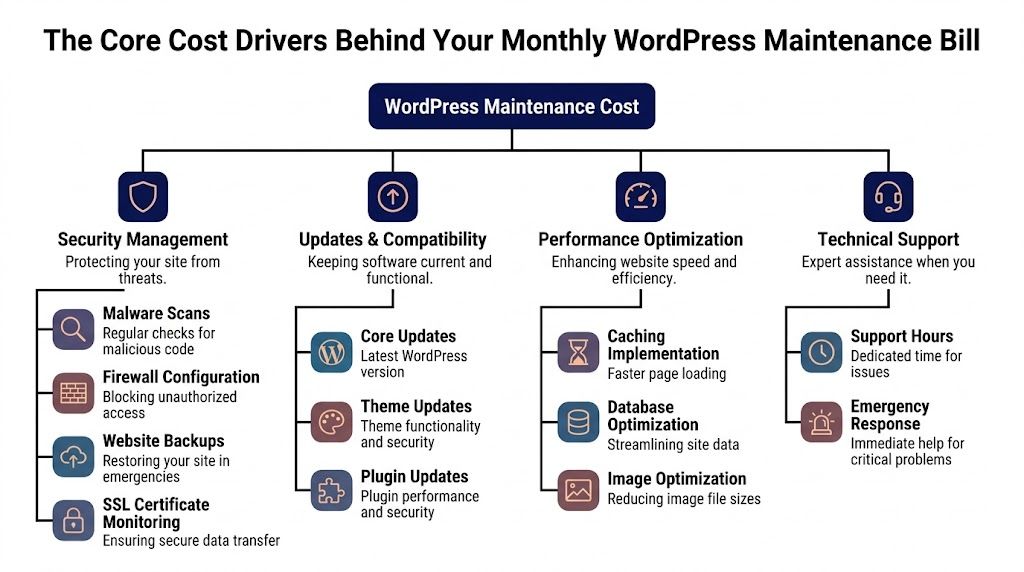
Monthly pricing rises or falls based on four operational pillars: updates, security, backups, and performance. Every serious maintenance plan touches all four. The primary difference is how much testing, judgment, and engineering each pillar requires.
Updates and compatibility
On a simple site, updates are routine. On a customized site, updates are change management.
Plugin conflicts are one of the biggest hidden drivers of wordpress website maintenance cost. A site using WooCommerce, page builders, multilingual tooling, custom blocks, or bespoke integrations needs staged testing before updates go live. Enterprise WooCommerce maintenance can reach $2,000 to $10,000+ per month because teams are paying for staged updates, visual regression testing, and SLA-backed response, not just button-clicking, as described in WP Creative’s maintenance cost breakdown.
That same analysis notes that unoptimized updates can slow Core Web Vitals by 30-50% and reduce conversion rates by 20-40%. That’s why mature teams treat updates as a controlled release process.
Security and incident prevention
Basic maintenance plans often include scanning. Strong maintenance includes response planning.
That means monitoring vulnerable plugins, hardening login paths, reviewing suspicious behavior, validating backups, and having a clear process when a site is compromised. If cleanup is a separate service, your quote may be understating your real exposure. For teams already dealing with infections or suspicious files, a specialized WordPress malware removal process should be part of the evaluation, not an afterthought.
Backups and recovery quality
A backup only has value if it can be restored quickly and cleanly.
The cheapest plans usually promise backups but say very little about retention, storage separation, testing, or restore responsibility. That gap becomes expensive during incidents. In long-horizon cost planning, this matters a lot. A five-year analysis found that WordPress sites built initially for roughly ₹40,000-₹80,000 ($480-$960 USD) reached a 5-year maintenance total of ₹2,28,000 ($2,736 USD) and around ₹3,08,000 ($3,696 USD) in total five-year costs, with hidden costs including compatibility issues, data recovery, plugin subscriptions, and developer intervention, according to WebTirety’s 5-year maintenance breakdown.
Performance and technical debt
Performance work is where maintenance starts overlapping with engineering.
Caching layers, image handling, database cleanup, script loading, and theme or plugin bloat all affect how the site feels to users and how well campaigns convert. If you’re trying to estimate effort realistically, frameworks for mastering the cost of a project are useful because they force the same discipline WordPress teams need: define ongoing scope, change frequency, dependencies, and failure impact before assigning a budget.
Fast websites rarely stay fast by accident. Someone keeps them that way.
Sample Maintenance Packages and Scoped Estimates
Most buyers don’t need another abstract pricing range. They need to see what a maintenance plan looks like when attached to a real website profile.
Below is a practical way to map scope to budget.
Three common business profiles
| Website Profile | Typical Monthly Cost | Core Services Included |
|---|---|---|
| Small content-focused site | $50-$150 | Core, plugin, and theme updates; scheduled backups; basic security monitoring; uptime checks; small content edits |
| Mid-sized B2B corporate site | $200-$500 | Everything above, plus staging-based testing, form and integration checks, performance tuning, reporting, and support for ongoing marketing updates |
| Large WooCommerce or enterprise site | $2,000-$10,000+ | Staging-tested releases, regression checks, incident response, advanced security oversight, performance engineering, custom integration support, and operational coordination |
Small content-focused site
This is the classic brochure site, editorial site, or light company website. It doesn’t change much. It isn’t tied to direct transactions. The main goal is protecting reputation and keeping lead capture forms working.
A sensible package here covers routine updates, backups, and basic monitoring. What usually doesn’t belong in this tier is deep custom development or priority support with strict response commitments. If the website is stable and low-risk, overbuying maintenance doesn’t make sense.
Mid-sized B2B corporate site
Cost starts moving up because marketing operations depend on the site. Campaign pages go live regularly. Integrations matter. Forms feed downstream systems. Content changes happen often enough that update testing can’t be casual.
For this type of site, the maintenance partner should test before deployment, verify key user journeys after updates, and leave room for minor implementation work. The business objective isn’t just “keep the site online.” It’s protecting lead generation and launch velocity.
If marketing publishes every week, maintenance isn’t background admin. It’s part of the delivery pipeline.
Large WooCommerce or enterprise site
This category supports direct revenue or complex internal workflows. Checkout, payment tools, product logic, localization, inventory connections, or franchise-level content operations all increase maintenance scope.
At this level, the team isn’t buying routine upkeep. They’re buying risk reduction. That includes release discipline, faster incident handling, and people who understand the architecture well enough to spot problems before customers do.
The important takeaway is that scoped estimates should track business criticality. Two sites can both run WordPress and still deserve completely different budgets.
Agency vs In-House vs White‑Label A Cost-Benefit Analysis
The delivery model changes your total cost almost as much as the technical scope does. A monthly maintenance quote only tells part of the story. The rest sits in staffing, responsiveness, institutional knowledge, and how often your team gets pulled away from core work.

In-house ownership
In-house support sounds efficient because the expertise is close to the business. For some organizations, it is. The problem is that maintenance work is uneven. Some weeks are quiet. Some weeks require urgent debugging, deployment discipline, hosting coordination, plugin triage, and performance analysis all at once.
That creates a mismatch. Either a capable internal person gets interrupted constantly, or a less experienced person becomes the default site owner and takes on risks they’re not set up to manage. The opportunity cost is real. Professional billing $150/hour who spends 3 hours per month on updates incurs $450 in opportunity cost, before factoring in the average $5,000-$10,000 cost of WordPress hack recovery.
Agency maintenance
A good agency spreads specialist skills across multiple clients. That usually means better access to senior troubleshooting, broader plugin experience, and stronger process around releases and incidents.
For teams that don’t want to hire extensively for WordPress operations, agency support is often the cleanest TCO decision. It converts irregular technical interruptions into a predictable operating cost. For a practical look at this model, outsourcing WordPress maintenance to a specialist team can reduce the burden on internal marketing and product teams when they need ongoing engineering support but not a full internal function.
White-label delivery for agencies
White-label is different. The buyer isn’t just trying to maintain one site. They’re trying to maintain client delivery capacity without staffing every specialty internally.
That model works when the white-label partner behaves like an extension of your team, not just a ticket processor. Reporting matters a lot here because your agency still owns client trust. If you need to standardize communication across accounts, this guide to white label reporting is useful because it highlights how agencies package technical work into client-facing accountability.
Here’s the practical comparison:
- In-house fits when WordPress is strategically central and you already have senior web operations talent.
- Agency fits when you want depth, process, and lower interruption cost.
- White-label fits when your agency needs scalable fulfillment behind the scenes.
A short walkthrough helps frame the trade-offs in operational terms:
You’re not only choosing who updates plugins. You’re choosing who owns the consequences when updates affect revenue, lead flow, or client trust.
Budgeting and Finding the Right Maintenance Partner
Procurement teams often make the same mistake. They compare maintenance proposals on headline price, then discover later that hosting, emergency work, and performance support sit outside the quote.
That’s where budgets drift. Hidden hosting integration costs can inflate true WordPress maintenance budgets by 20-50%, because maintenance-only plans often require separate optimized hosting costing $30-$150 per month, as explained in Codeable’s WordPress maintenance cost guide.
Build the budget around operational reality
Start with the website’s role in the business. Is it a brand presence, a lead engine, an e-commerce channel, or a platform tied to multiple systems? Then match the budget to the level of operational assurance required.
If you’re evaluating providers for internal teams or client delivery, ask whether the quote includes environment coordination or leaves your team stuck between host, developer, and plugin vendor. For agencies that need outsourced fulfillment under their own brand, a white-label WordPress maintenance model is worth considering when client communication and delivery consistency matter as much as technical execution.
Vendor checklist that actually matters
Use this checklist in procurement calls:
- Ask about update workflow: Do they update directly on production, or do they use staging and rollback procedures?
- Ask about incidents: Who responds if checkout fails, a form stops sending, or the site goes offline?
- Ask what hosting-related work is excluded: A low monthly fee can hide expensive coordination gaps.
- Ask for reporting examples: You want evidence of work completed, issues found, and actions taken.
- Ask about scope boundaries: Know what counts as maintenance versus billable development.
- Ask how they validate backups: Recovery readiness matters more than backup marketing copy.
Cheap maintenance often means expensive exceptions.
The right partner should be able to explain process without hand-waving. If the answers are vague, the scope probably is too.
Viewing Maintenance as an Investment Not an Expense
WordPress maintenance isn’t a tax on having a website. It’s the operating cost of keeping a business asset reliable.
That distinction matters because the “right” wordpress website maintenance cost depends on the value of the site and your tolerance for disruption. A low-stakes content site can accept more risk. A site tied to acquisition, sales, support, or multi-location operations usually can’t. In those environments, maintenance protects more than uptime. It protects campaign execution, customer trust, and your ability to keep shipping work without technical friction.
The teams that manage this well don’t ask for the cheapest monthly plan. They ask better questions. What failure modes are covered? How are updates tested? Who owns the incident? What does recovery look like? How much internal time does this save?
Seen through that lens, maintenance is a form of risk transfer and technical debt control. It keeps the website usable today and cheaper to evolve tomorrow.
If your team needs a partner to handle WordPress upkeep with senior engineering oversight, IMADO offers maintenance, on-demand development, and white-label support for agencies and in-house teams that need ongoing stability without building a full internal WordPress operations function.
Let’s build something exceptional
Tell us about your project – we’ll help you launch a fast, scalable, SEO-optimized WordPress platform built for growth.