 Ask Chatgpt to summarize Managing WordPress Sites for Agencies & Enterprise
 Ask Grok to summarize Managing WordPress Sites for Agencies & Enterprise
 Ask Claude to summarize Managing WordPress Sites for Agencies & Enterprise
 Ask Perplexity to summarize Managing WordPress Sites for Agencies & Enterprise
 Ask Gemini to summarize Managing WordPress Sites for Agencies & Enterprise
You are likely facing one of two scenarios at the moment. Either you manage a few WordPress sites that seem fine until a single week delivers a plugin update error, a client questioning mobile speed, and a security warning that lacks credibility. Or you oversee enough sites that the primary issue is not a specific event. It is the operational burden of managing wordpress sites without a system.
That’s where teams get stuck. They treat WordPress as a series of isolated tasks. Update the plugins. Run a backup. Fix the broken form. Patch the hacked site. Repeat next month.
That approach keeps sites alive, but it doesn’t create reliability. It doesn’t protect margins for agencies. It doesn’t give in-house teams a stable platform for campaigns, content publishing, or ecommerce operations. Good WordPress management is closer to platform engineering than routine upkeep. The work touches security posture, performance, editorial continuity, deployment safety, and business risk.
Table of Contents
Moving Beyond Break-Fix WordPress Management
Break-fix management feels productive because it’s visible. A problem appears, someone jumps in, the site comes back, and everyone moves on. But portfolios run into trouble when that becomes the default operating model.
The issue isn’t just stress. It’s accumulated technical debt. One site is running too many plugins. Another has no clean staging workflow. A third has backups, but nobody has verified a restore. A WooCommerce store is technically online, yet every update becomes a launch-risk event. Over time, each shortcut turns a business asset into a fragile dependency.
WordPress management as an engineering function
A mature team manages WordPress in layers.
- Foundation first: updates, backups, staging, and access control
- Continuous defense: monitoring, hardening, alerting, and response workflows
- Performance operations: caching, database hygiene, image handling, and Core Web Vitals work
- Scalability systems: multisite governance, multilingual workflows, ecommerce operations, and integrations
- Proof of value: reporting that translates engineering work into uptime, velocity, and reduced risk
That hierarchy matters because teams often start in the wrong place. They chase Lighthouse scores before they have dependable backups. They add plugins to solve process problems that should have been handled with governance. They buy premium hosting, then leave update approvals and incident response undefined.
Managing wordpress sites well means reducing variance. The fewer surprises your platform produces, the more useful it becomes to marketing, sales, content, and operations.
What good management actually changes
When the system is healthy, the benefits show up outside the dev team. Campaigns launch without deployment anxiety. Editors publish without fearing layout regressions. Store owners can update promotions without breaking checkout. Agencies stop burning senior hours on avoidable cleanup.
That’s the shift worth making. WordPress management isn’t just about keeping the lights on. It’s about turning a collection of websites into a predictable operating environment.
Choosing Your WordPress Management Model
The first real decision isn’t technical. It’s organizational. Who owns the work, who carries the risk, and who is accountable when something breaks on a Friday night.
Organizations typically adopt one of three models. They build an internal team, hand the responsibility to a managed agency, or use a white-label partner behind their own client relationship. None of these is universally right. The right choice depends on site complexity, internal maturity, client expectations, and how much operational load your team can absorb.
The three models compared
| Criterion | In-House Team | Managed Agency (e.g., IMADO) | White-Label Partner |
|---|---|---|---|
| Control | Highest direct control over process and priorities | Shared control with defined scope and escalation paths | Client-facing control stays with your agency |
| Specialized expertise | Depends on hiring depth and retention | Access to broader engineering coverage across security, performance, and maintenance | Strong if the partner is disciplined, but process quality varies by provider |
| Scalability | Harder to scale quickly when workload spikes | Easier to scale through retained engineering capacity | Strong option for agencies that need fulfillment without hiring |
| Cost structure | Salary, training, tooling, management overhead, and downtime risk | Monthly or scoped service cost with clearer operating boundaries | Usually lower monthly operating cost than hiring internally |
| Client accountability | Fully internal | Shared through SLA and documented process | Your agency owns the relationship, partner owns delivery behind the scenes |
| Best fit | Teams with steady volume and technical leadership | Brands with complex sites or agencies that want senior support | Agencies that need delivery capacity without expanding headcount |
The hidden cost of in-house ownership
In-house sounds cheaper until the full operating picture shows up. Someone has to own plugin reviews, update sequencing, backup verification, incident response, tool procurement, documentation, and handoff quality. If one strong engineer becomes the unofficial WordPress firefighter, you haven’t built a system. You’ve created a staffing risk.
That cost shows up directly in the numbers. WP Umbrella’s analysis of multi-site management notes that agencies often overlook hidden costs of in-house management, with engineer downtime averaging $15K per year per site. The same source notes that white-label services priced at $99-299 per month per site can yield 40-60% savings, and professional security integration can reduce breaches by 85%.
When managed service makes more sense
A managed agency works well when the platform matters to revenue and the work goes beyond updates. That includes WooCommerce stores, multilingual sites, multisite networks, custom themes, custom plugins, and API-connected platforms. In those environments, management decisions affect release quality and business continuity, not just maintenance tasks.
If you need a baseline for what that service model usually includes, IMADO outlines the scope in its WordPress website maintenance plans. The useful lens here isn’t branding. It’s operational ownership. Who watches the site, who responds, and who improves the platform over time.
When white-label is the smarter agency move
White-label is often the cleanest model for agencies that sell strategy, SEO, design, or marketing but don’t want to staff a WordPress operations bench. It preserves your client relationship while giving you delivery capacity.
Decision rule: if your team keeps postponing hires but keeps inheriting more support work, you don’t have a staffing puzzle. You have a delivery model problem.
The wrong model creates recurring friction. The right one gives you enough expertise, enough accountability, and enough capacity to support growth without turning every site into a custom support burden.
Establishing Core Maintenance Workflows
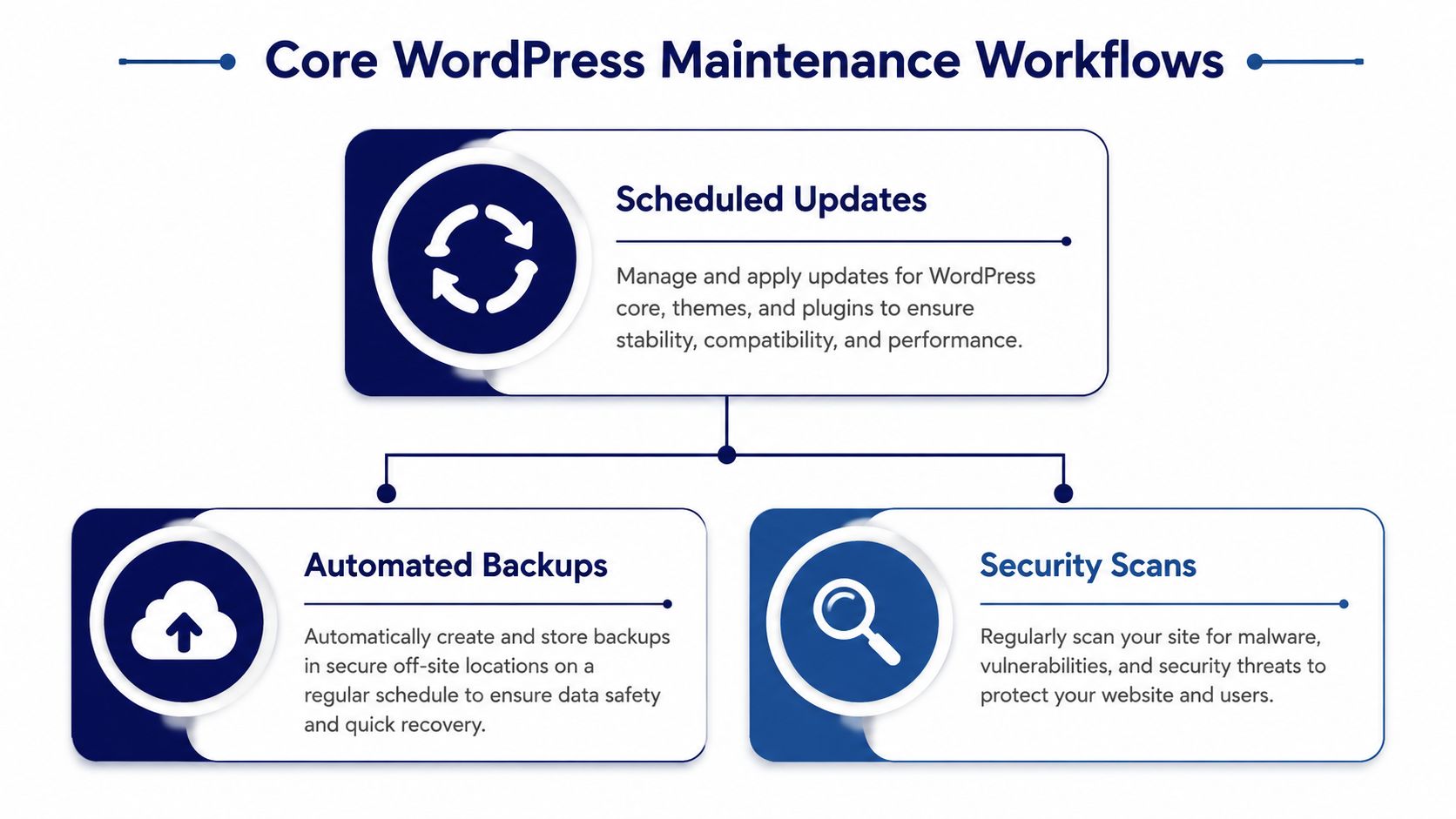
Every stable WordPress environment rests on three recurring workflows. Updates, backups, and staging. Teams love to skip past them because they aren’t flashy. That’s a mistake.
These workflows are the structural load-bearing parts of managing wordpress sites. If they’re weak, everything above them stays fragile. Security hardening won’t save a site from a bad deployment. Performance tuning won’t matter if a rollback is impossible.
Build an update cadence, not an update habit
Random updates are where avoidable incidents begin. A proper cadence defines what gets updated automatically, what gets staged first, and what requires manual review. Core updates, plugin updates, and theme updates don’t all carry the same risk profile.
Kinsta’s WordPress statistics roundup notes that major WordPress core updates occur every 150 days on average. It also notes that nearly 85% of sites run the latest version, the average site has 12-15 plugins, and 40% of WordPress sites are outdated. Those numbers matter because plugin volume changes your risk surface. More plugins mean more interactions, more vendor dependencies, and more chances for regressions.
A practical workflow usually looks like this:
Classify updates by risk
- Low risk: minor plugin releases, maintenance updates, small compatibility releases
- Medium risk: page builder changes, SEO plugin updates, ecommerce extensions
- High risk: major WooCommerce releases, custom theme dependencies, membership or checkout-related plugins
Separate timing by site type
- Marketing sites: can often tolerate a faster update window
- Lead generation sites: need form testing and analytics verification
- WooCommerce stores: need transaction-path validation before release
Define post-update checks
- Front-end review: homepage, templates, responsive states, and obvious layout shifts
- Functional review: forms, search, login, checkout, multilingual switchers, and custom modules
- Error review: logs, broken assets, cache state, and plugin notices
Backups only matter if restores work
Many teams say they have backups when what they really have is backup software. Those aren’t the same thing. A backup strategy needs frequency, off-site storage, retention, and restore testing.
A backup you haven’t restored is an assumption, not a safeguard.
For higher-risk sites, I prefer backup policies tied to operational change. Scheduled backups are useful, but change-triggered backups before plugin updates, deployments, and content migrations close a lot of preventable gaps.
Staging is part of governance
Staging environments stop production from becoming your test lab. They also let project managers and marketers review changes before release, which matters just as much as developer validation. If your current process applies updates directly on live sites, your issue isn’t speed. It’s missing release control.
A clear explanation of how this works in practice is IMADO’s guide to what a staging site is. For agencies and internal teams, staging should be standard on any site with custom functionality, active traffic, or transactional paths.
To keep these workflows efficient, automate the repetitive parts wherever you can. If you’re trying to streamline business operations, maintenance is one of the most obvious places to start. Scheduling scans, triggering backups, and standardizing QA checklists removes avoidable manual work while improving consistency.
Implementing Proactive Security and Monitoring
Reactive WordPress security fails for one reason. The site has already lost by the time the problem becomes visible.
A hacked admin account, a malicious redirect, a compromised plugin, or a spike in failed logins rarely starts with a dramatic warning. It starts subtly. That’s why proactive security is less about one plugin and more about building a detection and response system.

The threat environment is constant
Security complacency doesn’t hold up against the actual volume of attacks. Hostinger’s WordPress statistics reports that WordPress sites face an average of 2,340 attacks per day, and outdated plugins account for 98-99% of all vulnerabilities. The same source notes that Wordfence blocks over 10 million malicious login attempts daily.
Those numbers should change how you think about operations. Security isn’t a rare event. It’s a continuous condition. If a team manages wordpress sites without update discipline, role control, and monitoring, the exposure is active every day.
Hardening reduces avoidable exposure
Basic hardening still matters because it removes low-effort attack paths. I usually look for the same weaknesses first:
- Excessive admin access: too many users with administrator privileges
- Weak authentication: no enforced password hygiene, no two-factor authentication, shared accounts
- Unneeded attack surface: inactive plugins left installed, old themes left on the server, file editing enabled in production
- Poor separation: production credentials shared broadly across agencies, marketers, and freelancers
The principle is simple. Use the least privilege necessary for each role. Editors should edit. Store managers should manage products and orders. Very few people should hold production-level control.
For teams deciding how much of this should be procedural versus tool-based, IMADO’s overview of whether WordPress is secure is a practical reference.
Monitoring needs an owner and a response path
Monitoring tools don’t solve anything by themselves. They generate signals. A useful setup tells the right person what happened, how urgent it is, and what action to take next.
A workable monitoring stack usually includes:
| Monitoring area | What to watch | Why it matters |
|---|---|---|
| Uptime | Site availability and response interruptions | Detects outages before clients or customers do |
| Security | Malware signatures, suspicious logins, file changes | Flags compromise indicators early |
| Application health | Error logs, fatal errors, plugin conflicts | Catches failures caused by updates or code regressions |
| Performance | Slow pages, high response times, cache anomalies | Identifies issues before SEO and UX degrade |
Incident response should be documented before you need it
Most teams know they should have an incident process. Fewer teams have one written down. That gap matters when production is unstable and people are improvising under pressure.
Operational advice: if security alerts go to a shared inbox that nobody actively owns, you don’t have monitoring. You have delayed discovery.
A basic incident runbook should define who gets alerted, who can take the site into maintenance mode, who reviews logs, who contacts stakeholders, and how the team validates the site before reopening it. The point isn’t bureaucracy. It’s speed with control.
Optimizing for Performance and Core Web Vitals
Performance management starts with a mindset shift. A slow WordPress site usually isn’t suffering from one issue. It’s carrying friction across the stack. Hosting, PHP version, caching policy, database condition, asset delivery, and front-end build choices all interact.
That’s why performance work has to be operational, not occasional. If you only look at speed after rankings slip or conversions soften, you’re already reacting too late.
Start with the platform layer
Before tweaking scripts and compressing images, look at the environment running the site. Weak hosting can bottleneck everything that follows. Old PHP versions, poor database resources, and inadequate cache layers force the application to work harder than it should.
The right question isn’t “How do we get a better page score?” It’s “What is the server making WordPress do repeatedly that it shouldn’t have to do?” In many cases, page caching, object caching, image offloading, and a properly configured CDN remove expensive repeat work.
If you need a practical reference for the broader speed stack, IMADO’s guide on how to improve WordPress site speed is a solid starting point.
Database health affects front-end speed
Database neglect is one of the most common reasons a site gets slower over time. Revisions accumulate. Transients pile up. Search-heavy plugins add overhead. Ecommerce metadata grows. The site still works, but query cost rises.
GeeksforGeeks’ database management guide for WordPress notes that an unoptimized WordPress database can increase load times by 50-200%. The same source states that regular cleanups and query tuning can reduce query times by 60-80%, and that a CDN can cut database queries by 40-70% while improving TTFB from 800ms to under 200ms.
That’s why database maintenance belongs in a recurring operations schedule, especially for WooCommerce, membership, and content-heavy builds.
Common fixes include:
- Cleaning transient and revision bloat: useful for older editorial sites and rebuilt landing pages
- Reviewing high-cost queries: especially where custom fields or filtering logic are involved
- Using object caching: Redis or Memcached can help on dynamic sites with repeated queries
- Offloading static delivery: CSS, JavaScript, and media should not keep dragging the origin server into work it doesn’t need
Core Web Vitals need cross-functional discipline
Core Web Vitals problems often come from process, not just code. Marketing adds a popup platform. Design requests a video background. Tracking scripts expand. A page builder section duplicates blocks. Nobody owns the aggregate weight.
Here’s a useful walkthrough on the broader optimization mindset:
The best performing teams set guardrails. New assets have size budgets. Third-party scripts get reviewed. Templates are standardized. Editors work inside intentional block systems instead of assembling one-off pages that vary wildly in structure.
Fast sites usually come from restrained systems, not from endless after-the-fact optimization.
For business stakeholders, the takeaway is straightforward. Speed work supports search visibility, paid traffic efficiency, user trust, and conversion flow. It’s not cosmetic maintenance. It’s revenue protection.
Managing Complex and Scalable WordPress Setups
Single-site maintenance is one discipline. Scaled WordPress operations are another. Once you’re dealing with multisite, multilingual publishing, WooCommerce, or franchise-style deployments, the failure modes change. The challenge stops being “How do we maintain a site?” and becomes “How do we govern a platform?”
Centralization works when isolation is built in
Operational sprawl creates waste quickly. Different hosts, different update patterns, different backup tools, and different access practices make every portfolio harder to support. Centralization fixes that, but only when paired with strong isolation between environments.
LRob’s guidance on site management at scale notes that centralizing sites on high-performance servers with system-level isolation can cut manual maintenance time by up to 80% using bulk update tools. The same source notes that human error in updates causes 43% of WordPress downtimes. That’s the key trade-off. Centralization improves efficiency, but weak isolation can spread risk.
For larger portfolios, the pattern that works is usually:
- Centralized visibility: one dashboard for updates, health checks, user access, and alerts
- Isolated execution: separate containers, virtual machines, or similar boundaries for each site or logical group
- Controlled privileges: role-based access so operational staff can do their jobs without broad production authority
Multisite needs governance more than convenience
WordPress Multisite is powerful, but teams often adopt it for convenience and then underestimate the governance burden. Shared codebases make bulk administration easier, but they also amplify mistakes. A poorly tested plugin activation can affect an entire network. User role confusion becomes common. Domain mapping and brand-level autonomy need clear operating rules.
For franchise and multi-location setups, I usually recommend defining three layers of ownership:
- Network-level control for engineering, security, and shared platform tooling
- Brand or region-level control for content templates, menus, and approved feature sets
- Local editor-level access for location-specific content, events, and updates
That structure keeps local teams productive without giving them the ability to destabilize the entire network.
Multilingual and WooCommerce operations add process load
Multilingual sites aren’t just translation projects. They require content workflows, SEO consistency, release coordination, and clear ownership of source versus localized content. Tools like WPML or Polylang can handle the mechanics, but governance determines whether content stays synchronized.
WooCommerce adds a different class of operational concern. Payment gateways, tax logic, shipping extensions, ERP connections, stock synchronization, and customer-account behavior all raise the cost of untested changes. Logged-in users also complicate caching strategy, so speed decisions need to be made with commerce behavior in mind.
In complex environments, the safest process is usually the one that limits local variation and standardizes deployment paths.
At scale, the work stops looking like site maintenance and starts looking like product operations. That’s the level of thinking these setups require.
Using Audits and Reporting to Prove Value
A lot of WordPress work stays invisible until something goes wrong. That’s a problem for agencies trying to justify retainers and for internal teams defending budget. If stakeholders only see maintenance as background IT activity, they’ll undervalue it.
Audits and reporting solve that by turning technical operations into a visible management function. They also force discipline. A team that reports consistently tends to work more consistently, because unclear ownership gets exposed quickly.
Start every engagement with an audit
When taking over a site or a portfolio, the audit should do more than list issues. It should separate symptoms from structural causes. A broken form is a symptom. No plugin governance is a cause. Slow pages are a symptom. Poor media standards, weak caching, and database bloat are causes.
A strong audit usually reviews these areas:
| Audit area | What to inspect | What it tells you |
|---|---|---|
| Security posture | user roles, unused plugins, hardening gaps, monitoring setup | How exposed the site is and where operational risk sits |
| Maintenance readiness | backup quality, restore confidence, staging availability, update history | Whether change can happen safely |
| Performance | templates, scripts, cache behavior, database health, media handling | Why the site feels slow and where the friction comes from |
| Code and build quality | theme practices, custom plugin quality, environment consistency | Whether the platform can scale without brittle regressions |
| Editorial operations | block patterns, template governance, plugin sprawl, approval workflow | How easily content teams can work without breaking pages |
Report on outcomes, not just activities
Clients don’t need a monthly list that says “updated plugins” and “ran backups.” That reads like routine housekeeping because it is. The report should connect the work to risk reduction, stability, and business continuity.
Useful reporting usually answers questions like:
- What changed? Which updates, fixes, or improvements were completed
- What was prevented? Security issues mitigated, plugin conflicts caught in staging, incidents resolved before business impact spread
- What improved? Stability, editorial usability, page consistency, operational confidence
- What needs a decision? Plugin replacements, hosting changes, refactors, or governance policies that require stakeholder approval
Good reporting changes budget conversations
When you package maintenance as a strategic function, stakeholders start treating it differently. They can see why a site with custom integrations needs stricter release controls than a basic brochure site. They can see why performance work should be funded before another round of design embellishment. They can also see when recurring work is masking a deeper architecture problem.
A short executive summary helps. So does a technical appendix for the people who need implementation detail. The combination works well because decision-makers and operators rarely need the same level of information.
The best report doesn’t prove that a team was busy. It proves that the platform is safer, faster, and easier to scale than it was before.
That is the true value of disciplined reporting. It closes the loop between engineering effort and business confidence.
The End Goal of WordPress Management
The end goal isn’t a perfectly maintained WordPress site. It’s a website operation that people can rely on.
Choosing the right management model, building update and backup discipline, securing the platform before there’s an incident, and treating performance as an ongoing operating concern are all essential steps. It also means recognizing when a simple single-site workflow no longer fits the situation of multilingual publishing, multisite governance, or WooCommerce complexity.
Teams that manage WordPress casually stay trapped in recurring cleanup. Teams that manage it as an engineering discipline gain something much more valuable. Predictability. They reduce avoidable risk, make launches smoother, protect search and conversion performance, and create a platform that can support growth instead of resisting it.
For agency owners, that protects margin and reputation. For in-house teams, it creates delivery confidence across campaigns, content, and commerce. For enterprise and multi-location brands, it turns WordPress from a collection of websites into an actual digital platform.
That’s what managing wordpress sites should do. Not just preserve uptime, but give the business a stable foundation for what comes next.
If your team needs senior support for maintenance, performance, multisite governance, WooCommerce operations, or white-label delivery capacity, IMADO is one option to evaluate. They work across ongoing maintenance and on-demand WordPress engineering, which is useful when the challenge isn’t just fixing a site, but building a management system that can scale.
Let’s build something exceptional
Tell us about your project – we’ll help you launch a fast, scalable, SEO-optimized WordPress platform built for growth.