 Ask Chatgpt to summarize A Guide to Technical Website Audits for Peak Performance
 Ask Grok to summarize A Guide to Technical Website Audits for Peak Performance
 Ask Claude to summarize A Guide to Technical Website Audits for Peak Performance
 Ask Perplexity to summarize A Guide to Technical Website Audits for Peak Performance
 Ask Gemini to summarize A Guide to Technical Website Audits for Peak Performance

A technical website audit is a complete diagnostic check of your site’s health, from the foundation up. It’s a deep dive into your website’s performance, security, and underlying structure, making sure it meets the strict standards of both search engines and your users. Think of it as a master inspection for your digital property.
What Is a Technical Website Audit and Why Is It Essential

If your website were a high-performance engine, a technical audit is the master diagnostic test that makes sure every piston, gear, and wire works in perfect harmony. It goes way beyond surface-level checks to examine the code and server configuration that actually power your site.
This process is a lot like a building inspector reviewing a skyscraper’s blueprints. Those blueprints dictate the structure’s strength, safety, and long-term viability. In the same way, a technical audit examines your site’s digital blueprint to find hidden flaws that could tank its performance, compromise security, and kill its ability to rank on Google.
Skipping this process is like sailing a ship without checking for leaks. You might stay afloat for a while, but eventually, small, undetected issues grow into massive problems that sink your traffic, conversions, and reputation.
The Four Pillars of a Technical Audit
A proper audit isn’t a single-minded hunt for one type of problem. It’s a holistic evaluation built on four core pillars that work together to create a solid, successful online platform. Each pillar covers a critical part of your website’s function and how users perceive it.
The core pillars include:
- Performance: How fast does your site feel to a real user? This focuses on metrics like Core Web Vitals to ensure visitors get a smooth, frustration-free experience that keeps them on the page.
- Technical SEO: Can search engines find, crawl, and understand your content? Here, we check sitemaps, indexability, and internal link structures to make sure nothing is blocking your path to the top of the search results.
- Security: Are there vulnerabilities that could expose your site or your customers’ data? This pillar scans for outdated software, insecure configurations, and other open doors for attackers.
- Accessibility: Can people with disabilities use your website? This ensures your site is compliant with standards like WCAG, opening it up to a much wider audience and avoiding legal risks.
The Strategic Value of an Audit
Ultimately, a technical audit isn’t just a one-time checkup; it’s a strategic roadmap for growth. For those who want to dig deeper, learning how to do an SEO audit provides a practical guide that frames the audit as more than just a list of problems.
An audit transforms abstract technical data into an actionable business plan. It turns jargon into measurable outcomes—higher rankings, better user engagement, and more conversions.
This strategic approach is especially vital for businesses running on complex platforms like WordPress and WooCommerce. These systems have a lot of moving parts – plugins, custom themes, and third-party integrations – that can create hidden conflicts and performance drags. A professional audit pinpoints these exact issues, giving you a clear path to resolution that protects your investment and fuels future growth.
Auditing Core Web Vitals for Superior Performance

Website performance is no longer a “nice to have.” It’s a deal-breaker. In a world of fleeting attention, a slow or clunky site is a direct path to lost users, tanking search rankings, and missed revenue. This is why any serious technical audit places a heavy focus on a specific set of metrics from Google: Core Web Vitals (CWV).
Think of your website as a live theater show. The quality of the performance isn’t just about the story—it’s about how quickly the curtains open, how responsive the actors are to their cues, and whether the set stays put. Core Web Vitals measure that same execution for your digital “stage,” from a real user’s point of view.
These aren’t abstract technical scores. They’re a direct reflection of user frustration. When pages load slowly or elements jump around, people leave. Google notices this behavior and is far less likely to recommend a site that delivers a poor experience, which directly impacts your traffic and bottom line.
Decoding the Core Web Vitals
To really get a handle on performance, you have to speak the language of Core Web Vitals. Let’s break down the three key metrics, using that theater analogy to make them stick.
Largest Contentful Paint (LCP): This measures how quickly the main event loads on the page. Is it the big hero image? The headline? LCP is the time it takes for that single most important element to appear. A slow LCP is like an audience staring at an empty stage, wondering when the show is going to start.
Interaction to Next Paint (INP): This one is all about responsiveness. When someone clicks a button or taps on a menu, how long does it take for something to happen? A long delay is like an actor delivering a line and the stagehand missing their cue to change the scenery. Everything just hangs, and the user is left confused.
Cumulative Layout Shift (CLS): This tracks visual stability. Have you ever tried to click a link, only to have it jump away at the last second because an ad loaded above it? That’s a layout shift. In our theater, it’s like the backdrop suddenly moving mid-scene, disorienting both the actors and the audience
A technical website audit is designed to measure these three vitals, pinpoint exactly what’s causing the delays or shifts, and map out a clear plan to fix them. The goal is simple: deliver a seamless experience that feels instant and stable for every visitor. We cover the fixes in-depth in our guide on how to improve Core Web Vitals.
Common Performance Killers on WordPress Sites
For most WordPress sites, poor performance isn’t a single, catastrophic failure. It’s usually the result of many small issues piling up over time—a “death by a thousand cuts” that an audit is designed to uncover.
Some of the most common culprits we find are:
- Bloated Plugins: Too many plugins – or even just a few poorly coded ones – can add a ton of unnecessary code and database queries that grind your site to a halt.
- Unoptimized Images: Large, heavy image files are one of the biggest causes of a slow LCP. They take forever to download, leaving visitors staring at a half-loaded page.
- Slow Server Response Times: A cheap or badly configured hosting server creates a bottleneck before your site even gets a chance to load.
- Render-Blocking Resources: Clutter from unneeded CSS and JavaScript files can force the browser to stop and think, leaving users with a blank white screen.
The Core Web Vitals compliance crisis isn’t going away. As of late 2025, only 54.6% of websites managed to meet all the standards. Organizations that ran comprehensive technical audits before the February 2026 Google core update saw minimal ranking volatility, while unprepared sites were hit hard.
An audit connects these technical metrics to real business outcomes. By pinpointing the root causes of poor scores, you get a direct lever to pull to improve SEO rankings, lower bounce rates, and increase conversions.
The Core Components of a Technical SEO Audit
Yes, site speed gets all the attention. But a real technical website audit has to dig much deeper than that. Its main job is to make sure search engines like Google can find, crawl, index, and—most critically—understand your content.
If performance is the engine, then technical SEO is the GPS and road signs guiding Google’s bots straight to your money pages.
Think of your website as a massive library. It might be full of incredible first-edition books (your content), but they’re useless if the building is a chaotic mess. If there’s no card catalog, the floor plan is a maze, and half the doors are locked, visitors (search engine crawlers) will get lost and just leave. A technical SEO audit is the master librarian, putting everything in order so your best work is impossible to miss.
Below is a breakdown of the core areas a proper audit will dissect. Each component is essential for building a solid foundation for your site to be found and understood by search engines.
Core Components of a Technical SEO Audit
This table outlines the foundational pillars of a technical SEO audit, explaining what each part looks at and the typical tools used to get the job done.
| Audit Component | Purpose | Common Tools |
|---|---|---|
| Indexability | Controls which pages search engines are allowed to see and add to their database. Prevents indexing of irrelevant or private pages. | Google Search Console, Screaming Frog, Ahrefs |
| Crawlability | Ensures search engine bots can efficiently navigate your site structure to discover all important content without wasting resources. | Screaming Frog, Sitebulb, Log File Analyzers |
| On-Page Signals | Provides explicit context to search engines about a page’s content, purpose, and target audience. | Schema.org validators, Ahrefs, SEMrush |
Getting these three areas right is the non-negotiable bedrock of any organic search strategy. Let’s look at what that means in practice.
Ensuring Your Content Can Be Found and Indexed
The first question is simple: are search engines even allowed to see your content? This is indexability. It’s all about controlling which pages get into Google’s massive database and which ones you deliberately keep out.
Here’s what we check:
- Robots.txt File: This is the first file a search engine bot looks for. It’s a gatekeeper, with rules on which parts of your site bots can and cannot visit. One wrong line here can accidentally make your entire website invisible to Google.
- Meta Robots Tags: These are instructions on individual pages. They tell a bot whether to
indexornoindexthe page and whether to trust its links (followornofollow). An audit always hunts for roguenoindextags that developers might have forgotten to remove. - XML Sitemaps: Your sitemap is the official “map” of your website. It lists every URL you want search engines to find. We verify that it’s up-to-date, free of errors, and submitted correctly in Google Search Console.
Making Your Website Easy to Crawl
Once a bot knows it can access your site, it has to navigate it. This is crawlability. A confusing site structure will exhaust a search engine’s “crawl budget”—the finite resources it has for your site—long before it finds your most important pages.
Think of it as the library’s internal signage. Are the aisles clearly marked? Or do visitors have to wander aimlessly?
A convoluted site architecture is like a library with no signs, where visitors must wander aimlessly, hoping to stumble upon the right book. Poor crawlability effectively hides your best content in plain sight.
An audit puts these critical crawlability factors under the microscope:
- Internal Linking: Good internal links create logical pathways between pages. They pass authority and help bots (and users) understand how your content is related. A key part of an audit is finding “orphan pages” that have no internal links pointing to them.
- Site Architecture: You want a flat, logical site structure. Key pages should be reachable within 3-4 clicks from the homepage. If a page is buried too deep, it’s far less likely to get crawled or ranked.
- Redirect Chains: When pages move, they get redirected. An audit finds and cleans up long redirect chains (Page A -> Page B -> Page C). These chains waste crawl budget and slow down the user experience.
Sending the Right Signals to Search Engines
Finally, after a bot finds and crawls your page, it needs to know what it’s about. This is where on-page signals come in. These technical elements give Google explicit context, helping it rank your content for the right search queries.
Key signals we analyze include:
- Schema Markup: This is structured data that adds clear labels to your content. It tells Google you’re showing a product, an article, an event, or a recipe. It’s the difference between a bot seeing a random block of text versus understanding it’s a 5-star review for a specific product.
- Canonical Tags: These tags are your defense against duplicate content. They tell Google which version of a page is the “master” copy that should be indexed. This is absolutely critical for e-commerce sites with product variants or filtered navigation.
- Hreflang Tags: For international sites,
hreflangtags tell Google the specific language and geographic target of a page. This ensures that users in Germany see the German version and users in France see the French one.
Auditing for Security, Accessibility, and Architecture
While performance and SEO often get all the attention, a proper technical website audit goes much deeper. Three other pillars are just as vital for your site’s long-term health and risk management: security, accessibility, and site architecture.
Ignoring these is like building a fast, beautiful car but forgetting to add seatbelts, locks, or a chassis that can handle the power. It might look impressive standing still, but it’s not safe, inclusive, or built to last.
Fortifying Your Digital Vault with a Security Audit
Think of your website as a vault holding your most valuable assets—customer data, business information, and your brand’s reputation. A security audit is how you methodically check every lock, alarm, and weak point in that vault’s structure. It’s a proactive hunt for vulnerabilities before someone with bad intentions finds them.
A thorough security check homes in on the biggest risk areas:
- Outdated Software: Un-updated WordPress core, plugins, and themes are the #1 entry point for hackers. An audit pinpoints every outdated component, which is like leaving a back door unlocked.
- HTTPS Implementation: Just having an SSL certificate isn’t good enough. We check for mixed content issues, weak encryption protocols, and proper redirect rules to ensure every visitor’s connection is fully secure.
- Common Vulnerabilities: An audit scans for well-known weaknesses like Cross-Site Scripting (XSS) or sloppy user permission settings that could hand an attacker the keys to the kingdom.
A security audit isn’t about being paranoid; it’s about being prepared. It finds the weakest links in your digital defenses and gives you a clear plan to reinforce them, protecting your business and building trust with your users.
Letting these checks slide can lead to disaster. We’re talking data theft, massive ranking drops from Google penalties, and irreparable harm to your brand’s credibility. A single breach can undo years of hard work.
Expanding Your Audience with an Accessibility Audit
Website accessibility is all about making sure people with disabilities can use your site without barriers. This isn’t just about compliance—it’s a smart way to grow your audience and frankly, it improves the experience for everyone. An accessibility audit measures your site against established standards, mainly the Web Content Accessibility Guidelines (WCAG).
This is the digital equivalent of making sure your physical store has ramps, automatic doors, and clear signage. It makes your space welcoming to everyone. Failing to do this means you’re shutting out a huge part of the market—over 1.3 billion people worldwide live with some form of disability. If you want to dive deeper, you can learn more about how to improve website accessibility in our dedicated guide.
Key focus areas for an accessibility audit include:
- Screen Reader Compatibility: Making sure that all your content, especially images with alt text and interactive elements with ARIA labels, is correctly read aloud by tools used by visually impaired users.
- Keyboard Navigation: Confirming that someone can get to and use every single part of your site with just a keyboard, which is critical for people with motor disabilities.
- Color Contrast and Legibility: Checking that your text has enough contrast against its background and that fonts are easy to read. This helps users with low vision and makes the site more comfortable for all.
An accessible website isn’t just a legal or ethical goal; it’s a better-performing one. Many accessibility best practices, like a clear page structure and descriptive text, directly benefit your SEO.
Building for the Future with an Architecture Audit
Finally, a site architecture audit is like a blueprint review for your digital headquarters. This is absolutely essential for complex sites, like a WordPress multisite network or a headless CMS setup. Good architecture ensures your site can grow without creaking and groaning under its own weight.
This process is your main defense against technical debt—the future cost of rework you create by choosing a quick, easy fix now instead of the right one. Bad architecture makes every future update more expensive, time-consuming, and risky.
An architecture audit looks at your site’s structural logic, scalability, and how easy it is to maintain. It confirms your foundation can actually support your business goals for years to come, making your website a stable asset that’s ready to grow with you.
The Technical Audit Process from Discovery to Action
Knowing what to check in a technical website audit is just one piece of the puzzle. The other, arguably more important piece, is the process itself. A professional audit isn’t a random fishing trip; it’s a structured journey that turns raw data into a clear action plan, connecting technical fixes directly to your business goals.
The whole thing kicks off with a discovery phase. This isn’t about running tools yet. It’s about talking with stakeholders to get on the same page about what success actually looks like. Are we trying to boost organic traffic? Increase e-commerce conversion rates? Or maybe we’re just getting the site ready for a big migration?
By setting these goals upfront, the audit becomes a focused investigation, not just a generic health check. We zero in on the metrics and problems that have a real impact on your KPIs. This first step is critical for making sure the final report is full of relevant, high-impact recommendations.
Gathering and Analyzing the Data
With clear goals in hand, we start collecting data. This step uses a whole suite of powerful tools that work together to paint a complete picture of your site’s health. We never rely on a single report. Instead, we cross-reference data from multiple sources to get a full and accurate view.
To spot issues effectively during this phase, you absolutely need the right tools. Using some of the best website debugging tools can make this process much smoother.
Some key tools in our rotation include:
- Crawlers like Screaming Frog: Think of these as our digital explorers. They map out every URL, link, image, and redirect on your site, uncovering structural problems like broken links or orphan pages.
- Google Search Console: This gives us direct feedback from Google itself. It shows us how the search engine sees your site, pointing out indexing problems, mobile usability issues, and Core Web Vitals performance.
- Performance Analyzers like PageSpeed Insights: These tools measure how fast your pages load and respond for a real user, highlighting specific performance killers like oversized images or slow server response times.
After we’ve gathered all this raw data, the real analysis begins. This is where expertise makes all the difference. It’s about connecting the dots—like realizing a crawlability problem found by Screaming Frog is the root cause of the indexing errors showing up in Search Console. We translate technical metrics into business insights.
Delivering Actionable Insights and a Clear Roadmap
The final output of the audit is the deliverable—a detailed report built for two different audiences. This is not a data dump. It’s a strategic guide that connects technical findings with business objectives.
A great audit report doesn’t just list problems. It tells a story, explaining why an issue matters to the business and providing a clear, prioritized plan for what to do next.
The report always starts with an executive summary for stakeholders. This part frames the findings in business terms—lost revenue from slow pages, ranking risks from security flaws, or missed sales from poor accessibility. It gives a high-level overview without getting lost in technical details.
The visual below shows the core pillars that a solid audit process needs to cover for a healthy digital presence.
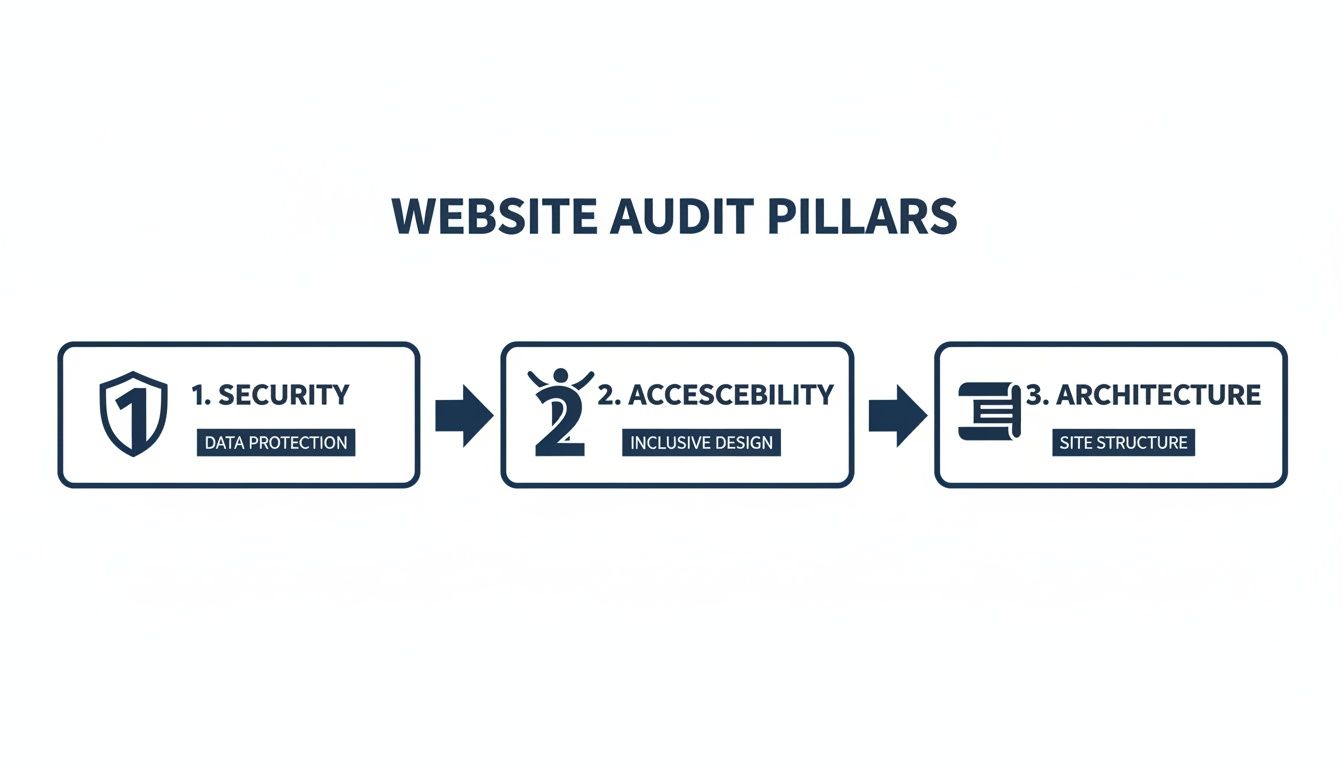
This highlights how security, accessibility, and architecture are the interconnected foundations of any well-built website.
For the development team, the report provides specific, granular guidance. It points to the exact files, lines of code, or server settings that need fixing, complete with steps to replicate the issue and best-practice solutions.
Finally, we build a remediation roadmap. This is a concrete project plan that prioritizes fixes based on their impact and the effort required to implement them. This turns a long list of findings into a manageable, step-by-step action plan, setting you up for real, measurable growth.
How to Turn Audit Findings into Measurable Growth
Getting through a technical website audit is a big milestone, but the report itself is just a map. The real value comes from turning that map into a journey that delivers measurable business growth. A list of problems is useless without a clear, expert-led plan to fix them.
This is where the audit process shifts from diagnosis to action, bridging the gap between technical data and bottom-line results.
The best audit deliverables aren’t one-size-fits-all. They have to be structured to speak to different people in the language they understand. A marketing manager doesn’t care about a “high Time to First Byte.” But when you reframe it as “a 2-second server delay is causing a 15% bounce rate on key landing pages,” it immediately becomes an urgent business problem.
For developers, the report needs to be the exact opposite – precise and granular. It has to provide clear, actionable tasks. Instead of saying “optimize images,” a good report specifies “compress the 2.4MB hero image on the homepage to under 300KB using WebP format” and points to the exact file.
From Report to Roadmap
A successful audit process doesn’t end when a PDF is sent. It marks the beginning of a strategic partnership. The findings get organized into a prioritized remediation roadmap—a practical project plan that balances impact against effort.
An audit report should never be a document that gathers dust. It’s the strategic foundation for a long-term plan focused on maintenance, performance optimization, and scalable growth for ambitious brands.
This roadmap might look something like this:
- Priority 1 (High Impact, Low Effort): Fix a misconfigured
robots.txtfile that is blocking key product categories from being indexed by Google. - Priority 2 (High Impact, Medium Effort): Implement sitewide lazy loading for all below-the-fold images to improve Largest Contentful Paint (LCP) scores by 30%.
- Priority 3 (Medium Impact, High Effort): Refactor a poorly coded, resource-heavy plugin that is causing slow database queries during checkout.
Translating Technical Fixes into Business Impact
The ultimate goal is to connect every technical fix to a real business outcome. When you implement an audit’s recommendations, you’re not just cleaning up code; you’re building a more efficient engine for growth.
Think about how these technical improvements translate directly into business value:
Solving Core Web Vitals Issues: Faster load times and a stable user interface lead directly to lower bounce rates and higher conversion rates. For an e-commerce site, this means more completed checkouts. If you’re interested in boosting sales, check out our eCommerce optimization guide.
Fixing Indexability and Crawlability Errors: Making sure Google can find and understand all your important pages leads to better organic search visibility and more qualified traffic.
Strengthening Security and Accessibility: A secure and accessible site builds trust, expands your potential audience, and protects your brand’s reputation. All of these contribute to long-term customer loyalty and revenue.
For WordPress and WooCommerce sites, a technical audit is the first, most critical step in creating a platform that is not only fast and secure but also ready to scale. It provides the clarity and direction needed to stop fighting technical fires and start building a website that actively drives your business forward.
Technical Website Audit FAQs
Even after you know what a technical audit is, a few practical questions always come up. Here are the direct answers to the most common ones we hear from clients.
How Often Should I Run a Technical Audit?
For most enterprise sites, we recommend one deep, comprehensive technical audit annually. This gives you a proper performance baseline to work from.
But you can’t just set it and forget it. You also need proactive, quarterly mini-audits to stay on top of things. These are smaller check-ins focused on high-impact areas like Core Web Vitals, indexation status, and any new security vulnerabilities. They’re especially critical before and after a major Google update, a site redesign, or a big feature launch. This rhythm helps you spot problems before they start eating into your rankings and revenue.
What Is the Difference Between SEO and Technical Audits?
The two are closely related, but they don’t cover the same ground. A standard SEO audit usually looks at things like keywords, content gaps, backlink profiles, and overall campaign results. It answers what content you should be creating and who you should be targeting.
A technical website audit goes much deeper, looking at how your site actually works. It checks the foundation that all of your SEO efforts rely on:
- Code quality and bloat
- Server configuration and response times
- How easily search engines can crawl and render your pages
- Security protocols and potential weaknesses
Think of it this way: you can’t have great SEO without a solid technical foundation. A technical audit makes sure the house is built well enough to support everything else you want to do with it.
Can I Perform a Technical Audit Myself?
Sure, you can get started on your own. Running your site through tools like Google PageSpeed Insights or a crawler like Screaming Frog will give you a ton of useful data. It’s a great first step for any team.
But for a complex WordPress or WooCommerce platform, a professional audit is about more than just running a scan. The real value is in the interpretation—connecting that raw data to your specific business goals and tech stack. An experienced engineer can spot the root cause of an issue, like a specific plugin conflict slowing down your load times, that a tool will never find on its own.
That expertise is what transforms a long list of problems into a prioritized, actionable plan that actually moves the needle on growth.
Ready to turn audit findings into a high-performance WordPress platform? IMADO provides the senior-level engineering expertise to diagnose, prioritize, and execute the technical fixes that power measurable growth. Book your discovery call to get started.
Let’s build something exceptional
Tell us about your project – we’ll help you launch a fast, scalable, SEO-optimized WordPress platform built for growth.