 Ask Chatgpt to summarize Custom WordPress Theme Development: A 2026 Guide
 Ask Grok to summarize Custom WordPress Theme Development: A 2026 Guide
 Ask Claude to summarize Custom WordPress Theme Development: A 2026 Guide
 Ask Perplexity to summarize Custom WordPress Theme Development: A 2026 Guide
 Ask Gemini to summarize Custom WordPress Theme Development: A 2026 Guide

You launch campaigns on time, publish content regularly, and the site still feels harder to run than it should. Marketing needs a landing page and asks development to work around theme constraints. Editors avoid certain layouts because the block experience is fragile. Product teams want faster pages, but the active theme ships markup, styles, and scripts meant for a hundred use cases you don’t have.
That’s the point where a WordPress theme stops being a visual layer and starts becoming an operational problem.
For many growing teams, custom wordpress theme development isn’t about wanting something fancy. It’s about removing friction from the business. WordPress still sits at the center of a huge part of the web. As of 2025, WordPress powers about 43.5% of all websites, which is part of why even small gains in performance, SEO, and editorial workflow matter at scale, especially for multilingual brands operating across markets, according to Pantheon’s WordPress statistics overview.
Table of Contents
When Your Website Gets in the Way of Your Growth
A common pattern looks like this.
A business starts with a capable premium theme. It launches fast. That was the right decision at the time. Then the company adds regions, campaigns, product lines, content formats, integrations, and more stakeholders. The theme doesn’t evolve with that complexity. It gets patched.
Soon, simple work becomes expensive work.
A content team wants a new landing page structure. The theme can’t support it cleanly, so someone duplicates an old page and edits around the edges. A performance issue appears on key templates, but nobody wants to touch the theme because too much depends on it. Design wants consistency, but every plugin and builder component introduces another variation.
That’s usually when a technical project manager starts asking the right question. Not “how do we tweak this theme?” but “what would it take to stop fighting the system?”
The real cost of theme friction
The visible issue is usually design inconsistency or page speed. The hidden issue is coordination cost.
When teams rely on an off-the-shelf theme beyond its natural fit, they pay for it in ways that don’t show up in a theme license:
- Editorial drag means marketers wait for developer help on routine layout changes.
- Performance drift happens because unused assets, plugin overlap, and template sprawl pile up over time.
- Brand compromises creep in when reusable components don’t match the way the brand needs to communicate.
- Operational risk rises when nobody can say with confidence what the theme is responsible for and what plugins are patching over.
If that sounds familiar, start with a proper website audit process before discussing a rebuild. You need to know whether the bottleneck is architecture, content modeling, plugin sprawl, hosting, or all of the above.
Practical rule: If your team needs workarounds to publish normal marketing content, the problem usually isn’t training. It’s architecture.
A custom theme becomes the right move when the current one blocks growth more than it accelerates launch speed.
What Custom WordPress Theme Development Truly Means
A technical project manager usually hears the phrase “custom theme” after a site has already started to strain. Marketing wants faster page creation. Design wants consistency. Development wants fewer exceptions. If the proposed solution is “let’s customize the theme we already bought,” that can help for a while, but it solves a different problem.
Custom wordpress theme development is the work of shaping WordPress around the business, not forcing the business to work around a theme. That includes the content model, template logic, editor experience, performance constraints, and maintenance plan. The suit analogy still fits. Adjusting an off-the-rack suit changes the fit at the edges. A custom suit is cut for the job from the start.
Custom means system design, not a visual reskin
A professional custom theme starts with operating questions, not color palettes.
- What content types and relationships does the business need?
- Which parts of the layout should editors control without risking brand drift?
- What belongs in blocks, what belongs in templates, and what should live in plugins instead?
- How should CSS, JavaScript, fonts, and media load so the front end stays fast under real content conditions?
- Who will maintain this code six months after launch, and what standards will make that practical?
Those decisions shape total cost of ownership. A theme that looks right on launch day can still be expensive if every new landing page needs developer time, every plugin update creates regressions, or no one can tell where presentation ends and application logic begins.
At code level, a custom theme is a structured front-end application inside WordPress. It often begins with a small file set, then grows into templates, template parts, block styles, theme settings, asset loading rules, accessibility checks, and security controls. WordPress documents that baseline in its theme developer handbook.
What a professional build usually includes
The good ones are disciplined. They keep responsibilities separated so the site remains easier to change.
- Presentation in the theme through templates, template parts, styles, and front-end interactions.
- Business logic outside the theme in plugins, integrations, or custom platform services where it can survive a redesign.
- Reusable editor components such as blocks, patterns, or constrained layout options that let content teams move quickly without creating layout debt.
- Defensive coding practices including output escaping, input sanitization, nonce checks, and careful control over third-party dependencies.
That separation matters after launch. If pricing logic, CRM rules, form handling, and editorial presentation are mixed together in templates, simple changes get slow and risky.
For teams weighing modern WordPress options, Full Site Editing and block-based theme building changes the definition of custom. A classic PHP theme still makes sense for some projects, especially when template control, legacy compatibility, or highly specific rendering logic matter. In other cases, a block-based system with design tokens, locked patterns, and a thin theme layer gives the business a lower-maintenance path.
A good custom theme usually feels smaller than the one it replaces because it carries less accidental complexity. That is the point. The goal is not handcrafted code for its own sake. The goal is a site architecture the business can afford to run, extend, and trust.
The Business Case for a Custom WordPress Theme
The strongest reason to invest in a custom theme isn’t aesthetics. It’s control over the variables that affect revenue, team efficiency, and maintenance burden.
Performance and editorial speed are linked
Teams often separate front-end performance from content operations. In practice, they’re tied together.
Modern theme workflows should be built around performance budgets and block editor compatibility. Fewer database calls and lighter front-end assets support better Core Web Vitals, while block-based structures let editors make layout changes without engineering intervention, according to this guide on scalable theme development.
That matters in everyday project management. A theme that requires developer involvement for every campaign page is expensive even if the code is clean. A theme that gives editors freedom without guardrails is also expensive, because content debt shows up as design inconsistency and support churn.
What businesses actually gain
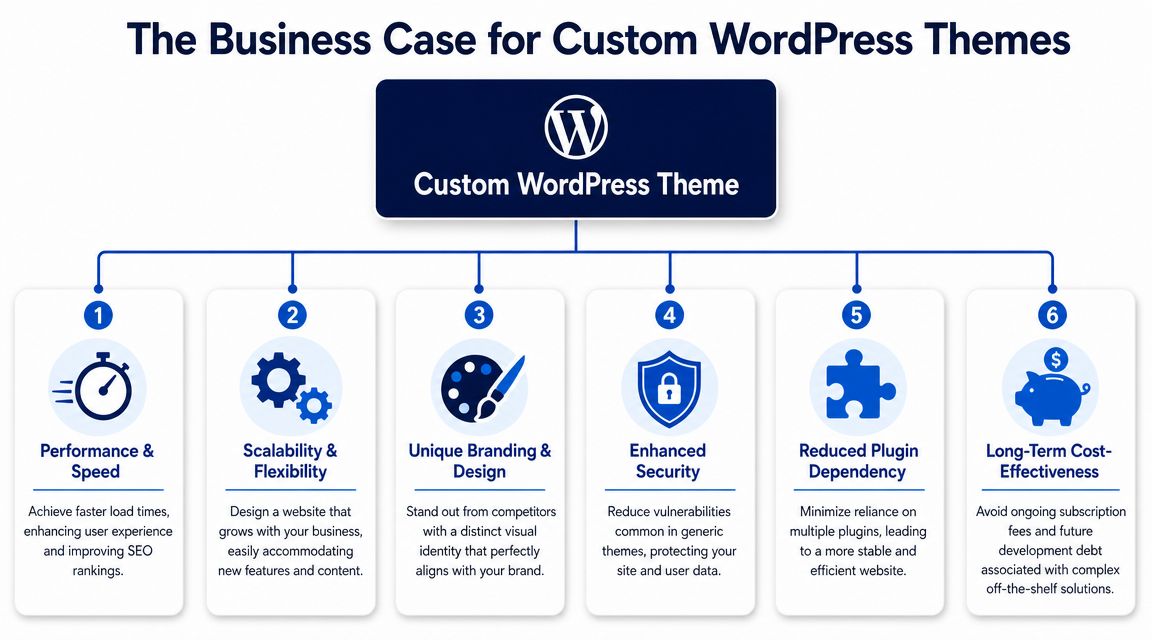
A well-scoped custom build usually improves business operations in six concrete ways.
- Cleaner performance path because the theme only loads what the site needs, not a marketplace feature bundle you never asked for.
- Stronger editorial governance through reusable blocks, locked patterns, and template rules that help teams publish faster without breaking layouts.
- Brand accuracy because design systems get encoded into components, not approximated with page-builder controls.
- Lower plugin pressure when layout and presentation needs are solved in the right layer.
- Better security posture when the codebase is smaller, reviewed, and easier to understand.
- More predictable evolution because future features build on a system rather than on exceptions.
For businesses trying to align marketing speed with platform stability, a custom WordPress site approach for growth is often less about “custom design” and more about removing recurring delivery friction.
What doesn’t work
Some patterns look efficient early and become expensive later.
| Approach | Short-term benefit | Long-term problem |
|---|---|---|
| Premium multipurpose theme | Fast launch | Unused code, asset bloat, template constraints |
| Heavy page builder dependence | Visual freedom | Inconsistent markup, hard-to-govern editor experience |
| Theme packed with business logic | Fewer moving parts at first | Hard updates, technical debt, poor portability |
| Hardcoded content sections | Pixel-perfect launch | Editors need dev help for normal changes |
If your theme has become the place where every urgent request gets shoved, it’s no longer a theme. It’s an ungoverned application layer.
That’s why the business case holds up. A custom theme, done well, isn’t a luxury purchase. It’s a way to make WordPress behave like a stable operating system for your content and commerce work.
Custom Theme vs Off-the-Shelf A Strategic Comparison
Teams generally don’t need a philosophical debate. They need a decision framework.
The comparison isn’t “premium theme bad, custom theme good.” The question is which architecture gives you acceptable speed to market today without locking in expensive constraints for the next phase of growth.
WordPress itself now supports both classic and block themes. That creates a genuine decision gap. The key question is which architecture, classic theme, block theme, or hybrid, will minimize technical debt while preserving performance and editorial control over time, as reflected in the WordPress Theme Handbook.
Comparison table
| Factor | Custom Theme | Off-the-Shelf Theme |
|---|---|---|
| Initial setup speed | Slower, because discovery and architecture come first | Faster, because the base is already built |
| Fit to brand | Designed around your system and UX rules | Adapted from a generalized visual system |
| Performance potential | Higher, because assets and templates can be kept lean | Mixed, often limited by bundled features and broad compatibility requirements |
| Editorial workflow | Can be designed around your team’s real publishing model | Usually shaped by the theme author’s assumptions |
| Security management | Easier to reason about when code ownership and responsibilities are clear | Depends on vendor quality, update discipline, and plugin interactions |
| Maintainability | Better when functionality is separated and components are modular | Often degrades as overrides and child-theme patches accumulate |
| Scalability | Better for complex integrations, multilingual setups, and custom workflows | Fine for simpler sites until edge cases pile up |
| Long-term TCO | Higher upfront, lower risk of rework if architecture is sound | Lower upfront, but can become costly when customizations stack up |
Where block themes and FSE fit
In this context, teams make avoidable mistakes.
Some projects still need a classic theme or a hybrid model. If you have unusual template logic, complex WooCommerce behavior, legacy plugin constraints, or highly specific rendering requirements, classic architecture can still be the right answer. The mistake is assuming “modern WordPress” means every project should be pure FSE.
On the other hand, many brochure, publishing, and campaign-heavy sites don’t need a heavily coded classic theme at all. They need:
- A disciplined block system with reusable patterns
- A clear theme.json setup for typography, spacing, and color governance
- A lightweight theme layer for layout and global presentation
- Strict separation of functionality into plugins or integrations
A practical decision filter
Choose off-the-shelf when your needs are standard, time is tight, and you can accept framework constraints.
Choose custom when the site is part of how the business operates.
A classic custom theme usually fits when rendering logic is specialized. A block theme usually fits when editorial control is central. A hybrid approach often works best when you need both coded structure and modern editor flexibility.
The strategic mistake isn’t choosing the “wrong trend.” It’s choosing a theme model that your team can’t govern six months after launch.
The End-to-End Custom Development Process
A custom theme project usually goes off track long before launch. The warning signs show up early. Vague template counts, unclear editor permissions, no staging plan, and design files that look polished but say nothing about block behavior. By the time the team notices, the budget is already being spent on rework.
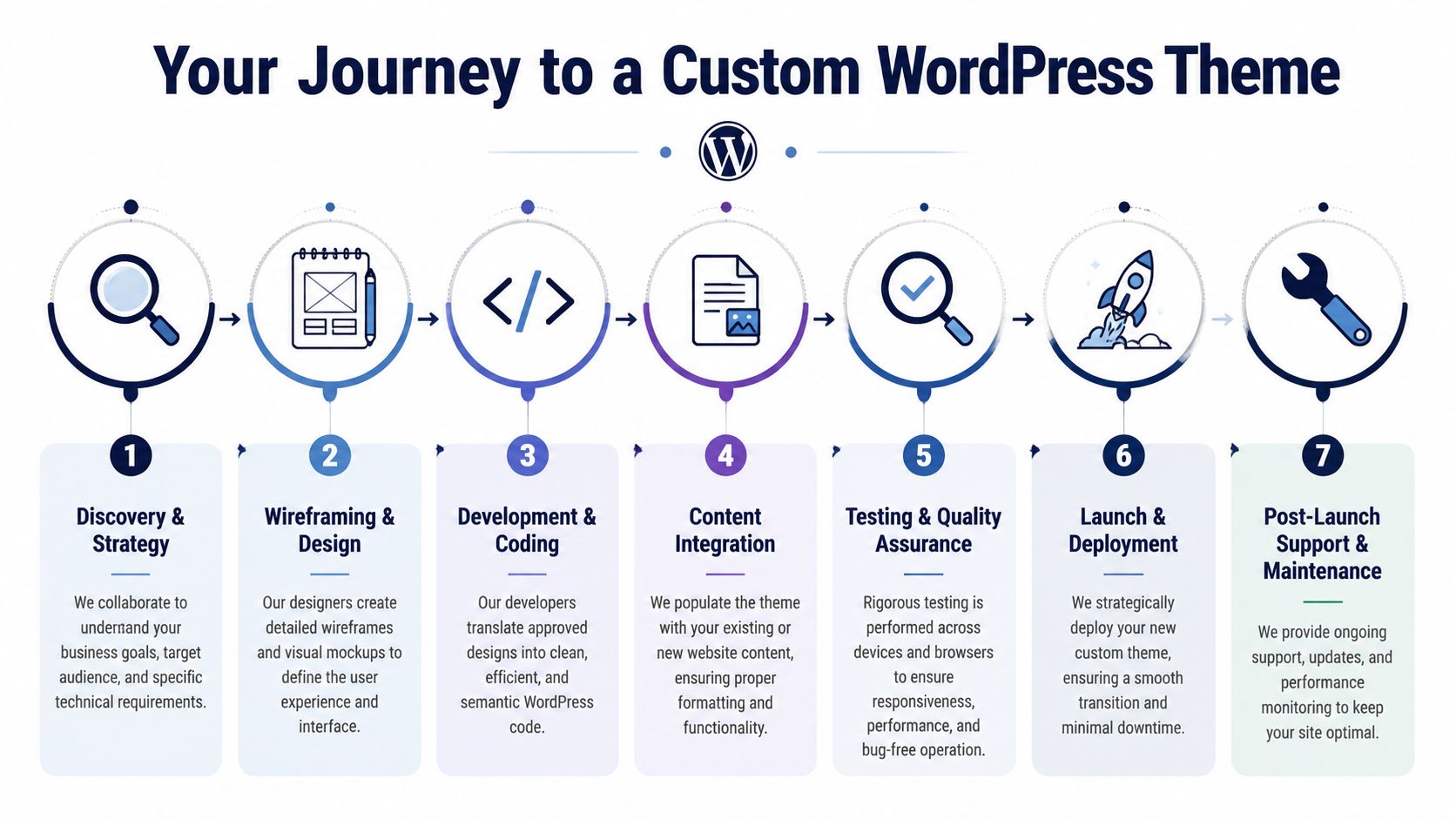
The delivery timeline depends on complexity, editorial requirements, and integration risk. A marketing site with a small page inventory moves quickly. A publishing platform, membership site, or enterprise build with multiple systems rarely does. The expensive mistake is treating them as if they follow the same path.
Discovery and architecture
This phase decides whether the theme will stay maintainable after launch or become a source of recurring cost.
The team needs to define business goals, integrations, content types, editorial workflows, approval steps, migration constraints, and support expectations. Technical project managers should press for specificity here. “Flexible” can mean block-based page building to marketing, reusable templates to design, and exception-heavy logic to stakeholders. Those are very different delivery models with very different maintenance costs.
Typical outputs include:
- Template inventory that shows the actual page and archive variations to build
- Content model decisions for posts, custom post types, taxonomies, and reusable content structures
- Architecture choices across classic, block, or hybrid theming based on editorial and rendering needs
- Responsibility boundaries that keep business logic, integrations, and presentation in the right layer
A staging site workflow for WordPress deployments should be planned from the start. Adding it near launch usually means preventable QA risk, rushed approvals, and weaker rollback options.
Design system and component planning
Strong design handoff includes rules, not just screens.
Developers need to know which blocks are available, which patterns are locked, what can be changed safely, and what must stay consistent across the site. Typography, spacing, states, forms, cards, media behavior, and responsive rules all need to be defined at the component level. In block-based builds, that often means deciding what belongs in theme.json, what should be controlled through custom blocks, and where editor freedom needs guardrails.
This is also where total cost of ownership starts to become visible. A loose component system may look faster in the first sprint, but it usually creates a long tail of one-off fixes, harder QA, and inconsistent publishing output. A tighter system takes longer upfront and saves money every time a new page, campaign, or section is added.
A short walkthrough of the process helps illustrate the sequence:
Development and QA
Execution quality matters here because theme mistakes tend to spread. One weak template pattern gets copied across the whole codebase. One poorly scoped block becomes a support issue for every editor.
Development should happen in local environments with version control, code review, modular templates, and repeatable deployment practices. Teams also need to test asset loading, query logic, block rendering, accessibility, and how the editor behaves with real content. Placeholder copy hides the exact problems that later slow publishing down, such as broken heading hierarchies, awkward card lengths, image ratio issues, and unusable control panels.
Required: test the editor experience with real content.
QA should cover the site as a working business system, not just a visual deliverable.
- Functional testing for templates, forms, navigation, search, filters, and dynamic content
- Responsive testing with realistic copy length, images, embeds, and localization edge cases
- Accessibility review against WCAG requirements and keyboard behavior
- Performance validation focused on theme bottlenecks such as oversized assets, template queries, and render paths
- Regression checks after plugin configuration, content entry, and integration work
Launch and post-launch handoff
Launch should be treated as a controlled deployment with clear ownership.
That includes staging signoff, content freeze timing, redirect validation, environment-specific configuration, cache checks, backup verification, and a tested rollback plan. The handoff also needs documentation for editors, admins, and the internal team that will own the site after go-live. If those people cannot explain how templates, blocks, and exceptions are supposed to work, maintenance costs will rise within weeks.
Some teams bring in outside support for this part of the process. For example, IMADO’s WordPress development services include custom themes, block development, migrations, and ongoing engineering support.
A custom theme is not finished when it ships. It starts proving its value when internal teams can publish quickly, make controlled changes, and extend the site without rebuilding the foundation.
Advanced Considerations for Enterprise-Grade Themes
Enterprise theme work starts where many public guides stop.
The hard part isn’t getting a homepage live. The hard part is keeping the platform fast, governable, and maintainable when multiple teams, regions, integrations, and publishing demands hit it at once.
The theme should do less than you think
One of the most important principles in advanced WordPress architecture is restraint.
Best-practice guidance stresses that performance, accessibility, and maintainability are ongoing requirements after launch. It also argues that the best custom theme often does less itself and delegates more to modular blocks and integrations so it doesn’t become a monolith that accumulates technical debt, as noted in ACF’s custom theme development guidance.
That principle becomes critical in enterprise settings.
A theme shouldn’t own every rule, every data transformation, every integration, and every editorial trick. When it does, updates get harder, debugging gets slower, and even small feature requests start requiring risky code changes.
Where complexity usually appears
The pressure points are predictable.
- Multilingual publishing creates duplication risk, layout drift, and governance overhead if content structures aren’t normalized.
- Multisite networks expose weak assumptions about shared components, deployment process, and tenant-specific customization.
- WooCommerce builds raise the stakes because catalog templates, checkout behavior, account areas, and promotional components are tied to revenue.
- Enterprise integrations with CRMs, ERPs, search platforms, or identity systems require clear ownership boundaries between data flow and presentation.
- Accessibility obligations don’t disappear after launch. They get harder when many authors and teams publish into the system.
What mature teams plan for
A strong enterprise theme usually has these characteristics:
| Concern | Mature approach |
|---|---|
| Performance | Budgeted assets, efficient queries, limited template logic, controlled third-party scripts |
| Editorial scale | Reusable blocks, locked patterns, role-aware workflows, documented publishing rules |
| Accessibility | Tested components, semantic templates, ongoing review of new content patterns |
| Integrations | Presentation kept in theme, business logic delegated to plugins or services |
| Change management | Staging, version control, release discipline, rollback planning |
A theme for a high-growth business should behave like infrastructure. Stable, predictable, and boring in the right ways.
That’s especially true if headless or decoupled options may be on the roadmap later. Even when the current build is traditional WordPress, clean separation between presentation and functionality preserves future options.
The mistake to avoid is building a theme that solves every current request in the fastest possible way. That feels productive during delivery. It becomes expensive during operation.
How to Make the Right Decision for Your Business
A common failure pattern looks like this: the site launches on time, the homepage looks right, and six months later the marketing team is back in the backlog asking developers for basic page changes. Publishing slows down, campaign pages drift off-brand, and every new integration increases the chance of something breaking. At that point, the decision is no longer about design. It is about operating cost.
Custom wordpress theme development makes sense when the website is becoming part of how the business runs, not just how it looks. The right question is whether your current setup helps your team publish, test, scale, and maintain the site without accumulating expensive workarounds.
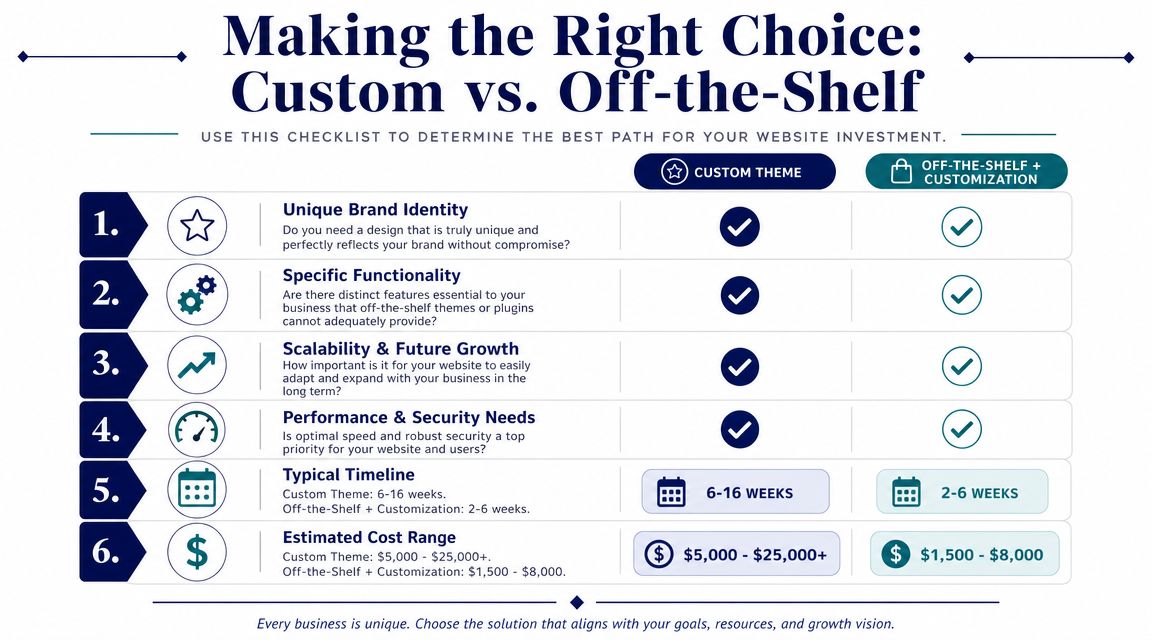
Use a simple decision checklist
A practical decision starts with operating reality.
If several of these are true, an off-the-shelf theme is probably costing more than it saves:
- Editors need speed with guardrails. They should be able to assemble landing pages and campaign content without filing tickets for routine layout changes.
- Your brand system leaves little room for drift. Marketplace themes usually look flexible in demos, then force compromises once design rules get specific.
- The site supports revenue or service workflows. Commerce, lead capture, multilingual content, gated resources, partner portals, and structured content operations all raise the cost of theme limitations.
- Your current stack runs on exceptions. Child-theme fixes, template overrides, CSS patches, and plugin conflicts are no longer occasional.
- Change is constant. New sections, campaigns, integrations, and stakeholder requests are part of the normal roadmap.
One or two items can be handled with careful customization. Four or five usually point to a deeper mismatch.
Timelines and budgeting
Timelines depend less on WordPress itself and more on decision quality. A project moves quickly when content models, approval paths, design rules, and integration boundaries are clear. It slows down when teams are still deciding what the site needs to do while development is already underway.
In practice, a small custom build may move fast. A block-based system with reusable patterns, accessibility review, content migration, and multiple stakeholder groups takes longer. Enterprise work takes longer again because QA, security review, and release process are part of the build, not an afterthought.
Budget works the same way. Cost is driven by scope, but also by the cost of uncertainty.
Estimate against the factors that change delivery effort:
- design system complexity
- number of templates and block variants
- migration needs
- accessibility requirements
- integration surface
- QA depth
- post-launch support model
If a vendor offers a fixed price before clarifying those areas, they are either leaving out work or planning to recover margin through change requests later.
Who should build it
The delivery model should match the business risk.
- In-house team makes sense when WordPress is a standing capability and product, engineering, and marketing already work well together.
- Full-service agency makes sense when the business needs strategy, UX, engineering, QA, and launch coordination under one accountable team.
- Staff augmentation makes sense when internal leadership is strong but a project needs senior WordPress execution for a defined period.
I usually advise teams to choose based on ownership after launch, not convenience during procurement. A cheaper build becomes expensive fast if nobody clearly owns the architecture, release process, and ongoing improvements.
A custom theme is a good investment when it lowers coordination cost, reduces editorial friction, and gives the business room to change without rebuilding the site every year.
If your team is weighing a rebuild, planning a block-based architecture, or trying to untangle a theme that’s become hard to maintain, IMADO can help assess the current setup and define a practical path forward for custom themes, Gutenberg systems, migrations, or ongoing WordPress engineering support.
Let’s build something exceptional
Tell us about your project – we’ll help you launch a fast, scalable, SEO-optimized WordPress platform built for growth.