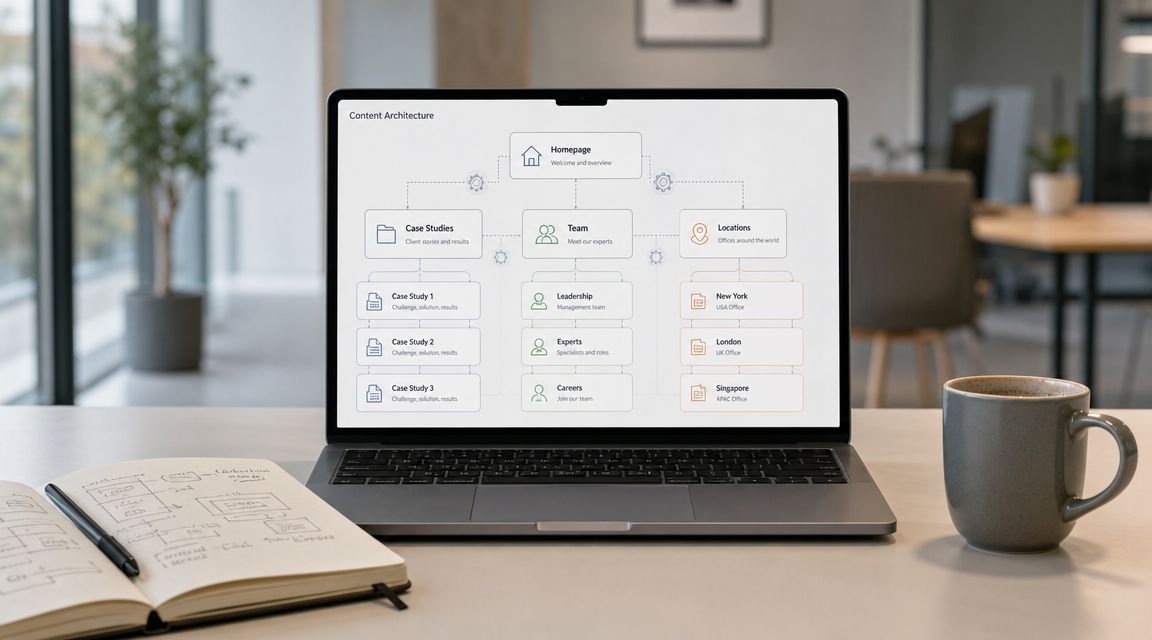
A website audit checklist helps you decide what to keep, fix, redesign, or migrate. Review business goals, search visibility, content, performance, accessibility, analytics, and the platform itself. These 30 checks turn findings into an evidence-backed plan before implementation starts.
An audit is useful when the site looks dated, organic traffic has shifted, forms or checkout feel unreliable, or your team is considering a new CMS. It helps you separate visible symptoms from the systems causing them.
This checklist is written for business and agency teams planning a redesign or migration. It includes WordPress and WooCommerce checks because template logic, plugins, caching, and commerce journeys can change the scope of the work. If the project needs broader engineering support, see IMADO’s web development services.
Key takeaways
- Set the business and technical baseline before changing templates, URLs, or platforms.
- Review search, content, accessibility, analytics, and key user journeys together.
- Treat WordPress and WooCommerce plugins, checkout, caching, and integrations as part of the migration scope.
- Turn each finding into an owner, priority, and way to verify the fix.
Why audit before a redesign or migration?
An audit gives the team a baseline for decisions before design or development changes the site. It records which pages, journeys, and systems work today, where the risks sit, and what the next version must preserve.
A redesign can change navigation, page templates, content hierarchy, and calls to action while leaving the CMS in place. A migration can also change hosting, code, data, URLs, integrations, or editing workflows. Many projects combine both. The distinction matters because each change introduces different checks and owners.
Do not begin with a list of cosmetic requests. Start with the business decision behind the project. Are leads hard to qualify? Are editors blocked? Does the store need a different product or checkout model? Is the team replacing the platform because of a real technical constraint, or because existing issues have not been diagnosed?
The answer determines what you audit, which pages deserve close review, and what evidence you need to collect. It also gives the design and engineering teams a clear definition of what success should look like after launch.
Website audit checklist: 30 checks for a redesign or migration
Work through these 30 checks across six areas. For every issue, record the affected URL or template, evidence, impact, owner, and a way to confirm the fix.
Goals, scope, and ownership
-
Define the decision the project needs to support. Write down whether the team is considering a visual redesign, a platform migration, targeted remediation, or a combination. Record the main reason and the decision date.
-
Name a business owner and a technical owner for each major area. Marketing may own landing-page goals, ecommerce may own product and checkout behavior, and engineering may own the theme and release process. Confirm the names rather than assuming one team controls everything.
-
Capture a baseline for the outcomes that matter. Use the same time period and segments when recording organic clicks, landing-page sessions, qualified leads, orders, or revenue. Include the source of each metric so the team can repeat the comparison later.
-
Inventory URLs and page templates. Record the page purpose, template, status code, canonical destination, indexation state, and owner for each important URL. Group repeated pages by template so one defect affecting a shared layout does not appear as dozens of unrelated findings.
-
Map the user journeys the new site must support. Follow the main paths from entry page to inquiry, account action, or completed purchase. Include logged-in and mobile states where they change what the user sees.
Crawlability, indexation, and search
-
Crawl the site and compare the results with the XML sitemap and Search Console data. Look for important URLs that appear in one source but not another, and confirm that the crawl includes page types such as product, category, location, and campaign pages.
-
Check robots rules and noindex settings on pages that should appear in search. Include staging rules, template-level directives, and plugin settings. Record the exact URL and response so the team can distinguish an intentional exclusion from a release mistake.
-
Review status codes, broken internal links, and redirects on important pages. Separate pages that should stay live from pages that should point to a replacement. For each redirect, confirm that the destination is relevant and that users do not pass through a chain of extra URLs.
-
Review canonical URLs, language variants, pagination, filters, and query parameters. Check representative examples from each template. A filter or language switch can create many URLs, so write down the intended version rather than relying on a crawler’s summary alone.
-
Check titles, meta descriptions, headings, structured data, and internal links on priority templates. Review whether the page answers its intended search query and whether the links lead to the next useful page. A crawl can flag missing fields, but a person still needs to judge whether the content is accurate and useful.
For a deeper technical crawl process, see IMADO’s guide to technical website audits.
Performance, accessibility, and user experience
-
Review field Core Web Vitals for representative templates and devices. Start with the pages that bring qualified visitors or support revenue. Record the metric, page group, device type, and date rather than copying a single homepage score into the report.
-
Run repeatable lab tests to investigate likely causes behind field results. Test the same template more than once and note the page state, cache state, and test conditions. Lab results help with diagnosis; they do not replace real-user data when field data is available.
-
Test the mobile experience on the journeys that matter. Check navigation, product or service detail, search and filtering, form entry, account access, and checkout. Record where labels, buttons, content, or layouts make the next action difficult to find or complete.
-
Test accessibility on representative components. Use a keyboard to move through navigation, menus, dialogs, tabs, and forms. Check focus visibility, labels, error messages, heading order, contrast, and text alternatives. WCAG 2.2 adds nine success criteria to WCAG 2.1, including criteria related to focus, dragging, target size, accessible authentication, help, and redundant entry. Use W3C’s WCAG 2.2 overview as a reference for relevant checks, then validate the complete page and its interactive states. An automated scan alone does not establish conformance.
-
Submit the main forms and exercise their failure states. Confirm that validation explains what needs correction, success messages appear, notifications reach the intended owner, and the user can recover from an error. A form that looks correct in a design file still needs a working submission test.
WordPress and WooCommerce implementation
-
Inventory themes, templates, custom blocks, and code that the redesign may change. Note which components are shared, which are specific to one page type, and who maintains them. This is especially useful when a site has several teams editing content through Gutenberg or custom blocks.
-
Review plugins, versions, purpose, overlap, compatibility, and update ownership. Mark the plugins that support important business functions, such as forms, search, multilingual content, payments, or analytics. Do not remove a plugin only because a scan calls it unused; confirm what depends on it first.
-
Test editor workflows, user roles, and access ownership. Ask editors to complete common tasks in a representative draft, including updating a heading, changing an image, adding a call to action, and publishing a revision. Confirm that each role supports its work without unnecessary permissions, identify who manages administrator access, and record how access is removed when responsibilities change.
-
Check caching, CDN, personalization, and logged-in behavior together. Test both anonymous and authenticated sessions where the site has accounts or personalized content. Confirm that a page cache does not serve another user’s data or break cart, account, search, or consent interactions.
-
Test the WooCommerce transaction path from product selection to confirmation. Include variations, quantities, coupons, shipping and tax rules, payment success and failure, order emails, stock changes, and the handoff to back-office systems. Use a safe test environment for transactions and record which extensions or integrations participate.
If the audit points to implementation work, compare the scope with IMADO’s WordPress development services.
Content, analytics, and governance
-
Build a content inventory with URL, purpose, audience, owner, and disposition. Mark each page to keep, revise, merge, move, or retire. Include media and downloadable files that users or external sites may still reference.
-
Find duplicate, outdated, thin, or competing pages. Check whether two URLs answer the same user need or divide useful links and search visibility. Decide which page remains the primary resource before copying content into a new design.
-
Match priority pages to search intent and review their internal links. Check that titles and headings describe the page, that important service or product pages are easy to reach, and that related articles support the same topic cluster. Record the current destination before changing the navigation.
-
Verify consent behavior and analytics events for key actions. Test that the page records the intended event after a form submission, account action, or order step, and check how the consent choice affects the measurement setup. Keep test events separate from production reporting.
-
Map systems that own forms, customer records, product data, translations, and tracking. Note the integration, data owner, failure signal, and person who can confirm a successful handoff. A redesign can preserve the visible interface while breaking a process behind it.
Redesign or migration readiness
-
Decide which URLs will keep their address and which will change. Record the reason for each change and the content that will replace an old page. Avoid changing a URL just because a new CMS makes a different format easy.
-
Create an old-to-new URL map before implementation. Give every retired URL one relevant destination, and flag pages without a clear replacement for a content decision. Google Search Central identifies HTTP 301 and HTTP 308 as permanent redirects. Before launch, map old URLs to relevant replacements and use server-side redirects for changed addresses, then update internal links. See Google’s documentation on permanent redirects.
-
Define the data and content migration rules. Include page fields, media, customer accounts, products, variations, order history, taxonomies, and translated content where they are in scope. Note what must be migrated, transformed, recreated, or intentionally left behind, and assign an owner to each decision.
-
Agree on the release, testing, rollback, and sign-off plan. Identify who approves content, who tests the new templates, how integrations are checked, and what condition would pause the launch. Confirm that the team can return to a known stable state if a critical journey fails.
-
Plan post-launch checks before the release. Recheck representative pages, redirects, internal links, indexing directives, sitemap entries, analytics events, forms, and revenue-critical journeys. Save the results with the release record so the team knows what was checked and what still needs follow-up.
How to use a website audit checklist to plan the work
A checklist becomes useful when each finding has evidence, an owner, and a validation step. Sort issues by their effect on customers and business goals, then group work that shares the same template, dependency, or release risk.
| Finding | Evidence | Business impact | Owner | Next step | Validation |
|---|---|---|---|---|---|
| Legacy service URL redirects through multiple pages | Crawl record with source and destination URLs | Users and crawlers take an unnecessary path | Web team | Map the source directly to its final replacement | Confirm one permanent redirect and a live destination |
| A key form does not confirm successful submission | Test record and notification status | Prospects may not know whether their request arrived | Marketing and engineering | Fix submission feedback and delivery | Submit again and confirm the user message and owner notification |
| A product page fails on mobile after a theme change | Device, template, and reproducible steps | Customers may be unable to complete the purchase path | Ecommerce and engineering | Fix the shared template and retest variations | Complete the product-to-order flow on mobile |
A simple prioritization model is enough if teams apply it consistently. Fix launch blockers and broken critical journeys first. Then schedule high-impact work with clear evidence. Keep lower-risk improvements visible, but do not let cosmetic items outrank defects that block search access, lead capture, or checkout.
Some findings support a targeted fix. Others expose a shared template or platform limitation that makes a redesign or migration reasonable. Record why the team chose the next step, rather than treating a tool score as a recommendation by itself.
If you need to compare development capacity with the work identified in the audit, review IMADO’s pricing options. The scope should be based on the findings and delivery plan, not on a generic checklist score.
When is an audit enough, and when do you need a deeper technical review?
A public-page review can identify visible problems, but a source-level review needs access to the systems in scope. Code, plugin configuration, hosting, analytics, staging, and checkout data each require an agreed review boundary.
Start with the smallest scope that answers the decision. If the team only needs to confirm that a group of forms works, test those paths. If the concern involves shared templates, plugin interactions, or a migration, include the related technical owners before estimating fixes.
A useful report gives both technical and non-technical readers the same facts. It identifies where the problem appears, why it matters, and who can decide what to do next. If your team is preparing a WordPress redesign or migration, an IMADO WordPress website audit can help turn the findings into a prioritized engineering plan.
FAQ
How do you audit your website?
Start with the business decision, choose the important URLs and user journeys, capture a baseline, and review technical health, content, performance, accessibility, analytics, and platform behavior. Record evidence and ownership for each issue before deciding what to change.
What should a website audit checklist include?
It should cover business goals, page templates, crawlability, indexation, performance, mobile journeys, accessibility, content, analytics, integrations, and the platform. For a redesign or migration, it should also cover URL mapping, data migration, release checks, and post-launch validation.
Should I audit my website before migrating it?
Yes. A pre-migration audit helps the team identify which content and URLs to preserve, which user journeys depend on integrations, and what must be retested after launch. Create the old-to-new URL map before changing addresses.
What does an SEO audit involve?
An SEO audit reviews whether important pages can be crawled and indexed, whether their content matches search intent, and whether technical or structural issues make them harder to find. This checklist also covers accessibility, user journeys, analytics, and platform behavior beyond SEO.
How long does a website audit take?
The duration depends on the number of URLs and templates, the systems involved, the quality of existing documentation, and whether the team needs public-page or source-level review. Set the scope first, then estimate the work from the areas that need evidence.
Can automated tools audit a WordPress website?
Automated tools can crawl URLs and flag patterns such as broken links, missing metadata, or performance issues. They cannot decide which business journeys matter most or confirm every plugin interaction, editor workflow, and checkout scenario. Combine automated results with focused manual testing.
Prepare the next version with evidence
A website audit checklist should leave the team with a clear view of what to preserve, what to repair, and what the redesign or migration must prove before launch. The result is a scoped backlog with owners and validation steps, not a score without context.