 Ask Chatgpt to summarize PHP Page Builder: An Engineer’s Guide to Modern Web Dev
 Ask Grok to summarize PHP Page Builder: An Engineer’s Guide to Modern Web Dev
 Ask Claude to summarize PHP Page Builder: An Engineer’s Guide to Modern Web Dev
 Ask Perplexity to summarize PHP Page Builder: An Engineer’s Guide to Modern Web Dev
 Ask Gemini to summarize PHP Page Builder: An Engineer’s Guide to Modern Web Dev
You’re probably in the middle of a familiar argument.
Marketing wants drag and drop editing so campaign pages can ship fast. Engineering wants control over templates, performance, and security so the site doesn’t become a maintenance burden six months from now. Leadership wants both, plus a predictable budget.
That’s where the php page builder conversation becomes substantial. The question isn’t whether visual editing is useful. It is. The primary question is what kind of system you’re buying into when you choose one, and what that system will cost you to run, extend, secure, and migrate later.
A page builder can shorten launch timelines and give content teams more autonomy. It can also lock layout logic into a rendering pipeline that becomes expensive to optimize, hard to debug, and risky to integrate with custom business systems. The difference usually comes down to architecture, not the toolbar in the editor.
Table of Contents
What Is a PHP Page Builder Anyway
A php page builder is a visual content system that lets editors assemble pages without hand-coding templates, while PHP handles the server-side work needed to turn those visual choices into actual output. That sounds simple, but the practical meaning matters.
In most implementations, the editor isn’t building static files. It’s saving structured data such as layout settings, widget configuration, content fields, and style rules. PHP then reads that data and renders the final page on request. That’s why page builders feel flexible. It’s also why they can become hard to maintain when a project grows.
Why PHP still matters
A lot of teams assume modern web stacks have moved past PHP. In practice, PHP remains the foundation under a large portion of the web. PHP powers 71.4% of all websites whose server-side programming language is known, and WordPress powers 43.5% of the entire web, according to W3Techs usage data for PHP.
That matters because page builders don’t live in isolation. They sit inside ecosystems. On WordPress, they hook into themes, plugins, custom post types, taxonomies, menus, SEO layers, and editorial workflows that already rely on PHP. In custom PHP applications, they often act like a lightweight CMS on top of an existing codebase.
What it solves, and what it doesn’t
A php page builder solves one clear business problem. It reduces the amount of developer involvement required for routine page production.
That’s valuable when teams need to ship landing pages, update content frequently, or hand day-to-day control to non-technical editors. It becomes less valuable when the project needs tight design system governance, unusual data relationships, ERP integrations, or strict security controls.
Practical rule: If the layout changes often but the business logic stays simple, a page builder usually helps. If the business logic gets complicated, the builder should stay at the presentation layer and nowhere else.
The professional definition
From an engineering perspective, a php page builder is best understood as a content abstraction layer over server-rendered templates. That’s a more useful definition than “drag and drop website tool.”
It reminds you to evaluate the right things:
- Where content is stored
- How output is rendered
- Who owns the markup
- How easy it is to extend safely
- What happens when you need to replace it
That last question gets ignored in most software comparisons. It shouldn’t. The easiest builder to adopt can become the most expensive one to unwind.
The Three Architectures of PHP Page Builders
Not all builders create the same maintenance burden. The fastest way to understand the trade-offs is to sort them by architecture, not by feature list.
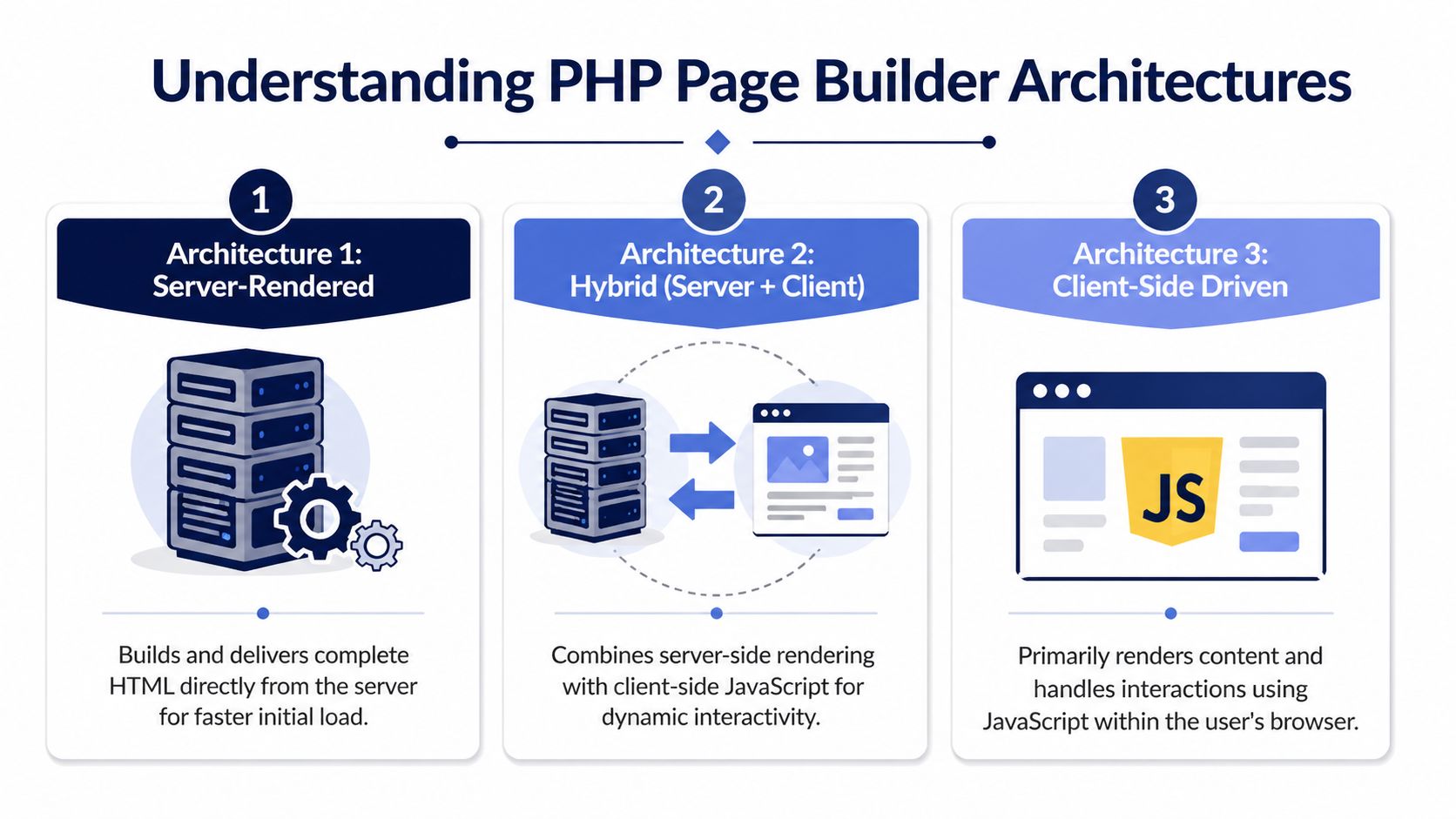
Think of these as three ways to build a house.
One approach adds prebuilt rooms onto an existing structure. Another gives you a full blueprint and lets you change the framing. The third ships components that need orchestration between multiple systems before the house feels complete.
Plugin builders inside WordPress
This is the common model. Tools like Elementor and Beaver Builder sit inside WordPress and extend it through plugin APIs, template hooks, stored builder data, and a visual editor.
The appeal is obvious. You get content management, user roles, media handling, revision history, SEO plugins, and a mature admin interface immediately. For a marketing site, that can be the shortest path from idea to launch.
The downside is dependency layering. A plugin builder usually depends on WordPress, the active theme, companion plugins, widget libraries, and its own internal rendering system. That stack can work well, but it often creates hidden coupling.
A good example is template behavior. A post may support comments in the default theme template but lose that behavior when a full-width builder template takes over. That’s not a bug in isolation. It’s what happens when layout ownership moves from theme templates to builder templates.
Standalone and framework-based builders
Standalone tools such as PHPageBuilder and developer-focused systems like OctoberCMS or UltimateWB take a different route. Instead of living as one more layer inside WordPress, they act as the content editing layer in a broader PHP application.
That changes the economics of customization. You usually get more direct control over routing, models, schema design, API integration, and template structure. You also avoid some of the plugin sprawl that makes WordPress builds fragile.
Here’s the most important distinction:
| Architecture | Best fit | Main strength | Main risk |
|---|---|---|---|
| WordPress plugin builder | Marketing-heavy WordPress sites | Fast editorial rollout | Dependency bloat and layered complexity |
| Standalone or framework builder | Custom PHP apps and bespoke platforms | Greater code control | More responsibility for security and tooling |
| Headless connector | Multi-channel or app-driven experiences | Frontend freedom | Higher implementation complexity |
Headless and connector-driven setups
The third model separates editing from presentation more aggressively. PHP may still manage content, authentication, or backend workflows, but the frontend consumes data through APIs and renders elsewhere.
This approach is attractive when a business needs one content source for multiple experiences, such as web, app, kiosks, or localized storefronts. It can also help teams that want tighter frontend performance control.
But headless architecture moves cost, it doesn’t remove it. Editors often lose some preview simplicity. Developers have to maintain the contract between content structure and frontend rendering. If the content model is weak, publishing becomes frustrating fast.
The more you decouple the builder from the frontend, the more important your content model becomes.
What maintainability really depends on
Maintainability doesn’t come from the nicest editor. It comes from clear ownership boundaries.
Ask these questions before choosing any php page builder:
- Does the builder own markup, or do your templates?
- Can developers override output cleanly?
- Are styles generated in a predictable way?
- Can content be exported or migrated without rebuilding everything by hand?
- Will your team still understand this stack after the original implementer is gone?
A builder that answers those questions well will usually outlast one with more flashy features.
Analyzing the Performance and SEO Trade-Offs
Page builders are often sold as a speed multiplier. That’s true for production workflow. It’s not automatically true for runtime performance.

A practical evaluation starts with a balanced scorecard. You have to weigh editorial speed against rendering cost, SEO control, accessibility discipline, and future cleanup work.
Where page builders help
For many businesses, the upside is immediate.
- Faster page creation: Marketing teams can launch campaign pages without waiting on template development.
- Lower content bottlenecks: Editors can update layouts, modules, and copy in one place.
- Better experimentation: Teams can test messaging, offers, and page structures more freely.
- Reusable content patterns: Well-configured builders can give non-technical teams guardrails through saved sections and template parts.
This is why page builders remain popular. They solve a staffing and workflow problem that pure custom development often doesn’t.
Where they hurt performance
The main technical issue is rendering overhead. Many builders store design configuration as structured data and rely on PHP to rebuild the final output every time a request comes in. As described in Elementor’s explanation of PHP rendering and dynamic page generation, many page builders store design data as JSON in the database and use PHP to generate HTML on every request. That model can hurt Largest Contentful Paint when PHP execution time goes beyond 500ms.
That threshold matters because slow server-side rendering doesn’t just affect synthetic benchmarks. It affects first impressions, crawl efficiency, and conversion flow on high-traffic pages.
The SEO and accessibility layer
SEO problems with page builders usually aren’t dramatic. They’re cumulative.
One widget outputs the wrong heading structure. Another loads decorative markup before meaningful content. A template injects too much inline styling. A third-party addon creates duplicate controls or inaccessible accordions. None of that looks severe in the editor. Together, it creates a site that is harder to crawl, harder to maintain, and more brittle during redesigns.
A quick audit should check more than keyword usage. I often recommend running important landing pages through a tool like the free ai seo checker to catch issues in page structure, content clarity, and search presentation before they spread across a large library.
If site speed is already slipping, a focused workflow for improving WordPress site speed usually reveals the same pattern. The builder isn’t always the only problem, but it often magnifies all the others.
A practical scorecard
| Area | Benefit | Cost |
|---|---|---|
| Editorial workflow | Faster publishing and fewer developer tickets | Editors can create inconsistent layouts if governance is weak |
| Performance | Acceptable with strong caching and disciplined templates | Dynamic rendering and extra assets can drag response times |
| SEO | Good enough when markup is controlled carefully | Heading misuse, duplicate wrappers, and style noise add friction |
| Accessibility | Can work if components are vetted | Widget libraries often need manual review and remediation |
| Maintainability | Reusable sections can help standardize content | Builder-specific data structures complicate migration |
A short visual walkthrough helps if you’re diagnosing this in live projects.
If your team measures success only by how fast a page gets published, you’ll miss the cost of keeping that page healthy for years.
Mastering Integration with WordPress and APIs
A php page builder becomes expensive when it stops being a page tool and starts acting like an application framework. Integration is where that usually happens.

The safest approach is to decide, early, what the builder owns and what it never should.
WordPress and Gutenberg side by side
In mature WordPress builds, the cleanest pattern is usually mixed ownership. Let Gutenberg or custom blocks handle structured, repeatable content. Let the builder handle campaign-oriented presentation where editors need flexibility.
That means product comparison tables, location data, testimonials, staff profiles, and legal templates should usually live in structured fields or custom blocks. Hero sections, landing page arrangements, and temporary campaign variants can live in the builder.
This split gives you a stable data model and a flexible presentation layer. It also lowers migration pain later because the business content isn’t trapped inside layout definitions.
A solid enterprise implementation usually starts with a governance model, then maps it into a broader enterprise WordPress architecture approach rather than letting each team install widgets and design patterns ad hoc.
WooCommerce without turning checkout into a science project
WooCommerce is where teams overuse page builders fastest.
Product merchandising pages can benefit from builder-driven layouts. Checkout, cart logic, pricing displays, account flows, and transactional templates should be treated much more carefully. Those screens depend on predictable behavior, extension compatibility, and a smaller surface area for breakage.
A better pattern looks like this:
- Use the builder on category pages: Merchandising blocks, promos, seasonal modules, and editorial content fit well here.
- Keep transactional templates controlled: Cart and checkout need minimal interference and clear ownership.
- Avoid logic in visual widgets: Inventory rules, pricing conditions, and fulfillment logic belong in application code, not builder conditions.
- Preserve template consistency: Reusable patterns matter more than one-off creativity on revenue-critical paths.
API integrations in custom PHP projects
The difficult part isn’t calling an API. It’s making that integration safe and maintainable when a builder sits in the middle.
The common failure mode is simple. A team exposes API-fed data directly into templates, mixes rendering with business rules, and gives editor-level users too much freedom over fields that affect external systems. That creates a debugging nightmare and opens security risk.
A cleaner pattern is:
- Fetch external data in a service layer
- Validate and normalize it before it reaches the builder
- Expose only approved fields to templates
- Log failures outside the page layer
- Cache responses where freshness rules allow
If you need to formalize those contracts across teams, an AI-ready API specification template is useful because it forces the important questions up front. Which fields are editable, which are display-only, what happens on timeout, and who owns fallback content.
The overlooked security issue
The biggest under-documented risk appears when teams use lightweight builders in custom PHP projects outside the managed WordPress ecosystem. As noted by PHPageBuilder’s own ecosystem context, these setups often lack strong input sanitization and access control, which can expose servers to phishing attacks or full site takeovers.
That risk grows when teams treat “lightweight” as “simple.” It isn’t. A standalone builder may remove plugin complexity, but it also removes some of the guardrails WordPress teams take for granted.
A builder integrated into a custom app needs the same security review as any admin interface that can write output to public pages.
Implementation and Security Best Practices
The difference between a sustainable php page builder setup and a future rebuild usually comes down to discipline. Teams get into trouble when they treat the builder as self-managing software.

The safest standard is simple. Editors should control content. Engineers should control systems.
Keep templates boring
Good templates are intentionally uneventful. They define layout regions, approved modules, spacing rules, and fallback states clearly enough that editors can’t accidentally create design debt on every page.
That means:
- Limit freeform regions: Too much freedom creates inconsistent pages fast.
- Use reusable sections: Shared calls to action, trust blocks, and footers should be centralized.
- Separate content from logic: Conditions, API handling, and data transforms should stay outside visual templates.
Cache aggressively, but with intent
Because many builders generate pages dynamically, caching isn’t optional. It’s part of the architecture.
Use page caching where possible. Add object caching when repeated queries or builder metadata retrieval become expensive. Review asset delivery so generated CSS and script dependencies don’t expand unchecked.
The editor experience should stay dynamic. The public experience should feel static whenever possible.
Reduce dependency sprawl
Developer-focused tools such as OctoberCMS and UltimateWB take a different approach from plugin-heavy setups. According to UltimateWB’s comparison of developer-oriented PHP builders, this low-code and no-code hybrid model can keep the dependency footprint around 2-3MB instead of the 15-20MB common in plugin-heavy WordPress stacks.
That difference matters beyond load size. Smaller dependency chains are easier to audit, upgrade, and secure. They also make root-cause analysis much faster when something breaks.
Enforce security rules at the system level
A secure builder setup needs rules that editors can’t bypass by accident.
| Practice | Why it matters |
|---|---|
| Sanitize all input | Prevents unsafe markup and hostile payloads from entering templates |
| Use role-based permissions | Keeps layout controls and code-sensitive settings away from casual users |
| Restrict custom code injection | Stops “quick fixes” from turning into public vulnerabilities |
| Audit third-party addons | Extra widgets often introduce the weakest code in the stack |
| Document override paths | Developers need one approved way to customize output |
For teams tightening their process, this broader checklist of software development security best practices is worth adapting into your delivery standard.
“Easy to edit” should never mean “easy to exploit.”
Protect the editor from the system
This sounds counterintuitive, but it’s one of the most important rules. The builder configuration should protect non-technical users from the complexity underneath.
Hide unstable controls. Remove unnecessary widgets. Lock spacing scales and typography tokens. Give editors a clean set of approved components instead of an empty canvas plus hundreds of options.
That reduces support tickets, layout drift, and the temptation to solve structural problems with ad hoc CSS.
The Strategic Choice Build vs Migrate
The right answer isn’t always “use a builder” or “build custom.” Most projects sit somewhere in between.
A cleaner way to decide is to evaluate what you’re optimizing for. Launch speed, editor autonomy, custom logic, integration complexity, and future portability rarely peak at the same time.
Use a builder for new work when flexibility matters more than purity
A greenfield marketing site is often a good candidate for a builder. There’s no legacy content to untangle, no historical layout debt, and no need to retrofit old templates into a new editing model.
That said, the builder should still sit inside a defined system. Approved sections, naming conventions, and content boundaries prevent “quick launch” from turning into “slow rebuild.”
Migrate when the current stack blocks business teams
A migration makes sense when the current site is too rigid for the people who operate it. If simple campaign changes require engineering time, or if the existing CMS creates publishing bottlenecks, a page builder can be a practical fix.
But migration risk rises sharply when the old site has many custom templates, business logic with intricate nesting, or fragile plugin dependencies. In those cases, replacing the editing layer may expose structural issues that were previously hidden.
For teams weighing that trade-off, this perspective on when to say no to a page builder is useful because it frames the decision in operational terms instead of feature comparison.
Build custom when the site is really an application
Some websites are not content systems with a few advanced features. They are applications with editorial surfaces attached.
If the project depends on complex permissions, custom workflows, ERP synchronization, product logic, or unusual content relationships, forcing all of that through a builder usually increases total cost of ownership. You may still use a builder for selected presentation areas, but not as the center of the system.
A decision lens that works
Ask these questions before committing:
- Who changes pages every week, and what exactly do they need to change?
- What business logic must stay predictable and testable?
- Can this content survive a future platform migration?
- Will your team be able to debug the rendering layer without the original implementer?
- Is the current pain a publishing problem, a template problem, or a platform problem?
If you answer those truthfully, the path usually becomes obvious.
When to Partner with a Development Agency
Some page builder projects are easy to launch and hard to run. That’s when outside engineering help starts making financial sense.
You don’t need an agency because a builder is complicated in theory. You need one when the project carries enough business risk that mistakes are expensive. That includes revenue-critical WooCommerce builds, multisite rollouts, multilingual platforms, custom API integrations, redesigns with SEO exposure, and migrations where content structure can’t be lost.
Full delivery
A full build is the right fit when the internal team doesn’t have the bandwidth or senior technical oversight to set architecture, performance standards, and editorial governance. The value isn’t just implementation. It’s making the right constraints early so the system remains supportable.
That matters most when several decisions interact. Theme strategy affects builder flexibility. Builder flexibility affects page speed. Page speed affects SEO and conversion. API integration choices affect long-term maintenance.
White-label support for agencies
White-label support works when an agency owns client relationships and design, but needs stronger engineering behind the scenes. That’s common when client work expands beyond standard brochure sites into custom Gutenberg blocks, builder hardening, WooCommerce tuning, or multisite and multilingual operations.
The right partner should feel invisible to the client and very visible to your internal delivery process. Clear scoping, code standards, and release discipline matter more than broad claims.
Staff augmentation for in-house teams
Staff augmentation is usually the best option when your team already knows the product and roadmap but lacks specialized WordPress or PHP depth for a critical phase. That could mean performance remediation, migration planning, custom plugin work, or integration engineering around an existing builder stack.
This model is especially effective when the bottleneck is expertise, not ownership. You keep strategy and internal velocity. The partner fills the gap where architecture or implementation quality would otherwise slip.
The strongest reason to bring in senior help is simple. A php page builder can save time at launch, but the wrong implementation compounds cost over time. Expert oversight reduces that risk before it shows up in production incidents, security issues, or expensive rework.
If your team is weighing a php page builder for a new build, a migration, or a complex WordPress integration, IMADO can help you choose the right architecture and implement it without sacrificing speed, maintainability, or security.
Let’s build something exceptional
Tell us about your project – we’ll help you launch a fast, scalable, SEO-optimized WordPress platform built for growth.