

 Ask Chatgpt to summarize Eye Tracking on Websites: Boost UX, SEO, Conversions
 Ask Grok to summarize Eye Tracking on Websites: Boost UX, SEO, Conversions
 Ask Claude to summarize Eye Tracking on Websites: Boost UX, SEO, Conversions
 Ask Perplexity to summarize Eye Tracking on Websites: Boost UX, SEO, Conversions
 Ask Gemini to summarize Eye Tracking on Websites: Boost UX, SEO, Conversions

Your team is probably having the wrong argument.
One person wants a brighter CTA. Another wants a larger hero image. Someone from sales says the headline is too vague. The developer points to page speed. Analytics shows drop-off, but it doesn’t show what people looked at before they left. So the discussion turns into opinion, rank, and taste.
That’s expensive.
Eye tracking on websites gives teams a way to stop guessing. It shows where attention lands, what gets skipped, and which elements interrupt a task instead of supporting it. For WordPress and WooCommerce teams, that matters because most revenue problems are not caused by a total lack of traffic. They come from weak visual hierarchy, buried trust signals, hidden shipping details, confusing product pages, and forms that ask people to work too hard.
Used well, eye tracking is not a flashy research exercise. It’s a decision tool. It helps marketing, UX, and engineering teams agree on changes they can justify, ship, and measure.
Table of Contents
Why Your Website Design Might Be Invisible
A design can be polished, on-brand, and technically sound, yet still fail because users don’t notice the one thing the business needs them to see.
That happens more often than teams admit. Internal reviewers know the layout already. They know where the offer sits, where the filters live, and where the checkout reassurance copy appears. Real users don’t. They arrive cold, scan quickly, and make decisions with partial attention.
A large eye-tracking study of eCommerce pages found that users spent an average of just 15 seconds on a page (EyeQuant). That alone should change how teams think about homepage debates, category layouts, and product page clutter. You don’t have time to teach people how to use a page. The page has to explain itself almost immediately.
Why analytics alone isn’t enough
Analytics tells you what happened. Eye tracking helps explain why it happened.
A session recording might show that a shopper hovered near the product gallery, scrolled to reviews, then abandoned the page. Useful, but incomplete. You still don’t know whether they noticed the shipping message, whether the trust badge looked like an ad, or whether the size guide link was visually weak.
That gap matters when the next decision involves development time, design revisions, or stakeholder sign-off.
Practical rule: If a page has one commercial job, the visual hierarchy should make that job obvious without explanation.
Teams often overestimate visibility. They assume that a banner is prominent because it’s large, or that a promotion is clear because the copy reads well in a design review. Eye tracking on websites strips away that assumption. It records the actual pattern of attention.
What invisible design problems look like
The failures are usually ordinary, not dramatic:
- Weak first impression: The headline doesn’t attract attention quickly enough.
- Competing focal points: Product imagery, promo bars, badges, and sticky elements all pull in different directions.
- Navigation friction: Users search the page because labels don’t match intent.
- Missed trust signals: Delivery, returns, and payment reassurance are technically present but visually lost.
- False prominence: A decorative image gets more attention than the action you want.
For business teams, these aren’t abstract UX issues. They affect conversion rate optimization, content performance, and even SEO indirectly through weaker engagement and task completion.
A page can’t convert from what people never see. That’s the practical value of eye tracking. It reveals whether your design is communicating or merely existing.
How Eye Tracking Reveals What Users Really See
At a basic level, eye tracking uses a camera and software to estimate where someone’s gaze falls on a screen over time. The output isn’t mind reading. It’s an attention map. You see where the eyes pause, how they move, and what gets ignored during a task.
That can happen in a controlled lab with dedicated hardware, or remotely through a participant’s webcam. Both approaches can be useful. The right choice depends on the kind of decision you need to make.
What the technology is actually measuring
Eye tracking data is built from a few simple components:
- Fixations: brief pauses where the eyes settle on something
- Saccades: quick jumps between points of focus
- Sequences: the order in which people inspect content
- Attention zones: the parts of a page that receive sustained visual interest
That matters because a click is late-stage evidence. Gaze comes earlier. It tells you whether people found the content before they acted on it, or failed to find it at all.
If a user never fixates on your shipping note, checkout reassurance, or comparison table, rewriting the copy won’t solve the problem. The issue is visibility.
Lab and remote testing solve different problems
Lab studies give you tighter control. Remote studies give you more flexibility and easier access to broader participant pools. In practice, many teams start remote because it fits normal product cycles better, then use lab work for deeper research when needed.
| Factor | Lab-Based Tracking | Remote (Webcam) Tracking |
|---|---|---|
| Environment | Controlled setting with managed lighting, hardware, and screen setup | Participants use their own device in a natural setting |
| Setup effort | Higher. Requires specialist hardware, scheduling, and moderation | Lower. Easier to launch on live or staging pages |
| Research depth | Strong for detailed behavioral observation and moderated sessions | Strong for scale, faster iteration, and early validation |
| Cost profile | Typically higher because of equipment and ops overhead | Typically more accessible for product teams and agencies |
| Use cases | Complex usability studies, sensitive flows, high-stakes redesigns | A/B test support, page audits, content checks, funnel diagnostics |
| Data consistency | More controlled session conditions | More variability, but often closer to real-world browsing |
What to choose for WordPress and WooCommerce work
For most website teams, remote testing is the more practical starting point. It works well when you need to evaluate a homepage, landing page, product detail page, category template, or checkout step on a live or staging environment.
That suits WordPress workflows because you can test real templates instead of static mockups. You can compare block layouts, notice whether a sticky add-to-cart bar steals attention from product options, and validate whether your revised navigation labels are easier to find.
Lab testing makes more sense for projects with greater significance. That includes major replatforming, high-friction account flows, or accessibility-focused research where you need close observation of task behavior.
Use lab studies when you need tight control. Use remote studies when you need speed, directional clarity, and a realistic read on how people scan an actual website.
The mistake is treating eye tracking like a specialist exercise reserved for large brands. In reality, it’s often most useful when a team is choosing between two expensive implementation paths and needs evidence before development starts.
Decoding Visual Data Heatmaps Gaze Plots and Metrics
Once you’ve run a study, the hard part isn’t collecting the data. It’s interpreting it without jumping to the wrong conclusion.
The most useful outputs are visual. They make attention visible in a way stakeholders can understand quickly. That’s one reason eye tracking on websites works so well in cross-functional teams. A developer, marketer, and designer can look at the same result and discuss the same problem.
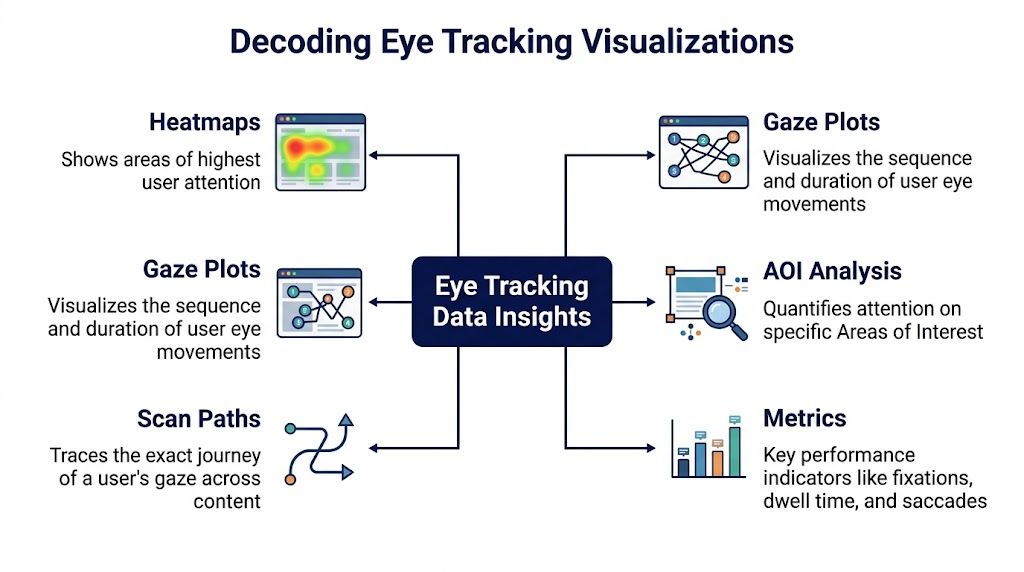
Heatmaps show where attention concentrates
A heatmap is the fastest way to read an eye-tracking result. Think of it as a thermal image of attention. Warmer zones indicate stronger concentration of gaze, while cooler zones suggest lower interest or missed elements.
Teams usually spot hierarchy problems immediately. A badge, stock counter, or promotional ribbon may attract more attention than the product title. Or the product image may dominate while key purchase information gets almost none.
If your team already uses heat maps on websites, eye tracking adds an important layer. Cursor and scroll behavior are useful proxies, but gaze shows what users noticed before they moved, hesitated, or clicked.
For WordPress teams comparing templates or blocks, a tool that surfaces visual attention on real pages can be especially useful. A practical starting point is a WordPress heatmap workflow that helps connect visual findings to page-level improvements.
Gaze plots and scan paths show order
A heatmap tells you where people looked overall. A gaze plot tells you what they looked at first, second, third, and for how long. It’s the connect-the-dots version of attention.
That sequence matters because order shapes comprehension. If users notice a discount badge before the product title, that may help. If they inspect decorative content before the value proposition or CTA, that usually doesn’t.
A related view is the scan path, which traces the route of the eye across the page. This is especially valuable when diagnosing form flows, menu discovery, or category pages with filters. You can see whether people move through the interface in a clean pattern or bounce between competing elements.
A confusing page often doesn’t look chaotic in a design file. It looks chaotic in the scan path.
AOIs and timing metrics answer business questions
Areas of Interest, usually shortened to AOIs, let you mark specific regions of a page and measure attention within them. Using these, eye tracking becomes operational rather than merely interesting.
You can define AOIs around:
- Primary CTA: Is the add-to-cart button seen early enough?
- Trust elements: Are users noticing returns, security, or delivery messages?
- Navigation items: Which labels attract attention, and which are missed?
- Feature modules: Does the new announcement panel earn attention or get skipped?
- Legal or pricing info: Are users seeing the details that reduce hesitation?
The metrics tied to these zones are often more valuable than the visualization itself. Teams commonly review Time to First Fixation, fixation duration, and total fixations per area. Those metrics tell you whether something is discoverable, whether it holds attention, and whether users are working too hard to understand it.
A useful benchmark from NN/g’s eye-tracking discussion is that users often fixate 2.5x longer on top-left headlines than content on the right, and moving a primary CTA from the right to the left reduced navigation time by 22% in A/B tests (NN/g). The lesson isn’t “always put everything left.” The lesson is that visual position strongly affects discoverability.
How not to misread the data
Eye tracking is powerful, but it’s easy to over-interpret.
A fixation doesn’t automatically mean understanding. Long attention on a form field can mean interest, but it can also mean confusion. A skipped element may be unimportant, or it may be invisible because contrast, placement, or competing content pulled attention away.
That’s why the best teams pair gaze findings with task completion, analytics, and plain-language usability feedback. The visual data shows where the friction sits. The broader context tells you what kind of friction it is.
Planning Your First Website Eye Tracking Study
A useful study starts before any participant sees the page. Most failed eye-tracking projects don’t fail because of technology. They fail because the team asked a vague question, recruited the wrong people, or tested a page that wasn’t close enough to the actual experience.

The right way to approach eye tracking on websites is as a focused research project. Narrow scope beats broad ambition. A single page with a clear business question often produces better decisions than a sprawling study across the whole site.
Start with one decision that matters
Don’t begin with “we want to understand user attention.” That’s too broad to guide setup or analysis.
Start with a decision the business needs to make, such as:
- Homepage problem: Are visitors noticing the primary offer before secondary promotions?
- Product page issue: Do shoppers see delivery and returns information before they abandon?
- Checkout concern: Are users missing coupon, payment, or shipping cues that affect completion?
- Navigation question: Can people find the category path they expect without searching the header?
If you need a wider framework before selecting a method, this overview of essential user research methods is a helpful way to place eye tracking among interviews, usability tests, and surveys. That matters because eye tracking works best when it answers a specific visibility question, not every UX question at once.
Write tasks that don’t lead the user
Bad task design corrupts the study. If you tell a participant exactly what to look for, you’ll get attention data for your script, not for your page.
Good tasks describe intent, not interface. For example:
- Better task: You’re looking for a gift and want to compare options before buying.
- Better task: Find out whether this store delivers quickly enough for your needs.
- Avoid this: Click the shipping information under the add-to-cart button.
The second version preserves discovery. The third one tells the user where the answer lives.
Moderated teams often falter. Someone in the room wants clarity, so they over-explain. That reduces realism. The cleaner the task, the more honest the gaze behavior.
Recruit people who resemble actual buyers
You don’t need perfect market segmentation for every study, but you do need users who broadly match the audience for the page.
A WooCommerce store selling technical products should not test only with general consumers who have no familiarity with the purchase context. A franchise site with location-based intent should not recruit participants who never use local service pages. Representative context matters because scanning behavior changes with task urgency, familiarity, and motivation.
Consent and privacy are not optional
Eye tracking collects behavioral data. That means privacy and consent have to be handled explicitly.
Teams need to tell participants what is being recorded, how the data will be used, how long it will be stored, and who can access it. If you’re running studies through a WordPress site or related tooling, your research process should align with your wider compliance setup. A practical reference for teams reviewing storage and consent workflows is WordPress and GDPR compliance guidance.
A short briefing video can also help internal teams understand how to set up a study before launch:
Keep the study honest. If participants don’t know what they’re consenting to, or the task tells them where to look, the output won’t support a real product decision.
A well-planned study doesn’t just produce cleaner data. It produces findings the team can trust when code changes, design revisions, and budget decisions follow.
Turning Gaze Patterns Into Higher Conversions
Attention patterns are only useful if they change what gets built.
This is the point where eye tracking on websites moves from research into execution. You have evidence. Now you need page decisions that improve discoverability, reduce friction, and support clearer user journeys.
One of the most durable findings in visual behavior is the F-shaped pattern. Users tend to skim in horizontal sweeps near the top and then scan down the left side. Nielsen Norman Group’s pattern has held up over time, and related research cited in a PMC review notes that users read only about 28% of the text on a webpage. The same PMC source also found that poor contrast and unclear links significantly increase fixation counts, impairing task completion by up to 50% in designs that don’t comply with WCAG-oriented guidance (PMC study review).
That has direct implications for conversion work. If users skim that aggressively, your page can’t rely on patient reading. It has to communicate through structure.
Design for scanning instead of hoping for reading
The most common mistake on high-intent pages is density without hierarchy. Teams add more supporting content because they want to answer objections. The result is often a page where nothing stands out enough to guide action.
A stronger approach is to align layout with natural scanning:
- Lead with the core promise: Put the product value, service offer, or category intent where users can identify it quickly.
- Support the left-side scan: Important labels, headings, and section anchors should be easy to detect during the initial sweep.
- Reduce visual competition: If every component is bold, colored, sticky, or badged, none of them acts as a priority cue.
- Use whitespace intentionally: Separation helps users parse groups faster than decorative styling does.
This doesn’t mean every page should look the same. Sparse landing pages may behave more like a Z-pattern, especially when the path from headline to proof to CTA is simple. Dense eCommerce pages often need stronger anchoring so users can move from image to title to price to action without getting lost.
What usually lifts conversion quality
Teams often ask what changes eye tracking tends to justify. The answer is rarely a cosmetic tweak. It’s usually a structural correction.
Clarify the visual hierarchy
If users look at secondary elements before the main action, hierarchy is broken.
Common fixes include reducing the weight of promo bars, moving reassurance copy closer to the decision point, simplifying icon clutter, or changing block order in WordPress templates so the primary message appears sooner.
Make CTAs discoverable without over-designing them
A CTA doesn’t need to scream. It needs to be easy to find when the user is ready.
That often means improving placement, spacing, contrast, and nearby context. It also means removing false alternatives. On WooCommerce pages, for example, links for shipping, wishlist, comparison, financing, and tabs can all compete with add-to-cart if they’re visually equal.
Simplify forms and checkout steps
Gaze patterns in forms reveal hesitation fast. Repeated back-and-forth movements between labels, helper text, and input fields usually signal uncertainty.
What helps:
- Group related fields: Billing, shipping, and contact details should feel clearly separated.
- Surface key reassurances at the right time: Return policy, payment security, and delivery expectations matter near commitment points.
- Reduce link ambiguity: If a link looks weak or blends with surrounding copy, users waste effort searching.
Accessibility is not a side issue
This is one of the most overlooked uses of eye tracking.
When attention data shows that users miss links, struggle with low-contrast elements, or repeatedly search for small interactive controls, you’re often looking at both a conversion issue and an accessibility issue. The overlap matters. WCAG-oriented improvements don’t just help users with specific needs. They often make the interface easier for everyone to parse.
Target spacing is a practical example. Larger, clearly separated interactive targets reduce accidental selections and support users who rely on eye-tracking devices as assistive technology. In real product work, that means auditing buttons, links, mini-cart controls, filter chips, and mobile tap targets with the same seriousness you give page speed or SEO metadata.
The strongest CRO changes often come from making the next step easier to see, easier to understand, and easier to hit.
For teams translating research into implementation, the most useful next step is not another workshop. It’s a prioritized list of page changes tied to expected business outcomes. If you’re evaluating what to ship first, this practical guide on how to improve website conversion rate is a good companion to gaze-based findings because it connects UX fixes to measurable funnel impact.
A simple action checklist for page reviews
Use eye-tracking findings to review pages through four lenses:
| Review lens | What to check |
|---|---|
| Visibility | Is the main value proposition seen early, or hidden behind decorative elements? |
| Comprehension | Do users understand labels, links, and page sections without searching? |
| Action | Does the CTA appear at the moment of intent, with enough visual support to be obvious? |
| Accessibility | Are contrast, link clarity, and target spacing helping task completion rather than blocking it? |
Conversion work improves when design, content, and development all respond to the same evidence. Eye tracking makes that shared evidence easier to see.
Eye Tracking Workflows for WordPress and WooCommerce
The value of eye tracking rises when it fits the way your site is built.
On WordPress and WooCommerce projects, that means working with live templates, reusable blocks, product page modules, checkout components, and analytics you already trust. The workflow should connect a visual finding to a change request, then to an experiment, then to a business result.
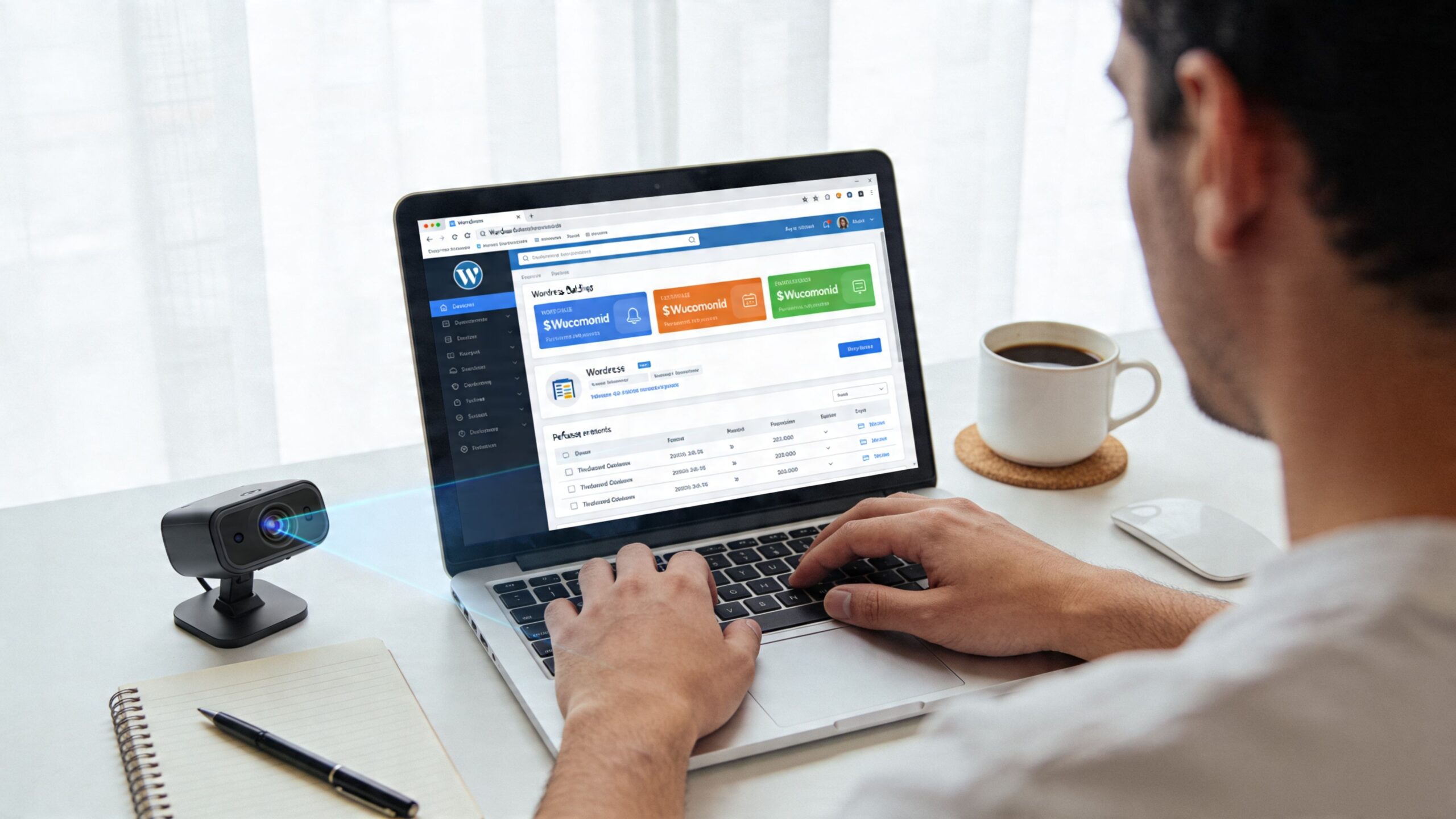
A practical workflow from finding to release
A common pattern looks like this:
Review a critical page or flow
Test a homepage, product page, category layout, cart, or checkout step on staging or production.Identify the missed element
Maybe users don’t notice shipping policy links, variant selectors, trust badges, coupon fields, or store locator prompts.Form a clear hypothesis
Example: “If shipping reassurance moves closer to price and add-to-cart, more shoppers will notice it before hesitation sets in.”Implement the smallest viable change
In WordPress, that may mean changing block order, adjusting heading levels, editing a template part, revising button contrast, or simplifying plugin output.Run an A/B test or controlled rollout
Compare the revised version against the current one, ideally on a single page type first.Check business metrics alongside attention findings
Review engagement, exit points, product interaction, cart behavior, and completed purchases.
That sequence keeps teams from treating eye tracking as a one-off report. It becomes part of iterative product work.
Where this fits in the WordPress stack
WordPress is well suited to this kind of testing because many changes are modular. You can often adjust:
- Gutenberg block order
- Template part placement
- WooCommerce product summary structure
- Archive page card design
- Navigation labels and mega menu grouping
- Checkout field arrangement
- Sticky mobile controls
Development discipline matters. If the theme or component system is too rigid, teams end up discussing findings they can’t implement efficiently. A flexible block system and clean template architecture make eye-tracking insights much easier to act on.
Pair visual attention with platform analytics
Gaze data should not sit alone in a slide deck.
For WooCommerce, compare visual findings with sales and funnel behavior. If users rarely inspect delivery messaging and the page also shows hesitation before cart addition, that’s a stronger signal than either source by itself. If category pages draw attention to filters but users still abandon search, the issue may be taxonomy or label clarity rather than visibility.
For content-heavy WordPress sites, combine gaze observations with scroll depth, internal search behavior, and page-level exits. If readers fixate on a false endpoint or miss internal links that support the journey, the content architecture likely needs revision.
A strong workflow doesn’t stop at “users didn’t see it.” It asks whether that missed element affected task completion, purchase confidence, or page engagement.
Tool categories that work in practice
Teams often don’t need to start with specialist hardware. The practical path is usually:
| Tool category | Best use in WordPress and WooCommerce workflows |
|---|---|
| Webcam-based remote eye tracking | Fast validation of real pages, templates, and landing pages |
| Heatmap and session behavior tools | Ongoing monitoring after release to spot emerging friction |
| A/B testing tools | Validating whether the layout change improves business outcomes |
| Analytics dashboards | Connecting visibility changes to conversion and revenue behavior |
The main trade-off is precision versus speed. But for many website decisions, directional clarity is enough. If a study shows people repeatedly miss a key module, you usually don’t need lab-grade complexity to justify moving it, simplifying it, or styling it differently.
That’s especially true in WooCommerce, where the smallest discoverability issue can disrupt the path from product interest to purchase intent.
The Business Case for Seeing Through Your Users Eyes
Eye tracking earns its place when it prevents bad decisions and speeds up good ones.
Most website teams don’t struggle because they lack ideas. They struggle because they have too many plausible ideas and not enough evidence to choose among them. Eye tracking reduces that uncertainty. It helps you see whether a redesign is clarifying the path to action or just rearranging pixels.
Why the investment is easier to justify than it looks
The business case is simple. A study can de-risk changes before your team spends time on development, content rewriting, QA, and rollout.
That matters in common situations such as:
- A homepage redesign where the business needs confidence that the primary offer is visible
- A WooCommerce product page refresh where trust messaging, pricing, or variant selection may be buried
- A checkout optimization project where users seem to stall, but analytics doesn’t reveal what they missed
- A franchise or multisite template rollout where one layout decision will affect many pages
In each case, the cost isn’t just the research effort. The bigger cost is shipping the wrong design and learning too late.
What ROI looks like in practice
You don’t need a dramatic case study to justify eye tracking. A realistic ROI model is enough:
| Cost avoided or value created | Why eye tracking helps |
|---|---|
| Fewer redesign reversals | Teams catch visibility problems before full rollout |
| Faster stakeholder alignment | Visual evidence resolves subjective arguments faster |
| Better A/B test quality | Hypotheses are based on observed attention, not preference |
| Cleaner accessibility fixes | Improvements address both usability and compliance concerns |
| Stronger conversion work | Changes focus on what users actually see during decision moments |

The teams that get the most from eye tracking usually treat it as a filter for decision-making. They don’t ask it to answer everything. They use it to answer one hard question clearly: did users see and understand the parts of the page that matter most?
That’s why eye tracking on websites belongs in serious UX and CRO work. It turns hidden friction into visible evidence. It gives design and development teams a common language. And it helps businesses spend implementation effort where attention, clarity, and conversion improve.
If your team needs senior WordPress engineering to turn research insights into faster templates, cleaner WooCommerce flows, stronger accessibility, and measurable conversion improvements, IMADO can help design, build, and optimize the implementation side with the technical depth most growth teams are missing.
Let’s build something exceptional
Tell us about your project – we’ll help you launch a fast, scalable, SEO-optimized WordPress platform built for growth.



