 Ask Chatgpt to summarize Unlock WordPress Web Design Pricing in 2026
 Ask Grok to summarize Unlock WordPress Web Design Pricing in 2026
 Ask Claude to summarize Unlock WordPress Web Design Pricing in 2026
 Ask Perplexity to summarize Unlock WordPress Web Design Pricing in 2026
 Ask Gemini to summarize Unlock WordPress Web Design Pricing in 2026
You’re probably here because two WordPress proposals landed in your inbox and they don’t even look like they’re for the same project.
One vendor says your site can be done for a few thousand. Another comes back with a five-figure or enterprise-level estimate. Both say “custom WordPress website.” Both mention design, development, and launch. If you’re an agency outsourcing delivery, an in-house marketing team replacing an aging site, or an ecommerce brand planning a rebuild, that spread is frustrating.
The gap usually isn’t about WordPress itself. It’s about architecture, process, risk, and the amount of engineering hidden behind seemingly simple requirements. A homepage mockup can look identical whether it’s powered by a bought theme with light edits or by a custom block system, structured content model, accessibility review, API orchestration, and deployment workflow.
That’s why WordPress web design pricing makes more sense when you stop asking, “What does a WordPress site cost?” and start asking, “What are we building, who needs to maintain it, and what breaks if it’s done cheaply?”
Table of Contents
Why Are WordPress Price Quotes So Inconsistent
A marketing team asks for a new WordPress site. The brief sounds ordinary: refreshed design, editable landing pages, solid SEO, good performance, and a clean launch. One proposal prices a fast production build. Another prices a platform that has to hold up under integrations, content growth, compliance reviews, and internal handoff.
Those quotes differ because the underlying engineering decisions differ.
A lower estimate usually assumes WordPress will be configured, not engineered. The vendor expects a commercial theme, light template changes, standard plugins, simple content structures, and limited QA. That approach can work for a brochure site with short page life cycles and a team that can tolerate plugin quirks, layout constraints, and more manual editing.
A higher estimate usually includes choices that reduce operational risk later. Custom Gutenberg blocks instead of a generic page builder. Structured fields instead of freeform content entry. API integration work that includes authentication, field mapping, retries, and failure handling. Performance work that goes beyond caching plugins. Accessibility checks that involve real remediation, not a checkbox in a proposal.
That is why two agencies can hear the same request and price two different jobs.
Expensive quotes often include the cost of preventing future rework, editorial friction, integration failures, and launch-day surprises.
The same requirement can mean very different builds
“Flexible landing pages” is a good example. In one build, that means editors get a page builder and a set of reusable rows. In another, it means a library of custom blocks with locked settings, validation rules, and patterns that keep pages on-brand. In a more mature environment, it means a block system tied to a content model, approval process, analytics standards, and multilingual rules.
All of those solutions create pages. They do not cost the same to build or maintain.
The same pattern shows up in common project language:
- “Connect it to HubSpot” might mean embedding a form. It might also mean syncing lifecycle stages, routing leads by region, and logging failed submissions for support review.
- “We need multilingual support” might mean a plugin and manual translation. It might also mean locale-specific content governance, duplicated block patterns, regional SEO rules, and editor permissions.
- “We want a fast site” might mean basic caching on standard hosting. It might also mean image pipeline work, script auditing, Core Web Vitals targets, CDN setup, and custom front-end decisions.
- “We may go headless later” can be ignored in a low-cost build. If the business needs that option, the content model, API approach, preview workflow, and hosting plan should be designed differently from the start.
On paper, pricing appears inconsistent, though it is logical in practice. One vendor is estimating visible output. Another is estimating the system behind it.
WordPress supports both ends of that range. The platform can run a small self-managed site, but it also supports heavily customized, integrated, governed platforms. If a quote includes custom block development, third-party APIs, data migration planning, deployment workflows, staging environments, and post-launch accountability, the number rises because the scope has moved from website assembly to platform engineering.
The Three Tiers of WordPress Website Pricing
A company asks for “a WordPress site” and gets three quotes that are nowhere near each other. One proposal assumes a premium theme and standard plugins. Another includes custom block development, CRM integration, staged deployments, and accessibility review. A third is planning for multilingual governance, API dependencies, and a future headless front end.
Those are not pricing disagreements. They are different technical assumptions.
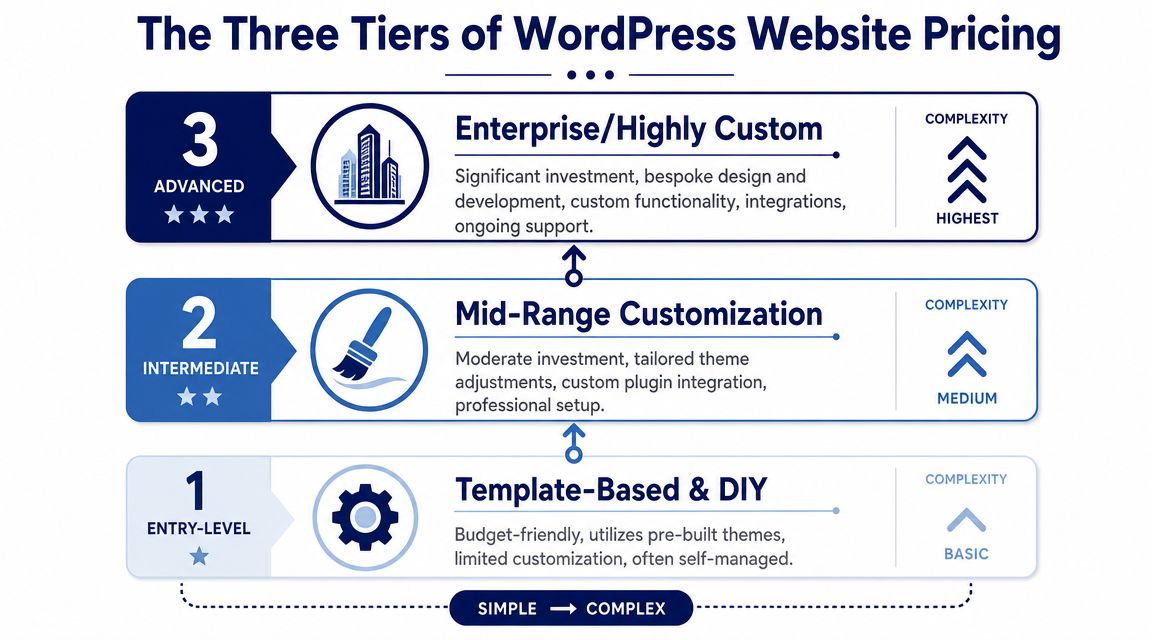
Template-based and DIY
This tier fits projects with low editorial complexity and limited business logic. The goal is to get a usable site live quickly, with the fewest custom decisions possible.
Typical characteristics include:
- Pre-built themes or site kits with limited design changes
- Standard page and post structures with little content modeling
- Plugin-led functionality for forms, SEO, backups, and galleries
- Minimal custom development beyond configuration and light styling
This can be the right choice for a small brochure site, a short-term campaign microsite, or an early-stage business validating demand. Cost stays down because the team is assembling existing parts rather than engineering new ones.
The limit shows up fast. If the site needs reusable custom Gutenberg blocks, role-specific publishing workflows, complex search behavior, or integration logic that affects how leads or content move through the business, this tier starts accumulating patchwork.
Custom professional sites
WordPress begins operating like a business system instead of a packaged website.
The budget rises because the team is making deliberate engineering decisions. They may build a custom theme to avoid long-term theme override problems. They may define a content model so editors can create landing pages without breaking layout rules. They may build Gutenberg blocks around real publishing needs instead of relying on generic page builder modules.
Common elements include:
- Custom design implementation
- Purpose-built Gutenberg blocks
- Advanced custom fields or structured content models
- Integrations with CRM, marketing automation, search, or analytics tools
- Formal QA, performance testing, and launch planning
This tier is often the best value for established B2B companies, lead generation programs, publishers, and brands with active content operations. Upfront cost is higher, but maintenance is usually lower because the system matches the way the team works.
Enterprise and headless solutions
At this level, WordPress is part of a larger platform architecture.
The project may involve headless WordPress with a separate front end, multisite governance across business units, multilingual workflows, identity or permissions logic, or API integrations where failures affect revenue, operations, or compliance. The visible interface matters, but a large share of the budget goes into decisions users never see directly: deployment process, environment strategy, rollback planning, caching layers, observability, editorial permissions, and migration controls.
Here you start seeing:
- Headless WordPress architectures
- Multisite or multilingual governance
- Custom user roles and editorial workflows
- Complex API integrations
- High-stakes migration planning
- Security, accessibility, and release discipline
This tier costs more because failure costs more. If publishing breaks, data sync fails, or preview workflows collapse under multiple stakeholders, the business impact is larger than a delayed page launch.
Practical rule: If your project depends on custom workflows, connected systems, governance rules, or future architectural flexibility, the budget is covering product and platform engineering, not just visual design.
How to place your project in the right tier
Use the operational requirement behind each request.
| Tier | Typical fit | What you are really paying for |
|---|---|---|
| Template-based | Simple presence site, short timeline, low editorial complexity | Speed, setup efficiency, and lower upfront cost |
| Custom professional | Growth-focused marketing site, UX designed for specific user journeys, structured content | Maintainability, cleaner editing, and fewer workarounds |
| Enterprise or headless | Multi-team platform, deep integrations, scale and governance needs | Risk control, system reliability, and architectural flexibility |
If two vendors give very different numbers, ask what they are assuming about architecture, editing experience, integrations, and post-launch responsibility. That usually explains the gap faster than a feature checklist.
Key Cost Drivers That Determine Your Final Price
WordPress web design pricing rises when the work shifts from assembly to engineering. The CMS is rarely the expensive part. The expensive part is the labor needed to make the site stable, editable, secure, and aligned with business rules.
According to Elementor’s WordPress cost guide, freelance WordPress developers commonly bill around $50 to $150 per hour, while agencies often quote flat project fees. The same benchmark notes that in major markets a basic informational site is often estimated at $3,000 to $7,000, a custom-designed business site at $7,000 to $15,000, and an ecommerce store at $8,000 to $25,000+. The article also points to scope multipliers such as custom templates, content model design, integrations, QA, and launch hardening.
Theme setup versus custom theme engineering
A premium theme lowers initial cost because someone else already solved layout patterns, responsive behavior, and many common UI states.
But theme-based work gets expensive in a different way. Once your design system diverges from the theme, developers start overriding templates, fighting builder markup, and adding compatibility code. That’s where quick wins turn into brittle maintenance.
A custom WordPress theme development approach usually costs more upfront because the team builds only what the business needs. Done well, it reduces plugin sprawl, improves editorial clarity, and avoids years of theme lock-in.
Custom Gutenberg blocks and Full Site Editing
Custom blocks are often misunderstood as “small components.” They aren’t small when built correctly.
Each block typically needs:
- Design logic for different content states
- Editor controls that non-technical teams can effectively use
- Frontend rendering that stays performant
- Validation and QA across devices and browsers
- Rules for spacing, nesting, and reusable patterns
That work pays off when your content team publishes often and needs consistency without developer intervention. It doesn’t pay off if the site has a handful of static pages and no real editorial velocity.
Headless WordPress
Headless architecture can be the right move, but it changes the cost profile immediately.
Now the team is managing:
- A decoupled frontend such as Next.js or another framework
- Content delivery APIs
- Preview workflows
- Hosting and deployment complexity across multiple layers
- Caching strategy and error handling between systems
Headless usually makes sense when frontend performance, app-like UX, omnichannel delivery, or broader platform strategy justifies that complexity. It doesn’t make sense just because it sounds modern.
If the editors can’t preview changes reliably, or if the in-house team can’t support the stack after launch, headless becomes an expensive status symbol.
WooCommerce complexity and operational logic
A basic WooCommerce catalog can be straightforward. Pricing changes when commerce rules stop being standard.
Examples that increase effort include:
- Subscriptions or recurring billing
- Custom checkout flows
- Role-based pricing
- ERP or inventory synchronization
- Tax and shipping logic across markets
- Promotional mechanics that interact with margin rules
If you’re planning merch, bundles, wholesale, or channel-specific price logic, the website architecture needs to reflect your commercial model. Teams working through margin, bundling, and offer design often benefit from reviewing broader ecommerce pricing strategies before they lock technical requirements into checkout and product data.
API integrations, multilingual, and multisite
Integrations are expensive because they create invisible responsibilities.
A CRM sync isn’t just “connect form to CRM.” It includes authentication, field mapping, retries, logging, edge cases, and data ownership decisions. A multilingual build isn’t just translated pages. It involves URL structure, duplication rules, localized assets, and editorial process. A multisite network introduces governance, shared codebase concerns, and deployment discipline.
These are the moments where costs rise for good reason. The team isn’t charging for a feature label. They’re charging for all the failure modes that need to be handled before launch.
Sample Budgets for Common WordPress Projects
Most WordPress work still sits in the practical middle of the market. The 2025 Web Designer Academy pricing report found that 56.75% of respondents charged an average of $2.5k to $9,999 per project, with $2.5k to $4,999 as the single most common range. Only 2.4% charged more than $10k per project. Among hourly practitioners, the report lists an average hourly rate of $100 and a median of $92.75, with hourly rates rising from $76/hour in the under-$10k revenue band to $131/hour in the $75k+ band.
That matters because it explains why some businesses still receive low four-figure proposals while others get much larger estimates. The market includes both lightweight service work and custom engineering work.
2026 sample WordPress project budgets
| Project Type | Typical Budget Range | Core Deliverables |
|---|---|---|
| Marketing site with custom blocks | Mid five figures | Custom design implementation, reusable Gutenberg blocks, CRM integration, migration, QA |
| WooCommerce growth build | Upper five figures or more | Custom checkout behavior, product architecture, operational integrations, performance work |
| Multi-location franchise platform | Enterprise budget | Multisite or equivalent architecture, shared components, local content governance, role controls |
| Headless content platform | Enterprise budget | Decoupled frontend, preview workflow, API-driven content delivery, deployment orchestration |
High-performance marketing site for a SaaS brand
This is a common build for companies that have outgrown a page builder site. They want brand differentiation, flexible landing pages, editorial control, and a clean handoff to marketing.
Scope often includes custom page templates, a library of Gutenberg blocks for testimonials, stats, team, comparison tables, and case studies, plus CRM forms and analytics events. The hard part isn’t the homepage. It’s creating a block system that lets marketing launch campaigns without opening tickets for every layout adjustment.
The budget moves up when the team also needs content migration, advanced redirects, design system rules, or accessibility review.
Scalable WooCommerce store for a growing retailer
Simple store estimates stop being useful when a retailer may need custom product logic, promotional rules, account behavior, and integration with inventory or fulfillment tooling.
A build like this often includes custom cart or checkout behavior, product data normalization, search tuning, and heavy attention to performance under catalog load. Before committing scope, teams should review a practical ecommerce website checklist so requirements like merchandising, payment methods, shipping logic, and customer account flows don’t emerge late in the estimate.
Stores get expensive when business rules live in spreadsheets, support docs, and operations meetings instead of a defined technical spec.
Multi-location franchise or multi-brand platform
This kind of project tends to look easy from the outside. “It’s the same site repeated for many locations.” In practice, that means balancing shared governance with local control.
The team has to decide which content is global, which is local, who can edit what, how templates stay consistent, and how location pages inherit updates without breaking local requirements. Multisite can be the right answer, but only if the governance model is clear.
The budget rises because the project includes architecture decisions, not just page production.
Headless content platform for a product-led company
A headless build typically appears when the business wants a custom frontend, stronger app integration, or a broader composable stack. The visual design may not look more complex than a standard WordPress site, but the implementation is very different.
The estimate usually reflects frontend engineering, preview workflows, deployment pipelines, content API shaping, and cross-environment testing. Buyers often underestimate this because they see a brochure site. The engineering team sees two connected applications and a more fragile release process.
How to Scope Your Project for an Accurate Estimate
If you want comparable quotes, you need a scope that describes the same project to every vendor. Otherwise, each team fills in the blanks differently and prices a different version of the website.
A good brief doesn’t need to be long. It needs to remove ambiguity.
Start with this visual checklist:
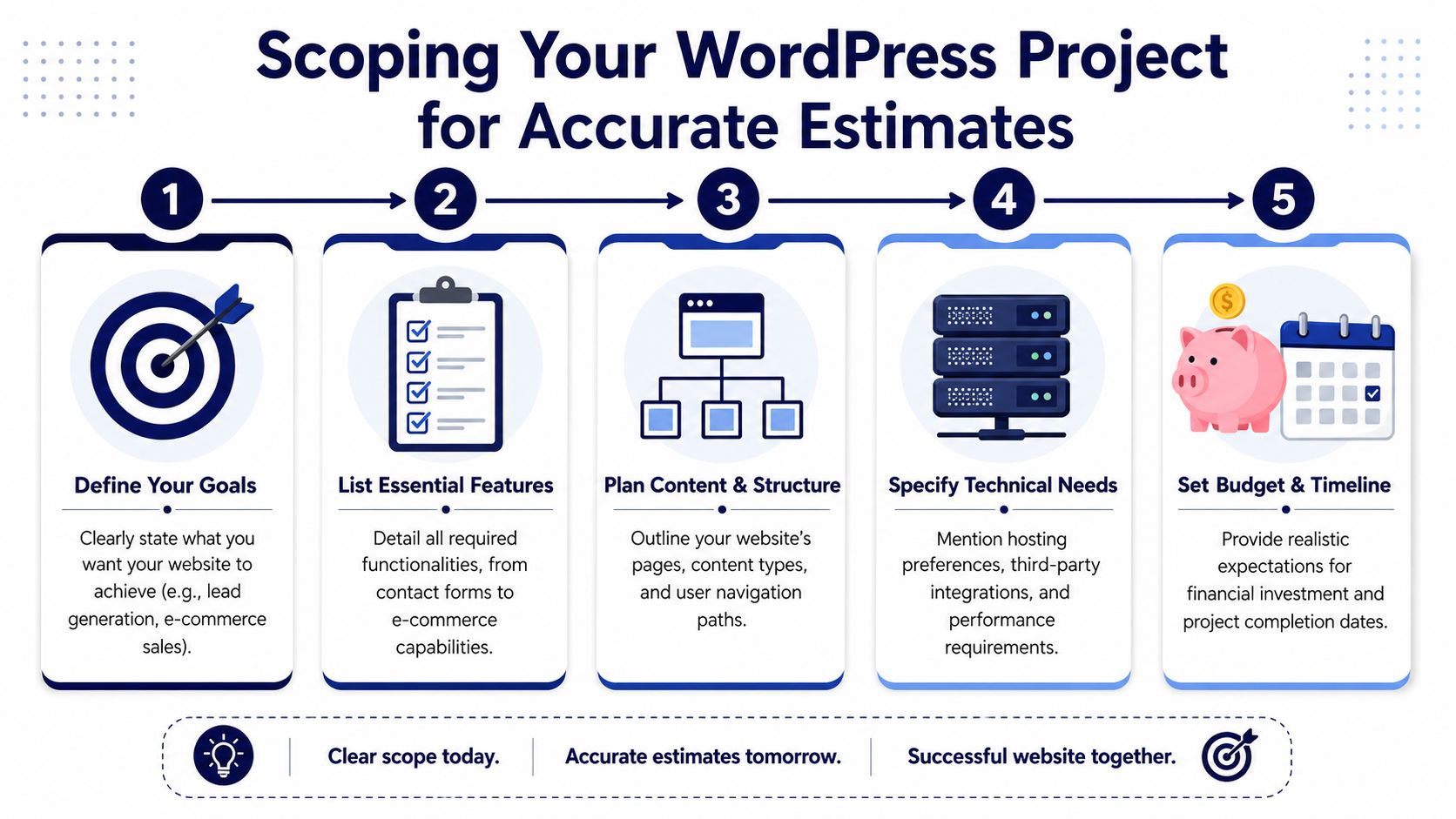
Define business goals before features
“Need a new website” isn’t a scope. It’s a trigger.
Useful goals sound like this:
- Support a sales-led funnel with pages built for demos, use cases, and proof points
- Give marketers publishing control without relying on developers for every landing page
- Unify multiple locations or brands under one governed platform
- Replace plugin-heavy technical debt with a maintainable build
These goals tell an engineering team what to optimize for. They influence architecture, editorial setup, analytics planning, and QA priorities.
A detailed planning process helps here. A structured website redesign project guide is useful when teams need to align marketing, product, and engineering before requesting proposals.
Describe users, content, and operational constraints
The strongest briefs usually include three things buyers often skip:
Who needs to use the site
Marketing teams, editors, franchise managers, recruiters, support staff, or ecommerce operators all need different backend experiences.What content structures exist
Case studies, resources, product pages, location pages, events, and landing pages all imply different fields, templates, and relationships.Which systems must connect
CRM, email automation, ERP, search, DAM, analytics, or consent tools all change the estimate because each integration introduces dependencies and testing work.
This walkthrough can help teams frame those inputs before they meet vendors:
Include what success and risk look like
Many estimate problems come from unspoken expectations. One side assumes “fast launch.” The other assumes “careful migration.” One side expects open-ended revisions. The other budgets one design round.
Add a short section to your brief that answers:
- What can’t break at launch
- Who approves design and content
- How much content needs migration
- Whether SEO preservation matters
- What internal team will maintain the site after handoff
The clearest estimate usually comes from the buyer who knows what must be true on day one, not the buyer who brings the longest feature list.
If you’re evaluating multiple agencies, ask them to mark assumptions directly in the proposal. That’s where most pricing differences are hiding.
Pricing for Maintenance Contracts and Ongoing Support
Launch is the start of operating the site, not the end of paying for it.
WordPress sites need ongoing work because plugins update, content changes, integrations drift, performance can degrade, and security issues don’t wait for redesign cycles. Maintenance pricing exists to cover that operational reality.
What a maintenance contract usually covers
A standard support retainer often includes a predictable set of recurring tasks:
- Core, theme, and plugin updates
- Backups and recovery readiness
- Security review and incident response
- Performance monitoring
- Uptime checks
- Small fixes and compatibility checks
That’s not the same as active feature development. It’s closer to keeping the platform safe and stable while reducing the chance of emergency work.
For businesses comparing support models, a focused breakdown of WordPress website maintenance cost helps separate true maintenance from ad hoc development.
When retainers make sense
Retainers are useful when the site matters every month. That includes lead generation sites with active campaigns, ecommerce stores with ongoing merchandising changes, and platforms with multiple editors or departments.
They also make sense when the original implementation includes custom code. Custom blocks, integrations, and workflow logic need someone who understands the system well enough to update it without introducing regressions.
By contrast, on-demand support works better for low-change sites that only need occasional fixes or enhancements.
On-demand development and staff augmentation
Not every post-launch need belongs in maintenance. New landing page systems, additional integrations, custom search, or ecommerce features are development work.
Those needs are usually handled in one of three ways:
| Support Model | Best for | Pricing logic |
|---|---|---|
| Maintenance retainer | Stability, updates, monitoring | Recurring monthly fee |
| On-demand development | Feature requests, fixes, iteration | Hourly or scoped project work |
| Staff augmentation | In-house teams that need extra senior capacity | Embedded engineering time |
Staff augmentation is often the cleanest option for agencies and internal teams that already have process but need specialist WordPress engineering. Instead of handing off the whole site, they add experienced developers to existing delivery workflows.
The business case for ongoing support
Poor maintenance costs more than maintenance itself. Not always immediately, but eventually.
Neglected updates create security exposure. Plugin conflicts break forms and checkout flows. Performance declines slowly enough that teams stop noticing. Then a campaign launches, traffic rises, and the weak points show up at the worst time.
That’s why mature teams budget for total cost of ownership, not just build cost. The site is a live operational asset. It needs care, not just a launch date.
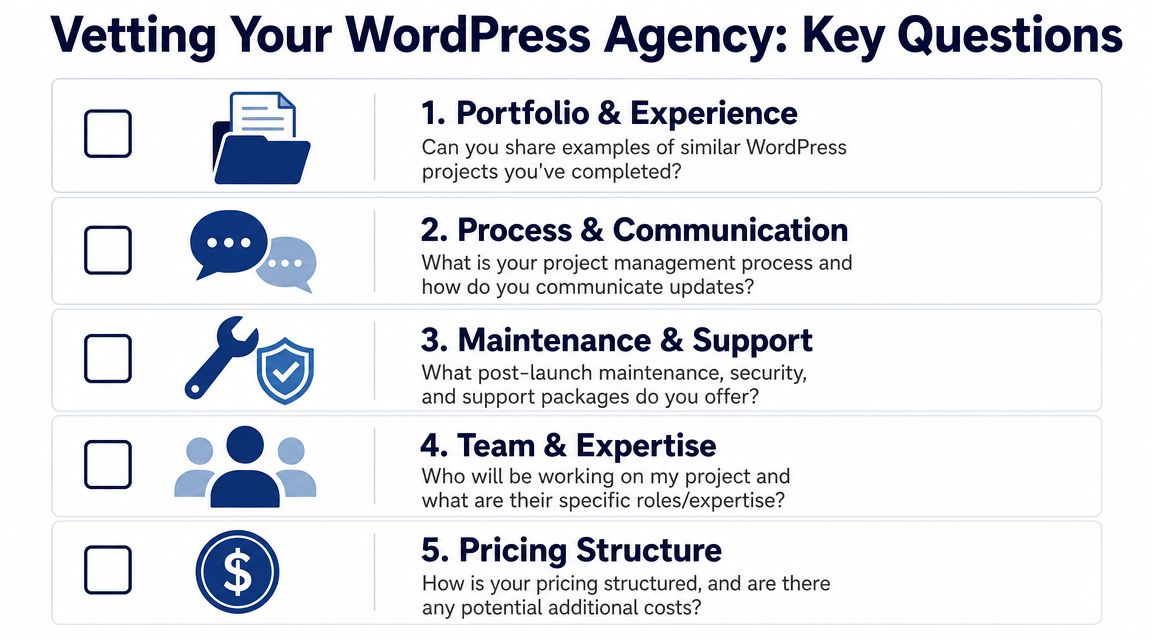
Essential Questions to Ask a WordPress Development Agency
A WordPress estimate can look disciplined in the proposal and still go off track in delivery. The gap usually comes from decisions the agency made early about architecture, editing workflow, integrations, and release process. Ask questions that expose those decisions before you sign.
Ask about architecture, not just portfolio
A polished portfolio shows design range. It does not show how the site was engineered, how editors use it day to day, or how expensive it will be to extend later.
Ask questions like:
- Can you show a project with custom Gutenberg blocks and explain how the editor was structured for content teams?
- How do you decide between a premium theme, a custom theme, and a headless build?
- Which projects should avoid headless WordPress because the added complexity is not justified?
- How do you approach plugin selection versus custom development when performance, security, or long-term support is a concern?
Good agencies can explain the trade-offs in plain terms. A headless build may improve front-end flexibility and support a larger application stack, but it adds API work, preview complexity, and a more involved hosting setup. Custom blocks can make publishing faster and reduce content errors, but they add build time and require stronger documentation.
Ask how they handle quality and delivery risk
Weak estimates usually start to show at this point.
Press on areas such as:
- How do you test integrations, checkout flows, and forms before launch?
- What does your deployment process look like across staging and production?
- How do you handle rollback if a release causes a problem?
- What is included in QA, accessibility review, and performance work?
- How do you validate API dependencies, caching behavior, and plugin conflicts before go-live?
The goal is not to hear perfect terminology. The goal is to learn whether they have a repeatable process. If an agency cannot explain how code is reviewed, how releases are approved, or how failures are recovered, the budget may be missing hours that will appear later as change requests or launch delays.
Ask who will do the work
Delivery model affects cost as much as scope.
Some firms sell senior discovery, then pass implementation to a junior production team. That can work if the system is simple and well-defined. It becomes risky when the project includes custom blocks, multilingual rules, ecommerce logic, or external APIs, because those builds need stronger technical judgment during implementation, not just at kickoff.
Ask:
- Who is architecting the build?
- Who is writing the production code?
- Who handles QA and deployment?
- Will the same team support the site after launch?
- How do you document custom functionality for handoff and future maintenance?
A reliable agency can answer hard technical questions clearly. Jargon without specifics usually means the process is thin or the responsibilities are blurred.
Ask how pricing changes when scope changes
The first estimate matters less than the rules behind it.
You want to know:
- What assumptions are built into the estimate
- What triggers a change request
- How revisions are handled
- What happens if integrations take longer than expected
- What post-launch support includes, and what is billed separately
Strategic decisions directly impact the budget. A request for custom Gutenberg blocks instead of flexible field layouts changes build and QA time. A move from a traditional theme to headless changes front-end, API, preview, hosting, and deployment work. A third-party CRM connection can be simple if the API is clean, or expensive if the data model is messy and error handling is strict.
If you’re comparing agencies, look for the proposal that makes those dependencies visible. If you’re planning a WordPress rebuild, need white-label development capacity, or want a technically grounded estimate for a custom theme, WooCommerce store, multisite platform, or support retainer, IMADO is one option to evaluate. Their work is focused on senior-engineered WordPress delivery, from discovery and scoping through launch, maintenance, and on-demand support.
Let’s build something exceptional
Tell us about your project – we’ll help you launch a fast, scalable, SEO-optimized WordPress platform built for growth.