 Ask Chatgpt to summarize Accessibility Audit Services: Your 2026 Buyer’s Guide
 Ask Grok to summarize Accessibility Audit Services: Your 2026 Buyer’s Guide
 Ask Claude to summarize Accessibility Audit Services: Your 2026 Buyer’s Guide
 Ask Perplexity to summarize Accessibility Audit Services: Your 2026 Buyer’s Guide
 Ask Gemini to summarize Accessibility Audit Services: Your 2026 Buyer’s Guide
You’re usually not shopping for accessibility audit services on a calm day.
A client has received a legal complaint. Procurement just added accessibility requirements to an RFP. Your WooCommerce checkout is underperforming for reasons analytics can’t fully explain. Or your team already ran a browser extension, fixed the obvious alt text warnings, and still knows that isn’t enough.
This is the typical context for most audit projects. They don’t start as abstract compliance work. They start when a business needs evidence, clarity, and a fixable plan.
On straightforward brochure sites, the path is shorter. On WordPress, WooCommerce, multisite, multilingual, and headless builds, accessibility gets more operational. Problems often sit in custom blocks, plugin output, AJAX flows, modal logic, focus handling, and editorial patterns that drift over time. A generic checklist won’t catch that. A serious audit has to look at the platform the way users experience it.
Table of Contents
Why Accessibility Audits Are Suddenly a Top Priority
A familiar sequence plays out in agencies and in-house teams.
The account lead gets an urgent email. Legal wants a response. Sales wants to keep a deal alive. Development wants to know whether they’re looking at a quick patch or a structural problem. Marketing wants reassurance that fixing accessibility won’t wreck layout, tracking, or conversion paths.

That urgency makes sense. Accessibility has moved out of the “we’ll get to it later” category and into procurement, legal review, and release planning. It now affects whether a team can defend a product, bid on work, or launch with confidence.
Big brands aren’t exempt
If anyone still assumes accessibility problems mainly affect smaller teams, the public data says otherwise. A detailed WCAG 2.1 audit of Fortune 100 corporate websites found 815,600 accessibility issues, and only 2% achieved full compliance, according to Accessibly’s web accessibility statistics roundup.
That matters because it resets expectations. Large budgets don’t prevent accessibility debt. Complex publishing stacks, design systems, third-party embeds, and custom front ends create a lot of failure points.
The trigger is often broader than the website
Teams also underestimate how often accessibility obligations extend beyond pages and forms. Video, captions, PDFs, embedded tools, and media workflows all matter. If your team publishes webinars, demos, or product education, this practical guide to Video Captioning Laws, ADA, and European Accessibility Act Guide helps frame one part of that broader compliance picture.
Practical rule: If accessibility only appears in the project after launch, the audit will be more expensive, the fixes will be messier, and the reporting will be harder to defend.
For WordPress teams, the shift is especially visible. Editors add content every day. Plugins update. blocks change. Templates evolve. Accessibility isn’t a one-time setting. It’s a quality discipline that needs a proper baseline.
What an Accessibility Audit Truly Delivers
A professional audit isn’t a spreadsheet full of red flags.
It’s a risk map, a technical diagnosis, and a remediation plan that developers can use. When buyers evaluate accessibility audit services, this is the distinction that matters most. You’re not paying for error detection alone. You’re paying for enough evidence and guidance to fix the right problems in the right order.
The output should connect standards to business reality
Strong audits evaluate against a defined standard, usually WCAG 2.2 AA, and test the places where users can’t afford failure. That includes navigation, forms, search, checkout, account areas, gated content, and authoring interfaces. According to Equal Entry’s accessibility auditing overview, expert audits by IAAP-certified professionals evaluate against 88 WCAG 2.2 success criteria, including high-traffic journeys such as e-commerce checkout flows, where poor implementation can block 15-20% of global users with disabilities.
That’s the part many teams miss. Compliance criteria matter, but users experience flows, not isolated rules. A site can look polished and still fail at basic tasks because a modal traps keyboard focus, a validation message isn’t announced, or a custom block uses the wrong semantics.
For buyers comparing providers, it helps to review an example of what a structured website accessibility audit should include, especially if you want deliverables that support both technical teams and decision-makers.
What should be in the report
At minimum, a useful audit package should include:
- Executive summary: A brief explanation of overall risk, scope, major blockers, and likely remediation effort.
- Page and component coverage: Which templates, user journeys, and shared UI components were tested.
- Issue documentation: Screenshots, page URLs, code references, reproduction steps, and affected user groups.
- Standards mapping: Clear alignment to the relevant WCAG criteria and, where needed, legal frameworks.
- Remediation guidance: Specific implementation advice, not vague statements like “improve contrast” or “fix keyboard access.”
- Prioritization: What to fix first because it blocks task completion, creates legal exposure, or recurs across many templates.
WordPress changes what “good deliverables” look like
On WordPress projects, reports should also account for where the issue lives.
Is it in a reusable block? A theme template? A plugin override? A WooCommerce checkout customization? A translation layer? A multisite header shared across brands? That distinction changes the cost and the remediation path.
A good audit tells your developers not only what failed, but where the defect originates and how broadly it propagates.
That’s why generic scan exports are weak procurement artifacts. They don’t tell you whether the same bug is repeated manually across content, inherited from a component, or introduced by a vendor dependency. A real audit does.
Comparing the Three Tiers of Accessibility Auditing
Not all accessibility audit services use the same method.
Some vendors sell little more than a scanner report. Others run deep manual evaluations with assistive technology testing. Most serious engagements land in the middle, using automation for speed and human review for accuracy.
Why automated scans aren’t enough
Automated testing is useful, but its limits are well established. Accessible.org’s audit service explanation notes that automated tools detect only about 25-30% of WCAG issues and often miss problems tied to dynamic interaction, focus behavior, and actual user flows.
That doesn’t make automation bad. It makes it partial.
A scanner can find missing form labels, duplicate IDs, and some color contrast failures. It can’t reliably judge whether a mega menu is understandable by keyboard, whether a screen reader announces an AJAX cart update properly, or whether a custom Gutenberg accordion exposes state correctly.
If your team needs a foundational refresher on standards before vendor selection, this primer on https://imado.co/web-accessibility-wcag is useful context for framing audit scope and expected conformance targets.
Automated vs. Manual vs. Hybrid Audits at a Glance
| Attribute | Automated Scan | Manual Audit | Hybrid/Usability Audit |
|---|---|---|---|
| Primary method | Software crawls pages and flags detectable code issues | Specialists inspect templates, flows, and behaviors by hand | Automation plus expert review, often with assistive technology testing |
| Best use case | Early triage, broad monitoring, CI checks | Deep compliance review of critical journeys and templates | Procurement-grade audit for complex sites and operational remediation |
| Strength | Fast and repeatable | Finds context-dependent failures | Balances coverage, speed, and real-world validation |
| Weakness | Misses many barriers and can create false confidence | Slower and more dependent on audit quality | Requires clear scope and stronger coordination |
| WordPress fit | Good for catching recurring template errors across many URLs | Good for custom themes, blocks, plugin overrides, and editorial UI | Best fit for WooCommerce, multisite, multilingual, and headless ecosystems |
| Output quality | Usually a list of machine-detected issues | Usually richer evidence and fix guidance | Usually the best mix of evidence, prioritization, and implementation detail |
| Buyer risk | High if used as the only compliance basis | Lower, but can become expensive if scope is vague | Lower when scope is disciplined and remediation support is defined |
Where each tier succeeds and fails
Automated scan
This is the cheapest entry point and the easiest one to oversell.
It works well for recurring checks in development workflows, broad inventory review, and catching obvious regressions. It fails when buyers mistake machine findings for legal readiness or user validation.
Typical signs of a low-value service include:
- No manual review: The vendor exports raw tool output and labels it an audit.
- No prioritization: Everything appears urgent, so nothing is.
- No WordPress context: Findings don’t distinguish between theme issues, plugin issues, and content issues.
Manual audit
A manual audit goes much deeper. Auditors test keyboard navigation, semantic structure, screen reader behavior, visible focus, error handling, reading order, naming, state changes, and responsive behavior.
WordPress-specific defects are visible in these instances. Examples include:
- Custom Gutenberg blocks: Visual styling suggests one structure, but HTML semantics expose another.
- WooCommerce checkout customizations: AJAX updates don’t announce status changes.
- Multisite navigation: Shared components vary by locale and break language handling or menu logic.
Manual work is slower, but it’s often the first time a team gets a credible picture of user impact.
Hybrid or usability audit
This is the model I’d recommend for most serious projects.
It combines scanner output, manual validation, and practical journey testing with tools such as JAWS, NVDA, keyboard-only navigation, and browser-based inspection. On complex builds, that approach catches broad code patterns without losing the detail needed for remediation.
Don’t buy accessibility audit services based on the prettiest dashboard. Buy based on whether the method can explain failures in your actual components and workflows.
For agencies, this matters even more. A white-label partner has to produce findings your developers can fix, your clients can understand, and your project managers can schedule.
The Audit Process from Scoping to Final Report
The cleanest audits start with restraint.
Teams get into trouble when they ask for “the whole site” without defining page types, user journeys, platform dependencies, and ownership boundaries. A professional audit begins with scoping, because scope determines whether the findings will be actionable or chaotic.
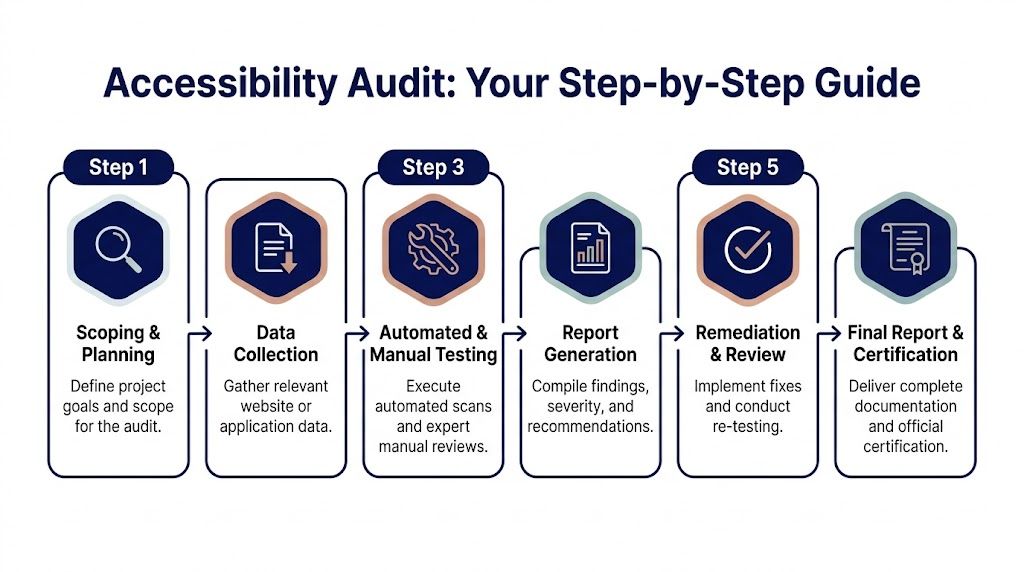
Step 1 and Step 2 define what actually gets tested
Most good engagements begin with discovery.
The auditor asks for your sitemap, page templates, major user flows, design system or component library, plugin stack, and any known problem areas. On WordPress platforms, they should also ask who controls content, whether reusable blocks are in use, whether WooCommerce has custom checkout logic, and whether the site runs multisite or multilingual layers.
Then comes asset selection. The aim isn’t random page sampling. It’s selecting a representative set of templates and journeys that expose the system.
A sensible scoped sample often includes:
- Core templates such as homepage, landing page, article, archive, and contact page.
- Transactional journeys such as product detail, cart, checkout, and account access.
- Shared components like headers, menus, accordions, tabs, sliders, forms, modals, and alerts.
- Editorial interfaces when internal publishing workflows matter.
- Authenticated or protected content if users must log in to complete important tasks.
Step 3 is where shallow vendors get exposed
Testing should mix automation and manual review. On WordPress, that means inspecting both front-end behavior and source patterns created by themes, plugins, and custom blocks.
The auditor will usually test with:
- Keyboard navigation to verify focus order, visibility, trapping, and escape behavior
- Screen readers such as JAWS or NVDA to check names, roles, values, landmarks, announcements, and reading order
- Browser dev tools and code review to inspect semantics, ARIA usage, headings, labels, and state changes
- Visual review for contrast, zoom behavior, spacing, and interface clarity
- Responsive checks to catch mobile and reflow issues in complex components
Step 4 turns defects into a usable backlog
The report should separate business summary from engineering detail.
Stakeholders need to know where the major risks sit. Developers need exact issue descriptions, affected WCAG criteria, reproducible steps, and recommended fixes. If the same defect appears in a shared component, the report should call that out so the team fixes one source instead of chasing many page-level symptoms.
The best reports read like a backlog your engineering lead can triage tomorrow morning.
A strong report usually includes severity or remediation priority, but the useful distinction isn’t “minor versus major” in the abstract. It’s whether the issue blocks task completion, causes repeated failure, or spreads through reused templates.
Step 5 and Step 6 decide whether the audit has value
An audit without validation is unfinished work.
After fixes are implemented, the provider should re-test the corrected areas. That’s where teams confirm whether the patch solved the user problem or only changed the code enough to silence a scanner. Retesting is especially important on WordPress builds where one plugin update or template override can reintroduce the issue.
Final documentation often includes a revised findings status, implementation notes, and material that procurement, legal, or enterprise buyers can retain for internal compliance records.
How to Evaluate and Select an Audit Provider
Most buyers compare vendors too late and on the wrong basis.
They look at price first, skim a list of claimed standards, and assume every provider offering accessibility audit services is selling roughly the same thing. They aren’t. The gap between a scan vendor and an engineering-grade audit partner is enormous, especially on WordPress.
Cost matters, but methodology matters more
Remediation cost is one reason buyer discipline matters. According to Accessibility Innovations’ accessibility audit services page, average accessibility remediation costs can range from $5,000 to $50,000 per site, while a hybrid approach that combines automation with expert review can detect up to 85% of issues.
That has two implications.
First, a cheap audit can become expensive if it misses the hard problems and forces your team into rounds of partial fixes. Second, paying for a more rigorous method upfront can reduce waste, because developers work from validated findings instead of scanner noise.
Questions that separate real providers from compliance theater
Ask how they test, not just what they test
A vendor should be able to describe their methodology clearly. You want to hear about keyboard testing, screen reader validation, component review, dynamic interaction testing, and evidence capture.
If the answer stays at “we run automated scans against WCAG,” keep looking.
Ask for a sample report
You’re checking for practical quality.
Does the report include screenshots, reproduction steps, code guidance, and prioritization? Can a developer tell what to fix? Can a project manager estimate effort? Can a stakeholder understand user impact without reading raw WCAG language?
Ask who performs the audit
Experience matters, and so does role clarity.
You want to know whether the work is done by trained specialists, whether senior reviewers are involved, and whether the provider can discuss assistive technology behavior with confidence. If they can’t explain focus management, status message announcements, semantic landmarks, or accessible name computation in plain language, they probably aren’t doing serious audits.
WordPress expertise is not optional on WordPress projects
Many procurement teams make mistakes at this point.
A provider may be excellent at generic marketing sites and still struggle with Gutenberg blocks, Full Site Editing, WooCommerce custom templates, multilingual plugins, search overlays, cookie banners, and multisite governance. Those aren’t edge cases in WordPress. They’re normal project conditions.
Ask specifically whether they can audit:
- Custom block libraries and reusable blocks
- WooCommerce carts, checkout flows, and account areas
- Plugin-modified markup and template overrides
- Multisite component inheritance
- Headless front ends where WordPress is only one part of the rendering chain
White-label and remediation support matter for agencies
Agencies often need more than an audit PDF.
They need a partner who can communicate clearly with client teams, fit into ticketing workflows, support phased remediation, and stay invisible when white-label delivery is required. If you expect post-audit implementation support, ask whether the provider can work directly with developers, verify fixes, and support ongoing engineering. One option in that category is IMADO, which offers WordPress-focused accessibility audits along with code-level remediation support for custom themes, Gutenberg builds, WooCommerce, and multisite setups.
Buy for the stack you have, not the website category the vendor prefers to sell.
What a solid proposal should make obvious
A good proposal should answer these points without you chasing them:
- Scope boundaries: Which pages, templates, components, and journeys are included
- Standards target: Usually WCAG 2.2 AA, unless legal or contractual requirements specify otherwise
- Testing method: Manual, automated, hybrid, and any assistive technology coverage
- Deliverables: Report format, evidence quality, prioritization, and retesting terms
- Remediation support: Advisory only, implementation help, or full engineering follow-through
- Commercial model: Per page, per template, by journey, or project-based
If those details aren’t explicit, the engagement will get blurry fast.
From Audit Report to Actionable Remediation
The audit isn’t the finish line. It’s the handoff from diagnosis to engineering.
That’s where many accessibility efforts stall. Teams commission the audit, get a detailed report, then discover nobody has translated the findings into ticket structure, code ownership, release order, and regression prevention.

The market is moving toward tighter integration between testing and delivery. Mordor Intelligence’s accessibility testing market report projects the global accessibility testing market will reach USD 827.86 million by 2031, and notes that many firms now embed audits into agile workflows to reduce remediation costs and legal exposure earlier.
Turn findings into engineering work
The best remediation plans start by grouping issues by source.
If twenty pages fail because one custom form component lacks proper labels, that’s one component fix, not twenty unrelated tickets. If a multisite header has a broken focus pattern, fix the shared template before you triage every child site. If WooCommerce notices aren’t announced after AJAX updates, treat that as a checkout system defect.
A workable post-audit flow usually looks like this:
- Group by component ownership: Theme, plugin, custom block, integration, or content.
- Prioritize by blocked journey: Checkout, lead form, account access, search, navigation.
- Patch shared sources first: Components and templates before page-level cleanup.
- Retest before close: Verify with keyboard and screen reader behavior, not just automated tools.
Two common WordPress examples
WooCommerce checkout labels and announcements
A report may note that checkout fields don’t expose clear labels to assistive technology, or that shipping/payment updates happen without notification after selection changes.
In code terms, that often means checking label associations, accessible names, and whether status changes are being announced properly. The fix might live in a template override, a checkout customization script, or a plugin conflict. The point isn’t adding ARIA everywhere. The point is making sure the field and update behave correctly in the actual checkout flow.
Custom Gutenberg blocks with weak semantics
A visually polished block can still be inaccessible if it outputs non-semantic wrappers, clickable div patterns, or broken heading hierarchy.
The remediation may involve changing block markup, improving focus styles, using the correct native element, or tightening editor guidance so content teams don’t recreate the same issue. If your team is building that process internally, this practical resource on https://imado.co/how-to-improve-website-accessibility is a good companion for turning audit findings into repeatable implementation standards.
Here’s a useful explainer before development starts:
What post-audit support should include
Not every provider offers implementation help, but the useful ones usually support some combination of:
- Developer consultation during remediation
- Issue clarification when findings need more context
- Validation testing after fixes are shipped
- Content guidance for editorial teams
- Regression planning so the same patterns don’t return next sprint
If the provider disappears after sending the PDF, your team is buying diagnosis without treatment.
For complex WordPress estates, remediation offers the most value. That’s when audit work becomes better templates, safer blocks, clearer editor rules, and fewer recurring defects.
Your Checklist for Procuring an Accessibility Audit
Use this as a buying filter before you sign anything.
Before you inquire
- Define your target standard: Confirm whether you need WCAG 2.2 AA or another contractual baseline.
- List your critical journeys: Include checkout, lead forms, search, login, account, support, and any gated content.
- Map your stack: Note WordPress version, custom theme details, Gutenberg usage, WooCommerce customizations, multisite, multilingual plugins, and major integrations.
- Identify decision-makers: Legal, procurement, product, marketing, and engineering should agree on what the audit needs to deliver.
Questions to ask providers
- How do you test: Ask specifically about keyboard review, screen readers, manual testing, and dynamic interactions.
- Can I see a sample report: You’re looking for evidence, prioritization, and code-level clarity.
- Do you understand WordPress specifics: Ask about blocks, plugin output, template overrides, WooCommerce, and multisite inheritance.
- What happens after the report: Clarify retesting, developer support, and whether they help with remediation planning.
When reviewing the proposal
- Check the scope model: Template-based and journey-based scope is usually more useful than a vague “site-wide” promise.
- Look for deliverable detail: The proposal should state what evidence, prioritization, and remediation guidance you’ll receive.
- Confirm ownership assumptions: Make sure the vendor has accounted for third-party plugins, internal teams, and content authors.
- Prepare internal follow-through: This accessible WordPress websites developers checklist is a good companion for aligning your developers before the audit lands.
A good proposal should make implementation easier, not create another round of discovery.
Frequently Asked Questions About Accessibility Audits
Does an audit guarantee we won’t get sued
No.
An audit helps you identify barriers, document a serious accessibility effort, and prioritize remediation. It does not guarantee immunity from complaints or legal action. What it does give you is a defensible process and a clearer path to improvement.
How often should we run an audit
Run a formal audit when you launch a new site, redesign critical flows, change major components, or add substantial new functionality.
After that, accessibility should stay in your delivery process through routine checks, regression testing, and periodic expert review. WordPress sites change often. That’s why one audit is a baseline, not a permanent shield.
Do we need to audit every single page
Usually, no.
Most professional audits sample representative templates, shared components, and critical journeys. If the sample is chosen well, it exposes system-level defects that affect many pages. Very large content estates still need smart scoping, especially when reusable templates drive most output.
Can our team just use an accessibility plugin
Plugins can help with narrow tasks. They don’t replace an audit.
They won’t fully evaluate custom interactions, third-party embeds, editorial decisions, checkout behavior, or assistive technology compatibility. They also won’t tell you whether your implementation works for users.
What’s the biggest mistake teams make after the audit
Treating the report like compliance paperwork instead of an engineering backlog.
The teams that make progress assign owners, fix shared components first, retest properly, and update their publishing and development workflows so the same issues don’t return.
If your team needs WordPress-specific accessibility audit services that connect findings to real remediation work, IMADO can help assess custom themes, Gutenberg/FSE builds, WooCommerce flows, multisite setups, and ongoing maintenance workflows with engineering follow-through in mind.
Let’s build something exceptional
Tell us about your project – we’ll help you launch a fast, scalable, SEO-optimized WordPress platform built for growth.