 Ask Chatgpt to summarize WCAG Compliance Audits: A Complete 2026 Guide
 Ask Grok to summarize WCAG Compliance Audits: A Complete 2026 Guide
 Ask Claude to summarize WCAG Compliance Audits: A Complete 2026 Guide
 Ask Perplexity to summarize WCAG Compliance Audits: A Complete 2026 Guide
 Ask Gemini to summarize WCAG Compliance Audits: A Complete 2026 Guide
Accessibility failures are common across production websites, and agency teams pay for them twice. First in avoidable remediation work, then again in client trust when issues surface after launch.
A wcag compliance audit gives you a usable map of risk. It shows where people get blocked, which templates or components are causing repeat defects, and how much of the problem sits in code you control versus plugins, embeds, or client content. That distinction matters if you sell fixed-scope builds, support retainers, or white-label delivery for other agencies.
I have seen the same pattern across WordPress, WooCommerce, multisite, and headless projects. Problems rarely live on one page. They usually come from shared blocks, menu systems, search and filter UI, form validation, modals, checkout steps, and custom theme components. If the audit stays at page level, the remediation plan stays shallow, and the same defects return in the next sprint.
For agency owners, that makes audits more than a compliance task. They are part delivery QA, part technical discovery, and part service packaging. Run them well, and you can feed clearer remediation tickets into development, add regression checks to CI pipelines, and offer white-label audit work as a repeatable revenue stream instead of treating accessibility as one-off cleanup.
Table of Contents
Why WCAG Audits Are Non-Negotiable in 2026
Accessibility failure is the default state of the web right now. The 2026 WebAIM Million Report shows a reversal in progress, with 95.9% of homepages containing detected WCAG 2 failures and 56.1 average errors per homepage.
That matters because most agencies assume accessibility is improving through better tooling and awareness. The data says otherwise. Teams are launching polished sites that still fail on contrast, labels, alternative text, focus handling, and interactive behavior.
The business case is bigger than compliance
A wcag compliance audit isn’t just about passing a checklist. It tells you whether users can complete high-value tasks.
For an agency owner, that changes the conversation with clients:
- Revenue protection: If users can’t submit a lead form, use a product filter, or finish checkout with a keyboard or screen reader, the problem isn’t theoretical.
- Delivery quality: Audits catch defects that visual QA and browser testing routinely miss.
- Client retention: Accessibility work creates ongoing remediation, regression testing, training, and review cycles.
- Reputation: Clients notice when your team can explain why an issue matters to a real person, not just point to a validator warning.
Accessibility debt behaves like technical debt
The longer a team waits, the more expensive remediation becomes. A missing form label on one page is easy. The same defect baked into a custom Gutenberg block library, a WooCommerce checkout customization, and a multilingual template system is not.
Practical rule: Audit patterns and workflows, not just pages. Most expensive fixes come from repeated components, not isolated content mistakes.
I’ve seen the same mistake across many delivery teams. They launch first, scan later, then discover the site architecture itself encourages inaccessible output. That usually means retrofitting templates, retraining editors, and rewriting acceptance criteria after the fact.
Why agencies should care now
Agency teams sit in a strong position here because they control design systems, theme architecture, QA gates, and launch process. That means they can prevent accessibility issues earlier than most clients can.
The firms that treat accessibility as a service capability, not a rescue task, have a cleaner operating model:
| Agency approach | Likely result |
|---|---|
| Accessibility checked at launch only | Repeated defects and rushed remediation |
| Accessibility built into discovery, design, development, and QA | Fewer regressions and clearer accountability |
| One-off scan sold as an audit | Weak coverage and false confidence |
| Proper audit plus remediation roadmap | Actionable work the client can budget and schedule |
A serious audit gives you a baseline. It also gives you something many teams lack. A credible way to say what was tested, what failed, what was fixed, and what still needs manual review.
Understanding a True WCAG Compliance Audit
A lot of teams buy a scan and call it an audit. That’s like walking past a house, glancing at the roof, and claiming you’ve done a full inspection.
A true WCAG compliance audit combines automated testing with manual review against the 50 success criteria at WCAG 2.1 Level AA. Automated tools detect only 20-40% of accessibility barriers, so a hybrid process is required for meaningful coverage, as noted by Accessible.org’s audit guidance.
What WCAG actually measures
WCAG is built around four principles. Content must be Perceivable, Operable, Understandable, and Reliable.
That sounds abstract until you translate it into common failures:
- Perceivable: Low contrast text, missing alt text, media without equivalent access
- Operable: Keyboard traps, broken focus order, controls that require a mouse
- Understandable: Confusing forms, weak error messaging, unpredictable interaction
- Interoperable: Code and components that don’t expose usable names, roles, and states to assistive tech
For most commercial sites, Level AA is the practical target. It’s the standard most agencies should build toward because it balances broad feasibility with meaningful user access.
What automation does well and where it stops
Automated tools are useful. They catch obvious issues fast and help teams triage templates.
They’re good at finding things like:
- Missing non-text alternatives: Basic image failures
- Heading and landmark problems: Structural issues in templates
- Contrast failures: Especially in shared components
- Empty links or buttons: Common in icon-only controls and card UIs
They don’t tell you whether a checkout can be completed with a keyboard, whether a modal announces itself correctly, or whether a screen reader user understands a dynamic form error. That requires human testing.
A scan is a linting pass. An audit is an expert evaluation of whether the interface works for disabled users.
What manual testing adds
Manual testing closes the gap between technical validity and usable experience. It usually includes keyboard-only navigation, screen reader testing, zoom and reflow checks, form behavior review, and validation of custom widgets.
For WordPress projects, that matters in places scanners routinely underreport:
- Custom Gutenberg blocks: Visual freedom often hides weak semantics
- WooCommerce flows: Cart updates, coupon states, notices, and error handling need behavior testing
- Mega menus and overlays: Focus movement and announcements break easily
- Headless front ends: Good markup in the CMS doesn’t guarantee accessible rendered output
A defensible audit also needs a clear standard. The team should state the WCAG version, target conformance level, test environments, page sample, and assistive technologies used. Without that, you’re buying output, not a method.
If you need a plain-language baseline for clients or internal stakeholders, this overview of web accessibility and WCAG is useful as a framing document before deeper audit work starts.
What a legitimate audit deliverable looks like
A real audit report should give your developers and PMs something they can act on immediately. That usually includes:
- Pass or fail by criterion: Not just a pile of screenshots
- Issue descriptions: Clear reproduction steps and affected components
- Evidence: Screenshots, code references, and user impact notes
- Prioritization: What blocks critical journeys first
- Remediation guidance: Specific implementation direction, not vague advice
If the report can’t guide remediation, it wasn’t detailed enough. If it contains only automated output, it wasn’t an audit.
Choosing the Right Audit Scope and Methodology
Most failed audits are under-scoped before testing even begins. The agency picks the homepage, a contact page, maybe one product page, then declares the site reviewed. That approach produces a clean-looking report and a dangerous conclusion.
The better model is structured sampling. The WCAG-EM approach described by A11Y Collective combines essential pages with random samples, including 15-25% random sampling for sites with more than 100 pages, and audits using full scope identify 2-3x more failures than audits limited to hero pages.
Start with risk, not page count
Scoping should begin with business-critical paths. On a brochure site, that might be lead capture, navigation, search, and embedded media. On WooCommerce, it’s usually browse, filter, product detail, cart, checkout, account, and transactional messaging.
Page count matters less than template variety and interaction complexity.
Ask these questions first:
- Where does money move: Checkout, booking, application, quote request
- Where does user input happen: Forms, search, account actions, support flows
- Where does JavaScript control state: Modals, tabs, dropdowns, carousels, live updates
- Where do third parties enter the experience: Payment gateways, chat widgets, maps, review embeds
Audit templates, components, and journeys together
A page-only sample misses system-level defects. A component-only review misses context. You need both.
A practical scope usually includes three layers:
| Scope layer | What to include | Why it matters |
|---|---|---|
| Core journeys | Login, checkout, registration, contact, search | These are the paths users must complete |
| Template set | Home, archive, single, landing, product, article, account | Repeated layout patterns spread defects widely |
| Shared components | Header, nav, forms, modals, sliders, alerts, accordions | One broken component can affect many pages |
For agencies, profit and quality align. If you identify that one custom block or one multisite header pattern is causing repeated violations, you can fix the root, not just patch symptoms.
What changes scope in WordPress projects
WordPress adds a few scoping realities that generic audit guides often skip.
Custom themes need review at the template and block markup level. Gutenberg builds require checking both editor output and rendered front-end behavior. WooCommerce needs journey-based testing because cart notices, validation, shipping options, and payment steps often rely on dynamic updates. Multilingual and multisite builds need sampling across site variants because shared code can behave differently with translation plugins, alternate content lengths, or local design overrides.
Scoping mistake to avoid: If the proposal says “we’ll test a few representative pages” but doesn’t name key journeys, shared components, or third-party dependencies, the scope is too loose.
If you need support defining an audit scope around WordPress templates, commerce flows, and reusable components, accessibility audit services can help formalize that sampling plan before work begins.
Good scope documents answer four things
A strong scope document should answer these plainly:
- What standard applies
- Which environments will be tested
- Which pages, templates, components, and journeys are in sample
- How retesting will happen after fixes
That keeps expectations aligned and prevents a common agency problem. Clients assume “audit” means full-site certification, while the team only planned a partial review.
The Complete Audit Workflow from Discovery to Remediation
A useful audit process is predictable. It produces evidence, prioritization, and a path to closure. Without that, findings sit in a PDF while the same issues keep shipping.
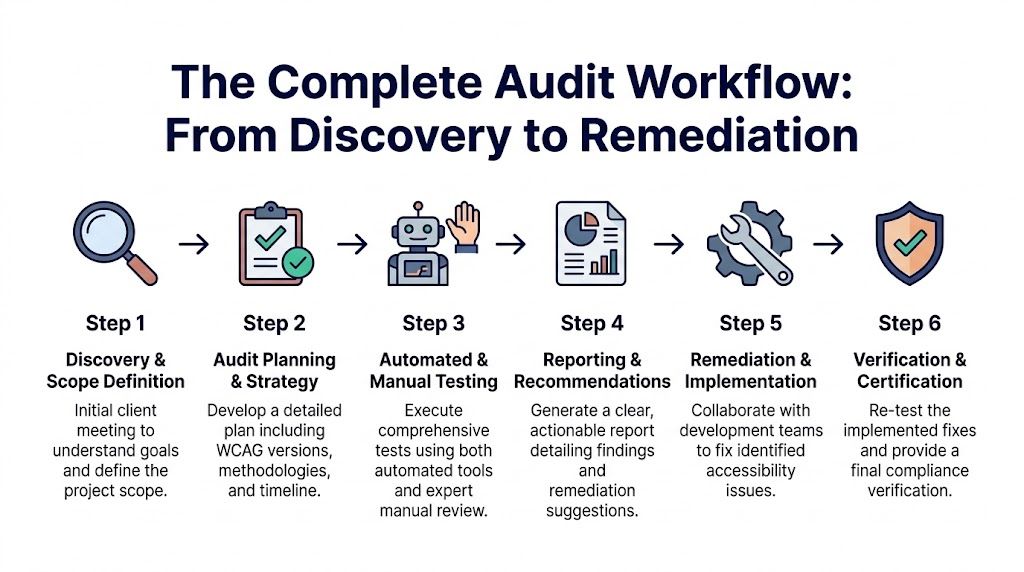
Discovery and scope definition
The first step is business discovery, not tool selection. You need to know what the site does, which journeys matter, what technologies are in play, and where the legal or operational risk sits.
For an agency, discovery should capture:
- Platform details: WordPress stack, theme model, plugin footprint, headless front end, WooCommerce customizations
- Content model: Templates, block patterns, document types, media usage
- User journeys: Lead gen, purchase, sign-in, support, application, booking
- Dependencies: Payment providers, embedded tools, third-party widgets
This is also where you define target standard, environments, and what counts as done. If you skip that, remediation turns into argument instead of execution.
Audit planning and baseline scanning
Once the scope is locked, run automated checks across the selected sample to establish a baseline. This gives the team a fast list of structural and code-level defects before manual testing begins.
Use scanners and browser tools to catch recurring issues in templates and shared components. This phase is good for surfacing missing labels, contrast failures, empty controls, landmark gaps, and malformed heading structures.
But don’t let the baseline drive the whole project. The point is to speed up triage, not replace review.
Manual testing with assistive technology
Actual auditing commences. Test the sample with keyboard-only navigation, screen readers, zoom and reflow, form interactions, status messages, and responsive breakpoints. Review custom UI controls as behavior, not just markup.
For WordPress and WooCommerce work, manual testing usually reveals the issues that most affect conversion and task completion:
- Keyboard focus gets lost in off-canvas navigation and modal sequences
- Screen readers miss updates in AJAX cart or filter interfaces
- Error messaging lacks context in checkout and registration forms
- Visible UI and accessibility tree diverge in heavily scripted components
If a user can see that something changed, but assistive technology doesn’t announce it, the interaction isn’t complete.
Reporting and recommendation writing
A good report doesn’t overwhelm the client with raw output. It organizes findings by severity, affected journey, repeated component, and WCAG criterion.
The best reports are built for multiple audiences:
| Audience | What they need |
|---|---|
| Executives | Risk summary, remediation scope, timeline implications |
| Project managers | Priorities, dependencies, task grouping |
| Designers | Visual and interaction corrections |
| Developers | Repro steps, code patterns, implementation guidance |
This is also the point where process discipline matters. Teams that treat accessibility as an operational capability usually borrow ideas from broader enablement programs. If you’re building internal rollout plans, this guide to compliance training best practices is useful for structuring adoption, ownership, and repeatable training across roles.
Remediation and implementation
Remediation works best when issues are grouped by source, not only by page. Fix the component library, theme partial, or form pattern first. Then clean up page-specific exceptions.
In practice, the highest-value changes often include:
- Semantic HTML corrections: Native buttons, lists, headings, landmarks
- Form fixes: Programmatic labels, field grouping, clear validation, status messaging
- Focus management: Dialog entry and exit, skip links, visible focus, logical tab order
- Design token updates: Contrast, state styling, focus indicator consistency
For implementation teams looking for a practical checklist while fixing issues, this guide on how to improve website accessibility works well as a companion resource during remediation.
Verification and closeout
Don’t close an audit when tickets are marked done. Close it when changed experiences are retested.
Verification should confirm three things:
- The defect is fixed
- The fix didn’t introduce a new barrier
- The user journey now works as intended with assistive tech
That final pass is what turns an audit from a diagnostic into a quality control loop.
An Auditor’s Toolkit Recommended Tools and Checklists
Tools don’t make an audit credible, but the wrong tool mix makes an audit shallow. The right setup combines fast detection, manual verification, and disciplined reporting.
Automated scanners versus manual aids
Automated tools are best for repeatable technical checks across many templates. Manual tools help auditors verify behavior and experience.
Here’s the practical split:
| Category | Good options | Best use |
|---|---|---|
| Automated browser scanning | WAVE, axe DevTools | Fast page-level issue discovery |
| Site crawling | Site-wide crawlers, CI-integrated checks | Repeated pattern detection across templates |
| Screen readers | NVDA, VoiceOver, JAWS | Real interaction testing and announcement validation |
| Visual inspection tools | Contrast checkers, zoom, browser dev tools | Color, focus, reflow, responsive review |
| Interaction testing | Keyboard only, browser accessibility tree | Focus order, semantics, custom widget behavior |
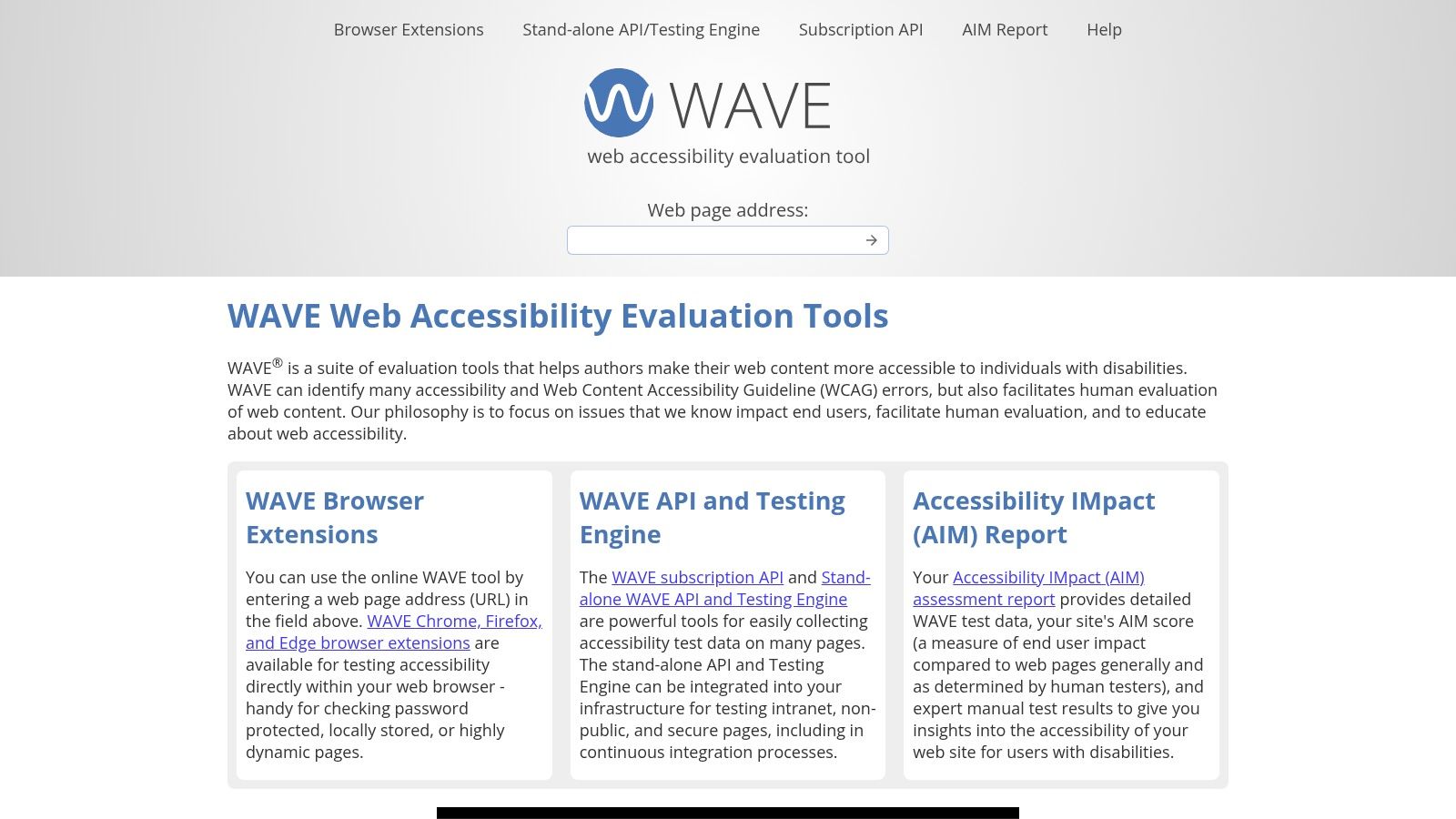
WAVE and axe are strong starting points because they expose common markup failures quickly. Browser dev tools help verify computed names, roles, and states. NVDA is especially useful for Windows and Chrome testing. VoiceOver is essential for Safari and iOS review. JAWS still matters in many enterprise environments.
What each tool is good at and bad at
The mistake isn’t using scanners. It’s expecting them to answer usability questions they can’t answer.
Use tools with clear boundaries:
- WAVE: Excellent for quick visual overlays and structural issues. Limited for dynamic behavior.
- axe DevTools: Strong developer workflow fit. Good for repeatable checks during implementation.
- NVDA: Great for confirming reading order, landmarks, form labels, and state announcements.
- VoiceOver: Necessary for Apple ecosystem behavior, especially touch and rotor navigation.
- Keyboard-only review: Still the fastest way to expose broken focus logic and hidden interaction traps.
Field note: If a custom component needs ARIA just to imitate native behavior, test it twice as hard.
A practical audit checklist
A usable checklist should follow real production risks, not just WCAG numbering. I prefer grouping checks by what breaks tasks.
- Structure and landmarks: Headings, page title, skip link, region labeling
- Navigation and focus: Keyboard access, visible focus, logical order, no traps
- Forms and validation: Labels, instructions, grouping, error identification, status updates
- Media and non-text content: Alt text quality, captions, transcripts, decorative handling
- Dynamic components: Dialogs, accordions, tabs, toasts, filters, cart updates
- Responsive behavior: Zoom, reflow, orientation, clipping, overlap
- Code semantics: Native elements first, valid names and roles, predictable states
For teams that process large remediation reports or documentation sets, tools from adjacent workflows can help organize evidence. This overview of AI document analysis is useful if you’re exploring ways to structure issue logs, categorize report content, or summarize repeated findings across audits.
What the report should include
A report that developers can use immediately usually contains:
- Issue title and affected area
- WCAG criterion reference
- What the user experiences
- How to reproduce
- Why it happens in code or UI
- Recommended fix
- Priority and repeatability note
One practical option for WordPress-focused remediation support is IMADO, which offers WCAG issue identification and code-level remediation support for custom themes, Gutenberg builds, WooCommerce, and multisite setups. That kind of implementation-aware support matters when the audit findings point back to reusable architecture, not one-off pages.
Integrating Audits into Agency and Development Lifecycles
Often, accessibility is bolted on at the end. That’s one reason Accessible.org notes that only 41% of organizations include accessibility testing in their standard development processes, while 80% of WCAG errors are considered preventable.
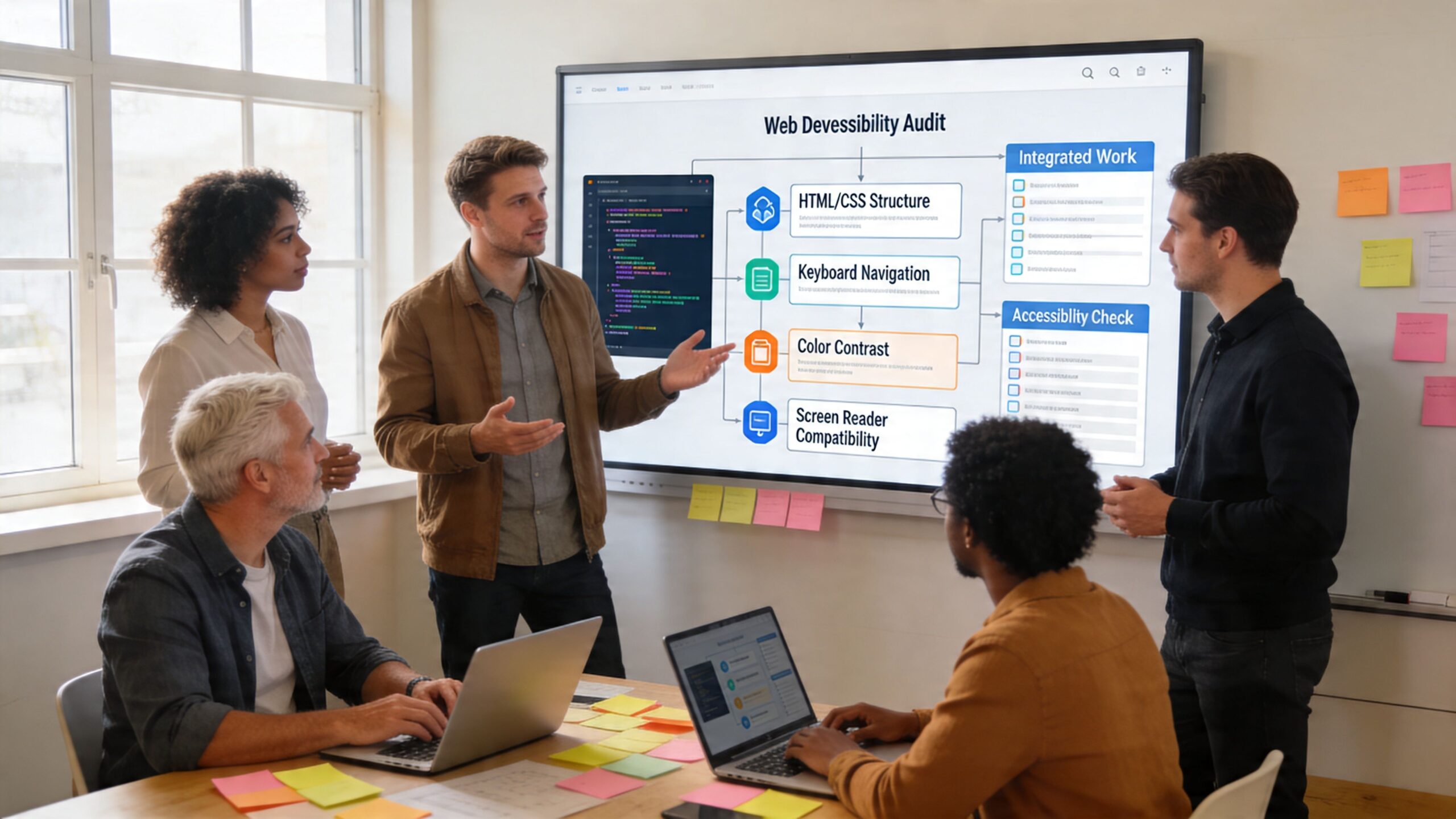
That gap should push agencies toward a different model. Don’t treat audits as isolated compliance projects. Treat them as part of delivery design.
Shift left in real agency workflows
In WordPress projects, the right time to catch many issues is before content entry and before UAT. Add automated checks in development, review components during build, and reserve manual audit time for template validation and high-risk flows.
A practical lifecycle looks like this:
- Discovery: Accessibility requirements are included in scope, estimates, and acceptance criteria
- Design review: Components are checked for contrast, focus states, form clarity, and interaction logic
- Development: Automated checks run in local and CI environments
- QA: Manual keyboard and screen reader review happens on key journeys
- Pre-launch: Formal audit validates representative templates and business-critical flows
- Post-launch: Regression checks follow feature releases, plugin changes, and redesigns
For WooCommerce, this is especially important. Cart drawers, variation selectors, coupon notices, shipping calculators, and payment steps often behave acceptably with a mouse while failing under keyboard or screen reader use.
Build accessibility into service delivery
If you’re an agency owner, wcag compliance audits can become a white-label service line instead of an occasional favor for clients. The mistake is selling a cheap scan as a standalone deliverable. That creates low trust and weak margins.
The stronger package is operational:
| Service layer | What to offer |
|---|---|
| Audit | Scoped review of journeys, templates, and components |
| Remediation support | Ticket writing, design guidance, code fixes, retesting |
| Ongoing monitoring | Release reviews, regression checks, recurring manual validation |
| Team enablement | Dev and content training, QA checklists, editor guidance |
Sell the process, not just the report. Clients usually need help understanding what failed, what blocks users first, and who should fix what.
White-label delivery works when roles are clear
For white-label work, define ownership early. The partner agency owns the client relationship. The audit team owns methodology, testing evidence, and remediation guidance. The development team owns implementation and re-verification.
That keeps handoffs clean and prevents the common failure mode where the report is technically correct but impossible for the delivery team to execute.
A short explainer can help clients understand why process matters before you pitch the service. This video is a useful conversation starter for teams that need a non-technical framing.
Make audits part of release management
The highest-performing teams don’t wait for annual reviews to think about accessibility. They put lightweight checks into release management.
Use audits to create reusable assets:
- Definition of done updates
- Component-level acceptance criteria
- Content editor rules
- Regression scripts for common journeys
- A backlog grouped by template and component source
That’s where accessibility stops feeling like compliance overhead and starts working like engineering hygiene.
Frequently Asked Questions About WCAG Audits
A lot of confusion around wcag compliance audits comes from bad market language. Vendors blur the line between a scan, an audit, a certification, and a legal opinion. Agency owners need a simpler standard. If the work doesn’t produce reliable findings, prioritized remediation, and retesting, it isn’t enough.
Federal audit data is a good reality check. According to analysis summarizing governmentwide accessibility audits, only 23% of public web pages achieved full conformance, even though 80% of WCAG errors are preventable with stronger programs and dedicated staff in those audit contexts, as described by ADA Compliance Pros. The takeaway is practical. Most failures come from process weakness, not from impossible standards.
FAQ quick answers
| Question | Short Answer |
|---|---|
| Is an automated scan enough? | No. It helps with baseline detection, but it misses many issues that affect real users. |
| Should agencies target WCAG AA? | Yes, in most commercial projects that is the practical conformance target. |
| Do audits need manual testing? | Yes. Keyboard, screen reader, zoom, and behavior testing are core parts of a real audit. |
| Is accessibility a one-time project? | No. It needs retesting after releases, design changes, and content changes. |
| Can agencies sell audits white-label? | Yes, if the methodology, scope, reporting, and remediation workflow are clearly defined. |
How long does an audit take
It depends on scope, complexity, and how many unique templates and user journeys the site includes. A small marketing site and a customized WooCommerce build are not the same job.
The useful planning principle is this: audit time should follow interaction complexity, not just URL count. A site with a few pages but heavy custom UI can require more manual review than a larger site with simpler patterns.
What should clients receive at the end
At minimum, clients should get a report that explains the sample tested, the standard used, the environments reviewed, the failures found, and the recommended remediation path.
The strongest deliverables also include:
- Issue prioritization by impact
- Clear mapping to WCAG criteria
- Component-level grouping for efficient fixing
- Evidence such as screenshots and code references
- Retest results after implementation
Can AI replace auditors
No. AI can help summarize reports, flag patterns, and support issue management. It still doesn’t replace human judgment about whether interactions are understandable, operable, or correctly announced by assistive technologies.
That matters most in dynamic interfaces. Custom widgets, checkout updates, modal behavior, and error communication still require expert review.
Clients don’t buy an audit because they want more output. They buy it because they need credible answers about user barriers and what to fix first.
What’s the biggest scoping mistake agencies make
Testing only polished pages. Homepages and flagship landing pages often get the most design attention and the fewest ugly edge cases.
Significant defects usually sit in account areas, search results, form states, embedded tools, product filtering, document downloads, and content assembled by editors over time. If the sample excludes those, the audit will overstate accessibility.
How should agencies position the service
Position it as a quality and risk discipline tied to development, not as a badge. Clients respond better when you explain that the audit will identify blocked user tasks, repeated component defects, and a remediation roadmap their team can execute.
That framing also supports ongoing work. Once the client sees accessibility as part of release quality, recurring reviews make sense.
What actually works
The strongest model is simple:
- Define scope around journeys and reusable patterns
- Use automation early
- Do manual testing where behavior matters
- Write reports developers can act on
- Retest fixes before closing work
- Turn findings into delivery standards
That’s the practical value of wcag compliance audits. They don’t just help you find defects. They help you change how sites get built, reviewed, and maintained.
If your team needs senior WordPress support for accessibility audits, remediation, or white-label delivery, IMADO can help structure the work around real templates, user journeys, and implementation constraints so the output is useful to both agency teams and end clients.
Let’s build something exceptional
Tell us about your project – we’ll help you launch a fast, scalable, SEO-optimized WordPress platform built for growth.