
 Ask Chatgpt to summarize Does WordPress Cost Money? a 2026 Pricing Guide
 Ask Grok to summarize Does WordPress Cost Money? a 2026 Pricing Guide
 Ask Claude to summarize Does WordPress Cost Money? a 2026 Pricing Guide
 Ask Perplexity to summarize Does WordPress Cost Money? a 2026 Pricing Guide
 Ask Gemini to summarize Does WordPress Cost Money? a 2026 Pricing Guide

Most advice on this topic is too shallow. It says WordPress is free, which is technically true and practically misleading.
If you’re asking does WordPress cost money, the useful answer isn’t yes or no. It’s what kind of site are you building, how much control do you need, and what failure would cost your business more later.
The WordPress software license costs nothing. The moment you want a real site with your own domain, reliable hosting, security, backups, performance work, premium functionality, or custom engineering, the budget starts moving. For a simple self-hosted setup, independent pricing guides put the entry point at about $70 per year, based on roughly $14 for a domain and $56 for hosting in one estimate, while another guide notes entry-level hosting around $2.99/month and domains commonly $10 to $20 per year in this WordPress pricing breakdown.
That spread is the point. WordPress isn’t a product with one price tag. It’s a platform. A hobby blog, a brochure site, a WooCommerce store, and an enterprise publishing system may all run on WordPress, but they don’t belong in the same budget conversation.
Table of Contents
The Real Answer to the ‘Free’ WordPress Question
WordPress is free in the same way blueprints are free. The plans don’t cost much, but the building still does.
The WordPress core software is open source and free to install. That part is real. What trips people up is assuming free software means free website. It doesn’t. A website needs infrastructure, and infrastructure costs money.
Where the free part ends
If you want a live, professional site, you need more than the CMS:
- Hosting so the site exists on a server people can reach
- A domain name so visitors see your brand, not a subdomain
- Design and functionality choices that usually go beyond the default install
- Maintenance so updates, backups, security, and uptime don’t become an afterthought
A lot of beginner advice treats those as optional extras. In practice, they’re the operating layer.
Practical rule: WordPress is free at the code level. Your actual spend starts the moment the site has to perform for a real audience.
The better budgeting question
The right question isn’t “Is WordPress free?” It’s “What level of WordPress am I trying to run?”
A simple personal site can stay inexpensive for a long time. A business site usually needs a cleaner design, form handling, SEO tools, and dependable support. An e-commerce build adds transactions, customer data, plugin compatibility issues, and higher hosting demands. Once a site becomes revenue-generating or operationally important, the budget stops being about software and starts being about risk.
There’s also a basic platform distinction that changes the whole conversation. Some people mean WordPress.com, which bundles hosting and management into a service. Others mean WordPress.org, the free software you run yourself. Those are different cost models, different responsibilities, and different ceilings for customization.
WordPress.com vs WordPress.org The First Cost Decision
The first real cost decision isn’t about plugins or themes. It’s about which WordPress you’re using.
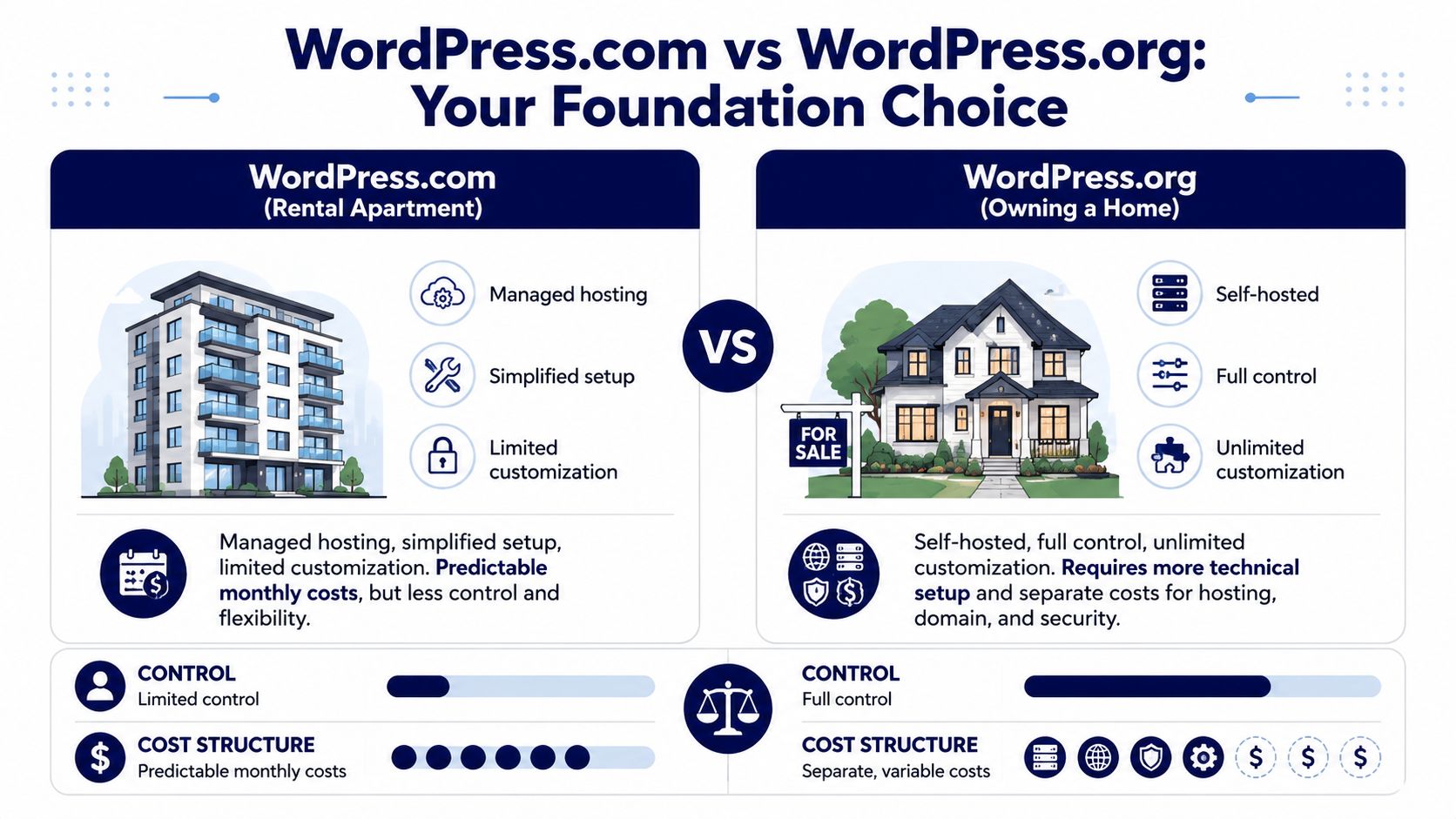
WordPress.com is closer to renting a managed apartment. WordPress.org is closer to owning a house on your own land. One is simpler and more packaged. The other gives you far more control, but you take on more responsibility.
What you get with WordPress.com
WordPress.com offers a free ad-supported tier and paid plans starting at $4/month billed annually on its official pricing page. That’s useful if you want convenience first and control second.
For some users, that trade-off is fine. You don’t need to think much about hosting, server setup, or core maintenance. You pay for a managed environment and work within its rules.
That model works well for:
- Personal publishing where speed of launch matters more than flexibility
- Basic marketing sites with limited feature requirements
- Teams avoiding technical ownership in the early stage
It works less well when you need custom workflows, deep plugin freedom, or a site architecture that has to match business systems.
What changes with WordPress.org
WordPress.org gives you the software for free, but you bring the environment. That means separate hosting, separate domain registration, and your own decisions around security, backups, updates, performance, and implementation.
For a serious business, that’s usually the more capable route. You can choose your host, build with WooCommerce, integrate CRMs or ERPs, use custom themes, and control the stack instead of inheriting platform constraints.
A quick way to consider this:
| Platform | Cost model | Control level | Trade-off |
|---|---|---|---|
| WordPress.com | Monthly platform plan | Lower | Easier setup, more limits |
| WordPress.org | Variable operating costs | Higher | More freedom, more ownership |
If you’re comparing hosted platforms broadly, especially for commerce, this distinction matters just as much as the CMS itself. Teams weighing packaged commerce platforms may also want this comparison of Shopify and BigCommerce for B2B, because the hidden issue is often not monthly price alone but how much flexibility and operational control you need.
A cheap platform choice can become an expensive migration if it blocks your business model later.
Most of the remaining cost discussion in this article applies to self-hosted WordPress.org, because that’s where WordPress becomes a serious engineering platform rather than just a bundled website service.
Your Baseline Budget Essential WordPress.org Costs
Self-hosted WordPress has a low entry price, but a business-ready site never stops at the software download. The baseline starts with infrastructure you control, then expands based on how much risk, traffic, and operational responsibility the site needs to handle.
For a personal blog, that baseline can stay lean. For a company site expected to generate leads, rank in search, and stay online during campaigns, the starting budget needs more margin.
Core costs
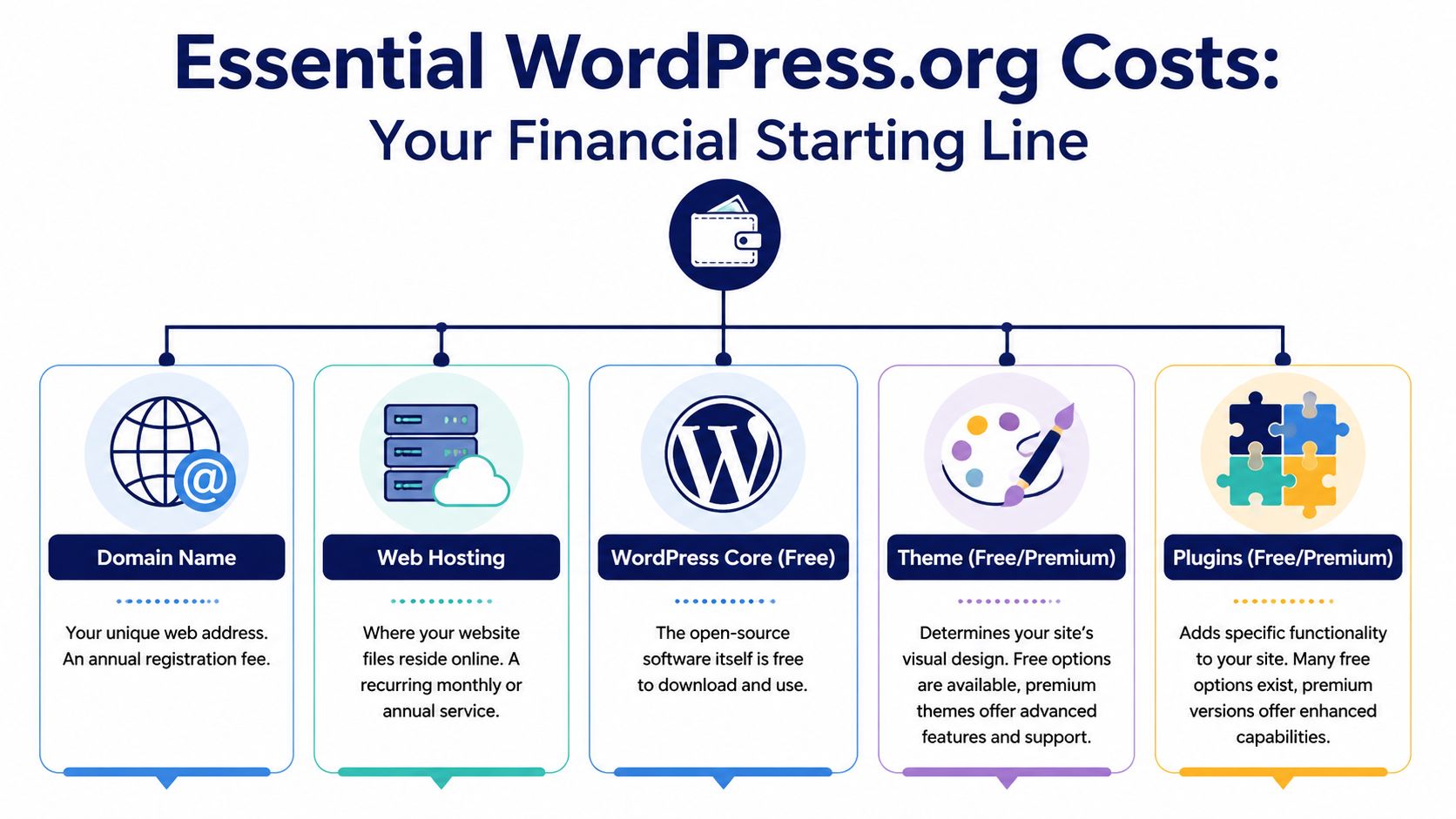
Three cost layers usually exist before design upgrades, paid plugins, or custom development enter the picture.
Domain name
This is the address you own. In practice, it is a small annual cost, but it matters because ownership, renewal management, and registrar quality affect long-term control of the site.Hosting
Hosting is where the first serious trade-off shows up. Low-cost shared hosting can work for a simple brochure site or early-stage project. It also tends to come with tighter resource limits, slower support, noisier server environments, and less room for traffic spikes, staging workflows, or heavier plugin stacks.SSL and setup validation
HTTPS is required. Many hosts include SSL certificates, so the line item may be hidden inside the hosting plan rather than broken out separately. What matters is not whether SSL is “free.” The issue is whether the certificate is active, renews properly, and the site is configured without mixed-content errors or insecure redirects.
A bare-minimum WordPress.org setup often looks inexpensive on paper. That number only reflects the cost to make the site reachable on the web.
Where baseline budgets usually fail
The common budgeting mistake is treating launch as the whole investment. In real projects, launch is only the first checkpoint.
A site with a cheap domain and low-end hosting can still be a poor business asset if updates are ignored, backups are missing, forms fail without notification, or the server slows down every time a campaign drives traffic. I have seen companies save a small amount on year-one setup, then spend far more fixing avoidable issues after the site is live.
That is why WordPress cost works better as a spectrum than a single number. A hobby site can operate close to the floor. A revenue-focused site needs a stronger operating baseline from day one.
If you want to price that ongoing layer more accurately, review this guide to WordPress website maintenance cost alongside your launch budget.
A practical baseline by site goal
| Cost layer | What it covers | Best fit |
|---|---|---|
| Minimum live site | Domain, entry-level hosting, SSL, basic setup | Personal sites, test projects, simple blogs |
| Business baseline | Better hosting, clean setup, dependable backups, routine updates | Brochure sites, service businesses, lead generation sites |
| Operational baseline | Monitoring, support, recovery planning, performance oversight | Marketing teams, ecommerce sites, sites tied to revenue |
The right starting budget depends on what the site needs to do.
If the goal is to publish a few pages and keep costs tight, the baseline can stay modest. If the goal is to run a dependable business platform, the baseline is an operating commitment, not a one-time fee.
Adding Functionality The Price of Themes and Plugins
WordPress costs quickly diverge. The base install is cheap. The moment you want the site to look customized or do more than publish pages, themes and plugins become the first meaningful cost multiplier.
Independent pricing breakdowns show a basic WordPress site can land around $50 to $415 in the first year, while a more customized build can start around $6,445, with recurring annual costs of nearly $1,000 before specialized maintenance, according to DreamHost’s WordPress cost guide. That gap exists because customization changes both software choices and implementation effort.
Themes are not just visual skins
A free theme can be enough for a basic blog or brochure site. For business use, the theme decision affects more than appearance. It shapes layout flexibility, editor experience, performance overhead, update reliability, and how much custom code you need later.
A premium theme can make sense when you need:
- Better design controls without rebuilding basic templates
- Vendor support when updates or compatibility issues appear
- A faster launch path for marketing teams that need to ship pages
But premium doesn’t automatically mean good. Many commercial themes pack in page builders, bundled scripts, and feature bloat that slow the site and make long-term maintenance worse.
Plugins are where capability turns into cost
WordPress is powerful because plugins add function without rebuilding the platform. That’s also where teams lose budget discipline.
Common examples include:
- SEO plugins such as Yoast SEO
- Forms and workflows such as Gravity Forms
- E-commerce layers through WooCommerce and paid extensions
- Caching and performance tools such as WP Rocket
- Multilingual tooling, redirects, search upgrades, and access controls
One or two paid plugins usually isn’t a problem. A pile of overlapping plugins becomes one. The direct cost is only part of it. Each plugin also adds update risk, compatibility testing, support dependency, and performance overhead.
Buy plugins to solve defined business requirements, not to imitate a feature list you saw on another site.
If the design itself needs to be unique, plugin-heavy assembly often becomes the wrong approach. At that point, custom theme work is usually cleaner. This is why many teams move from off-the-shelf setups into custom WordPress theme development once the site has to support a specific brand system, content model, or editorial workflow.
A useful rule from engineering practice is simple. If a plugin gives you commodity functionality, buy it. If it forces awkward workarounds across templates, user roles, or integrations, you’re starting to pay for convenience twice.
Real-World Budgets for Different WordPress Projects
The easiest way to answer does WordPress cost money is to stop treating all WordPress sites as the same project. They’re not. A hobby blog, a service business site, and a WooCommerce store behave like three different products.

The hobby blogger
This is the lowest-pressure version of WordPress. The goal is publishing, not operational complexity.
A hobby blogger can often stay close to the low end of self-hosted costs by using:
- Entry-level hosting
- A standard theme
- Mostly free plugins
- Minimal custom work
The site doesn’t need advanced forms, CRM connections, custom blocks, or conversion tracking everywhere. In that scenario, the budget remains modest because the business risk is low.
The small business site
A service company, local brand, consultant, or SaaS marketing team usually needs more than a brochure. They need a site that converts traffic into inquiries, supports search visibility, and can be updated without friction.
That usually means spending for things like:
- Stronger hosting
- A better design foundation
- Lead forms and marketing plugins
- Ongoing upkeep instead of set-and-forget publishing
If you’re planning that type of project, this reference on WordPress web design pricing helps frame where design and implementation costs begin to move beyond the bare minimum.
A practical walkthrough helps here:
The e-commerce build
E-commerce raises the cost floor because the site has to process orders, handle customer data, and stay stable under more moving parts.
Recent pricing guides show a basic site can be as low as $50 to $300 per year, but a WooCommerce or custom business website typically falls in the $300 to $800+ per year range, and can reach about $6,000 upfront with around $1,000 in recurring costs before maintenance, according to this pricing guide for beginners.
That happens because stores usually need more of everything:
| Project type | Typical investment pattern | Why it changes |
|---|---|---|
| Blog | Low annual operating spend | Fewer moving parts |
| Business site | Moderate annual spend plus setup work | Marketing and lead-gen needs |
| WooCommerce store | Higher recurring spend and more implementation effort | Transactions, integrations, and security concerns |
For stores, the hidden cost isn’t WooCommerce alone. It’s payment gateways, shipping logic, tax handling, product filters, transactional email, plugin conflicts, checkout UX, and the performance work required to keep all of that usable.
Scaling Up Enterprise and High-Growth Costs
A growing WordPress site doesn’t just get more expensive because traffic increases. It gets more expensive because failure becomes less acceptable.
Once a site supports campaigns, content teams, multiple regions, logged-in users, product catalogs, or revenue operations, the budget shifts from setup costs to resilience costs. That’s where many teams move from cheap shared hosting and occasional updates into managed infrastructure and structured maintenance.
Where scaling changes the math
At higher stakes, three cost drivers show up fast:
Hosting quality
Better infrastructure buys stability, support depth, and room for more demanding workloads.Performance tooling
This can include caching strategy, CDN usage, image handling, database hygiene, and environment-level tuning.Operational support
Someone has to own plugin updates, backup validation, incident response, and post-launch troubleshooting.
Those aren’t luxury items for an important site. They’re part of running it responsibly.
Maintenance becomes a business decision
Professional maintenance fees can range from $30 to over $5,000 per month, with full-service care plans for serious businesses often around $500 to $1,000/month and strategic retainers reaching $2,000 to $3,000+ monthly, based on this WordPress cost analysis.
That range sounds wide until you look at what maintenance means at scale. It can include update testing, uptime monitoring, malware cleanup, backup management, plugin licensing oversight, technical troubleshooting, and proactive performance work.
A high-growth site usually doesn’t fail because WordPress is expensive. It fails because nobody funded the boring work that keeps it stable.
What serious teams usually fund
| Cost area | Why it matters |
|---|---|
| Managed hosting | Better environment, support, and reliability |
| Monitoring and backups | Faster recovery when something breaks |
| Security and update management | Fewer preventable incidents |
| Engineering retainer | Ongoing improvements without project-by-project delays |
For organizations running complex publishing or multi-team environments, the conversation usually isn’t whether to spend. It’s how to structure that spend so the platform remains predictable. That’s where enterprise WordPress solutions enter the picture, especially when internal teams need support around multisite, governance, integrations, or performance at scale.
When to Partner with a WordPress Agency like IMADO
There is a clear point where DIY stops being efficient. It usually happens before people admit it.
If your site needs custom post types tied to editorial workflows, API integrations with a CRM or ERP, multilingual architecture, multisite governance, bespoke Gutenberg blocks, or a WooCommerce checkout flow that has to match business logic, you’re no longer buying a website. You’re funding software implementation.
The cost trigger is custom engineering
Independent estimates place setup and customization around $1,000 to $5,000, theme development at $1,000 to $15,000, added functionality at $3,000 to $10,000, custom plugins at $5,000 to $30,000, and full custom WordPress development commonly between $15,000 and $85,000 in this custom WordPress pricing guide.
Those numbers make sense if you’ve been on complex builds. Once the site has real business rules, accessibility requirements, third-party systems, approval workflows, or non-standard content models, the biggest expense is engineering time, not the CMS license.
Signs an agency is the right move
An agency becomes the sensible option when any of these are true:
- Your requirements are custom and plugin assembly is producing technical debt
- The site is business-critical and downtime, slow performance, or security issues carry real cost
- Multiple stakeholders need structure across design, content, engineering, QA, and launch
- You need ongoing capacity beyond what an in-house marketer or freelancer can safely manage
If you’re evaluating partners, it helps to review how other teams approach the selection process. This guide can help you find your ideal website design agency based on scope, process, and fit rather than just headline price.
For teams that need senior WordPress engineering, IMADO is one option for custom builds, WooCommerce development, maintenance, staff augmentation, and white-label delivery. That kind of partnership makes sense when the site has to scale cleanly and technical debt would cost more than doing the build properly.
The short version is simple. WordPress can be cheap. Serious WordPress rarely is. And that’s not a flaw in the platform. It’s a reflection of what you’re asking it to do.
If your WordPress site needs more than a basic setup, IMADO can help scope the cost of ownership before you commit to the wrong build path. That includes custom themes, WooCommerce engineering, maintenance, and ongoing development support for teams that need a stable platform, not just a launch.
Let’s build something exceptional
Tell us about your project – we’ll help you launch a fast, scalable, SEO-optimized WordPress platform built for growth.