 Ask Chatgpt to summarize Why Website Audit Is Important for Growth and ROI
 Ask Grok to summarize Why Website Audit Is Important for Growth and ROI
 Ask Claude to summarize Why Website Audit Is Important for Growth and ROI
 Ask Perplexity to summarize Why Website Audit Is Important for Growth and ROI
 Ask Gemini to summarize Why Website Audit Is Important for Growth and ROI

A website can lose money without looking broken.
The clearest proof is speed. A 0.1-second improvement in page speed can increase conversion rates by 8.4% for retail businesses and raise average order value by 9.2% according to White Hat SEO. That’s why website audit is important in business terms, not just technical terms. Small defects in performance, structure, and content clarity affect revenue long before anyone on the team notices them.
Most companies still treat an audit like a one-off SEO task. That’s outdated. Search now includes AI-generated answers, answer engines, and result formats that depend on clear structure, technical access, and strong topical signals. If your next audit only checks rankings, meta tags, and a few broken links, it’s already behind.
Table of Contents
Your Website Is a Leaking Bucket of Opportunity
An unaudited website usually doesn’t fail all at once. It drifts. A plugin update adds bloat. A redesign changes internal linking. New landing pages go live with weak mobile layouts. Forms still work, but not smoothly. Search visibility slips page by page.
That drift matters because 62.54% of organic traffic is now mobile, which means teams need constant verification of mobile responsiveness and Core Web Vitals, as noted by Elementor. If your site feels fine on a desktop review but slows down, shifts, or hides key actions on mobile, you’re losing the majority channel for organic discovery.
A good audit turns that from guesswork into decisions. It shows which issues are cosmetic, which ones block growth, and which ones expose the business to avoidable risk.
Practical rule: If a website drives pipeline, leads, or sales, auditing it is an operating discipline, not a cleanup project.
There’s another leak most audit guides miss. Marketing teams often check whether Google can crawl and rank pages. They don’t check whether AI systems can interpret the page well enough to use it in generated answers. That’s now part of search visibility.
Adjacent systems also matter. If your growth engine depends on forms, nurture sequences, and lifecycle emails, it also helps to test email deliverability so leads captured on-site don’t stall after submission. Website performance and message delivery are different problems, but revenue teams feel both as lost opportunity.
What a Website Audit Actually Uncovers
A real website audit is closer to a due diligence review than a quick software scan. Tools can flag issues. They can’t tell you which issues matter first, which problems share a root cause, or which fixes create business impact.
It goes below the surface
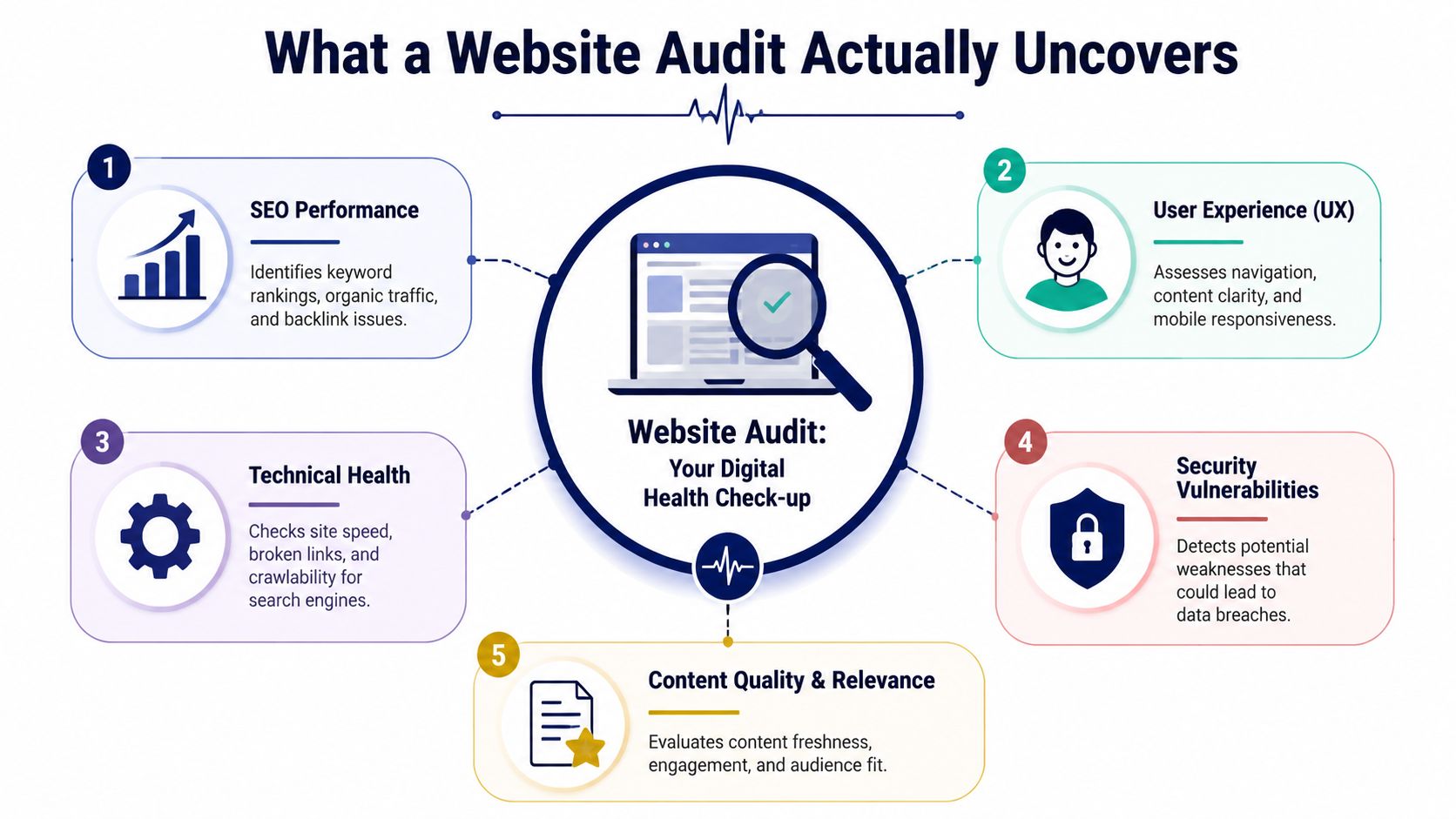
A strategic audit looks at the site in layers:
- Technical layer checks crawlability, indexing, render issues, server behavior, and page performance.
- Experience layer reviews navigation, page hierarchy, mobile behavior, and how easily users complete key actions.
- Content layer examines relevance, duplication, gaps, outdated pages, and weak intent matching.
- Risk layer reviews security, accessibility, and platform upkeep.
- Visibility layer asks whether search engines and AI systems can understand what each page is about.
That last point is where many audits are behind. According to Surnex, only 15% of enterprise audit guides explicitly evaluate whether content is optimized for AI-generated answers. That creates a real gap. A site can appear healthy in traditional SEO reports and still underperform in AI-influenced search experiences.
Technical debt is usually the hidden culprit
Technical debt isn’t just messy code. It’s the pileup of small shortcuts and unreviewed changes that make a site slower, harder to maintain, and less reliable. One script loads on every page when it only belongs on two. Old templates keep generating poor heading structure. Redirect chains stack up after content migrations. Nobody notices until rankings dip or paid landing pages stop converting.
Manual review matters here. Tools catch symptoms. Experienced reviewers trace patterns.
For user behavior, visual analysis can reveal issues that analytics alone misses. Teams that want a closer read on scroll depth, CTA visibility, and attention patterns often look at resources on eye tracking on websites during UX review. That kind of perspective is useful when pages technically load but still fail to guide action.
A free scan gives you findings. An audit gives you priorities.
Modern audits also check AI readiness
If you want your content cited, summarized, or surfaced in AI-driven search, your audit should check:
- Semantic structure so headings, sections, and supporting information make sense without design context
- Entity clarity so products, services, locations, authors, and topics are unambiguous
- Topical depth so pages answer related questions, not just target a single keyword
- Technical accessibility so systems can render and index the content consistently
That’s one of the clearest reasons why website audit is important now. The search environment changed. The audit process has to change with it.
The Six Pillars of a Comprehensive Audit
The best audits don’t dump hundreds of issues into a spreadsheet and call it done. They sort the website into a few operating pillars, then tie each pillar to revenue, risk, and execution effort.
A useful way to think about it is this: every website has acquisition, trust, usability, and conversion jobs to do. The six pillars below map to those jobs.
Pillar one through three
Technical SEO covers crawlability, indexability, canonicals, redirects, XML sitemap health, robots directives, and site architecture. This is the foundation that lets search engines access the right pages and ignore the wrong ones. If this pillar is weak, even strong content gets trapped behind poor structure or conflicting signals.
Performance and Core Web Vitals focus on load behavior, visual stability, rendering delays, and script weight. In this context, technical debt becomes expensive. Zero Gravity Marketing notes that pages with load times over 3 seconds can see a 32% drop in conversion rates. In practice, teams often uncover oversized media, bloated JavaScript, poor caching, and third-party scripts doing more harm than good.
If speed is already a concern, teams often pair an audit with implementation guidance on how to improve WordPress site speed so findings turn into fixes instead of staying in a slide deck.
Security checks platform updates, SSL behavior, plugin risk, authentication weaknesses, malware exposure, and unsafe integrations. Security issues aren’t just IT concerns. They affect trust, uptime, transactions, and legal exposure. An audit should show both immediate vulnerabilities and recurring patterns that make the platform fragile.
Pillar four through six
Accessibility reviews keyboard use, alt text, form labels, contrast, heading hierarchy, and assistive technology basics. This pillar often gets pushed down the list until a complaint or procurement review forces attention. That’s a mistake. Accessibility work usually improves clarity for everyone, especially on content-heavy or form-driven pages.
Operational advice: Treat accessibility findings like product defects, not optional enhancements.
Content evaluates whether the site has the right pages, whether those pages still serve current intent, and whether the messaging supports both human readers and machine understanding. This evaluation reveals outdated blog archives, duplicate service pages, thin location content, and weak information architecture. AI search readiness also requires assessment.
Conversion rate optimization looks at the path from visit to action. This includes forms, CTA placement, trust signals, checkout friction, content sequencing, and dead-end pages. A site can rank well and still underperform badly if the path to conversion is vague or interrupted.
The six pillars at a glance
| Audit Pillar | Primary Objective | Common Tools |
|---|---|---|
| Technical SEO | Ensure search engines can crawl, index, and understand the right pages | Google Search Console, Screaming Frog |
| Performance and Core Web Vitals | Improve speed, rendering, and page experience | Google PageSpeed Insights, Lighthouse |
| Security | Reduce vulnerability, downtime risk, and trust issues | Sucuri, platform update review |
| Accessibility | Improve usability and compliance readiness | WAVE, Lighthouse |
| Content | Strengthen relevance, structure, and topical coverage | Google Analytics, content inventory review |
| Conversion Rate Optimization | Increase the percentage of visitors who take action | GA4 funnel review, session review tools |
What works and what doesn’t
What works is a prioritized audit that separates:
- Revenue blockers such as slow templates, broken conversion paths, or key pages that don’t rank or convert
- Risk issues such as security gaps and accessibility failures
- Scalability issues such as messy taxonomy, weak editorial structure, or technical debt that slows future work
What doesn’t work is an automated PDF report with no context, no prioritization, and no ownership. That kind of output creates motion, not progress.
Connecting Audit Findings to Business ROI
Executives fund outcomes. A website audit earns attention when each finding is tied to revenue gained, cost avoided, or risk reduced.
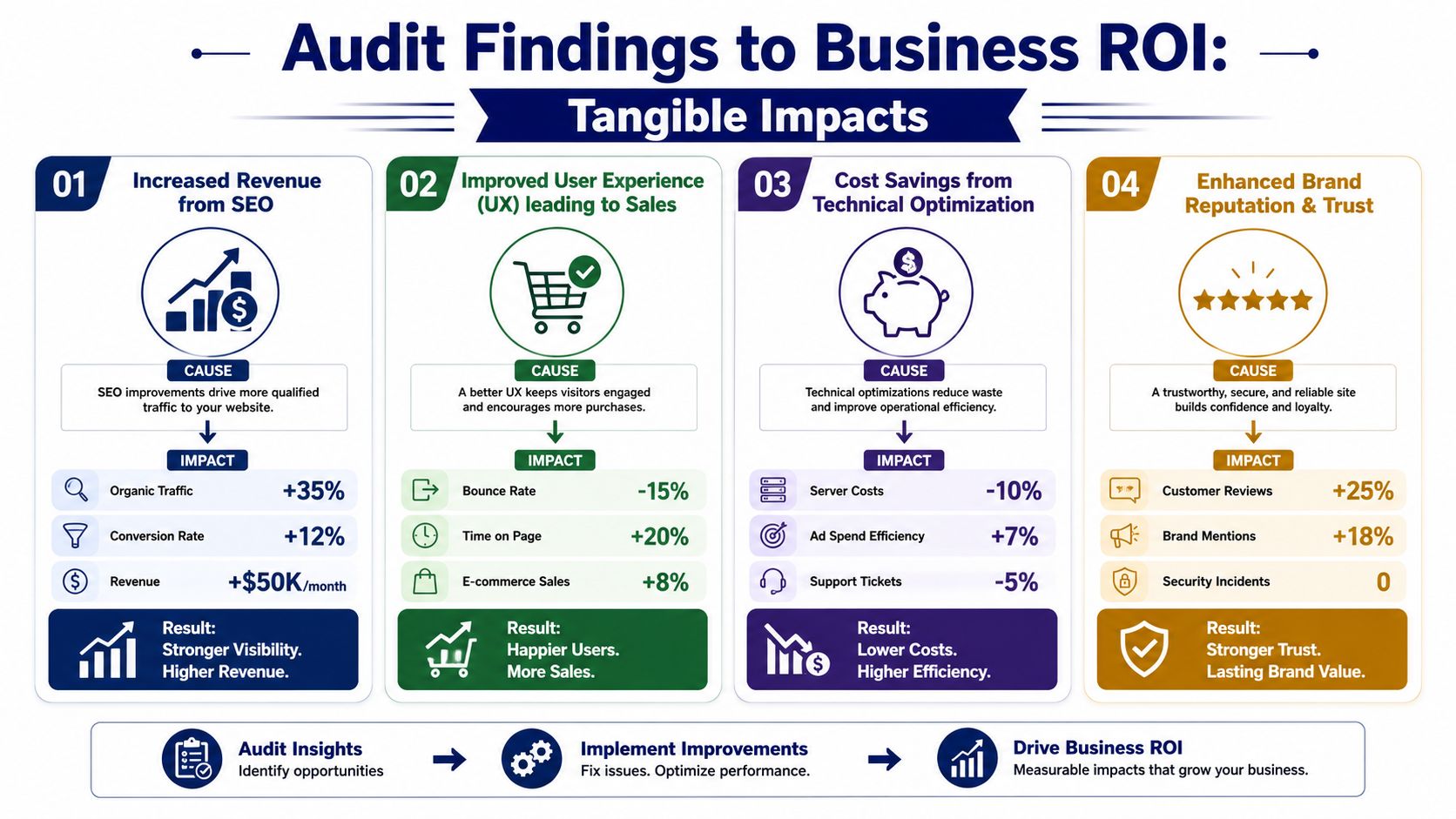
That translation matters because the same issue looks very different depending on how it affects the business. A slow product page is not just a performance problem. It reduces completed sessions from paid traffic, lowers conversion rate on mobile, and raises customer acquisition cost. Weak internal linking is not just an SEO cleanup task. It limits how much demand the site can capture from search and from AI-generated search experiences that pull answers from poorly connected or poorly structured content.
I usually map audit findings into three categories: revenue lift, cost reduction, and risk control. That keeps the conversation practical. It also helps leaders decide what gets fixed this quarter and what can wait.
A useful companion to that conversation is a review of how to improve website conversion rate, because audit findings create value only after the team turns them into tests, design changes, content updates, or engineering tickets.
This video gives a broader view of how audit-led improvements connect to growth:
Three business scenarios leaders recognize fast
Paid traffic underperforms
The company is buying visits, but landing pages load poorly on mobile, forms break, or tracking misses conversions. An audit connects those failures to wasted ad spend and gives the team a direct path to better return on media budget.
Organic growth stalls, even with new content
The content team publishes regularly, yet priority pages do not gain visibility or assist conversions. Often, the problem is weak page architecture, duplicate intent, poor schema, or content that is written for rankings but not for AI search summaries and citation-style results. The ROI case is straightforward. Better structure and clearer entity signals increase the chance of earning visits from both traditional search and AI-assisted discovery.
Revenue slips while traffic stays flat
This is common on service sites and ecommerce stores. Sessions hold steady, but fewer users complete forms, start trials, or finish checkout. Audits often find avoidable friction: inconsistent trust messaging, poor mobile layouts, missing reassurance near high-intent actions, or steps in the checkout flow that create drop-off.
The strongest audit work changes prioritization. Teams stop debating whether an item belongs to marketing, product, or development and start asking how quickly it can improve pipeline, sales, or retention.
ROI also includes avoided losses
Some returns show up as growth. Others show up as problems that never reach finance.
A solid audit reduces wasted spend on pages that cannot convert, lowers support volume caused by broken user journeys, and cuts the rework that happens when teams keep patching symptoms instead of fixing root causes. It also highlights which content should be expanded, merged, redirected, or retired. That matters more now because AI search rewards clear structure, original information, and strong page relationships. Sites built only for old ranking models are already losing ground.
That is why audit findings should end in a business case, not a spreadsheet. Each issue needs an owner, an expected outcome, and a reason to act now.
Audit Cadence and Ownership for Your Team
A website audit only works if someone owns the outcome. Otherwise the company buys a report, nods at the findings, and keeps running the same problems into the next quarter.
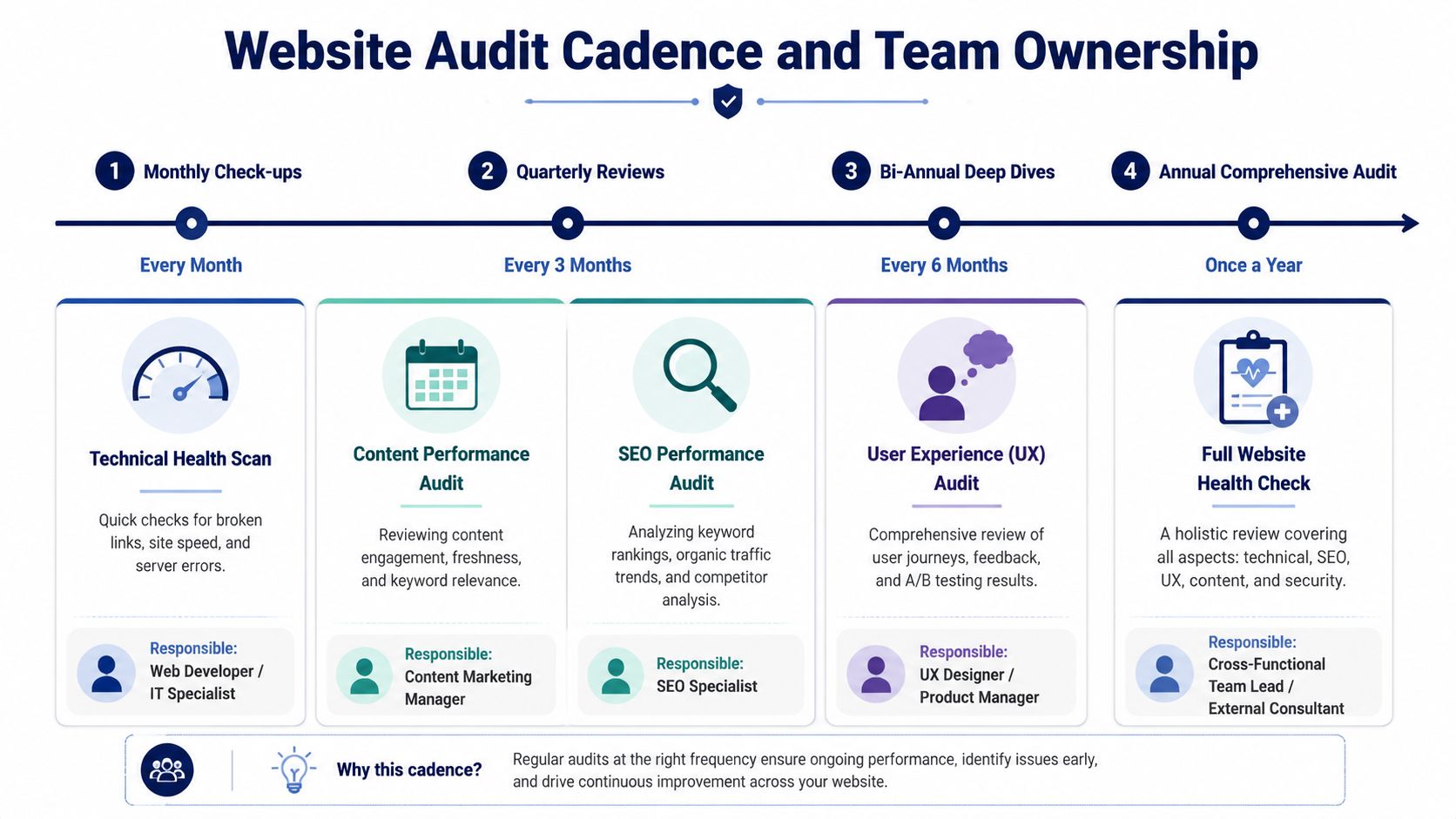
Different teams need different audit rhythms. The right cadence depends on how often the site changes, how directly it affects revenue, and how much compliance or operational risk sits on the platform.
For agencies
Agencies should treat audits as both a delivery discipline and an account protection tool. A quarterly review gives account managers, SEO specialists, and developers a shared picture of what changed, what slipped, and what needs escalation. That’s especially useful in white-label or multi-client environments where different teams touch the same WordPress stack.
The agency mistake is over-relying on recurring tool exports. Those reports rarely capture deployment issues, template regressions, or AI-search readiness. Someone still has to inspect the site with judgment.
For in-house marketing teams
Marketing teams need an audit process that doesn’t die in a backlog. The most practical model is shared ownership:
- Marketing owns content quality, conversion priorities, and page intent
- Development owns performance fixes, technical SEO implementation, and security remediation
- Leadership owns priority calls when trade-offs affect roadmap or budget
This model works because it ties findings to the right operating owner instead of calling everything “web.”
For e-commerce and WooCommerce owners
Stores need a tighter loop. Revenue depends on page speed, category architecture, product discoverability, and checkout reliability. Even small regressions can hit sales fast. A solo owner may not have a large team, but they still need a routine for checking what changed after plugin updates, merchandising changes, campaign launches, or payment integrations.
GeeksforGeeks notes that sites with validated security measures experience a 90% reduction in phishing and malware incidents, and accessible sites can achieve 20% broader audience reach while avoiding average ADA penalties of $50,000+ per incident. That’s why cadence isn’t just about growth. It’s about legal and financial control.
A site that collects leads, processes orders, or supports regulated customer journeys shouldn’t wait for a visible failure before it gets audited.
A practical cadence
Here’s a defensible operating schedule:
- Monthly checks for high-change or high-revenue sites. Focus on uptime signals, key templates, forms, checkout, and obvious technical regressions.
- Quarterly audits for most active marketing and e-commerce sites. Review technical health, content performance, conversion paths, and AI-search visibility.
- Bi-annual or annual deep reviews for lower-change sites, depending on risk profile and growth goals.
- Immediate audits after major redesigns, migrations, traffic drops, or algorithm shifts.
Ownership matters as much as frequency. One person should coordinate findings, assign actions, and track closure. Without that, the audit becomes documentation instead of management.
Your Practical Next Steps for a Website Audit
Websites rarely fail all at once. Revenue slips through smaller breaks first: a slow category template, a form that stops submitting on mobile, product pages that are indexed but not understood well enough to earn visibility in AI-generated search answers.
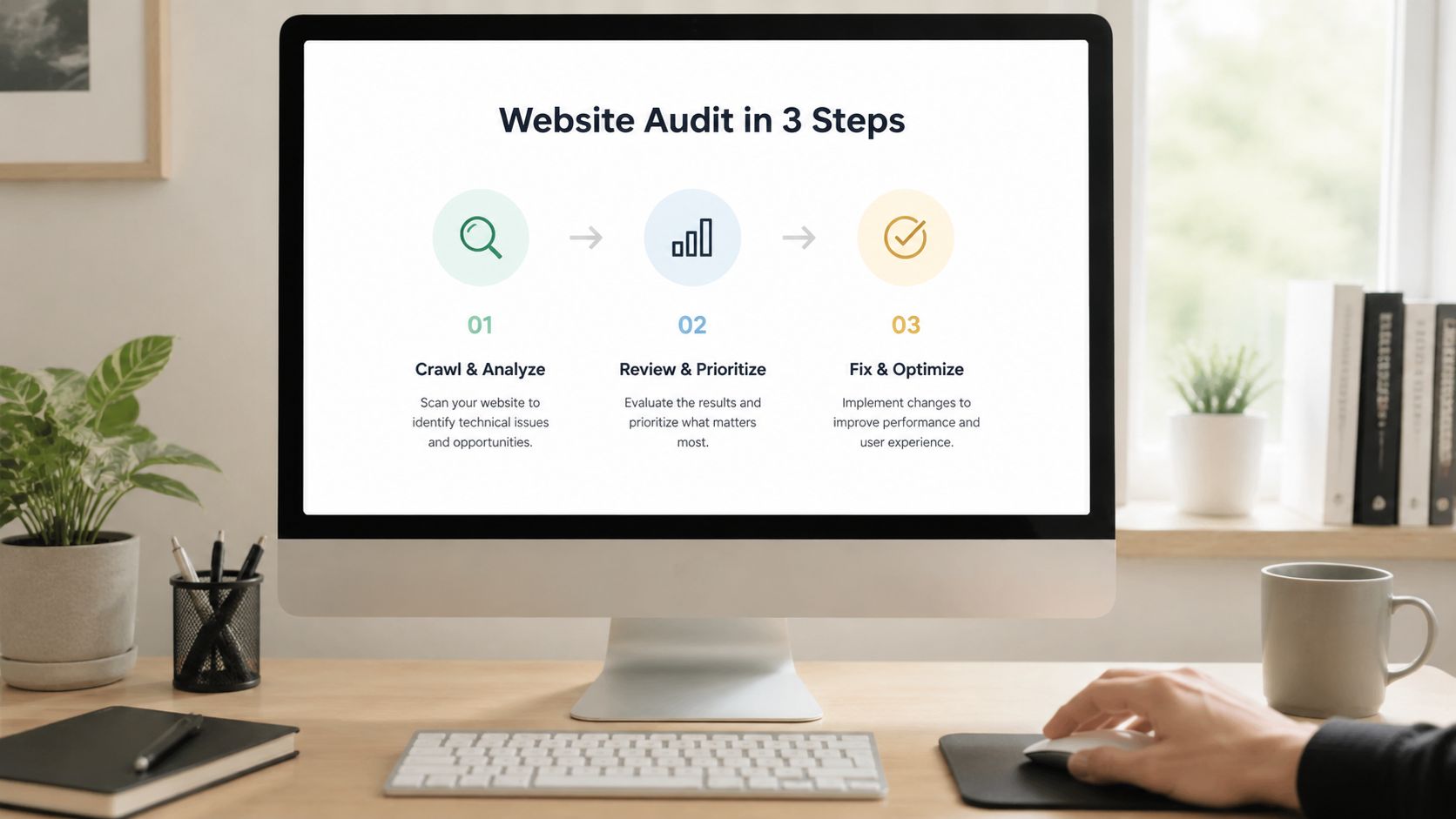
Start with a baseline that shows where money or risk is exposed. Use free tools for the first pass:
- Google PageSpeed Insights for page speed and Core Web Vitals signals
- Lighthouse for accessibility, performance, and technical warnings
- Google Search Console for indexing, coverage, and search visibility issues
- Screaming Frog for redirects, metadata, status codes, crawl paths, and template-level patterns
Check more than the home page. Review a revenue page, a lead-gen page, a blog article, and at least one page type that depends on a shared template. That is often where recurring problems hide.
Then pressure-test the audit itself. A serious review should answer business questions, not just produce a list of errors. Ask your agency, freelancer, or internal team how they rank findings by revenue impact, legal or operational risk, and implementation effort. Ask how they test mobile layouts separately, how they verify forms or checkout by hand, and how they assess whether your content is ready for AI search, not just traditional rankings.
That last point matters more than many teams realize. An audit that stops at keyword positions is dated. Search engines now generate summaries and answers directly in the results. If your pages are slow, poorly structured, thin on clear entity signals, or difficult to parse, you can lose visibility even when classic ranking reports still look acceptable.
A useful deliverable is specific and operational:
- A plain-language summary for stakeholders who need decisions, not raw exports
- A prioritized issue list tied to impact, effort, and ownership
- Evidence such as screenshots, affected URLs, crawl findings, or template references
- Implementation guidance that tells marketing and engineering what to change first
If you want a practical reference before commissioning a larger review, this guide on how to audit a website is a solid starting point. IMADO also provides WordPress website audit support focused on SEO, performance, and platform stability.
Use the audit to create an action plan with owners and deadlines. That is what turns a technical review into higher conversion, stronger search visibility, and lower operational risk.
Frequently Asked Questions About Website Audits
Can I just use free tools and do the audit myself
Yes, for an initial review.
Free tools can flag crawl errors, slow pages, missing metadata, broken links, and accessibility issues. What they cannot do reliably is explain why those problems exist, how they interact, or which fixes will improve lead flow, conversion rate, or search visibility first. That judgment matters because a long list of issues is not the same as a plan.
How much does a professional website audit cost
The price depends on scope, platform complexity, and the level of validation required. A small brochure site needs a different review from a WordPress or WooCommerce site with custom templates, integrations, gated content, and multiple conversion paths.
I usually advise leadership teams to judge cost against the value of faster fixes, fewer missed leads, lower technical risk, and clearer priorities for marketing and engineering. A cheap audit that produces a spreadsheet no one acts on is expensive. A well-scoped audit that leads to measurable fixes usually pays for itself faster than expected.
My website is new. Do I still need an audit
Yes.
New sites often launch with preventable errors: broken redirects, mobile layout issues, tracking gaps, slow templates, or important pages blocked from indexing. Those issues are easier and cheaper to fix before paid traffic, SEO campaigns, or sales outreach start sending visitors to pages that underperform.
Is AI search really part of a website audit now
Yes. It should be part of the brief from the start.
Traditional rank tracking still matters, but it no longer gives a full picture of search visibility. Search engines now extract, summarize, and reframe content directly in results. If your pages are hard to parse, weakly structured, technically inconsistent, or unclear about entities and intent, you can lose visibility even if a few target terms still rank reasonably well. An up-to-date audit checks for that risk.
If your site drives leads, sales, publishing, or customer trust, auditing should be an operating habit, not a cleanup task after performance drops. IMADO audits WordPress websites for performance, SEO, technical stability, scalability, and AI search readiness, then turns findings into implementation plans engineers and marketers can use.
Let’s build something exceptional
Tell us about your project – we’ll help you launch a fast, scalable, SEO-optimized WordPress platform built for growth.