 Ask Chatgpt to summarize ERP Integration with WooCommerce: A Guide for 2026
 Ask Grok to summarize ERP Integration with WooCommerce: A Guide for 2026
 Ask Claude to summarize ERP Integration with WooCommerce: A Guide for 2026
 Ask Perplexity to summarize ERP Integration with WooCommerce: A Guide for 2026
 Ask Gemini to summarize ERP Integration with WooCommerce: A Guide for 2026

Your WooCommerce store probably worked fine when order volume was low, the catalog was simple, and one person could keep the back office in their head. Then growth exposed the weak spots. Orders started getting copied into an ERP or accounting system by hand. Stock levels drifted. Customer records split across systems. Finance, fulfillment, and ecommerce each began operating from slightly different versions of reality.
That’s the point where ERP integration with WooCommerce stops being a nice technical upgrade and becomes an operational requirement. If you’re an ecommerce manager, an agency leading delivery, or an in-house developer inheriting a store that has outgrown duct-tape workflows, the hard part usually isn’t connecting two APIs. It’s deciding what the integration should do, which business rules belong where, and how to keep the sync stable once real orders start flowing.
Table of Contents
Why Your Growing Store Needs More Than Just WooCommerce
A growing store usually doesn’t break all at once. It slips. A stock count is wrong on one fast-selling SKU. A warehouse team ships against an ERP status that never made it back to the storefront. Finance asks why refunded orders still look complete in a downstream report. Nobody sees a single dramatic failure, but everyone feels the friction.

That’s common because WooCommerce is often the customer-facing layer, not the full operating system for the business. Once purchasing, fulfillment, accounting, tax handling, and customer service become more complex, you need a central source of operational truth. For many businesses, that’s the ERP.
Where the pressure shows up first
WooCommerce powers over 6 million websites globally and holds 38% market share, while its REST API is commonly used to automate the flow of orders, customers, products, inventory, and shipping data between the store and an ERP, reducing manual errors and helping prevent overselling, according to this overview of WooCommerce ERP integration. That matters because the platform is flexible enough to launch quickly, but flexibility also means many stores reach scale before their operations are structured well enough to support it.
In practice, the first warning signs are usually operational, not technical:
- Manual re-entry keeps expanding: Staff copy orders, addresses, or shipment details from WooCommerce into the ERP.
- Inventory timing falls behind: The store sells faster than scheduled stock updates can keep up.
- Pricing logic starts living in too many places: Promotions, trade pricing, or customer-specific rules drift between plugins and ERP records.
- Support loses visibility: Customers ask about status changes that exist in the ERP but never reached the storefront.
Practical rule: If your team is using spreadsheets to reconcile orders between WooCommerce and the ERP every day, the integration problem is already costing you.
This is a business systems project
Treating ERP integration with WooCommerce as “just connect the APIs” is where bad projects begin. What you’re really doing is redesigning how the business moves data across sales, inventory, finance, and fulfillment.
That’s why operations leaders often need to be in the room before developers start building. Finance needs to define posting expectations. Warehouse teams need shipment status rules. Ecommerce needs clarity on what customers should see and when. If your stakeholders need a non-technical framing for that wider shift, this CFO guide to business automation is useful because it explains automation from the perspective of process ownership rather than software features alone.
A store also needs to understand where WooCommerce still adds value on its own. It remains a strong frontend commerce platform, especially when paired with the right architecture, checkout flow, and content model. For a concise view of that side of the platform, see these advantages of using WooCommerce.
Lay the Strategic Foundation Before Writing Any Code
Most failed integrations don’t fail because the APIs were impossible. They fail because the business never made the core decisions up front. Teams start building before they’ve agreed on ownership, sync direction, exception handling, or the minimum viable workflow.
The first planning document should answer one question for every important data domain: which system is the system of record? If you skip that, both platforms start overwriting each other in ways that look random but are predictable.
Decide what each system owns
For example, many teams let the ERP own inventory, accounting status, tax logic, and fulfillment states. WooCommerce may still own product descriptions, merchandising images, landing-page copy, and frontend promotional presentation. That split is normal. The mistake is leaving ownership ambiguous.
According to this WooCommerce ERP implementation guide, 90% of successful implementations agree on the system of record for each data domain and document SKU mapping rules before development begins. The same source notes that failing to map product variants explicitly and failing to audit plugins that modify order data are common pitfalls.
That tells you where to focus first:
Products and variants
Don’t stop at parent products. Define how variations map, how attributes are represented, and what happens when one side supports values the other side doesn’t.Orders and statuses
Decide which order states are meaningful to downstream teams. “Processing” inside WooCommerce may not be enough for warehouse or finance workflows.Customers and addresses
Choose whether customer creation starts in WooCommerce, in the ERP, or both under different conditions.Prices and taxes
Clarify whether WooCommerce displays ERP-driven values or calculates pricing locally and only posts final order values.
Scope the sync before you scope the build
A solid scope document isn’t long because someone likes paperwork. It’s long because sync logic gets expensive when left vague. You want a concrete inventory of what moves, in which direction, and under what trigger.
Use a structure like this:
- Data entity: order, customer, product, stock, shipment, refund
- Direction: WooCommerce to ERP, ERP to WooCommerce, or bidirectional
- Trigger: real time, scheduled job, manual push
- Validation: required fields, allowed formats, fallback behavior
- Failure handling: retry, quarantine, alert, or manual review
If a team says “we need full sync,” slow the project down. “Full sync” usually means nobody has decided what matters.
A lot of stores also need adjacent system clarity because the ERP is rarely the only integration in play. CRM, marketing automation, subscriptions, and customer-service tools often touch the same records. If you’re already dealing with that overlap, this guide to WordPress CRM integration is a useful companion because it helps frame cross-system ownership before those dependencies start colliding.
Audit what already modifies your data
Before development, inspect the store for plugins that alter checkout fields, order metadata, tax handling, shipping labels, or product structures. This step is where teams discover that the “same” order doesn’t look the same once several plugins have filtered it.
That audit needs to answer:
- Which plugin adds or rewrites line-item metadata?
- Which plugin changes product type behavior or variation storage?
- Which checkout customizations create fields the ERP must receive?
- Which status automations may fire before the integration finishes?
A clean discovery phase feels slow. It’s still faster than rebuilding a sync after go-live because nobody noticed a plugin was rewriting order payloads.
Choosing Your Integration Architecture
The architecture decision is where budget, complexity, and future pain all meet. Many organizations choose too early and for the wrong reason. They pick a plugin because it’s available now, or they choose a fully custom build because “we might need flexibility later,” even when the current requirements don’t justify it.
The right choice depends less on software preference and more on your business logic. If your store only needs straightforward order export and stock import, you can tolerate simpler tooling. If your ERP drives customer-specific pricing, warehouse allocation, approval rules, or role-based catalogs, you need more control.
The three common patterns
There are three broad approaches in play.
| Method | Best For | Cost | Scalability |
|---|---|---|---|
| Plugin | Basic order and inventory sync in simpler stores | Lower initial cost | Limited when business logic gets complex |
| Middleware | Stores with multiple workflows, error handling needs, and ERP-driven rules | Moderate to higher depending on platform and customization | Strong for growing operations |
| Custom API integration | Highly specific workflows, deep ERP logic, and unusual data models | Highest initial cost and maintenance burden | Strong when designed well, but depends on engineering discipline |
Where plugins work and where they break
Plugins are attractive because they shorten time to first connection. For basic stock synchronization and order transfer, they can be enough. That’s why they’re common.
But the limit shows up fast when the ERP is expected to do more than receive orders. According to this analysis of WooCommerce and ERP integration approaches, 70% of basic stores use plugins for inventory sync, yet fewer than 15% successfully implement ERP-driven tiered pricing with user-role mapping without custom middleware. The same source notes that webhook-driven architecture via middleware is becoming the standard for high-volume operations that need sync throttling and error redundancy.
That aligns with what many teams run into:
- A plugin can sync “price.”
- It often can’t reliably apply different prices for different customers based on ERP segments, contracts, or roles.
- It may push inventory.
- It often struggles with warehouse-aware availability, fallback logic, or selective product exposure.
Plugins are usually fine when the requirement is data movement. They struggle when the requirement is business decision-making.
Middleware is often the practical middle ground
Middleware earns its keep when you need orchestration, transformation, logging, retries, and separation between systems. It gives you a place to apply business rules without stuffing them into WooCommerce hooks or forcing the ERP to speak storefront logic directly.
This is especially important in B2B or hybrid B2C/B2B setups. If the ERP says customer group A sees one price list, customer group B sees another, and certain SKUs ship from different warehouses depending on account terms, middleware becomes less of a luxury and more of a control layer.
Middleware also helps when teams need:
- queueing during traffic spikes
- webhook handling without exposing brittle direct dependencies
- field transformation between unlike schemas
- better observability than most plugins provide
If you’re weighing build paths for a commerce stack more broadly, this overview of WordPress ecommerce stores is useful context because the storefront architecture often shapes how much integration complexity WooCommerce should absorb versus offload.
When custom becomes non-negotiable
A fully custom integration is justified when your logic is too specific for plugin conventions and too awkward for generic connectors. That usually means one or more of the following:
- ERP-driven tiered pricing by account, role, or contract
- customer-specific product visibility
- warehouse-based routing rules
- custom approval workflows before fulfillment
- unusual ERP API constraints or legacy data structures
Custom work gives you freedom. It also gives you full responsibility. You own monitoring, retries, schema changes, and maintenance. That’s fine if the business benefits are real and the team is ready to support the system after launch. It’s a bad idea if custom is being used to avoid making hard scope decisions.
The Technical Blueprint for Data Mapping and APIs
Technical success starts with boring consistency. Not clever code. Not a long list of endpoints. Consistency. If product data is dirty, your sync will be noisy from day one.
Start with WooCommerce API access and clean source data
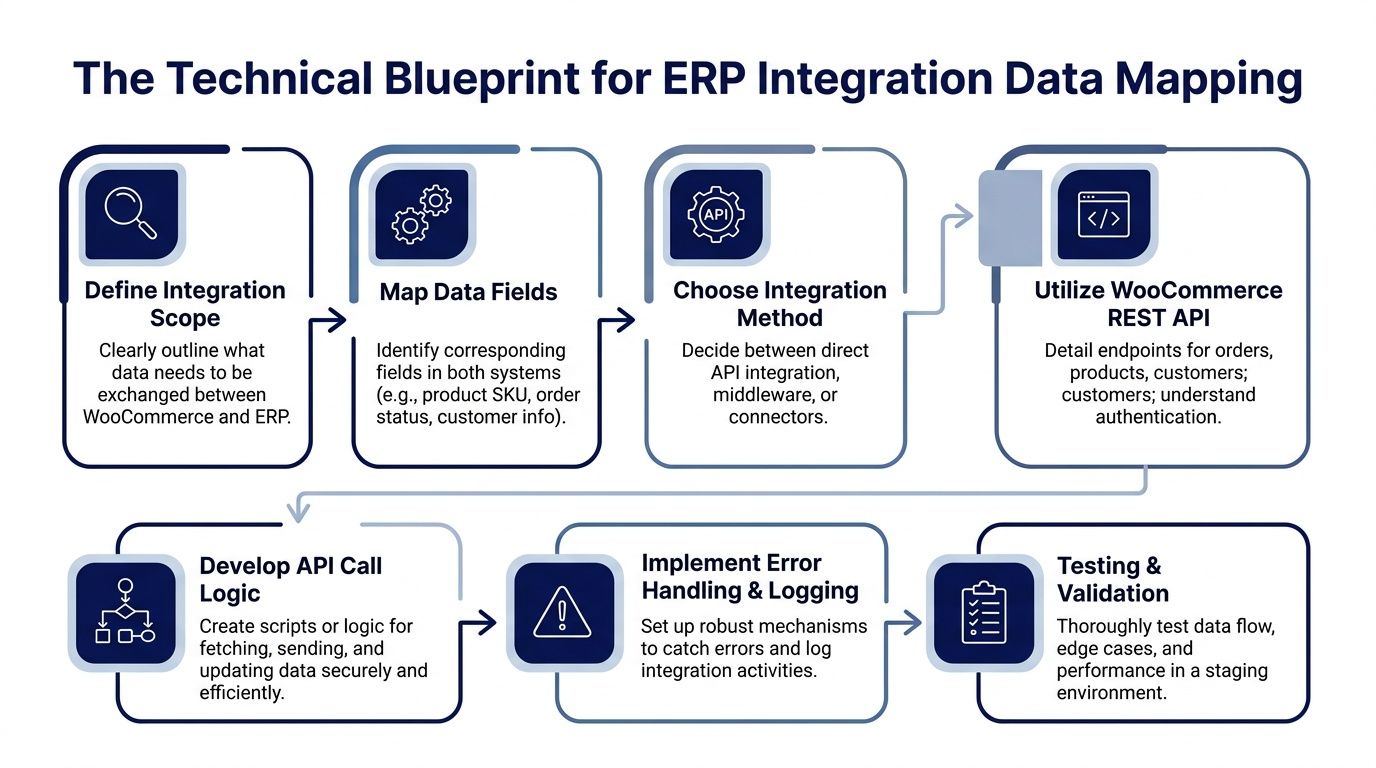
The core setup for ERP integration with WooCommerce usually begins by enabling the REST API in WooCommerce under Settings, Advanced, REST API, then generating Consumer Keys and Secrets and defining access levels. According to this technical guide on WooCommerce ERP integration, approximately 50% of integration issues come from not standardizing product data such as SKUs and names before sync begins.
That’s why a senior engineer will usually ask for data cleanup before building endpoints. The integration can’t invent consistency that doesn’t exist.
Focus your pre-build cleanup on:
- SKUs: one SKU format, one separator convention, no accidental duplicates
- Product names: predictable naming, especially where ERP records are stricter
- Attributes and variants: normalized values for size, color, pack, unit, or region
- Custom checkout fields: documented keys and expected values
A general primer on REST architecture from TekRecruiter can help non-developers understand why endpoint behavior, authentication, and resource design matter here. It’s useful context when stakeholders need to approve trade-offs without getting lost in implementation detail.
Build the mapping document before the sync engine
A real mapping document should be detailed enough that another engineer can read it and know exactly how the systems align. It needs field-level decisions, transformation rules, and exception behavior.
A simple example:
| WooCommerce field | ERP field | Rule |
|---|---|---|
| SKU | Item Code | Exact match required |
| billing_email | Customer Email | Reject if missing |
| shipping_lines | Freight Method | Map by approved method list |
| status | Sales Order Status | Transform using status matrix |
The most common mapping mistakes aren’t dramatic. They’re small and cumulative:
- treating a variation SKU as if it were the parent SKU
- sending display labels instead of canonical codes
- ignoring tax or currency normalization
- assuming optional checkout fields are safe to drop
A mapping sheet that fits on one screen is usually missing the transformations that actually cause production issues.
Here’s the implementation sequence I trust most:
- Define required entities such as orders, stock, shipments, and refunds.
- Map canonical identifiers first. SKU, customer ID, order ID, and warehouse codes matter more than descriptive fields.
- Write transformation rules for statuses, currencies, taxes, and custom attributes.
- Choose triggers by workflow, not by convenience.
- Add logging per transaction so support teams can diagnose failures quickly.
- Test edge cases before connecting any live process.
A useful walkthrough on API-level integration concepts is below.
Use real time selectively
Not every sync should run instantly. Inventory updates after checkout often should, because stale stock creates customer-facing problems fast. Product catalog enrichment or bulk attribute updates can often run on scheduled intervals if that reduces risk and keeps the system manageable.
A stable integration separates urgent flows from heavy flows. Orders, stock reservations, and fulfillment milestones usually deserve faster triggers. Catalog cleanup, historical reconciliation, and non-critical metadata usually don’t.
Robust Testing Deployment and Ongoing Monitoring
Go-live doesn’t prove an integration is solid. It proves the switch was flipped. Stability is earned during testing and in the weeks after launch, when real order patterns, real user behavior, and real platform updates start putting pressure on assumptions.
Testing needs a staging environment that behaves like production in all the ways that matter. According to Pressable’s guidance on WooCommerce ERP integration, best practices require testing in a staging environment before connecting live systems, and ongoing maintenance needs to be budgeted because updates to either WooCommerce or the ERP can introduce sync failures.
What to test before launch
The minimum viable test plan should cover more than a successful standard order. If all you test is the happy path, you’ll ship a fragile integration.
Build UAT around scenarios such as:
- Standard paid order: verify order creation, tax values, shipping data, and status propagation.
- Variation product order: confirm the exact variant posts to the ERP and reduces the right stock.
- Failed payment case: make sure no downstream fulfillment starts from an incomplete order state.
- Refund or return: verify financial and stock implications are handled as intended.
- Tracking update: confirm shipment status and tracking numbers return to WooCommerce properly.
- Plugin-modified checkout data: ensure custom fields arrive in the expected ERP structure.
Deploy in a controlled sequence
Teams get into trouble when they deploy all workflows at once. A safer pattern is to stage rollout by business criticality. Start with one stable workflow, observe, then expand.
That often looks like this:
- Activate order posting first.
- Validate downstream fulfillment visibility.
- Introduce inventory sync once identifiers and status handling are stable.
- Add less critical sync domains after the core path is trustworthy.
The first live week is for observation, not feature expansion.
A deployment plan should also include a rollback decision. Not because failure is expected, but because uncertainty always exists when production systems start exchanging live business data.
Monitor what operators actually need
Post-launch monitoring should tell you whether the integration is healthy from both a technical and operational perspective. Error logs alone aren’t enough if nobody can connect them to business outcomes.
Track signals such as:
- failed API transactions
- repeated retries on the same object
- orders created in WooCommerce but not posted to the ERP
- shipment updates stuck in the ERP and never reflected in the storefront
- stock mismatches discovered by warehouse or support teams
You also need ownership. Someone should review alerts, someone should investigate failures, and someone should approve mapping or workflow changes when WooCommerce, plugins, or the ERP are updated. Integrations don’t drift because software is malicious. They drift because nobody owns the lifecycle after launch.
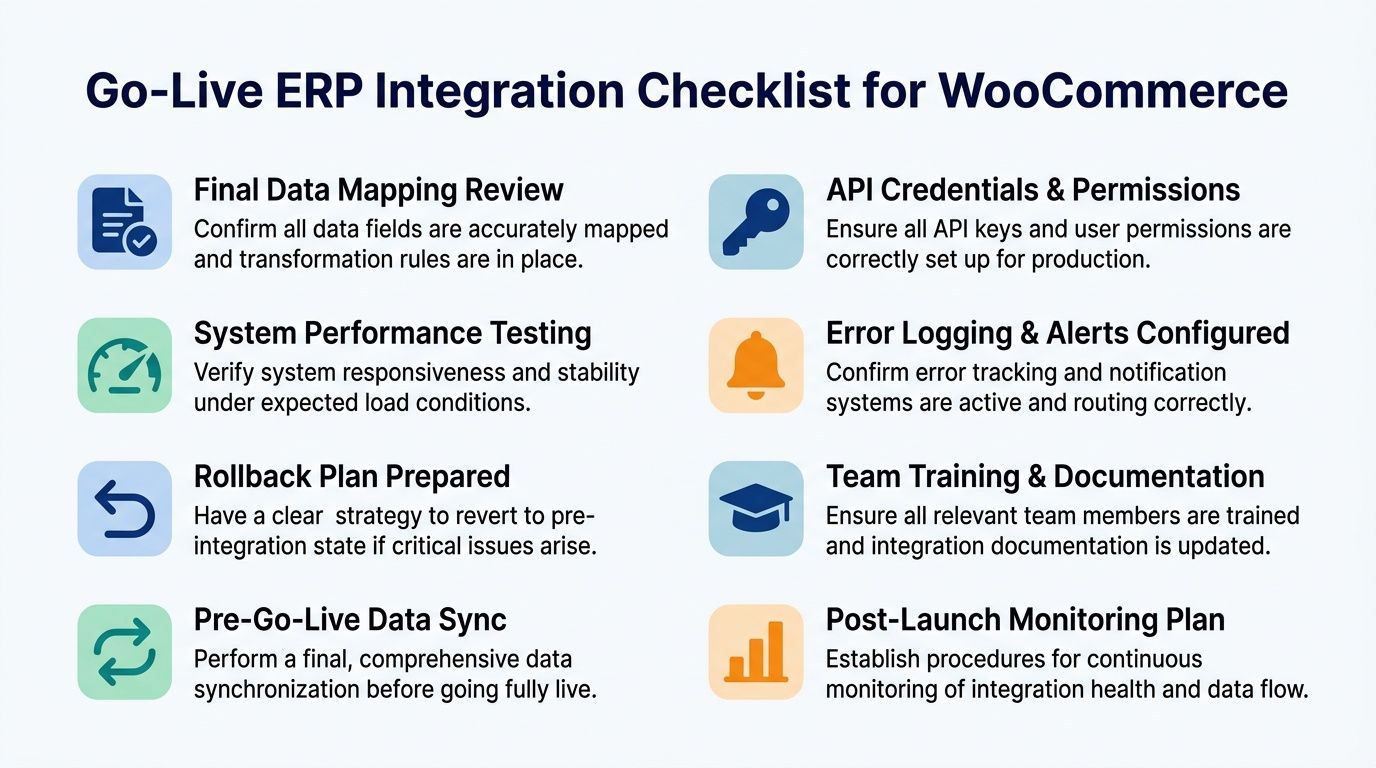
Your Go-Live Integration Checklist
By the time you’re close to launch, the project should stop feeling abstract. You need a list that a project manager, lead developer, and operations stakeholder can all use without interpretation. If the item can’t be checked clearly, it probably wasn’t defined clearly enough.
Pre-project and discovery
- System of record agreed: Every domain has an owner. Inventory, pricing, product content, customer data, tax logic, and shipment status should all have named authority.
- Scope document approved: The team knows exactly what syncs, what doesn’t, and which workflows are phase one versus later phases.
- Plugin audit completed: Checkout customizations, product extensions, and order automation plugins have been reviewed for payload impact.
- Business rule review done: Tiered pricing, account-specific catalogs, warehouse routing, and refund handling are documented before development.
Development and configuration
- WooCommerce REST API access prepared: Production credentials, access levels, and endpoint permissions are ready and verified.
- SKU and variant normalization finished: Product identifiers are cleaned and mapped consistently across both systems.
- Field mapping document signed off: Orders, line items, taxes, customers, shipping methods, and custom metadata have clear transformation rules.
- Error handling designed: Retries, duplicate prevention, manual review queues, and alert pathways are defined.
- Architecture choice validated: The build matches the business model. Plugin for simple sync, middleware for orchestration, custom for deep ERP logic.
Testing and launch readiness
- Staging environment mirrors critical production behavior: Test data, plugin stack, and core settings are close enough to expose real issues.
- UAT scenarios completed: Standard orders, variation orders, failed payments, refunds, status updates, and shipment feedback loops have been tested.
- Rollback plan documented: Teams know when to stop, how to revert, and who approves that decision.
- Support and operations trained: Warehouse, finance, ecommerce, and support know what the integration changes in their daily workflow.
A practical companion for final release preparation is this ecommerce website checklist, which helps teams catch non-integration launch issues that still affect store stability.
Post-launch operating discipline
- Monitoring is active from day one: Don’t wait for customer complaints to reveal sync failures.
- Ownership is assigned: One team owns incident review, one owns business rule changes, and one owns platform update coordination.
- Maintenance is part of the project, not an afterthought: WooCommerce, plugins, and ERP updates can all change behavior over time.
- Phase two is intentionally delayed: Let the first workflow stabilize before adding nice-to-have syncs.
A good integration doesn’t just move data. It preserves trust between teams that depend on that data.
ERP integration with WooCommerce pays off when the store stops acting like an isolated sales channel and starts behaving like part of a coordinated operating system. The stores that do this well aren’t the ones with the most features. They’re the ones that made clear decisions early, chose architecture based on business logic, and treated maintenance as part of the build.
If you’re planning a WooCommerce integration that needs senior engineering judgment, not just plugin setup, IMADO helps brands and agencies build scalable WordPress and WooCommerce platforms with solid API integrations, performance-focused delivery, and long-term maintainability.
Let’s build something exceptional
Tell us about your project – we’ll help you launch a fast, scalable, SEO-optimized WordPress platform built for growth.