 Ask Chatgpt to summarize Joomla to WordPress Migration: The 2026 Playbook
 Ask Grok to summarize Joomla to WordPress Migration: The 2026 Playbook
 Ask Claude to summarize Joomla to WordPress Migration: The 2026 Playbook
 Ask Perplexity to summarize Joomla to WordPress Migration: The 2026 Playbook
 Ask Gemini to summarize Joomla to WordPress Migration: The 2026 Playbook

You’re usually not migrating from Joomla to WordPress because you woke up wanting a new CMS. You’re doing it because the current stack has become expensive to maintain, awkward for editors, brittle around extensions, or too constrained for the next phase of growth. The site still works, but every change costs more than it should.
That’s where most migration advice falls short. It treats the move like a content import problem. For small brochure sites, that can be enough. For agencies, publishers, franchise groups, SaaS teams, and WooCommerce builds with integrations, a joomla to wordpress migration is an engineering project with business risk attached to every shortcut.
The practical question isn’t “How do we move articles?” It’s “How do we move content, preserve search visibility, rebuild functionality, keep editorial workflows intact, and launch a faster platform without inheriting more technical debt?” That’s the standard enterprise teams should use.
Table of Contents
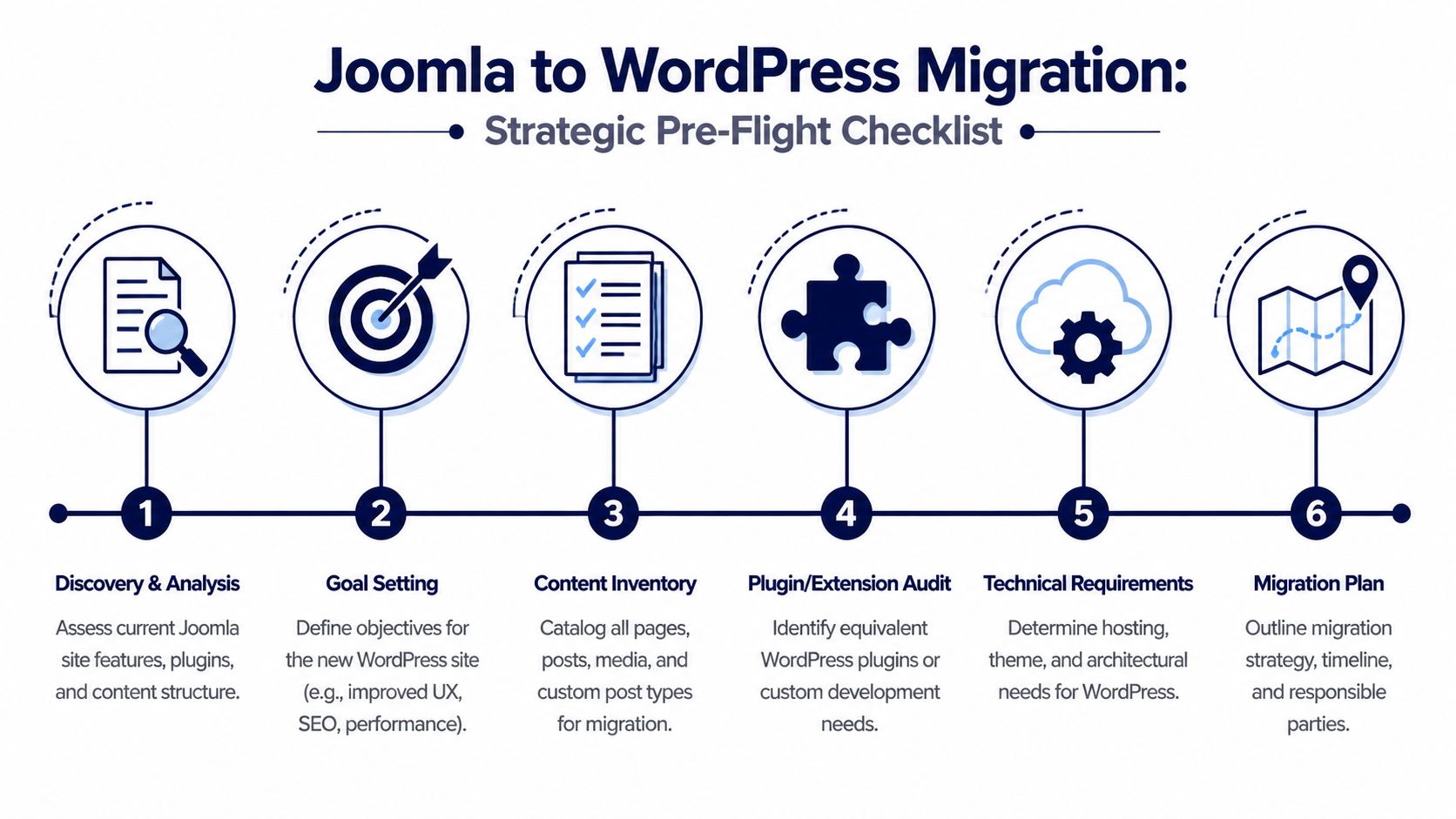
Pre-Migration Audit and Strategic Scoping
A migration project usually starts the same way. Stakeholders ask for a timeline, a budget, and a launch window before anyone has mapped the Joomla site’s actual logic. That is how agencies end up scoping a page transfer while the critical work sits inside ACL rules, template overrides, module placements, extension tables, multilingual behavior, and years of URL exceptions.
For small sites, a lightweight audit may be enough. For enterprise migrations, weak discovery creates expensive failure points later. The risk is not only bad imports. It is broken editorial workflows, missing structured data, lost search equity, unsupported integrations, and a WordPress build that inherits the same operational problems the move was supposed to fix.
Audit the business logic, not just the content inventory
A useful audit does more than count articles and categories. It explains how the site works, what revenue or lead flow depends on that behavior, and which parts should be migrated, rebuilt, or retired.
Start with six questions:
- What content exists: Articles, category trees, media, tags, archived sections, hidden campaign pages, user-generated content, and structured records stored by Joomla extensions.
- How content is rendered: Template overrides, module positions, menu relationships, filtered listings, related-content widgets, and any page assembly logic editors rely on without realizing it.
- What the editorial team needs: Roles, approval paths, publishing permissions, author attribution, scheduled publishing, multilingual workflows, and governance controls.
- Which extensions carry business value: Forms, search, SEO tooling, memberships, directories, event systems, ecommerce functions, review systems, custom fields, and third-party integrations.
- What cannot fail at launch: High-converting landing pages, high-traffic URLs, lead forms, checkout flows, API endpoints, CRM connections, and reporting dependencies.
- What should improve in WordPress: Editorial speed, component reuse, accessibility, Core Web Vitals, search templates, governance, multisite readiness, or WooCommerce support.
This is the point where scope discipline matters. “Rebuild the current site in WordPress” and “use the migration to redesign the content model” are different projects with different budgets, timelines, and QA requirements. Agencies lose margin when those two tracks get blended into one estimate.
A practical rule helps. If a Joomla feature affects publishing control, permissions, search visibility, revenue, or compliance, treat it as a migration requirement.
Build a scope that survives technical discovery
Scoping by page count fails on larger Joomla estates because page count hides the expensive work. A site with 800 simple articles can be easier than a site with 150 pages tied to custom extension data, regional navigation rules, and multiple editor roles.
A durable migration scope separates work into operating tracks:
Content transfer
Articles, pages, media, taxonomies, metadata, internal links, attachments, and structured fields.Functional replacement
Mapping Joomla extensions and module behavior to WordPress plugins, custom post types, blocks, or bespoke development.SEO preservation
URL inventory, redirect logic, metadata migration, canonicals, hreflang handling, XML sitemaps, and post-launch crawl validation.Frontend and experience rebuildTheme architecture, templates, navigation systems, search experience, block patterns, and component parity where parity is worth keeping.
Operational readiness
Hosting, environments, deployment process, rollback planning, content freeze rules, QA ownership, and support after launch.
That model makes trade-offs visible early. For example, rebuilding every Joomla module as a one-to-one WordPress component may reduce change management for editors, but it often preserves poor UX patterns and bloats the new stack. Reworking templates around reusable blocks usually improves long-term maintainability, but it increases discovery and frontend QA time.
For teams that want an external benchmark before redirect planning and risk estimation, Click Click Bang Bang’s SEO audit is a useful reference point for surfacing technical and organic issues that can complicate migration planning.
Define what gets retired before WordPress inherits it
Migration is one of the few moments when a team can remove years of accumulated CMS debt without political resistance. Use it.
Old Joomla modules, duplicate landing pages, abandoned category structures, expired campaign content, unsupported extensions, and one-off templates should be reviewed before they reach the build plan. If nobody can explain why an element still exists, it should not automatically earn a place in WordPress.
This matters more on enterprise projects because legacy clutter has downstream cost. It expands QA, increases template complexity, adds redirect overhead, and makes performance tuning harder after launch.
A formal audit process helps separate real requirements from historical residue. This checklist for how to audit a website before a migration is the kind of framework teams can use to document risks, dependencies, and retirement candidates before architecture decisions get locked.
Set measurable migration success criteria
Success needs a written definition before anyone touches the database. Otherwise, teams judge the project by whether the import finished, not whether the business kept working.
For enterprise Joomla to WordPress migrations, success usually includes these outcomes:
| Decision bucket | Meaning | Typical action |
|---|---|---|
| Preserve | Must move with parity | Migrate directly |
| Improve | Must move, but should work better in WordPress | Re-architect in WordPress |
| Replace | Joomla-specific implementation no longer fits the target stack | Map to a WordPress plugin or custom build |
| Retire | No longer useful or creates unnecessary complexity | Remove from scope |
Use those buckets during discovery and attach measurable acceptance criteria to each one. Preserve means URLs, metadata, and content relationships survive. Improve means the feature ships with a better content model or faster frontend output. Replace means the team has approved the new plugin or custom pattern before build starts. Retire means the business owner signed off, so the item does not reappear during UAT as an “unexpected requirement.”
That is the difference between a migration plan and a hopeful import checklist.
Executing the Core Content and Data Migration
A migration team usually learns the hard part after the first test import. Articles arrive. Categories look close enough. Then the exceptions surface. Joomla custom components hold business-critical data, editor workflows depend on field relationships that do not exist in WordPress yet, and thousands of internal links still point to Joomla routes. On enterprise projects, the core migration is not a copy job. It is a controlled data conversion with audit trails, rollback options, and validation at each stage.
The first decision is architectural. Use an automated importer for content that maps cleanly. Use manual exports or custom scripts where the target model is different. Large migrations often need both.

When automated migration is the right call
For standard Joomla articles, categories, users, tags, and media, FG Joomla to WordPress is often the fastest way to create a usable first-pass dataset inside WordPress. That matters because teams need something concrete to validate early. It is much easier to spot broken hierarchy, bad encoding, missing images, and weak field mapping in a real staging environment than in a planning document.
Automated migration works best under these conditions:
- The Joomla content model is relatively close to native WordPress posts, pages, and taxonomies.
- Custom component data is limited or can be handled separately.
- The immediate goal is to establish parity first, then improve structure in later passes.
- The team needs repeatable test imports during staging, not a one-time manual transfer.
A practical workflow looks like this:
- Provision a clean WordPress staging site: Avoid importing into an active build with existing content, plugins, and conflicting IDs.
- Install and configure the importer: Start from a clean target so duplicate handling stays predictable.
- Connect directly to the Joomla database: Pull connection details from Joomla’s
configuration.php. - Set import options carefully: Review media handling, internal link conversion, duplicate rules, and taxonomy mapping before the first run.
- Run a test import before the full pass: A smaller batch exposes mapping problems without wasting a full migration window.
- Validate record counts and sampled content: Compare source totals and inspect real pages, not just the import log.
- Separate import completion from launch readiness: Imported content still needs URL logic, template rebuilds, and QA.
The trade-off is straightforward. Plugin-based migration is efficient, but it can create false confidence if the source site relies on extension data or editorial rules that WordPress does not reproduce automatically.
Configuration details that matter on large sites
Large imports usually fail because of environment limits, not because the content is unusually complex. PHP memory runs out. Execution timeouts interrupt media processing. Character encoding issues survive until editors review old content and find broken punctuation, accented characters, or corrupted symbols.
FDG Web’s Joomla to WordPress migration guide reports that direct database connections imported large datasets much faster than HTTP-based methods in benchmark tests on 50,000-article sites. The same guide notes that raising max_execution_time and file upload limits often resolves media transfer failures on bigger imports.
Direct database access is usually the safer option for enterprise projects because it reduces retries and avoids unnecessary transfer overhead.
A few checks catch expensive problems early:
- Post and page totals: Compare imported counts against Joomla source totals by type, not only at site level.
- Media integrity: Open articles with inline images, attachments, galleries, and older embedded assets.
- Character encoding: Review multilingual content, smart quotes, symbols, and older copy pasted from desktop editors.
- Internal link mapping: Confirm links resolve to the new permalink structure rather than legacy Joomla routes.
- Author and date fidelity: Publishing history often matters for publishers, legal archives, and large editorial teams.
- Taxonomy relationships: Parent-child category structures can break unnoticed during automated imports.
Teams that have handled other CMS migrations will recognize the same pattern. The content transfer is only half the job. The harder part is mapping source structures to a WordPress model that editors can maintain. This comparison of Webflow to WordPress migration approaches is useful because it frames the same underlying decision, whether to preserve the source model or reshape it during migration.
When manual workflows are worth the extra effort
Manual migration takes longer, but it gives the team control where enterprise projects usually need it most. That includes data transformation, normalization, deduplication, and relationship mapping across systems.
Use manual workflows when the migration includes problems like these:
| Scenario | Why manual helps |
|---|---|
| Joomla categories need to become custom taxonomies | Mapping rules can be defined explicitly |
| Extension data needs normalization | CSV, XML, or scripted pipelines make transformation easier |
| Legacy pages should become reusable blocks or ACF-driven structures | The target model can be built intentionally instead of patched after import |
| Multiple Joomla sources must merge into one WordPress structure | Custom scripts handle ID conflicts and content merging more cleanly |
This is often where agencies underestimate scope. A site may look like a standard CMS migration at the page level, while the database tells a different story. Product catalogs, gated resources, event records, memberships, and multilingual relationships can all require separate migration logic.
For that reason, the best enterprise process is usually phased:
- Import the content that maps cleanly.
- Script or manually transform the data that does not.
- Validate counts, relationships, and URL behavior after each pass.
- Repeat the process until imports are stable and reproducible.
That reproducibility matters. If a staging environment has to be rebuilt, the migration should run again with the same result. Manual cleanup done ad hoc in wp-admin creates launch risk because nobody can recreate it reliably under deadline pressure.
My rule is simple. Prioritize a recoverable import over an elegant one. A dataset that is fully traceable, testable, and repeatable is far more valuable than a fragile migration that looked efficient on the first pass.
This walkthrough gives a useful visual of the importer interface and flow:
Rebuilding Functionality and Frontend Experience
A clean import doesn’t recreate the site people use. Joomla templates, modules, and extension-driven layouts often carry more frontend logic than teams realize. If you migrate content successfully but rebuild the wrong interaction model in WordPress, the project still fails.
The better approach is to treat the frontend rebuild as a set of decisions. Not “Which theme should we install?” but “Which architecture gives editors control without slowing the site down or locking the team into fragile dependencies?”

Theme strategy is an architecture choice
Joomla sites often rely on template overrides, module positions, and extension-specific output patterns. In WordPress, the equivalent decision is usually between a custom block theme, a classic theme with flexible page templates, or a premium theme paired with plugins.
A quick comparison helps:
| Option | Best fit | Trade-off |
|---|---|---|
| Custom block theme | Enterprise brands, publishers, performance-focused sites | Higher upfront build effort |
| Classic custom theme | Teams needing bespoke templates with familiar WP patterns | Less future-facing than block-first builds |
| Premium theme | Budget-conscious projects or fast turnarounds | More dependency weight, less control |
For enterprise work, custom block themes usually age better. They give editors structured flexibility through Gutenberg while keeping frontend output lean. Premium themes can speed up delivery, but they often bring styling overhead, opinionated builders, and long-term maintenance friction.
A migration is the right moment to remove layout dependencies that editors never wanted to manage in the first place.
Replace extensions by capability, not by name
One common mistake is searching for a one-to-one WordPress replacement for every Joomla extension. That sounds safe, but it often recreates Joomla’s complexity inside WordPress. The smarter move is to map each extension to the capability it provides, then choose the lightest implementation to meet the requirement.
Here’s a practical reference table.
Common Joomla Extension to WordPress Plugin Mappings
| Joomla Extension | WordPress Equivalent(s) | Notes |
|---|---|---|
| K2 | Advanced Custom Fields, custom post types, native taxonomies | Better when content needs structured editorial models |
| JoomShopping | WooCommerce | Requires separate handling for payments, shipping, and order logic |
| VirtueMart | WooCommerce | Product and order migration usually needs custom mapping |
| RSForm or ChronoForms | Gravity Forms, WPForms | Rebuild logic carefully if forms feed external systems |
| sh404SEF or SEO extensions | Yoast SEO, redirect tooling | Preserve metadata and URL intent, not plugin parity |
| Joomla gallery extensions | Native media plus gallery block or specialized gallery plugin | Check shortcode and image path cleanup |
| Membership or ACL-heavy extensions | Member-focused plugins plus role tools like User Role Editor | Permissions need design, not just installation |
Notice the pattern. WordPress equivalents often aren’t single-plugin swaps. They’re combinations of custom post types, fields, taxonomies, block templates, and selected plugins.
Recreate experience with fewer moving parts
The frontend rebuild should target three outcomes:
- Editors need less work: Reusable blocks, patterns, and custom fields should replace manual layout hacks.
- Users need better consistency: Navigation, search, content hierarchy, and mobile rendering should be cleaner than the Joomla version.
- Developers need less maintenance risk: Avoid stacking plugins where a custom block or theme template would be more stable.
For performance-sensitive builds, this is also the right moment to simplify CSS and JavaScript weight, remove layout bloat, and cut plugin overlap. A lot of Joomla migrations inherit visual complexity because teams treat “matching the old site” as the only success metric. That leaves obvious speed gains on the table.
If frontend speed is a priority, this guide on how to improve WordPress site speed is a useful reference when deciding between plugin-heavy assemblies and leaner theme-driven implementations.
The most successful rebuilds don’t try to imitate Joomla line for line. They preserve what users need, remove what editors hate, and implement the result in a way WordPress can support cleanly for years.
Handling Advanced Migration Scenarios
The difficult migrations are rarely about articles and images. They’re about language relationships, permissions, and transactional data. That’s where a standard Joomla to WordPress migration guide usually stops being useful.
Multilingual content needs relationship mapping
Joomla and WordPress can both support multilingual publishing, but they don’t model it the same way. During migration, the primary challenge isn’t just moving translated pages. It’s preserving the associations between language variants, navigation structures, taxonomies, and editorial ownership.
In practice, this means auditing:
- Language pairings: Which pages are true equivalents across languages, and which are unique by market.
- Menu structures: Whether navigation differs by region or language.
- Shared assets: PDFs, media, and reusable components that may have language-specific variants.
- SEO dependencies: Hreflang logic, translated slugs, and localized metadata.
Plugins such as WPML or Polylang can support the target setup well, but the migration logic has to be planned before import. If translated content gets imported as unrelated standalone pages, cleanup becomes expensive fast.
User roles and ACLs need explicit design
This is one of the biggest enterprise risks. Joomla’s granular user groups and ACL system don’t map neatly into WordPress’s simpler roles. A weak mapping can disrupt editorial workflows and create weeks of post-launch access fixes, especially for franchises, publishers, and large marketing teams.
That matters because permission failures don’t always appear in staging. They often surface after launch, when editors can’t update region-specific content, managers lose approval rights, or frontend modules stop respecting audience restrictions.
A practical approach is to define a role matrix before migration:
| Joomla concept | WordPress target | What to decide |
|---|---|---|
| User groups | Roles plus capability adjustments | Which permissions are global vs local |
| ACL rules | Native capabilities or role plugins | Which restrictions need custom logic |
| Module visibility by audience | Conditional rendering or membership logic | Whether visibility is editorial or application-level |
If you can’t explain your future role model in one shared document, you’re not ready to migrate users.
E-commerce data is a systems migration, not a content migration
When the Joomla site includes JoomShopping, VirtueMart, or custom commerce logic, the migration scope changes immediately. Products aren’t the hard part. The hard part is preserving the full operational chain around them.
That includes:
Catalog structure
Product variations, category hierarchies, attributes, downloadable assets, and merchandising rules.Customer and order data
Account migration, historic orders, tax data, order statuses, and service workflows.Payments and external systems
Payment gateways, ERP connections, fulfillment tools, shipping logic, and notifications.
WooCommerce is usually the WordPress target, but the engineering work sits around it. Data often needs transformation before import, and post-launch validation has to include order flow, checkout behavior, transactional email, and system handoffs.
For larger stores, I’d rather phase the migration than force a one-shot cutover. Product content can migrate in advance. Live order handling, payment logic, and integrations should be tested as a separate go-live stream with clear rollback conditions.
Preserving SEO Equity and Launching with Confidence
Friday, 6:00 p.m. The new WordPress site is approved, design signoff is done, and the team is ready to switch DNS. Then someone asks a simple question: where does /resources/whitepapers/legacy-title go now? If nobody can answer that immediately, the migration is not ready to launch.
SEO loss at cutover usually comes from operational gaps, not platform choice. Joomla to WordPress migrations fail here because teams treat redirects, canonicals, crawl controls, and validation as cleanup work. On a large site, they are release-critical infrastructure.

Build the redirect map before launch week
A redirect plan should start while information architecture is still being finalized. Waiting until launch week creates two expensive problems. High-value URLs get mapped by guesswork, and pattern-based rules miss exceptions that carry links, rankings, or paid traffic.
For enterprise migrations, I use a redirect register, not a loose spreadsheet with a few top pages. It should track:
- Old URL
- New URL
- Status code
- Rule type (one-to-one, pattern, merged, retired)
- Business priority
- SEO notes (backlinks, traffic, index status, campaign usage)
- Owner and QA status
That extra detail matters. A URL can be low traffic but still high risk because legal teams use it in PDFs, sales teams send it in outbound sequences, or industry sites link to it. A category page can look easy to consolidate, but if it ranks for a commercial term, merging it into a broader page can weaken relevance.
Pattern redirects help at scale, but they should never be the whole strategy. Use them to reduce manual work, then isolate exceptions for templates, hub pages, documents, campaign URLs, and legacy paths with odd parameters. I want those exceptions reviewed by a human before launch.
Crawl data, analytics, backlink reports, and Search Console exports should all feed the redirect decision. Rankings alone are too narrow. If your team measures migration impact at the market level, this explanation of share of voice SEO from Riff Analytics is useful because it frames visibility as competitive coverage, not just position changes on a few keywords.
QA around search risk, not just page appearance
Staging review should follow business-critical journeys and indexation logic. A page that looks correct can still launch with the wrong canonical, broken structured data, blocked assets, or a noindex directive inherited from staging.
A strong pre-launch QA pass checks:
- Priority landing pages: Titles, meta descriptions, canonicals, hreflang if applicable, headings, structured data, and rendered content
- Template behavior: Blog archives, resource centers, product listings, author pages, filtered views, and paginated URLs
- Internal linking: Navigation, breadcrumbs, contextual links, related content blocks, XML sitemaps, and HTML sitemaps if used
- Conversion paths: Forms, gated assets, checkout, quote requests, booking flows, and thank-you pages
- Media and files: PDFs, image paths, download URLs, and embedded assets that often break after path changes
- Crawler access: robots.txt, noindex tags, password protection, CDN rules, firewall settings, and JavaScript-dependent content rendering
Editors should also test the workflows they will use on day one. I’ve seen launches pass SEO QA and still create editorial damage because scheduled posts failed, redirects were bypassed by manual slug edits, or role permissions blocked urgent updates.
Cutover needs a runbook with owners and rollback conditions
Large migrations should be launched like an infrastructure release. Every step needs an owner, an approval point, and a rollback trigger. Committees slow decisions at the exact moment the team needs clarity.
A practical launch runbook usually includes this order:
Content freeze
Stop changes on Joomla early enough to avoid delta confusion during final sync.Final source and target backups
Keep recoverable states for both platforms, plus database exports and configuration snapshots.Final migration delta
Import the last approved content changes, then lock publishing until cutover is complete.Redirect and DNS coordination
Deploy redirect logic in sync with the switch, with rules tested against a priority URL set.Production hardening checks
Confirm SSL, caching layers, CDN behavior, canonical host rules, cookie banners, and environment-specific settings.Immediate smoke tests
Validate top pages, search, forms, transactional paths, analytics tags, and key integrations.Post-launch crawl and log review
Look for 404s, redirect chains, 5xx errors, blocked resources, orphaned pages, and indexation mistakes.
Rollback conditions should be explicit before launch day. For example: a broken checkout, widespread redirect failure on high-value URLs, analytics loss on revenue pages, or accidental noindex on core templates. If those conditions are met, the team should not debate next steps in Slack while traffic is hitting the new site.
Protect what search engines and users actually depend on
The hardest part of launch is not copying content. It is preserving the relationships around that content. URL history, internal link paths, canonical signals, file locations, schema output, and crawl access all shape how fast Google trusts the new environment.
That is why I treat launch confidence as an evidence problem. If the redirect map is tested, the high-risk templates are validated, and rollback conditions are defined, the cutover is controlled. If those pieces are vague, the site is still in rehearsal, even if the design looks finished.
Post-Launch Optimization and Continuous Improvement
Launch day isn’t the finish line. It’s the point where the migration stops being theoretical and starts meeting real traffic, real editors, and real conversion paths. Teams that treat launch as “done” usually spend the next few weeks reacting to problems they could have planned for.
This is especially true for performance. Most migration guides stop at content import and redirects, but Core Web Vitals can degrade by 20% to 50% after migration because of unoptimized media or theme decisions, and 70% of migrated sites require a performance audit within 3 months to address issues and avoid possible SEO damage.
The first 30 days decide whether the platform actually improved
Post-launch work should be scheduled, not improvised. The initial month should focus on observation, correction, and optimization.
A practical post-launch plan includes:
- Search Console monitoring: Watch crawl errors, indexation anomalies, and page experience signals.
- 404 review: Look for missed redirects, malformed internal links, and media paths that didn’t survive the move.
- Performance testing: Run Lighthouse or PageSpeed Insights on key templates, not just the homepage.
- Editor feedback loops: Capture friction around media, permissions, block usage, and publishing workflows.
- Security and backup review: Confirm backups, update policies, incident response, and restore readiness.
If the migration included WooCommerce or integrations, this phase should also cover order flow monitoring, webhook checks, ERP synchronization, and failed transaction investigation.
Performance debt shows up fast after migration
A migrated site often carries hidden weight. Old images are oversized. Imported markup is messy. Theme choices add scripts and CSS no one asked for. Plugins overlap because different teams solved different problems during the rebuild.
That’s why post-launch optimization should target the biggest offenders first:
| Area | Common migration issue | Practical fix |
|---|---|---|
| Media | Legacy images too large or poorly formatted | Recompress, regenerate, and review image delivery |
| Theme output | Heavy CSS and JS from broad theme frameworks | Remove unused assets and simplify templates |
| Caching | No page or object caching strategy | Configure caching and validate cache behavior |
| Database | Imported clutter and transient buildup | Clean unused data and audit slow queries |
| Third-party scripts | Legacy tracking or duplicate tags | Consolidate and remove nonessential scripts |
The new WordPress site should be faster than the Joomla site it replaced. If it isn’t, the migration only moved the problem.
Use the migration window to improve conversion paths too
Performance and SEO matter, but they shouldn’t distract from what the site needs to do commercially. A cleaner CMS gives teams a chance to tighten landing pages, reduce friction in forms or checkout, and simplify user journeys that had grown awkward over time.
That’s why post-launch review should include conversion analysis, not just technical QA. This conversion funnel optimization guide from SEOBRO® is a useful framework for evaluating whether the new build is helping users move through the site more effectively.
For teams that don’t have in-house bandwidth after launch, it’s sensible to keep engineering support in place for a defined stabilization period. That can include plugin updates, role fixes, redirect tuning, performance work, and issue triage. IMADO provides that kind of WordPress engineering support for migrations, maintenance, and post-launch optimization when the internal team needs extra implementation capacity.
The important shift is this. Don’t measure success by whether the site launched. Measure it by whether the new platform is measurably easier to operate, faster to use, and less fragile under change.
Conclusion Your Strategic Migration Partner
A Joomla to WordPress migration usually looks straightforward until the first executive review after launch. Traffic is unstable, editors cannot find the fields they need, a legacy integration breaks, and the new site is carrying old technical debt in a different CMS. That outcome comes from treating migration as an import task instead of an engineering program.
The projects that hold up under pressure are scoped differently. They start with a hard audit, define what must be preserved, decide what should be rebuilt, and set launch criteria that reflect business risk, not just developer completion. On larger estates, that means planning for multilingual content, custom data relationships, role mapping, third-party systems, analytics continuity, and performance budgets before anyone touches production content.
Method matters, but fit matters more. The right approach depends on content complexity, governance requirements, editorial workflows, and the team responsible for support after launch. A small marketing site can tolerate shortcuts that would create serious problems on a multisite, membership platform, or commerce build.
For agencies, this affects margin, delivery confidence, and client trust. For in-house teams, it affects change control, stakeholder confidence, and how much cleanup gets pushed into the first quarter after launch. Weak discovery, vague ownership, and delayed redirect decisions do not stay small. They turn into blocked editors, ranking loss, support queues, and expensive rework when the site is already live.
A strong migration leaves the organization with more than a new CMS.
It reduces technical debt, gives editors a cleaner operating model, and creates a better foundation for accessibility, search performance, multilingual expansion, and future integrations. That result comes from disciplined scoping, clear architecture, controlled QA, and a defined stabilization period after launch.
If the site is business-critical, tied to multiple systems, or carrying years of custom Joomla logic, treat the move as a managed delivery program with senior engineering oversight. That level of rigor is usually the difference between a platform change that settles quickly and one that keeps generating incidents long after launch.
If you’re planning a Joomla to WordPress migration and need senior engineering support for scoping, content modeling, redirects, frontend rebuilds, WooCommerce, or post-launch optimization, IMADO can help your team deliver the project with a clearer process and fewer surprises.
Let’s build something exceptional
Tell us about your project – we’ll help you launch a fast, scalable, SEO-optimized WordPress platform built for growth.