You’re probably here because a plugin has become a bottleneck.
Maybe your site needs to sync with an ERP, extend WooCommerce in a way no existing add-on handles cleanly, or support a multilingual editorial workflow without breaking performance. Maybe you already tried stacking off-the-shelf plugins and now the admin is slow, updates feel risky, and nobody’s confident about what happens when WordPress core changes.
That’s the point where hiring decisions matter. When businesses hire WordPress plugin developers well, they buy more than code. They buy maintainability, safer updates, cleaner integrations, and fewer expensive surprises after launch. When they hire badly, they inherit technical debt disguised as a cheap build.
Why Hiring a Plugin Developer Is a Strategic Decision
A plugin isn’t just a feature. It can sit directly in the path of checkout, lead capture, search, reporting, permissions, content modeling, or system integrations. If that layer is weak, the rest of the site pays for it.
The scale of WordPress is one reason this decision is bigger than many teams expect. WordPress powers about 43% of all websites, and the official repository contains over 59,000 free plugins, which is exactly why serious sites often need custom plugin work to handle security, compatibility, and maintainability properly, especially on larger builds and multisite environments, as noted in Uplers’ overview of WordPress plugin development.
Off-the-shelf plugins solve common problems, not your exact operating model
Prebuilt plugins are useful when your requirements are standard. They’re less useful when your business logic is specific, your stack is crowded, or your workflows cross multiple systems.
A custom plugin developer becomes strategic when you need things like:
- Workflow-specific logic that matches how your team works, not how a generic plugin assumes you should work
- Selective functionality instead of installing a large plugin suite to use one small feature
- Tighter integration control across CRMs, ERPs, payment layers, membership logic, or internal APIs
- Cleaner upgrade paths because the code was written around your site architecture, not bolted onto it later
A plugin that “works today” but complicates every future update is rarely a cheap solution.
For agencies and in-house teams, plugin work also affects delivery risk. One poorly designed extension can create regressions across a multisite network, slow editor interactions, or trigger conflicts during core and theme updates. That’s why teams often treat plugin engineering as part of platform architecture, not support work.
If you’re managing multiple client builds or need senior help without expanding your permanent team, a white-label WordPress development setup can make more sense than treating every plugin need as a one-off freelance task.
Laying the Foundation for a Successful Hire
Most hiring problems start before the first candidate applies. The issue usually isn’t talent scarcity. It’s vague scoping.
If your brief says “build a custom plugin” but doesn’t define business rules, compatibility requirements, user roles, admin UX, support expectations, or ownership after launch, you’ll get misleading estimates and weak proposals. Good developers know ambiguity creates risk, so they either price high or make assumptions that become change requests later.
Scope the plugin like a product, not a task
Before you hire anyone, write a short working brief that covers:
- Business objective. What problem does the plugin solve, and what happens today without it?
- Primary users. Editors, store managers, admins, customers, franchise teams, or internal operations staff
- Functional requirements. What it must do, what it must not do, and what can wait
- Compatibility targets. Theme framework, WooCommerce, multilingual tools, multisite, custom post types, API dependencies
- Operational ownership. Who handles updates, bug fixes, and future enhancements after launch
- Acceptance criteria. What would make you say the job is complete and production-ready
A staging environment should be part of this conversation from day one. Plugin work almost always needs safe testing against real site conditions, especially where checkout, content workflows, or external systems are involved. If your team doesn’t already use one, this guide to what a staging site is is a useful baseline before you begin hiring.
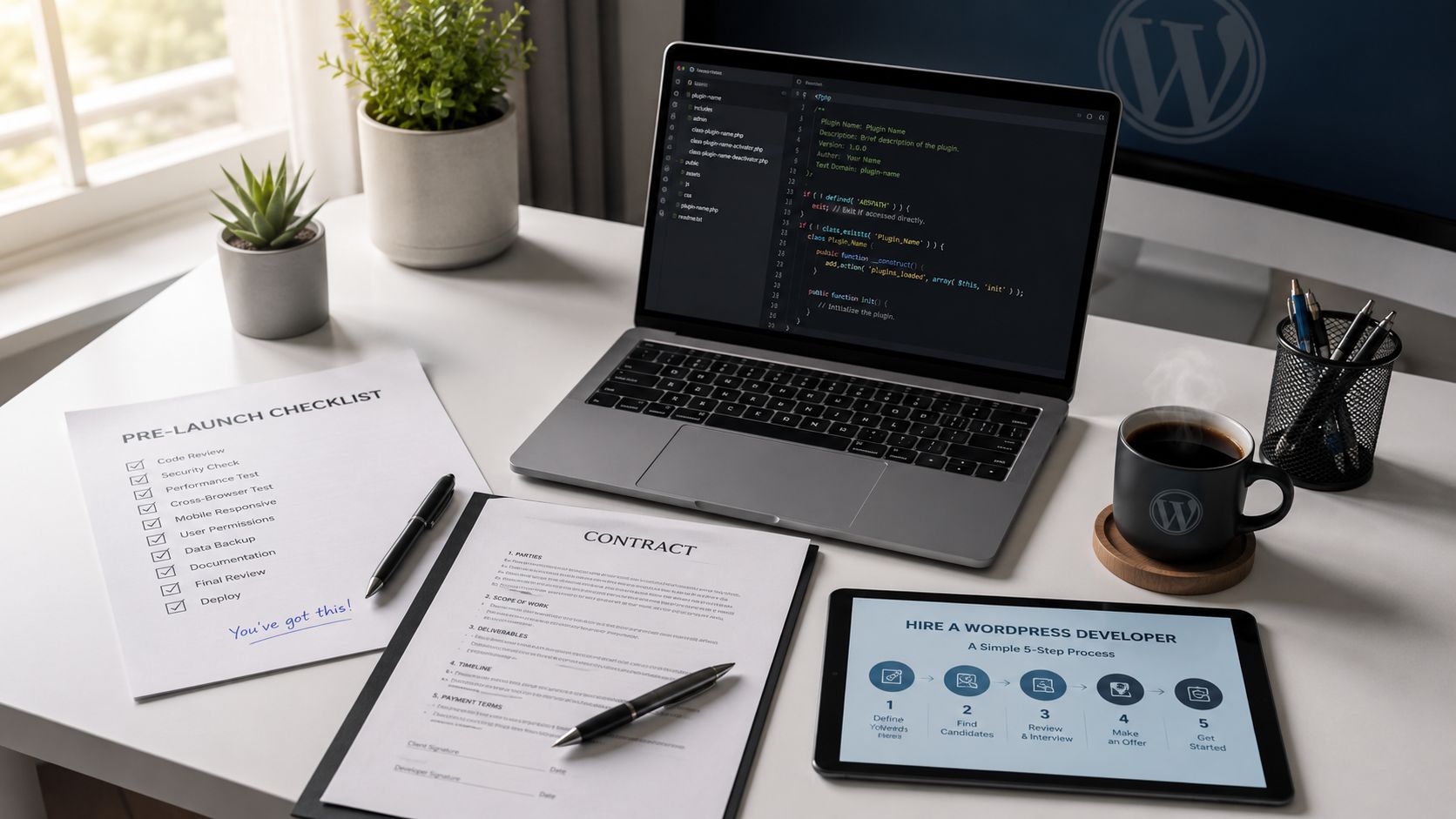
The hiring workflow itself should also be deliberate. Practical hiring guidance recommends a staged process: define exact scope and compatibility targets, review prior work, run a small paid test, then lock in payment and support terms. That same guidance also recommends adding a 10 to 20% buffer to timeline and cost estimates to absorb revisions, feedback cycles, and integration edge cases in WordPress plugin work, as explained in Codeable’s hiring guidance for WordPress developers.
Choose the hiring model that matches the risk
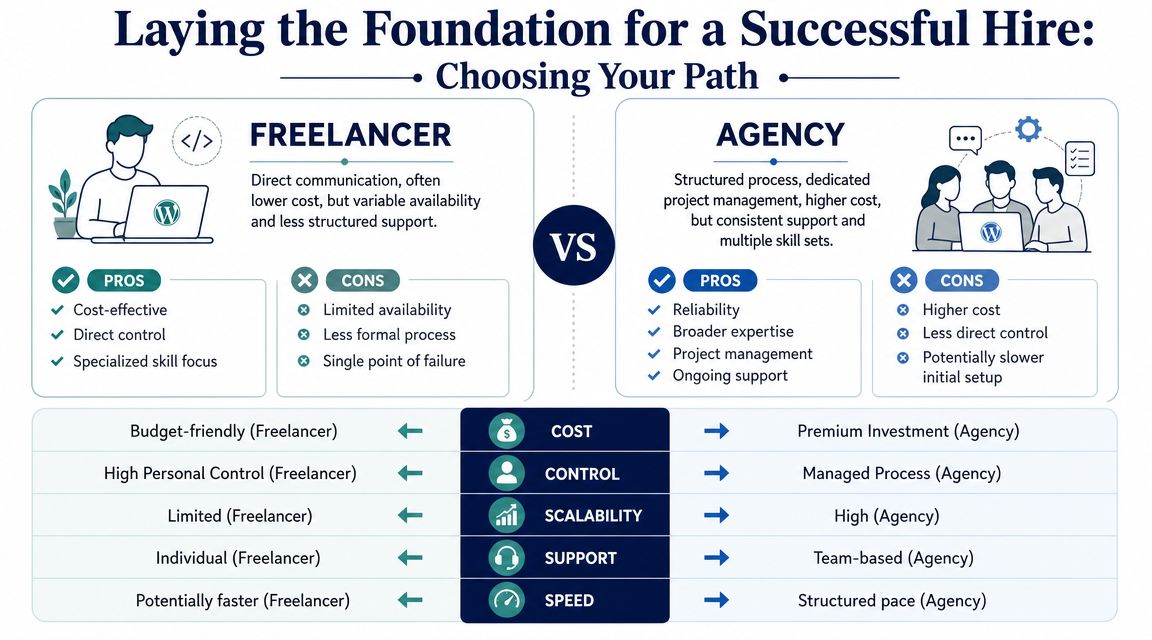
Here’s the decision many buyers get wrong. They choose a hiring model based on hourly rate, when they should choose it based on failure cost.
Freelancer
Freelancers fit well when the scope is tightly defined and the blast radius is limited.
They’re often a good choice for:
- Small enhancements to an existing internal plugin
- Short implementation tasks where requirements are stable
- Highly specific expertise if you already have internal technical oversight
The trade-off is operational fragility. One person may be brilliant, but they can still be a single point of failure. If they disappear mid-project or don’t offer support after launch, your team inherits the problem.
Agency
An agency makes more sense when the plugin touches multiple systems or has business-critical consequences.
That model usually works better for:
- WooCommerce extensions tied to checkout, subscriptions, inventory, or tax logic
- Multisite and multilingual environments where compatibility mistakes spread fast
- Projects requiring QA, project management, DevOps, and documentation, not just coding
You’ll usually trade some directness for process. That can be a feature, not a drawback, when support, testing, and accountability matter.
Staff augmentation
Staff augmentation sits between the two. You bring in a senior WordPress engineer who works inside your workflow, tools, and sprint cadence.
This model fits when:
- Your product or marketing team already runs development well
- You need capacity fast without handing off ownership
- The plugin is part of a broader roadmap, not an isolated project
One practical option in this category is IMADO’s on-demand WordPress engineering model, which plugs senior developers into a client’s workflow for sprint-based or ongoing work. It’s one route among several when you need continuity without building a full in-house bench.
Practical rule: Match the hiring model to the cost of being wrong, not just the cost of getting started.
Sourcing and Attracting the Right Developers
A weak job post attracts people who optimize for speed and guesswork. A strong one filters for engineers who ask the right questions before they estimate.
That matters because the market for plugin work is split. Some platforms are built for quick fixes. Others are built for higher-stakes engineering. Guidance on hiring WordPress developers notes that low-cost marketplaces like Fiverr are better suited to narrow plugin tasks, while vetted platforms like Codeable are better aligned with complex builds. The same guidance notes that lower-cost freelancers may start around $15 to $25 per hour, while experienced developers on vetted platforms often run $70 to $120+ per hour, reflecting differences in screening, support, and lifecycle value, according to Konstant Infosolutions’ hiring overview.
Write a job spec that screens before you interview
The fastest way to reduce noise is to make your post precise enough that weak candidates self-select out.
A solid plugin developer brief should include the exact environment, constraints, and maintenance expectations. It should also ask for evidence, not confidence. Don’t ask whether someone is “experienced with WordPress.” Ask for code samples, examples of custom hooks or API integrations, and one project where they handled plugin conflicts or long-term support.
Here’s a practical structure.
| Section | What to Include | Example Snippet |
|---|---|---|
| Project summary | Business problem and why custom plugin work is needed | “We need a custom plugin to sync order metadata between WooCommerce and an internal operations system.” |
| Environment | Key technical context | “Current stack includes WooCommerce, multilingual content, custom theme, and a staging workflow.” |
| Core requirements | Must-have behaviors and exclusions | “Plugin must create admin controls for manual re-syncs. It should not modify checkout templates directly.” |
| Compatibility | Systems and versions that matter | “Must coexist cleanly with our current theme architecture and existing payment extensions.” |
| Performance expectations | How you want code to behave | “Avoid loading scripts globally. Keep admin interactions responsive and minimize front-end overhead.” |
| Security expectations | Baseline engineering discipline | “Describe how you handle sanitization, escaping, capability checks, and authenticated actions.” |
| Support model | Post-launch obligations | “State whether you provide bug-fix support, update support, and compatibility reviews after launch.” |
| Evidence requested | What applicants must submit | “Include links to GitHub, code samples, and one example of a custom plugin you maintained after release.” |
Where to look depends on what you’re buying
If you need a developer to install or lightly adjust an existing plugin, broad marketplaces can work. If you need someone to design business-critical plugin architecture, they usually don’t.
Use this sourcing lens instead:
- Freelance marketplaces for narrowly defined, low-risk tasks with clear acceptance criteria
- Vetted WordPress platforms when code quality, screening, and support standards matter
- Agency partners and specialist networks when the plugin sits inside a larger platform roadmap
- Referrals from technical peers when you want proof of long-term reliability, not just a polished profile
Add friction on purpose
The best job posts include a few lightweight filters.
For example:
- Ask for one relevant code sample, not a generic portfolio
- Require a short written answer on how they’d approach compatibility and post-launch maintenance
- Request examples of debugging or conflict resolution, not just feature delivery
- State that a paid test will be part of the process for shortlisted candidates
That last point matters. Serious developers won’t object to a paid test if the scope is reasonable. Candidates who resist any practical assessment often expect to be hired on self-description alone.
The Vetting Process That Reveals True Expertise
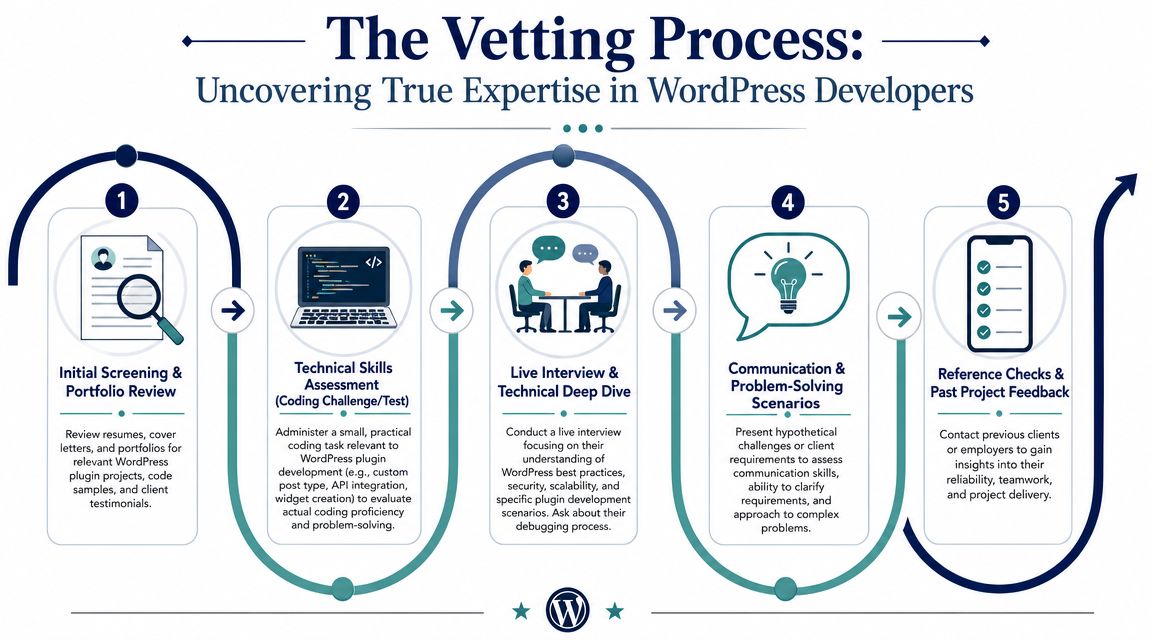
A polished portfolio can hide a lot. Many candidates can show a live WordPress site. Far fewer can explain how they structured plugin code, protected privileged actions, avoided unnecessary asset loading, or planned for future editor changes.
That’s the gap your vetting process needs to expose.
Start with evidence, not enthusiasm
Resume screens are useful for removing obvious mismatches. They’re not enough to identify real plugin engineers.
Ask candidates for:
- A custom plugin code sample
- A GitHub or repository link if they have one
- A brief explanation of what they owned in the project
- One example of a plugin they maintained after initial release
When reviewing code, look for practical signs of discipline:
- WordPress-native patterns instead of hard-coded shortcuts
- Clear separation of concerns between business logic, admin UI, and integration code
- Capability checks, sanitization, and escaping in the right places
- Thoughtful hooks and filters rather than editing around core behavior
- Selective asset loading so the plugin doesn’t add weight everywhere
A strong candidate should also be able to talk through trade-offs. If they can code but can’t explain why they chose a pattern, they may struggle once requirements shift.
Test the work in a small paid exercise
The paid test is where weak candidates usually separate themselves.
Keep it small but realistic. Good examples include:
- Add a controlled admin setting with proper permissions and validation.
- Build a narrow API integration that stores and displays structured data in WordPress.
- Extend an existing content model with custom fields, actions, and basic reporting.
- Create a block-aware feature that must behave cleanly in the current editor experience.
The test should evaluate more than output. Review how they clarify requirements, how they document assumptions, and whether they think about failure states.
Don’t ask a plugin developer only “Can you build this?” Ask, “What will break, what needs guarding, and how will you support it six months later?”
Interview for stack awareness and maintenance thinking
Modern plugin work lives inside a changing WordPress environment. A candidate’s value increasingly depends on whether they understand the current stack. WordPress 6.5 and 6.6 introduced further improvements to the Block Editor and Interactivity API, and Google continues to use Core Web Vitals as a ranking and UX signal. That means plugin developers need to think beyond legacy PHP customization and prove they can build for FSE, blocks, and performance-sensitive environments, as discussed in Pressidium’s guidance on hiring expert WordPress developers.
Ask direct questions such as:
- How do you decide whether plugin functionality belongs in PHP, JavaScript, or both?
- How do you avoid loading scripts or styles where they aren’t needed?
- What would you check before declaring a plugin compatible with a block-based theme?
- How do you handle deprecations and backward compatibility?
- What’s your process when a plugin update conflicts with WooCommerce or a multilingual layer?
Communication matters more than many teams admit. Technical strength without clarity slows projects down fast. If you’re hiring in distributed or cross-cultural teams, broader hiring guidance on essential soft skills for Dubai roles is useful because it highlights the communication, accountability, and problem-framing habits that make remote engineering work smoother.
Check whether they can operate inside your workflow
Some developers write decent code but create friction everywhere else. Vet operational fit explicitly.
Look for candidates who can:
- Estimate with assumptions stated
- Work in tickets instead of vague email threads
- Document implementation decisions
- Handle code review without defensiveness
- Support a handoff if someone else maintains the plugin later
If you need outside help evaluating candidates at a deeper technical level, using a WordPress expert for hire can be useful as a review layer before you commit.
The best plugin developers reduce uncertainty. They don’t just promise delivery. They make maintenance, updates, and future changes easier for everyone after them.
Navigating Contracts, Costs, and Onboarding
Once you’ve chosen a candidate, the next risk is sloppy commercial structure.
Often, teams undo good technical judgment. They agree on a build, skip details around ownership and support, and assume “we’ll sort it out later.” Later usually means during a bug, a missed deadline, or the first urgent update after launch.
Price the engagement according to complexity and accountability
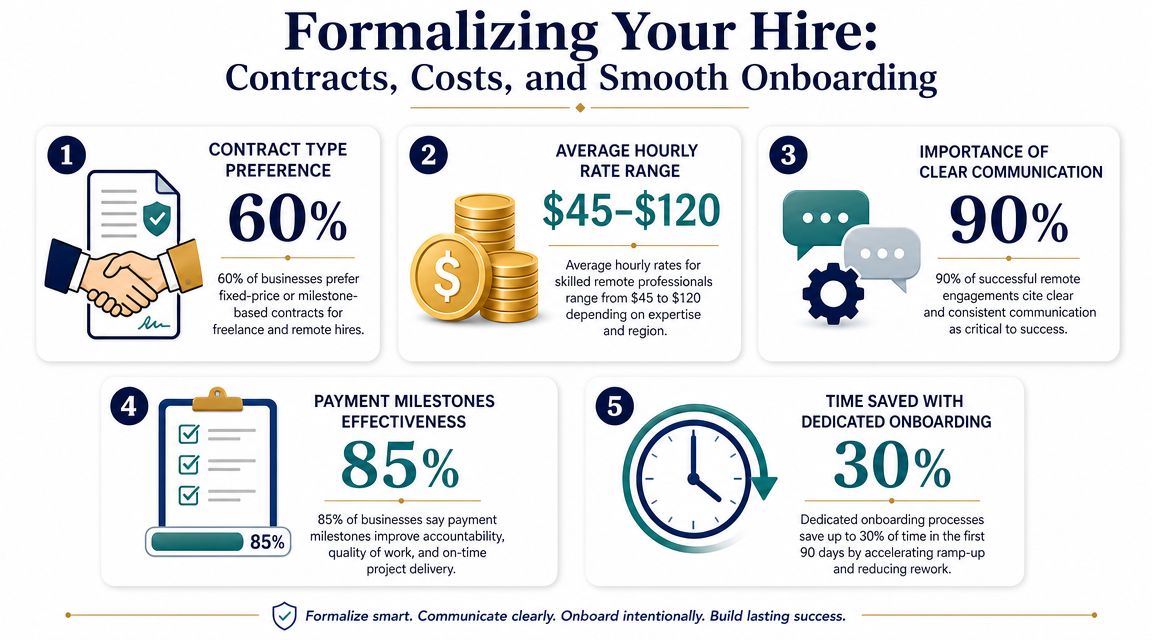
Rates vary because plugin development isn’t a commodity. Upwork lists WordPress plugin developer rates at about $20 per hour for beginner talent, $37 per hour for intermediate talent, and $100 per hour for advanced talent. Broader hiring benchmarks also show senior WordPress developers in Western Europe can command $45 to $200 per hour, which reflects how much seniority, location, and project complexity shape budget expectations, according to Upwork’s WordPress plugin developer hiring data.
That spread tells you something important. If a plugin touches payments, memberships, ERP data, search, editorial permissions, or multisite operations, you’re not buying “WordPress help.” You’re buying risk management in code.
Here’s a more useful way to think about cost:
- Low-risk task work can be budgeted around a defined output
- Custom engineering should be budgeted around architecture, testing, support, and revisions
- Business-critical plugins need room for QA, documentation, staging validation, and post-launch response
Put lifecycle terms into the contract
A plugin contract should answer five questions clearly.
Who owns the code
State whether your business owns the plugin source code, documentation, and related assets on final payment. If ownership is unclear, future maintenance gets complicated fast.
What support is included
Define the post-launch support window and what counts as a bug versus a new feature. If support isn’t written down, every issue becomes a debate.
How changes are handled
Plugin requirements often evolve after real-world testing. Your contract should define a simple change-request process so additions don’t derail the build.
What response times apply
Even if you don’t need a formal enterprise SLA, you should define communication expectations. How quickly should the developer respond during active development? What happens if a production issue appears after deployment?
What environment and handoff materials are required
Require documentation, deployment notes, and admin usage guidance where relevant. If another team takes over later, they should be able to maintain the plugin without reverse-engineering everything.
Onboard the developer like they’re joining a system, not starting a task
Good onboarding reduces avoidable mistakes. The developer needs context, not just credentials.
Provide:
- Access to staging and repositories
- A plugin brief with acceptance criteria
- A list of current plugins and known compatibility concerns
- Theme and deployment constraints
- A named decision-maker for requirement clarifications
Hiring mistake to avoid: Teams spend weeks vetting technical skill, then onboard with scattered Slack messages and no written acceptance criteria.
A plugin project usually runs better when payment is tied to milestones such as discovery, implementation, testing, and production readiness. The exact structure can vary. What matters is that deliverables are explicit and tied to review points, not trust alone.
Beyond the Launch Ensuring Long-Term Value
Launch is where the plugin starts proving its value. It isn’t where the hiring decision ends.
This is the part many guides miss. They focus on finding someone who can build the plugin, then stop before the harder question. Who keeps it healthy when WordPress core changes, another plugin updates, or a security issue appears?
According to Riseup Labs’ summary referencing Patchstack’s 2025 WordPress Security report, plugin vulnerabilities are the dominant attack surface for WordPress sites. That matters even more when your plugin handles payments, memberships, privileged admin actions, customer data, or external integrations.
Treat support as part of the original hire
If the plugin is business-critical, maintenance should be part of the hiring brief and the contract, not a future maybe.
A practical maintenance plan should cover:
- Compatibility testing against WordPress core changes and key plugin dependencies
- Security patching responsibilities including how urgent fixes are handled
- Update ownership so there’s no confusion about who reviews and deploys changes
- Incident response expectations for production issues
- Documentation upkeep when functionality evolves
Without that, custom code tends to drift into orphaned infrastructure. It still runs, but nobody wants to touch it. That’s how simple maintenance turns into emergency redevelopment.
Hire for restraint, not just speed
The most valuable plugin developers usually aren’t the ones who promise the most features fastest. They’re the ones who build narrowly, document clearly, and avoid creating hidden obligations for the next team.
Ask yourself one final question before signing off on the hire: if this developer disappeared after delivery, would your team inherit a stable asset or a fragile dependency?
If long-term ownership matters, structured WordPress plugin support should be part of the decision from the start, not bolted on after a launch issue forces the conversation.
A good plugin build solves today’s requirement. A good hiring process protects tomorrow’s site.
If you need senior WordPress engineers for custom plugin development, audits, support, or embedded team capacity, IMADO is one option to consider. Their work is geared toward scalable WordPress environments where performance, maintainability, and long-term ownership matter as much as the initial build.