 Ask Chatgpt to summarize SEO Above the Fold: A Guide to Faster Page Ranks
 Ask Grok to summarize SEO Above the Fold: A Guide to Faster Page Ranks
 Ask Claude to summarize SEO Above the Fold: A Guide to Faster Page Ranks
 Ask Perplexity to summarize SEO Above the Fold: A Guide to Faster Page Ranks
 Ask Gemini to summarize SEO Above the Fold: A Guide to Faster Page Ranks

Slow above the fold content costs more than patience. If the largest visible element on the page loads too slowly, Google’s Core Web Vitals guidance treats that as a ranking and UX problem. Specifically, Largest Contentful Paint should stay under 2.5 seconds for 75% of users, and when loads go past 4 seconds, bounce rates can rise by 32% and conversions can drop by 20% according to Semrush’s summary of Google-aligned guidance.
For WordPress teams, seo above the fold isn’t a design nitpick. It’s a delivery problem. The first viewport has to load fast, explain the page clearly, and avoid shifting around while scripts, fonts, and hero media arrive. That sounds simple until you add Gutenberg blocks, WooCommerce widgets, consent banners, multilingual headers, and a plugin stack that was never designed to cooperate.
The teams that get this right treat the first screen like a critical render path, not a marketing collage. They decide what must appear immediately, strip everything else out of that path, and test on mobile first. That’s where the hard trade-offs show up.
Table of Contents
What SEO Above the Fold Means in 2026
Above the fold still means the content visible before a user scrolls, but the useful definition is broader now. It’s the part of the page that has to prove relevance, stability, and speed immediately. In practice, that means your heading, supporting copy, primary visual, and first action need to render in a way that users and search engines can understand without delay.
The old mistake was treating the fold as a fixed desktop line. It never was. Different devices, browser chrome, cookie banners, sticky headers, and dynamic toolbars all change what fits in that first viewport. A layout that looks clean on a widescreen monitor can bury the actual value proposition on mobile.
The fold is a viewport problem
The fold is best handled as a responsive content priority system. You’re not just deciding where content sits. You’re deciding what deserves first paint.
On a well-built WordPress page, the first viewport usually does four jobs:
- Explains intent fast with a unique, descriptive heading
- Confirms relevance with supporting copy tied to the query
- Supports trust with a clean visual or product context
- Offers one primary next action instead of five competing ones
If any of those pieces are delayed by CSS, fonts, sliders, popups, third-party scripts, or oversized images, the page may technically load while still failing the first impression.
Practical rule: If a user can see the hero shell before the real message appears, the page is not above-the-fold optimized.
SEO above the fold is really a coordination problem
This is why seo above the fold sits at the intersection of technical SEO, front-end performance, UX, and content strategy. A strong heading with weak delivery still loses. A fast blank hero loses too.
What works now is disciplined prioritization. Render useful text first. Keep the first viewport stable. Make the page purpose obvious. Then let richer assets arrive without blocking the initial experience.
That approach holds across brochure sites, editorial builds, headless front ends, and WooCommerce stores. The implementation changes. The principle doesn’t.
Why Above the Fold SEO Is Non-Negotiable
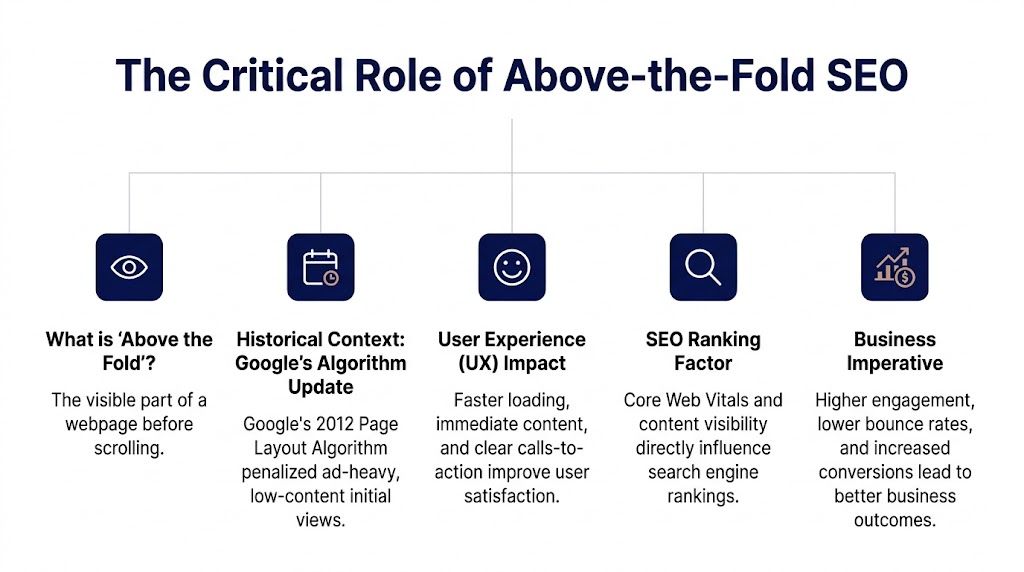
Google made this issue explicit a long time ago. Its Page Layout Algorithm update in 2012 penalized sites that pushed meaningful content down the page with excessive ads, affecting about 3% of search results according to WebFX’s SEO timeline covering the update. That was the moment above-the-fold quality stopped being a soft UX recommendation and became a ranking concern.
Search engines need immediate clarity
Search engines don’t evaluate a page the way a designer does. They look for signals that establish page purpose and user value. If the first screen is dominated by ads, oversized media, or generic banners, the page sends a weak relevance signal.
That’s why the first viewport needs visible unique content, not just a large background image with vague copy. On landing pages especially, the heading and nearby text should explain the topic in plain language. A homepage can get away with more brand-led presentation. A search landing page usually can’t.
Users judge the page before they scroll
People don’t need a full session to decide whether a page is worth their time. They make that call almost immediately. In client audits, the recurring pattern is obvious. When the first screen is cluttered, slow, or visually unstable, engagement weakens before content quality has any chance to help.
Three things usually damage trust fastest:
| Failure in the first viewport | What users experience | What teams usually caused |
|---|---|---|
| Visual delay | Blank or incomplete hero | Render-blocking CSS, JS, font delays |
| Content mismatch | They can’t tell what the page is about | Generic headlines, over-designed banners |
| Layout instability | Buttons and text jump while loading | Missing dimensions, late-loaded components |
Core Web Vitals start at the top
The metrics teams obsess over are often first-viewport metrics in disguise. LCP is usually a hero image, large heading block, or featured media. CLS often starts with banners, web fonts, sticky bars, and image wrappers that don’t reserve space. Input delay gets worse when the page asks the browser to execute too much JavaScript before users can interact.
The fastest path to a stronger page experience is usually to simplify what happens before the first scroll.
That’s why above-the-fold work pays off across SEO, UX, and conversion. It forces teams to remove noise from the most expensive part of the page.
Diagnosing Common Above the Fold Performance Issues
Many organizations don’t have an above-the-fold strategy problem. They have a diagnosis problem. They know the page feels slow or unstable, but they’re fixing the wrong layer. They compress images while a consent manager blocks render. They defer scripts while the heading still waits on a custom font.

Google’s page layout guidance has also made the content issue clear. Pages can lose ground when the visible area is overloaded with ads or lacks enough useful content, and that problem gets sharper on mobile where the fold may be only 300 to 500 pixels tall. Green Flag Digital also notes that top-ranking pages typically show unique, descriptive headings in that first visible area, which is exactly what many WordPress builds bury under visual chrome or promotional overlays in their analysis of above-the-fold SEO.
Start with a throttled human review
Before opening Lighthouse, load the page on a throttled connection and watch it like a user.
Look for these symptoms:
- Blank first paint. The viewport stays empty, then snaps in. Usually blocked by critical CSS or server delay.
- Flash of invisible or unstyled text. Fonts arrive late, or CSS for the hero comes in after the HTML.
- Hero shift. Text, buttons, or media jump downward as images, banners, or carousels initialize.
- Dead first interaction. The button appears clickable but doesn’t respond right away because the main thread is busy.
- Content buried under overlays. Cookie bars, sticky promos, announcement strips, and app widgets consume the first viewport.
Match the symptom to the cause
A simple mapping keeps teams from guessing.
| Symptom | Likely cause | First fix to test |
|---|---|---|
| Text appears late | Web font blocking or CSS delay | Use safer font loading and inline critical CSS |
| Hero image paints too slowly | Oversized media or missing preload | Resize, compress, and preload the correct hero asset |
| CTA jumps after load | Missing reserved dimensions | Set width, height, and stable container sizing |
| Page feels loaded but unusable | Heavy JS hydration or third-party scripts | Defer non-essential scripts and reduce initial JS |
If you need a plain-English refresher on what Largest Contentful Paint (LCP) measures and why it often maps directly to the hero area, that resource is useful for aligning dev and marketing teams before changes start.
WordPress-specific red flags
In WordPress, the top offenders usually come from familiar sources:
- Page builders or block stacks that inject large front-end CSS and JS payloads
- Slider plugins that preload multiple images and initialize late
- Header builders with sticky behavior, search drawers, and account/cart fragments
- WooCommerce widgets that fetch dynamic elements before the first screen stabilizes
- Marketing tags loaded globally instead of conditionally
A proper audit should isolate those dependencies early. A structured technical website audit for peak performance helps with this. Not because audits are glamorous, but because above-the-fold fixes fail when nobody knows what owns the render path.
If your first viewport depends on five plugins, two tag managers, and a font CDN, your design isn’t the primary problem.
A Prioritized Above the Fold Optimization Checklist
Most performance checklists bury the important fixes under a pile of generic advice. That’s backwards. Above-the-fold optimization should be done in order of render impact. You start with what paints the first viewport. Everything else comes later.
The strategic reason is simple. In a search market where Google holds 92% share, and where 60%+ of users abandon slow-loading sites, the first screen has to do useful work immediately according to Post Affiliate Pro’s overview of the above-the-fold concept and its SEO evolution.

1. Inline critical CSS for the first viewport
If the browser has to fetch a large stylesheet before it can paint the hero, you’ve already lost time. Critical CSS solves that by embedding only the styles needed for the initial viewport directly in the document head.
This should cover the header, hero layout, key typography rules, button styles, and image wrappers. Not the full site.
What works
- Small, targeted critical CSS generated per template
- Separate handling for homepage, landing page, product page, and article templates
- Regular review after theme updates so stale rules don’t pile up
What fails
- Inlining giant chunks of the full stylesheet
- Generating critical CSS once and never validating it again
- Letting plugin styles override the inlined layer and trigger repaint
2. Preload only the assets that must render first
Preload is powerful when used sparingly. It’s harmful when teams point it at everything.
For most WordPress pages, the preload shortlist is short:
- The hero image if it’s the likely LCP element
- One primary font file if the heading depends on it
- Possibly one key stylesheet if your setup can’t inline enough CSS cleanly
If you’re working through broader infrastructure issues at the same time, this guide on how to optimize website performance is a useful companion because it frames preload and asset prioritization inside the larger stack, not as isolated tricks.
3. Fix hero media before touching smaller images
The biggest image in the first viewport deserves its own workflow. Don’t treat it like every other asset.
Use the correct intrinsic dimensions, modern formats where appropriate, responsive srcset, and a container that preserves layout before the image arrives. Avoid background-image heroes when a regular image element gives you better control over priority and sizing.
Field note: The fastest hero is often a simpler hero. Replacing a motion-heavy composite with one well-sized image and live text usually improves both stability and clarity.
A practical walkthrough helps here:
4. Make font loading boring
Fancy typography causes a lot of fake polish and real delay. If the hero headline uses a heavy font family with multiple weights, the browser may wait, swap late, or shift the layout after text paint.
Use fewer files. Prefer stable fallback stacks. Set font-display: swap when custom fonts are necessary. Measure the visual result, not just the config.
5. Defer JavaScript that does not help the first viewport
Every script loaded before the first interaction competes with rendering and interactivity. On WordPress sites, common offenders include analytics stacks, chat widgets, carousels, review apps, animation libraries, and deferred-but-still-early bundle hydration.
Keep only what the first viewport needs. Defer the rest. On many projects, the right answer is not smarter sequencing. It’s deleting features that nobody needed at load.
6. Strip clutter from the top of the page
This is not just a speed issue. It’s a relevance issue.
Reduce competing elements in the first screen:
- Limit banners: stacked promo strips, cookie bars, and sticky notices crowd out content
- Collapse navigation wisely: oversized menus and mega-nav content can dominate mobile
- Keep one primary CTA: two can work, five won’t
- Write a descriptive heading: the page should explain itself without scrolling
That order matters. Teams often start by tweaking images while leaving structural clutter untouched. The cleaner fix is to decide what belongs above the fold at all.
WordPress Implementation Patterns for Peak Performance
The right implementation depends on the architecture. A traditional custom theme, a Full Site Editing build, a headless front end, and a WooCommerce storefront can all achieve strong seo above the fold. They just fail in different ways.
One issue deserves more attention than it gets. Mobile folds can be 30 to 50% shorter, and if WordPress multisite implementations don’t adapt layouts per viewport, key calls to action can drop below the fold for 60% of traffic, reducing conversions by up to 30% according to TheeDigital’s discussion of why the fold still matters. That’s not just a responsive styling bug. It’s a content-priority failure.
Traditional themes and custom block themes
A well-built custom theme is still the easiest place to control first paint. You own the templates, can scope assets tightly, and can keep hero markup clean.
Good pattern:
- Server-render the heading, copy, CTA, and primary image in the template
- Enqueue only template-specific CSS where possible
- Avoid loading global animation and interaction libraries on every page
- Keep header behavior simple until after first paint
Weak pattern:
- Theme options panels that let editors stack badges, ribbons, sliders, and video backgrounds in the hero
- One global stylesheet and script bundle for every template
- Header builders with multiple dependent components above the fold
If your team is tuning these builds regularly, this guide on WordPress page optimization is a good companion because it connects front-end choices to broader site speed discipline.
Gutenberg and Full Site Editing
Gutenberg can perform well. The problem isn’t the editor. The problem is undisciplined block design.
For above-the-fold sections, build blocks with these constraints:
| Block concern | Good implementation | Risky implementation |
|---|---|---|
| Styling | Scoped CSS for the block | Large shared CSS loaded sitewide |
| Content controls | Limited, purposeful options | Dozens of toggles that create bloated variants |
| Media | Explicit image sizing and focal controls | Decorative video and oversized background media |
| Scripts | No front-end JS unless required | Interactive effects initialized on load |
The strongest Gutenberg hero blocks expose content fields editors need, then lock down the rest. Every extra variation increases the chance of visual instability and payload growth.
Headless WordPress and SSR
Headless setups often look fast in component demos and then stumble in production because the first screen waits on hydration or API orchestration. If the user sees an empty shell while the JavaScript app assembles the hero, the build has missed the point.
For headless above-the-fold delivery:
- Prefer server-side rendering for the first viewport
- Send meaningful HTML immediately, including heading and supporting copy
- Hydrate selectively, not across the entire page at once
- Cache API responses that feed top-of-page content
A headless app can be excellent for seo above the fold, but only when the initial response behaves like a page, not like a loading state.
WooCommerce product and category pages
WooCommerce adds its own pressure points. Product galleries, variation selectors, dynamic pricing, trust badges, and stock messaging all compete for the first viewport.
What usually works best:
- One primary product image loaded as the hero asset
- Price and purchase context rendered immediately
- Variation logic that enhances the interface after baseline content is already visible
- Cart, wishlist, review, and recommendation widgets delayed until after first paint
The product page should be buyable before it becomes interactive in a fancy way.
That rule prevents many unnecessary regressions.
Measuring and Testing Your Above the Fold Optimizations
Above-the-fold work is easy to overestimate. The page feels better on your laptop, so the team calls it done. That’s how regressions survive into production. You need a testing stack that shows what rendered first, what blocked it, and whether real users experienced the improvement.
Use lab testing to find the obvious problems
Start with Lighthouse for quick audits. It’s not perfect, but it’s fast and good at exposing the usual suspects. Look closely at render-blocking resources, LCP candidate elements, unused CSS and JavaScript, and layout shift warnings.
For above-the-fold work, don’t just read the score. Open the opportunities and diagnostics, then compare them to the actual first viewport. A great score attached to a vague, unstable hero is still a bad result.
Use WebPageTest to see the rendering path
When a page is complicated, the filmstrip and waterfall matter more than the grade. WebPageTest shows whether the browser paints useful content early or spends the first moments negotiating scripts, fonts, and third-party assets.
A reliable review workflow looks like this:
- Run a baseline test on the primary template and key landing pages.
- Inspect the filmstrip to confirm the heading, CTA, and hero appear early.
- Read the waterfall to identify what blocked the first useful paint.
- Retest after each change instead of batching everything into one release.
Validate with real user data
Lab tests tell you what could happen under controlled conditions. Real user monitoring tells you what did happen across actual devices and networks.
For WordPress teams focused on production results, that means watching real-world Core Web Vitals, template-level changes, and release-to-release regressions. Under these conditions, a practical Core Web Vitals improvement workflow becomes useful. It gives teams a repeatable way to verify gains instead of treating performance as a one-off cleanup.
What to compare before and after
Use a short review table so stakeholders don’t get lost in tooling.
| Before and after check | What to confirm |
|---|---|
| First visible heading | Appears quickly and without shifting |
| Primary CTA | Renders in the first viewport on mobile and desktop |
| Hero media | Loads with stable dimensions and correct priority |
| JS impact | Non-essential scripts no longer delay first interaction |
| Real users | Field data trends improve after release, not just lab runs |
If the filmstrip shows a logo, a spinner, and a blank hero for too long, the page is not optimized no matter what the score says.
Agency QA and Migration Process for ATF Projects
Above-the-fold performance breaks most often during redesigns, migrations, plugin swaps, and content handoffs. The fix is process, not heroics. Agencies need a repeatable QA flow that treats the first viewport as a launch gate.
Pre-launch checks that catch most regressions
Run these checks on staging for every key template:
- Viewport review: test mobile and desktop first screens with throttling enabled
- Content review: confirm the heading is unique, descriptive, and visible immediately
- Stability review: watch for shifting buttons, cookie banners, sticky headers, and late media
- Dependency review: identify scripts, fonts, and apps loaded before first paint
- Template review: compare homepage, landing, article, category, and product templates separately
Migration-specific safeguards
Migrations create subtle ATF damage. CDN paths change. image sizes regenerate differently. old CSS assumptions stop matching new markup. plugin bundles expand. Teams should freeze a visual and performance baseline before moving anything, then compare the new build against that baseline on the same template set.
A lightweight handoff checklist also helps:
- Record the intended first viewport content for each template
- Document asset priority decisions so later teams don’t preload the wrong files
- Set alerts for regressions after launch when plugins, tags, or content edits change the top of the page
Reporting this work to clients
Clients rarely care about “critical CSS” as a phrase. They care that users can understand the page faster, that search visibility is protected, and that high-intent traffic isn’t wasted on a weak first impression.
The cleanest way to communicate value is to tie the work to three outcomes:
- Faster first view
- Clearer relevance for search landing pages
- Fewer performance regressions after launch
That framing keeps the conversation commercial without overselling the mechanics.
If your team needs senior WordPress engineers to clean up first-viewport performance, stabilize migrations, or build faster Gutenberg, WooCommerce, multisite, IMADO is built for that kind of work. They help agencies and in-house teams ship WordPress platforms that stay fast, scalable, and SEO-ready under real production pressure.
Let’s build something exceptional
Tell us about your project – we’ll help you launch a fast, scalable, SEO-optimized WordPress platform built for growth.