
 Ask Chatgpt to summarize Choose Your WordPress Website Management Service 2026
 Ask Grok to summarize Choose Your WordPress Website Management Service 2026
 Ask Claude to summarize Choose Your WordPress Website Management Service 2026
 Ask Perplexity to summarize Choose Your WordPress Website Management Service 2026
 Ask Gemini to summarize Choose Your WordPress Website Management Service 2026

Your website usually doesn’t fail on a quiet Tuesday. It fails during a launch, right after a paid campaign goes live, or the morning a stakeholder asks why checkout is suddenly broken. That’s when many teams discover their “maintenance plan” was really just occasional plugin updates and a backup they’ve never tested.
Table of Contents
A proper WordPress website management service isn’t a janitorial task. It’s operating support for a business asset that affects revenue, lead flow, customer trust, and internal team efficiency. If your site publishes constantly, sells products, runs multilingual content, or supports multiple stakeholders, you’re not buying updates. You’re buying risk reduction, response capacity, and technical judgment.
Beyond Keeping the Lights On
A common pattern looks like this. A business builds a WordPress site, hands basic upkeep to a marketer or a generalist developer, and assumes that’s enough until something breaks. For a while, it works. Then a plugin conflict takes down a landing page, a form stops sending leads, or a security issue forces an emergency cleanup at the worst possible time.

That’s the moment when maintenance stops being an IT chore and becomes an operational issue. The site isn’t just “up” or “down.” It’s tied to campaigns, sales, SEO visibility, editorial publishing, integrations, and customer experience. A weak support model shows up as missed revenue, slower execution, and preventable firefighting.
The scale of WordPress makes this a mainstream business problem, not a niche one. Pantheon reports that 43.5% of all websites worldwide run on WordPress, and there were 1.19 billion websites online as of March 2025. Pantheon also notes that WordPress is available in over 200 languages, which explains why management demand exists across markets, teams, and business sizes, not just among small publishers (Pantheon WordPress statistics).
What strategic management actually means
A serious service covers the basics, but it also answers harder questions:
- Who owns incident response when the site fails outside business hours?
- How are updates tested before they touch production?
- What gets monitored besides uptime?
- How quickly can the site be restored if an update, breach, or human error causes damage?
- Who translates technical issues into business impact for marketing, operations, or leadership?
Practical rule: If a provider only talks about updates, backups, and malware scans, they’re describing tasks. You still need to know how they operate under pressure.
Strategic management also means matching service depth to site importance. A brochure site and a WooCommerce store don’t need the same support model. A franchise multisite network and a single marketing site don’t need the same escalation path. If you’re evaluating options, this is the right place to start with a broader view of managing WordPress sites.
The Core Components of a Management Service
Treat a WordPress website like a high-performance vehicle. Basic upkeep keeps it legal to drive. A pit crew keeps it competitive under load. Many providers sell the first category while implying they deliver the second.
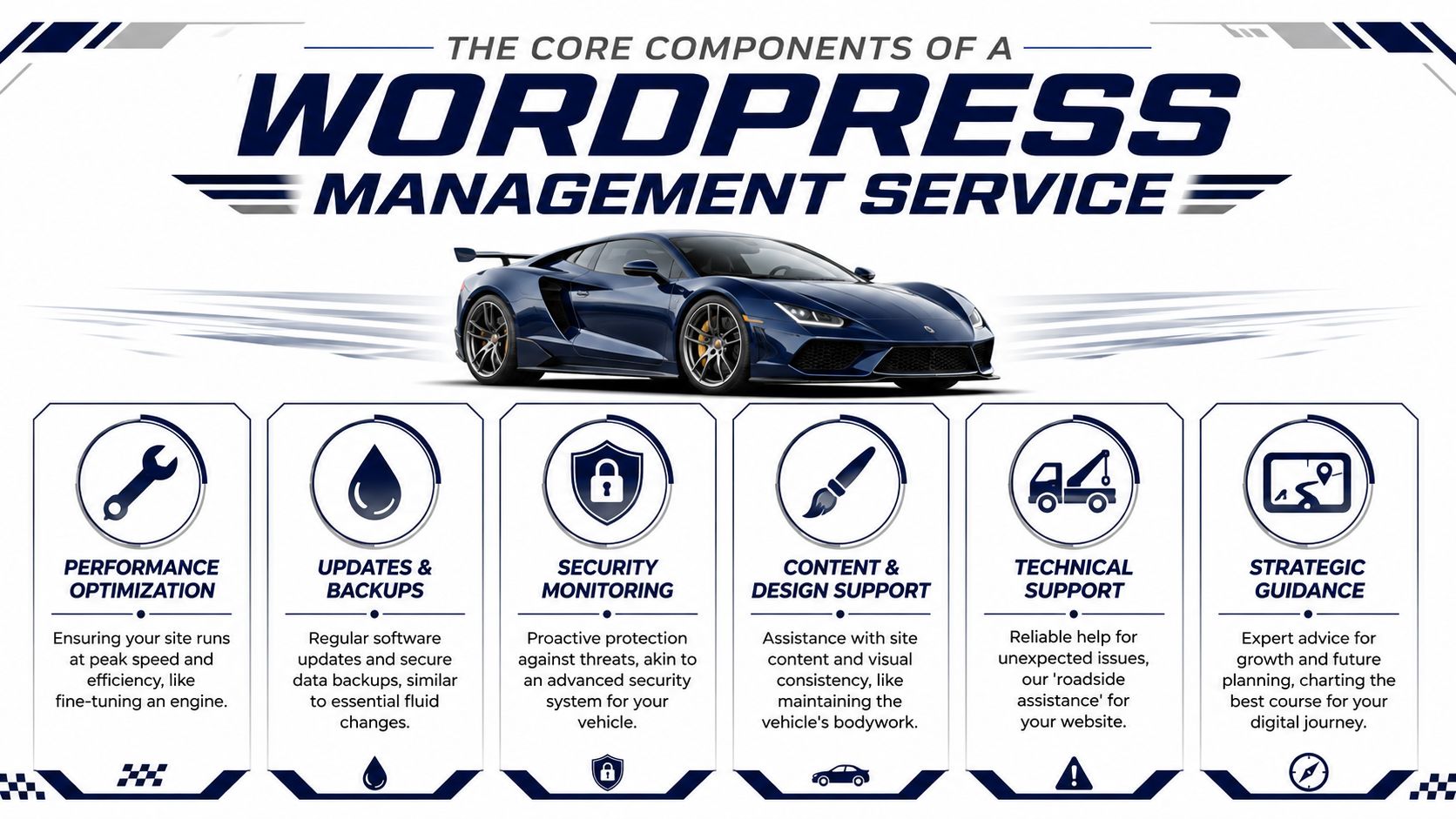
A credible WordPress website management service has several distinct components. If one is missing, the gaps usually appear later as downtime, sluggish performance, broken publishing workflows, or expensive emergency work.
Updates and patching
This is the minimum bar, but it still requires judgment. WordPress core, theme, and plugin updates can introduce breaking changes, especially when the site uses custom code, page builders, WooCommerce extensions, multilingual plugins, or API integrations.
A mature provider doesn’t just “run updates.” They sequence them, test them, and know when to hold back. They also track deprecated code, abandoned plugins, and compatibility risk. The business value is simple: fewer surprise outages and less production instability.
Security hardening and active defense
Security isn’t one scan per month. Good providers reduce attack surface, harden configurations, monitor suspicious activity, and respond when something looks wrong. They also clarify scope. Some firms handle application-level hardening only. Others coordinate with the host on server-side controls and recovery.
Look for practical security habits:
- Principle of least access: Not every editor or contractor should have the same privileges.
- Plugin discipline: Fewer plugins, from better vendors, usually means fewer problems.
- Change visibility: You want to know what changed, who changed it, and whether it triggered a problem.
Cheap plans often cover routine care. They usually become thin the moment you need urgent support, debugging, customization, or commerce-specific help.
Backups and disaster recovery
Backups are only useful if they’re recent, intact, accessible, and restorable. Buyers often ask whether backups exist. The better question is whether the provider has a recovery process they’ve rehearsed.
A management partner should define where backups live, how restores are performed, what happens if the host backup fails, and who approves rollback decisions. For stores and content-heavy sites, restoration planning matters because you may not want a full blunt rollback if orders, memberships, or editorial changes happened after the backup point.
Uptime and issue monitoring
Uptime monitoring sounds straightforward, but its value depends on response workflow. If a system sends an alert and nobody acts on it quickly, monitoring is just noise.
The provider should tell you:
| Monitoring area | What matters |
|---|---|
| Availability | Who gets alerted and when |
| Functional checks | Whether forms, checkout, login, or search are tested |
| Error visibility | How PHP errors, fatal conflicts, and failed cron tasks are surfaced |
| Escalation | What triggers emergency response versus next-business-day handling |
That operational clarity is what separates commodity support from service you can trust.
Here’s a useful visual walkthrough before going deeper into vendor evaluation:
Performance tuning as architecture
Many services commonly fall short in this area. Performance isn’t solved by installing a caching plugin and calling it done. Codeable’s guidance is the right framing: specialists treat performance as an architectural problem. That often includes tuning object caching with Redis or Memcached, dequeuing unnecessary CSS and JavaScript, and moving anonymous traffic to CDN edge caching so origin servers handle fewer requests. The effect is fewer database round-trips, lower render-blocking assets, and better resilience during traffic spikes (Codeable on WordPress development services).
That matters because business teams don’t buy milliseconds. They buy pages that load consistently during campaigns, category pages that don’t choke under product filters, and editorial dashboards that stay usable as content volume grows.
Support for complex WordPress setups
Not all WordPress estates are equal. Complexity rises quickly with:
- WooCommerce stores with payment, fulfillment, tax, or ERP integrations
- Multisite networks where one change can affect many properties
- Multilingual builds with translation workflows and duplicated content logic
- Custom Gutenberg or theme code that can’t be treated like an off-the-shelf template
If that describes your environment, a generic support desk won’t be enough. You need a partner that can combine maintenance with senior engineering judgment. That’s the gap many teams try to close through WordPress maintenance and support.
Choosing Your Service Model
Most procurement mistakes happen because buyers choose by package label instead of operating model. The right service depends less on the task list and more on who owns the website internally, how often priorities change, and how expensive delays are.
A founder-led business often needs predictability. An in-house marketing team may need escalation support without handing over full control. An agency may need delivery capacity under its own brand. These aren’t the same engagement.
The four common models
Retainer management fits teams that want recurring care, regular monitoring, and a known monthly spend. It’s the most common choice for sites that need ongoing attention but not a dedicated engineer in every weekly meeting.
On-demand support works when your internal team handles daily work and only needs specialist help for incidents, performance issues, or complex changes. This model can be efficient, but it can also fail if no one owns the queue internally.
Staff augmentation is the better fit when your business already has product, marketing, or engineering leadership and needs a senior WordPress specialist plugged into existing workflows. You’re buying capability, not just task completion.
White-label delivery is built for agencies that want to scale WordPress support without building a full internal engineering bench. It works well when account management stays in-house and execution is delegated to a specialist partner.
WordPress Management Service Model Comparison
| Service Model | Best For | Cost Structure | Key Benefit |
|---|---|---|---|
| Retainer | Businesses that want ongoing care and predictable support | Recurring monthly fee | Stability and routine coverage |
| On-demand support | In-house teams that need expert help only when needed | Variable, based on scope or time | Flexibility |
| Staff augmentation | Teams that need senior engineering capacity inside existing processes | Recurring engagement tied to dedicated capacity | Deep technical ownership |
| White-label | Agencies scaling client delivery | Recurring or blended agreement | Capacity without hiring overhead |
Matching the model to your operating reality
A retainer sounds safe, but it can become frustrating if your site needs frequent small improvements and the contract only covers maintenance tasks. On-demand sounds efficient, but it often creates delays because every issue must be scoped, approved, and queued after the problem appears.
The right question isn’t “what’s included?” It’s “what happens when priorities change on a Thursday afternoon and production can’t wait until next week?”
Staff augmentation is often undervalued by internal teams because it doesn’t look like a maintenance plan. In practice, it can be the strongest option when your WordPress stack includes custom integrations, accessibility work, Core Web Vitals pressure, or stakeholder-heavy release cycles. You get continuity without recruiting, onboarding, and retaining a niche senior hire.
White-label support has its own trade-offs. It can improve agency margin and delivery reliability, but only if responsibilities are clear. The agency should own client communication and scope. The delivery partner should own execution standards, documentation, and escalation discipline. If those lines blur, the client feels the confusion immediately.
Decision criteria that matter more than package names
Use these filters before comparing vendors:
- Internal ownership: Does someone on your team manage backlog, approvals, and priorities?
- Change frequency: Are you mostly maintaining, or are you constantly iterating?
- Business criticality: What happens if the site fails during a campaign or sale?
- Technical complexity: Are you running custom code, commerce workflows, multilingual setups, or multisite?
- Client-facing delivery: If you’re an agency, do you need invisible execution under your brand?
If you’re comparing recurring options, a practical starting point is to review different WordPress website maintenance plans and then assess whether they align with your actual operating model, not just your wish list.
Pricing Management Services and Calculating ROI
Price matters, but price alone is a poor buying lens for WordPress management. A low monthly fee can be perfectly adequate for a low-risk site. The same fee can be dangerously inadequate for a revenue-driving store, a multilingual publisher, or a site that supports multiple campaigns and integrations.
The market ranges widely. FatLab says entry-level WordPress management typically starts at $99 to $199 per month for a single site, with mid-tier plans at $200 to $500 per month, while enterprise-level management can reach $500 to $2,000+ per month depending on complexity and support needs. The same market overview also notes that WordPress maintenance can range from $30 to $5,000+ per month in 2026, and WooCommerce retainers often fall in the $500 to $3,000 per month range (FatLab overview of WordPress management services).
What actually drives the cost
Two sites can both “run on WordPress” and have radically different support requirements. Pricing usually moves based on a few practical variables.
- Site complexity: Custom themes, custom plugins, integrations, and editorial workflows increase testing and troubleshooting time.
- Commerce requirements: WooCommerce adds operational sensitivity. Payments, shipping, taxes, product syncs, and checkout stability raise the bar.
- Support expectations: Business-hours support is different from rapid incident handling and continuous monitoring.
- Change volume: A stable site costs less to manage than a site under constant iteration by multiple stakeholders.
TCO is the real procurement lens
Most buyers underestimate total cost of ownership because they compare a monthly retainer to a line-item salary or to “doing it ourselves.” That misses the hidden costs of fragmented ownership.
Internal management often looks cheaper until these issues pile up:
- Context switching: Marketers or product managers lose time to plugin conflicts, broken forms, or release coordination.
- Emergency sourcing: The team scrambles to find a developer only after something fails.
- Technical debt accumulation: Delayed cleanup turns small issues into brittle architecture.
- Unclear accountability: Hosting blames plugins, plugins blame custom code, and nobody owns resolution.
Recent maintenance-service roundups also point to a useful procurement reality. Low-cost plans can cover routine updates, but emergency support, customization, SEO and performance work, and e-commerce support often show up only in premium tiers. Many businesses underbuy support until the cost of inaction is higher than the monthly fee would have been.
Buy versus build
The buy-versus-build question is usually less about salary and more about skill mix. Routine updates can be handled by junior or mid-level resources. The expensive work appears when a plugin update collides with custom code, a performance bottleneck spans theme logic and hosting, or a checkout issue touches integrations and caching.
That’s why many teams outsource even when they have internal developers. They don’t need another generalist. They need intermittent access to senior WordPress judgment. That can be cheaper than staffing for edge cases full-time, especially when the site isn’t your core product.
For budget planning, use your likely risk profile, change frequency, and site complexity to frame the investment. Then compare that against the broader WordPress website maintenance cost, not just the sticker price of a basic plan.
Evaluating Providers SLAs and Reporting
Most proposals look similar at first glance. Updates. Backups. Security scans. Support. The primary difference appears in two places: the SLA and the reporting model. That’s where you learn whether the provider is selling reassurance or operational accountability.
For revenue-critical WordPress environments, the usual checklist is not enough. Independent enterprise guidance highlights a gap in the market: many maintenance discussions stop at routine tasks and don’t address how service should change for sites that need 24/7 uptime, incident response, and hosting-level resilience requirements. That guidance emphasizes continuous support, proactive monitoring, and disaster recovery for enterprise WordPress operations (HSW Solutions on maintenance planning).
What an SLA should answer
A weak SLA says the provider will “respond quickly.” That’s not useful. A stronger SLA explains what qualifies as critical, how incidents are prioritized, who gets paged, and what the communication pattern looks like while the issue is active.
Ask these questions directly:
- Severity definitions: What counts as critical, high, medium, or low priority?
- Response versus resolution: How fast do they acknowledge an issue, and what’s the path to actual resolution?
- Escalation process: When does an issue move from support to senior engineering?
- Dependency boundaries: What happens if the host, payment gateway, or third-party integration is involved?
- Recovery authority: Who approves rollback, restore, or temporary mitigation decisions?
Reporting that helps decisions
A commodity provider sends an activity log. “Updated plugins, ran backups, scanned for malware.” That’s fine for proof of work, but it doesn’t help management teams decide anything.
A stronger report should translate technical activity into operational meaning. It should identify recurring issues, highlight changes in performance or security posture, note unresolved risk, and recommend next actions. If the site is central to marketing or commerce, reporting should also support prioritization. Which issue needs engineering time first? What can wait? What creates exposure if ignored?
If reporting can’t help you decide what to fix next, it’s bookkeeping, not management.
How to separate a partner from a commodity vendor
Use the sales process as a test. Ask for a sample monthly report, an anonymized incident summary, and a plain-English explanation of their escalation workflow. Serious providers can show their process. Generic providers usually revert to a feature list.
Also listen for ownership language. Good partners speak clearly about what they do, what the host does, what falls to your team, and how handoffs work. Ambiguity creates delays. Delays create outages that last longer than they should.
The Onboarding Process A Checklist for Success
A good onboarding process reduces risk before the provider touches production. A bad one starts with admin access and vague assumptions. That’s how teams end up with duplicate plugins, undocumented cron jobs, and support engagements that feel messy from week one.
The smoothest transitions are collaborative. Your team brings history, constraints, and business priorities. The provider brings audit discipline, technical process, and documentation.
The first steps
Discovery and goal setting
The provider should ask how the site supports the business. Campaign engine, content hub, lead generation, commerce, franchise network, internal publishing platform. The answer changes what gets monitored and how incidents are prioritized.Credential collection with clear boundaries
Access should be secure, minimal, and documented. Production, hosting, DNS-related contacts, CDN, backup tools, repository access, analytics, and transactional email systems may all matter, depending on scope.Initial technical audit
This should identify theme and plugin condition, PHP compatibility concerns, custom code risk, backup posture, performance bottlenecks, cron behavior, user-role sprawl, and staging gaps.
A professional onboarding doesn’t rush to “optimize.” It first maps what exists, what’s fragile, and what can safely change.
What should happen before changes begin
A provider should establish a safe workflow before touching business-critical systems.
- Staging readiness: Updates and fixes should be tested off production where possible.
- Backup verification: Recovery options should be confirmed, not assumed.
- Monitoring setup: Alerts need to route to the right people.
- Scope confirmation: Everyone should know what is and isn’t included.
This is also the right moment to align on communication. If your internal team needs a template, this guide to planning your project kickoff is useful because it helps clarify decision-makers, responsibilities, timelines, and expectations before technical work starts.
What clients should prepare
The best onboarding outcomes usually come from clients who bring context, not just passwords.
- Known issues list: Past outages, recurring plugin conflicts, slow admin screens, checkout bugs, or unstable integrations.
- Business calendar: Planned campaigns, launches, blackout dates, and periods when change freezes apply.
- Approval paths: Who can authorize updates, restores, or emergency intervention.
- Existing vendors: Host, SEO agency, analytics team, paid media partner, internal developers.
One practical example in this category is IMADO, which offers recurring WordPress maintenance, uptime monitoring, security checks, and performance support as part of broader engineering engagement options. That kind of model can work well when onboarding needs to connect routine maintenance with deeper development capacity, rather than treating them as separate silos.
The first month should produce clarity
By the end of onboarding, you should have a baseline. That includes documented risks, communication channels, escalation expectations, and a prioritized list of issues or improvements. If the provider can’t produce that early clarity, the relationship will likely stay reactive.
Measuring Success with Case Examples
Success looks different depending on what the website does for the business. That’s why generic promises about “peace of mind” aren’t enough. The right WordPress website management service should improve the outcomes that matter to your operating model.
Agency example
An agency sells strategy, design, and campaign work, but delivery keeps getting interrupted by client support tickets, plugin conflicts, and small production fixes. The internal team spends too much time on low-margin maintenance and not enough on higher-value work.
The agency uses a white-label management partner for recurring care, incident handling, and overflow development. Success isn’t measured by how many plugins got updated. It’s measured by cleaner delivery, fewer client escalations, stronger retention, and healthier margins on WordPress accounts.
E-commerce example
A WooCommerce merchant has a stable store most weeks, but promotions expose weak spots. Caching is inconsistent, plugin updates feel risky, and checkout issues create immediate commercial pressure.
The merchant moves to a management model with stronger testing discipline, commerce-aware update workflows, and deeper performance support. The useful KPIs here are operational ones: fewer checkout incidents, faster issue triage, more stable release cycles, and better page-speed consistency on revenue-driving templates.
For stores, the win isn’t “maintenance completed.” The win is selling through a busy period without technical drama.
In-house marketing team example
A marketing department owns content and campaigns, but not senior WordPress engineering. They can publish, manage pages, and handle day-to-day work. What they can’t do reliably is debug plugin conflicts, audit custom code, or diagnose why a site feels slow after several rounds of layered changes.
An on-demand or staff-augmentation model often works better than a basic care plan here. The team keeps control. The partner fills the specialist gap. Success shows up as faster campaign execution, fewer blocked launches, and less dependence on ad hoc freelancers.
Enterprise or multisite example
A multi-location brand runs a more complex WordPress estate. Multiple sites, multiple editors, localization requirements, and higher uptime expectations create a different support burden. Routine maintenance is still necessary, but it’s no longer the whole job.
Underbuying support becomes expensive. Recent service roundups support a contrarian but familiar point: low-cost plans often cover routine updates, while premium tiers typically include emergency support, customizations, SEO and performance work, and e-commerce support. Teams that choose only for price often discover too late that they purchased maintenance without operational coverage.
The procurement decision, then, is straightforward. Buy the level of service that matches the role your site plays in the business. If the website is central to sales, lead generation, publishing, or brand operations, management should be treated as part of platform strategy, not as a leftover line item.
If you’re reviewing options for a WordPress website management service, IMADO is worth considering when you need more than routine upkeep. The team supports ongoing maintenance, on-demand engineering, staff augmentation, and white-label delivery, which makes it a practical fit for agencies, in-house teams, WooCommerce operators, and organizations running complex WordPress environments.
Let’s build something exceptional
Tell us about your project – we’ll help you launch a fast, scalable, SEO-optimized WordPress platform built for growth.