 Ask Chatgpt to summarize WordPress Custom Post Types: A Guide for Agencies
 Ask Grok to summarize WordPress Custom Post Types: A Guide for Agencies
 Ask Claude to summarize WordPress Custom Post Types: A Guide for Agencies
 Ask Perplexity to summarize WordPress Custom Post Types: A Guide for Agencies
 Ask Gemini to summarize WordPress Custom Post Types: A Guide for Agencies
You’re probably dealing with one of two situations.
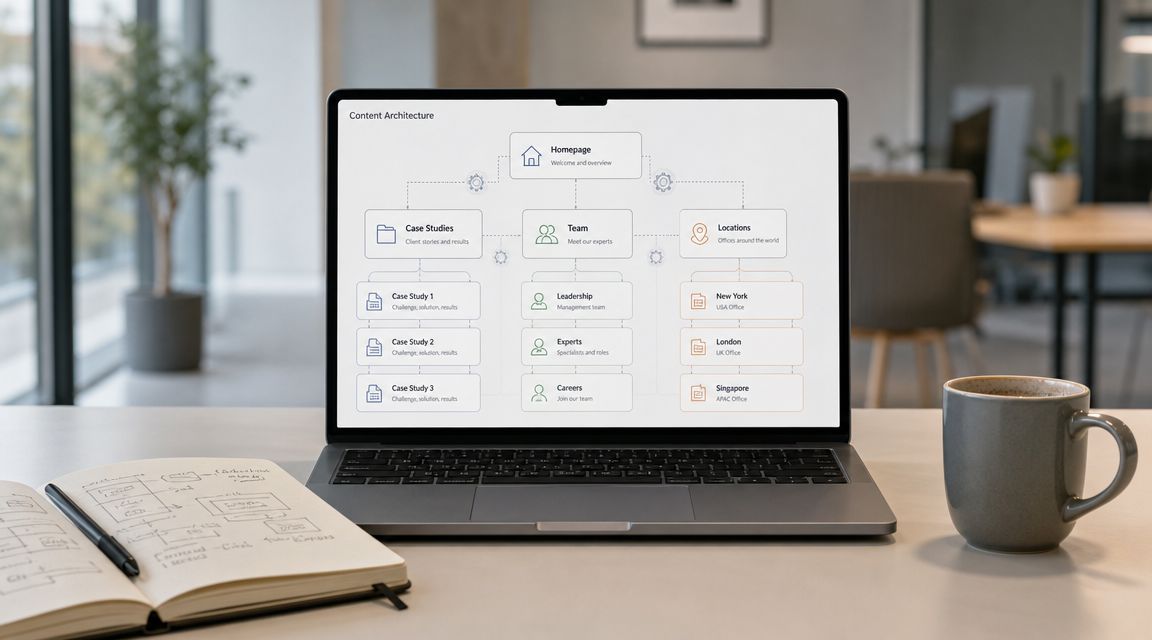
Either a client has outgrown the default WordPress setup and now wants sections like Case Studies, Team Members, Office Locations, Testimonials, Careers, or Products. Or you inherited a site where someone forced all of that into Posts, Pages, categories, parent pages, and a tangle of conditional templates that nobody wants to touch.
That’s the point where WordPress custom post types stop being a nice developer feature and start becoming an architecture decision. If you model content correctly, editors get a cleaner admin, developers get predictable templates, and the site stays maintainable when the brief changes six months later. If you model it badly, every new requirement multiplies complexity across templates, queries, SEO rules, and editorial training.
Custom post types matter because they let WordPress behave like a real content platform instead of a blog with hacks layered on top. WordPress core supports them directly through the Post API and register_post_type(), and when registered correctly WordPress automatically creates admin menu items and management screens for them, which is a major reason they work well for real editorial workflows, not just proof-of-concept builds (Learn WordPress on custom post types).
For agencies and in-house teams, that changes the conversation. A CPT isn’t just “how we store this content.” It affects how editors publish, how templates are organized, how archives are indexed, how APIs expose content, and how painful a redesign will be later. That’s why experienced WordPress teams treat CPT design early, usually during discovery or technical planning, not after the homepage is approved.
Table of Contents
Beyond Posts and Pages
A familiar project pattern starts with a harmless shortcut. Case Studies go into Posts with a category. Team Members become child pages under About. Office Locations get their own page template and a few custom fields. It ships, but six months later the admin is confusing, templates are full of exceptions, and routine requests such as “add filtering,” “change URLs,” or “send this content to the API” turn into rework.
That is usually a content model problem, not a development speed problem.
Posts and Pages are generic containers. They work well until a content type needs its own rules. As soon as a case study, staff profile, or location has different fields, archive behavior, permissions, template logic, or search intent, forcing it into the built-in types creates friction across the whole stack. Editors feel it first in the admin. Developers feel it next in queries and templates. SEO and analytics teams feel it when URLs, archives, and metadata need different treatment by content type.
What a CPT solves in practice
A custom post type gives that content a first-class place in WordPress. Instead of teaching editors that team profiles live under a specific parent page or that testimonials are really posts with a special category, you register content for what it is. Team Members. Locations. Case Studies.
That decision improves more than the admin menu.
- Editorial clarity. Each content type gets its own entry point, labels, workflows, and validation rules.
- Template discipline. Developers can build around a known content model instead of stacking conditionals into
page.php,single.php, or archive queries. - Governance and permissions. Capabilities, taxonomies, revision strategy, and field groups can be scoped to the right object.
- Operational scale. New requirements stay contained. Adding a filterable archive, exposing content through REST, or changing permalink rules does not force a cleanup of unrelated content.
A simple test works well here: if content has its own lifecycle, its own editorial owner, and its own front-end presentation, it usually deserves its own post type.
For agency and enterprise work, this is an architecture choice with long-term cost attached. A poorly chosen content structure increases QA time, raises migration risk, and makes redesigns harder because business rules are buried in page hierarchies, categories, and one-off fields. A well-designed CPT strategy keeps content portable and predictable, which matters when the site grows beyond its first launch.
Why teams should make the call early
CPT decisions belong in discovery and technical planning, not after templates are already approved.
The reason is straightforward. Content structure affects URL design, archive behavior, schema strategy, REST responses, cache patterns, search relevance, and editorial training. If a team waits too long, they often end up protecting an early shortcut with custom queries, rewrite rules, and field logic that should never have been necessary. The site still works, but it becomes expensive to change.
I have seen this show up most often on multisite, multilingual, and headless projects. The wrong model may look manageable in one theme and one language. It becomes a maintenance problem once content is syndicated, translated, indexed differently, or consumed by another application.
Custom post types matter because they let WordPress reflect the business model instead of forcing the business model into blog-era defaults. That is the difference between a site that can absorb new requirements cleanly and one that gets slower, messier, and riskier with every release.
Choosing the Right Content Structure
A content model can look acceptable in a kickoff deck and still fail once editors start publishing at scale. The usual warning signs show up fast. Search results mix unrelated content, archive pages need exceptions, templates fill up with conditional logic, and simple reporting questions turn into custom queries. Choosing between Posts, Pages, taxonomies, CPTs, and custom tables is an architectural decision that affects performance, SEO, governance, and future delivery speed.
The useful mental model is simple. Custom post types are part of content modeling, not a coding trick.
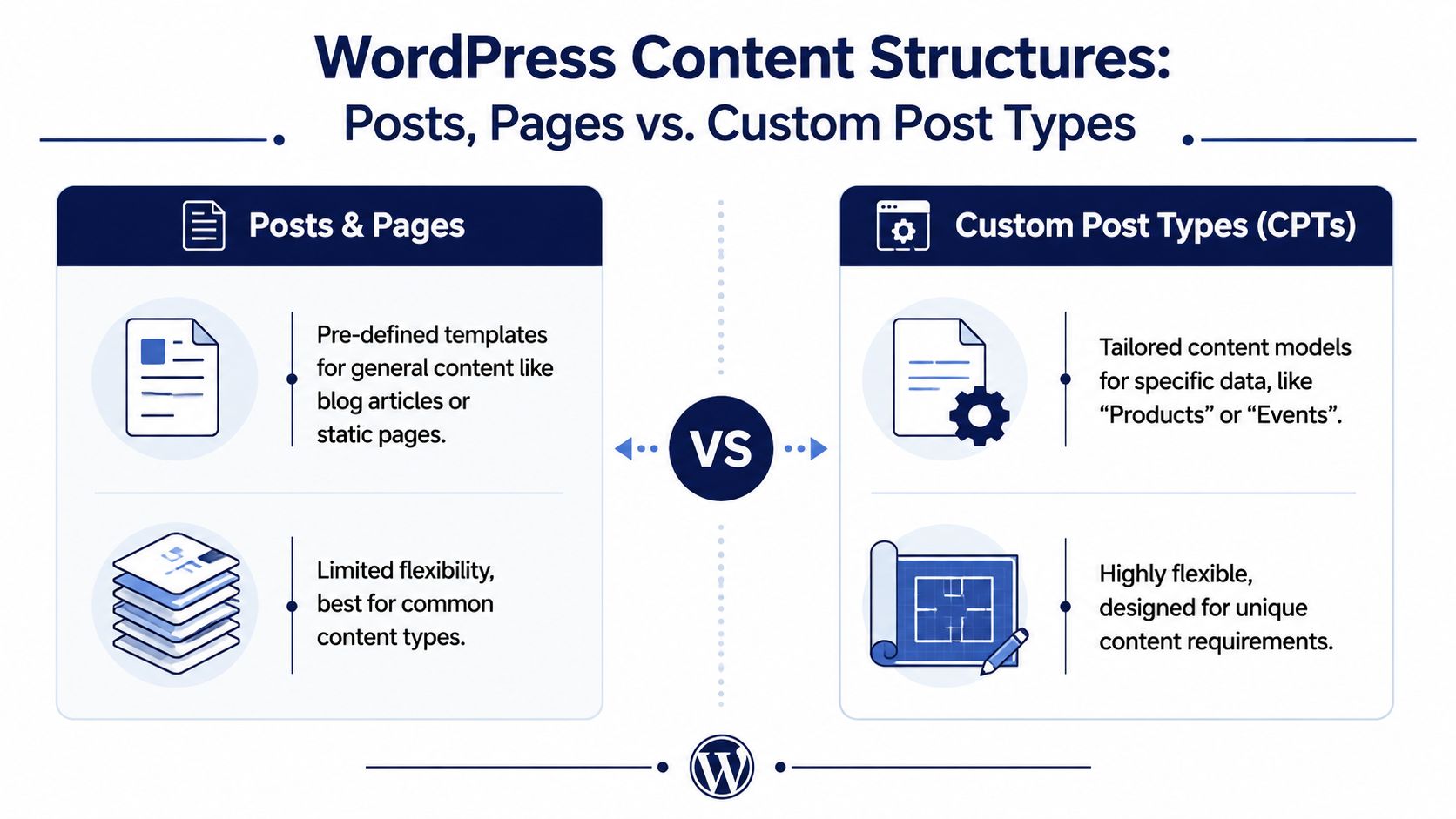
Posts and Pages are built-in content types with broad defaults. They work well for generic editorial content and static site sections. Office locations, physician profiles, case studies, product records, and job listings usually carry different fields, different archive behavior, different schema needs, and different user expectations. Treating all of that as Posts often saves time for a sprint and creates cleanup work for the next year.
Posts, Pages, taxonomies, and CPTs
Teams usually get stuck because they mix up content type with classification.
A CPT defines what an item is. A taxonomy defines how it is grouped. Posts and Pages are the built-in versions of content types. That distinction matters because it affects URLs, archives, template loading, schema markup, REST responses, and editorial permissions.
| Structure | Best use | Weakness |
|---|---|---|
| Posts | Time-based content like articles, announcements, or news | Breaks down when used for multiple unrelated content models |
| Pages | Static, hierarchical content like About, Contact, Services | Awkward for large repeatable collections and filtering |
| Custom taxonomies | Grouping content by topic, region, sector, service line, or other labels | Does not define fields, templates, or lifecycle rules |
| Custom post types | Distinct structured content like events, products, locations, team members | Requires planning for fields, rewrites, templates, permissions, and governance |
| Custom database tables | Specialized workloads with unusual storage or query patterns | Highest build cost, highest migration cost, and less compatibility with core APIs |
On enterprise and agency projects, the right choice is often the one that keeps the content model clear under growth. A CPT gives a content set its own admin space, archive strategy, field model, and template path. That usually leads to cleaner queries, more predictable editor behavior, and fewer conditional branches in theme code. It also makes a custom WordPress theme development approach more maintainable because templates can map directly to business entities instead of reverse-engineering them from categories and page trees.
When a taxonomy is enough
A new post type is not always the right answer.
If the content shares the same fields, editorial workflow, template structure, and archive logic, keep it in one post type and classify it with a taxonomy. A newsroom is a common example. Articles, interviews, and opinion pieces often remain standard Posts because the underlying structure is the same even if the labels differ.
That discipline helps SEO as well. It prevents thin archive sprawl, duplicate template paths, and URL structures that suggest a stronger content distinction than the site has.
When a custom table is justified
Custom tables have a place, but the threshold should be high.
They make sense when the data behaves more like application data than publishable content. Transaction records, inventory synchronization, booking availability, or heavily relational datasets can exceed what the posts and postmeta model handles comfortably. In those cases, forcing everything into post meta can create expensive queries, weak indexing options, and awkward admin workflows.
A custom table should be treated as the final escalation point, not the advanced default.
That trade-off is easy to underestimate. Once data moves outside the standard post model, teams lose part of the benefit of native revisions, familiar admin patterns, and broad plugin compatibility. You gain control over storage and query design, but you also take on more schema planning, more custom interfaces, and more migration responsibility.
A practical decision filter
Use this during discovery, IA planning, or technical scoping:
- Choose Posts when the content is editorial, date-driven, and fits the default publishing model.
- Choose Pages when the content is static, hierarchical, and does not need collection behavior.
- Choose a CPT when the content needs its own fields, templates, admin menu, archive, or permission rules.
- Choose a taxonomy when the main requirement is classification across one or more existing content types.
- Choose a custom table when query volume, relational complexity, or storage shape creates clear operational strain in the standard post model.
This decision affects more than the admin menu. It determines how easy the site will be to search, cache, redesign, translate, expose through APIs, and hand off to the next team.
Registering and Configuring Custom Post Types
A custom post type becomes real when you register it with register_post_type(). In production work, the question isn’t just how to make it appear in the admin. The important question is how to register it in a way that supports editing, templating, API access, portability, and future maintenance.
A CPT should be treated like a stable content contract.
Register on init and keep it out of the theme
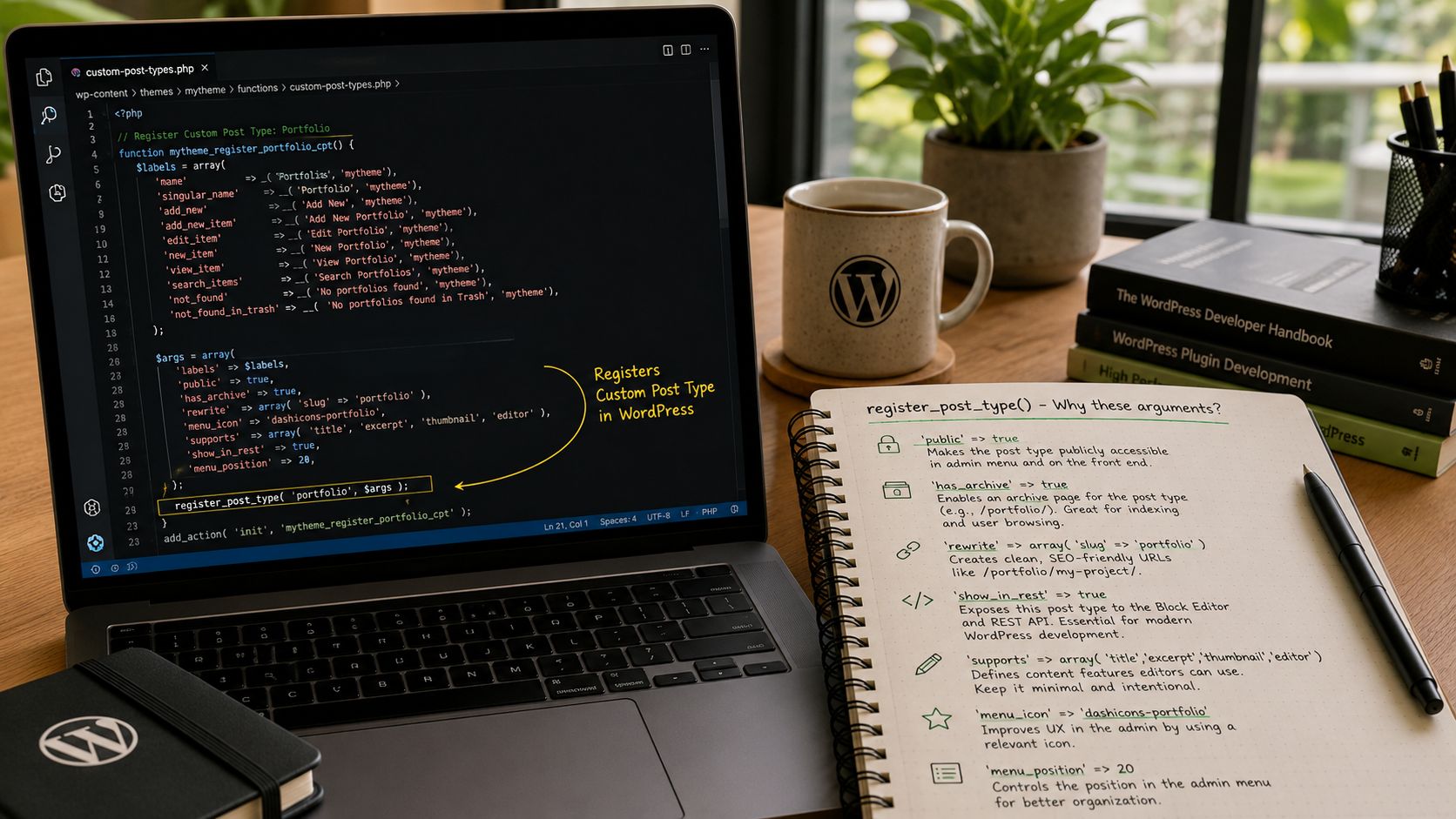
WordPress custom post types are registered programmatically with register_post_type() on the init hook, and the registration array can explicitly enable editor capabilities such as supports => ['title','editor','thumbnail'] and show_in_rest => true, which exposes the CPT to Gutenberg and the REST API. Plugin-based registration is usually safer than theme-based registration because changing themes doesn’t remove the CPT definition (Advanced Custom Fields on creating custom post types).
That last point matters more than many teams realize. If the content model lives inside functions.php, changing the theme can make the content appear to disappear from the admin. The entries are still in the database, but the site loses the registration layer that tells WordPress how to treat them.
For agency work, that’s why a site-specific plugin is usually the right home for CPT definitions. It protects data portability and keeps content architecture separate from presentation. The same reasoning often applies in broader custom WordPress theme development, where long-term maintainability depends on separating content rules from theme behavior.
A production-ready example
<?php
add_action( 'init', 'register_case_study_post_type' );

function register_case_study_post_type() {
    $labels = array(
        'name'               => __( 'Case Studies', 'your-textdomain' ),
        'singular_name'      => __( 'Case Study', 'your-textdomain' ),
        'add_new'            => __( 'Add New', 'your-textdomain' ),
        'add_new_item'       => __( 'Add New Case Study', 'your-textdomain' ),
        'edit_item'          => __( 'Edit Case Study', 'your-textdomain' ),
        'new_item'           => __( 'New Case Study', 'your-textdomain' ),
        'view_item'          => __( 'View Case Study', 'your-textdomain' ),
        'search_items'       => __( 'Search Case Studies', 'your-textdomain' ),
        'not_found'          => __( 'No case studies found', 'your-textdomain' ),
        'not_found_in_trash' => __( 'No case studies found in Trash', 'your-textdomain' ),
        'all_items'          => __( 'All Case Studies', 'your-textdomain' ),
        'menu_name'          => __( 'Case Studies', 'your-textdomain' ),
    );

    $args = array(
        'labels'             => $labels,
        'public'             => true,
        'has_archive'        => true,
        'rewrite'            => array( 'slug' => 'case-studies' ),
        'menu_icon'          => 'dashicons-portfolio',
        'show_in_rest'       => true,
        'supports'           => array( 'title', 'editor', 'thumbnail', 'excerpt' ),
    );

    register_post_type( 'case_study', $args );
}
This is a compact example, but each argument carries architectural weight.
Why these arguments matter
labels
Good labels aren’t cosmetic. They shape the admin experience for editors and reduce confusion in training and documentation. If a content type is called “Insights” on the website, the admin should say Insights, not a leftover developer name like resource_item.
public
This controls whether the post type behaves like public-facing content. If you’re creating content that should have front-end URLs, archives, and normal visibility behavior, public => true is usually right. If the CPT exists only as an internal data store, this needs more careful handling.
rewrite
The slug affects URL architecture and SEO. Decide the slug with the information architecture in mind, not just developer convenience. A URL like /case-studies/project-name/ communicates structure clearly. A vague slug chosen early and never reviewed often becomes technical debt.
supports
This should reflect actual editorial needs. If a content type doesn’t need the main content editor, don’t enable it. If it needs featured images and excerpts, include those explicitly. A lean editor is easier to govern than a generic one full of irrelevant controls.
The admin should make the right action obvious and the wrong action awkward.
Later in the build, developers pair the CPT with custom fields for structured metadata such as client name, project sector, office address, event date, or role title. The CPT defines the content model. Fields complete the schema.
After the core setup, this walkthrough can help teams see the flow in action:
show_in_rest
This is the flag too many legacy tutorials treat as optional. It isn’t optional for modern WordPress work unless you have a specific reason to avoid it.
When show_in_rest is enabled, the CPT works with the block editor and becomes available through the REST API. That matters for Gutenberg-based editing, block templates, JavaScript-driven interfaces, and decoupled builds. If you leave it off by habit, you’re cutting the CPT out of a large part of the modern WordPress ecosystem.
Common mistakes that create problems later
- Registering in the theme. Fast now, fragile later.
- Using vague slugs. Harder to fix once indexed.
- Copy-pasting giant argument arrays. Teams inherit noise instead of intent.
- Enabling every support feature. Editors get clutter and misuse fields.
- Skipping REST exposure. The content model becomes harder to reuse.
A good CPT registration is concise, deliberate, and boring in the best way. It should feel stable enough that nobody has to revisit it every sprint.
Building Templates for Your CPTs
A custom post type starts paying off only when its front end reflects the content model behind it. On large WordPress builds, template decisions affect more than presentation. They shape editorial consistency, archive quality, internal linking, crawl depth, and how expensive the site becomes to maintain after launch.
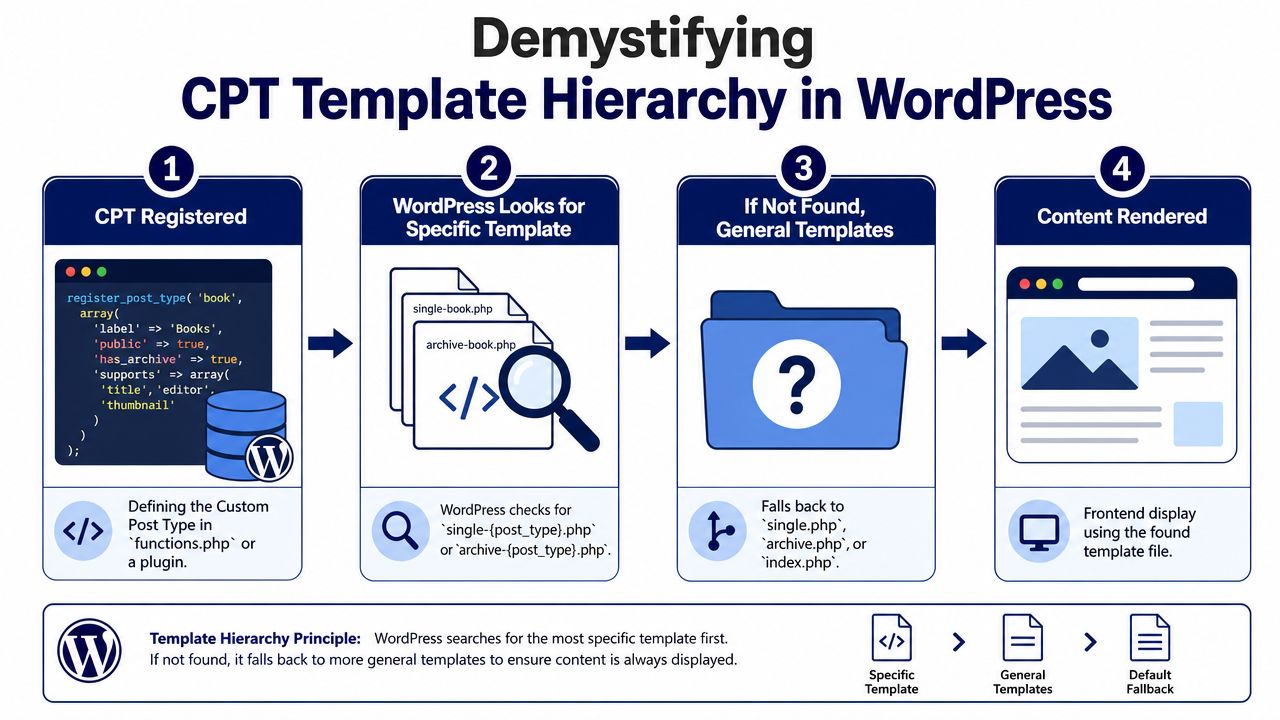
WordPress gives developers a predictable hierarchy, and that predictability is one of its strengths. Teams can map a CPT to dedicated single and archive views without inventing custom routing, then standardize that approach across projects. The result is easier QA, fewer edge cases, and less theme logic buried in one-off conditionals.
The file names that matter
For a CPT named case_study, the classic theme files that usually drive the experience are:
single-case_study.phpfor individual entriesarchive-case_study.phpfor the archive listingsingle.phporarchive.phpas fallback templatesindex.phpas the final fallback
WordPress documents this behavior in its training material on custom post types, but the practical takeaway is architectural. If the CPT represents a distinct business object, it should usually get its own template files. Reusing generic post templates saves time in sprint one and creates compromise later, especially once SEO requirements, custom fields, related content blocks, and design exceptions start piling up.
Archive templates carry more responsibility than many teams expect
Archive pages are often treated as simple listing screens. On agency and enterprise sites, they usually do much more. They become landing pages for long-tail search terms, index pages for users browsing by topic, and reusable surfaces for campaign links or internal search.
A Case Studies archive may need featured images, sector labels, service relationships, and a clear summary of outcomes. A Team Members archive may need office filters, role groupings, and a predictable card structure that supports both recruitment and trust signals. Those are content strategy requirements, not just visual preferences.
A simple archive pattern often includes:
<?php get_header(); ?>

<main class="case-studies-archive">
    <header class="archive-header">
        <h1><?php post_type_archive_title(); ?></h1>
    </header>

    <?php if ( have_posts() ) : ?>
        <div class="case-study-grid">
            <?php while ( have_posts() ) : the_post(); ?>
                <article <?php post_class(); ?>>
                    <?php if ( has_post_thumbnail() ) : ?>
                        <a href="<?php the_permalink(); ?>">
                            <?php the_post_thumbnail( 'large' ); ?>
                        </a>
                    <?php endif; ?>

                    <h2><a href="<?php the_permalink(); ?>"><?php the_title(); ?></a></h2>
                    <?php the_excerpt(); ?>
                </article>
            <?php endwhile; ?>
        </div>

        <?php the_posts_pagination(); ?>
    <?php else : ?>
        <p>No case studies found.</p>
    <?php endif; ?>
</main>

<?php get_footer(); ?>
That example is intentionally simple. Production archive templates usually need more discipline around query context, image sizes, pagination, schema output, and fallback states. They also need restraint. I have seen teams turn CPT archives into custom query hubs with multiple loops, filter layers, and field lookups that make the page slow and hard to cache. If the archive matters for acquisition, build it like a durable index page, not a design sandbox.
Single templates should express the schema clearly
Single CPT templates should render the structure the team decided to store. They should not improvise around missing planning.
A Location template might output address, region, opening hours, and contact data in a fixed order. A Team Member template might prioritize role, department, profile image, and biography. A Case Study template might lead with challenge, approach, services, and measurable outcomes. That consistency helps editors know what belongs in each record, and it helps search engines understand what each page is about.
Field frameworks such as ACF can support this well, but only if the template treats those fields as first-class content, not decorative extras dropped into random page sections. Teams that need reusable layout control across pages and CPT entries sometimes combine hierarchy-based templates with a more flexible WordPress custom template for page pattern, but that flexibility needs guardrails. Too much freedom at the template layer usually weakens the content model you built the CPT to protect.
A good CPT template makes the required content obvious to editors and predictable to developers.
Classic themes, block themes, and long-term maintenance
The hierarchy still matters in block themes and Full Site Editing. The implementation changes, but the architectural question stays the same. What should every entry of this content type show, and what can vary safely?
In classic themes, that answer usually lives in PHP templates. In block themes, some of it may live in block templates, template parts, or controlled editor patterns. The trade-off is straightforward. Block-based templating can give content teams more control, but unrestricted editing often leads to inconsistent CPT pages, broken design rules, and weaker archive-to-single relationships.
For larger projects, I recommend setting stronger defaults than teams expect. Define the archive carefully. Lock down the pieces every entry must include. Let flexibility exist at the component level, not at the level of core content structure. That approach keeps CPTs useful after the original build team hands the site over.
CPTs in the Modern WordPress Ecosystem
A common agency scenario looks like this. Marketing wants a polished website, sales wants the same case studies reused in pitch materials, and product wants selected content exposed to an app or partner portal. If those assets live as loosely structured posts or pages, every new channel adds manual cleanup, duplicated fields, and inconsistent output. A well-planned custom post type prevents that drift.
That shift matters because CPTs now sit closer to platform architecture than theme setup. The question is no longer just how to group content in wp-admin. The fundamental question is whether the content model can support block editing, API delivery, search visibility, caching strategy, and future migrations without forcing a rebuild.
Gutenberg changed the baseline
In modern WordPress, a CPT that is not exposed to the REST API is working against the editor stack. Setting show_in_rest => true is usually the starting point for Gutenberg support, but the bigger implication is architectural. It lets the post type participate in block editor workflows, previews, editorial tooling, and external consumers in a predictable way.
For enterprise teams, that predictability matters more than convenience. Content operations break down when one post type behaves like a first-class object in WordPress and another behaves like a legacy exception. Editors notice it in the UI. Developers notice it in custom blocks, API responses, and QA time.
Performance also enters the conversation earlier than many teams expect. Modern editorial experiences rely on REST endpoints, block rendering, and admin queries that can become expensive on large installs. Teams working on larger builds should treat CPT design and WordPress site speed improvements as connected work, not separate tracks.
Why CPTs matter in headless builds
In a headless build, a CPT is not just an admin container. It becomes a contract between editorial teams and front-end applications.
A Locations CPT might feed a store finder built in Next.js. A Team Members CPT might populate a leadership directory, an investor page, and an internal employee lookup. A Case Studies CPT might appear on the public site, in regional microsites, and inside sales tools. That reuse only works when the content model is strict enough to produce reliable data across every endpoint.
The failure pattern is familiar on agency projects:
- fields are too vague to support consistent output
- important content is buried in the main editor instead of stored in named fields
- editorial rules exist in training docs, not in the CMS
- API consumers are forced to guess which content is canonical
Headless projects expose bad modeling fast. If one case study stores the client summary in a dedicated field and another hides it inside a long WYSIWYG block, the inconsistency does not stay in the admin. It reaches the front end, search templates, feeds, and any downstream integration that depends on structured data.
Block templates and controlled editing
The stronger pattern is controlled flexibility. A Team Member entry can open with a locked profile layout. A Case Study can require challenge, approach, and outcome sections. A Location can enforce operating hours, map data, and service regions before publication. Editors still have room to write, but they are not defining the content model entry by entry.
Good CPT architecture reduces improvisation. Editors still create content, but they don’t have to invent the shape of the content every time.
That is why CPTs have become a governance tool as much as a development tool. They shape how content is entered, how it is queried, how it is rendered, and how safely it can be reused later. On multilingual, multi-brand, or decoupled WordPress projects, weak CPT decisions usually show up as duplicated templates, brittle integrations, and expensive migration work a year later. Strong CPT decisions keep the platform usable after the original build team is gone.
SEO and Performance Best Practices
A lot of CPT tutorials stop as soon as the post type appears in the admin menu. That’s enough for a demo. It’s not enough for a production site that has to rank, scale, and stay fast under editorial growth.
The question isn’t whether custom post types are good or bad for SEO and performance. The question is whether they were modeled and implemented carefully. Poorly planned CPTs create crawl confusion, heavy queries, and messy archives. Well-planned CPTs give search engines clearer site sections and give developers cleaner rendering logic.
A key concern for enterprise teams is how custom post types affect SEO, scalability, and indexing at scale. Too much WordPress content treats CPTs as a one-time setup task instead of an architecture decision that affects Core Web Vitals, query performance, editorial governance, and long-term portability (Smashing Magazine on CPTs as an architectural concern).
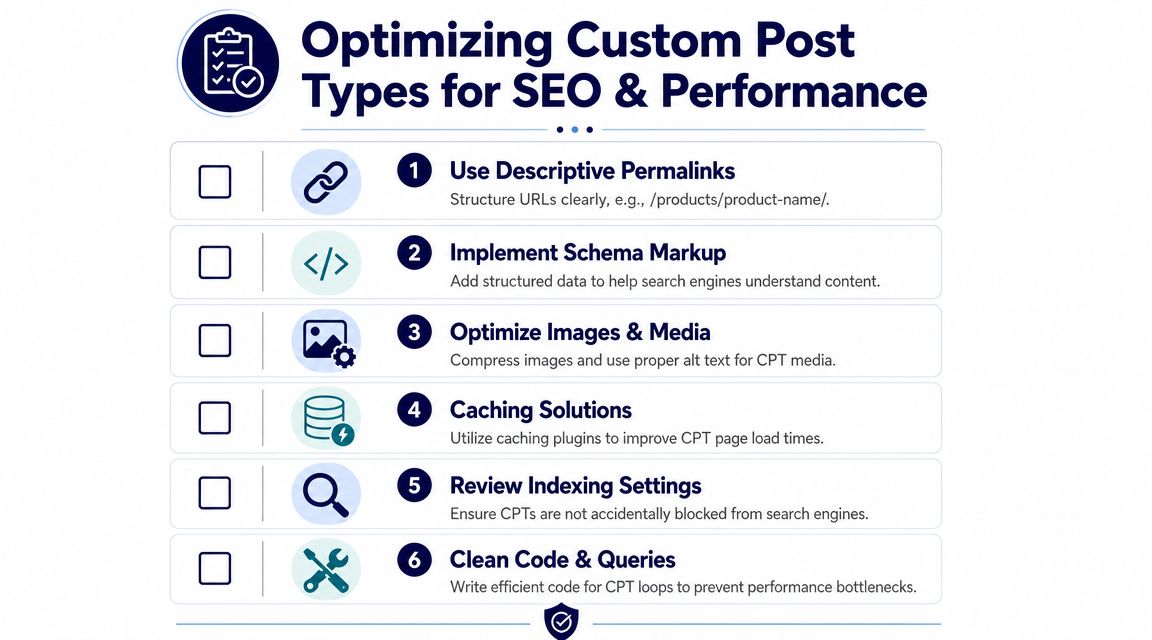
SEO benefits come from clearer information architecture
A CPT can improve site structure because it creates dedicated content sections rather than forcing everything into the blog feed or page tree. That helps when each section has a distinct purpose, template, and URL pattern.
Good examples include:
/locations/for physical offices or branches/case-studies/for proof-oriented project content/team/for people profiles/events/for time-based listings outside the blog
This structure often makes the site easier to understand for both users and search engines. The archive pages can become useful hubs if they contain meaningful intros, internal linking, and clean taxonomy relationships.
URL and indexing decisions that matter
A CPT slug should be descriptive and stable. That sounds obvious, but teams regularly approve temporary labels during development and keep them into launch. If the section deserves long-term visibility, give it a URL structure that reflects the content clearly.
Use this checklist during implementation:
- Choose a durable slug. Avoid internal jargon that won’t age well.
- Decide whether the archive should be indexable. Some archives are strong landing pages. Others are thin utility screens and shouldn’t compete in search.
- Avoid duplicate pathways. If a CPT item also appears through multiple taxonomy archives, review canonical handling and archive usefulness.
- Write archive introductions intentionally. A CPT archive shouldn’t be an empty list with pagination if it’s meant to rank.
- Keep naming consistent. Menu labels, breadcrumbs, schema labels, and on-page headings should describe the same content type.
Structured fields can also support richer on-page clarity. If your template stores location details, staff roles, service types, or other consistent attributes in dedicated fields, you can render cleaner markup and reduce the chance that important context gets lost in freeform content.
Performance problems usually come from query design
The CPT itself is rarely the bottleneck. The query strategy often is.
A common mistake is building large archive pages around complex meta_query conditions, stacked filters, and multiple related lookups. That might work on a small site, but it becomes harder to maintain and optimize as the dataset grows.
A more reliable approach is:
- use taxonomies for actual classification instead of forcing every filter into post meta
- keep archive queries predictable
- avoid loading unnecessary fields and relationships in loops
- paginate sensibly
- cache expensive outputs where appropriate
If a site is already struggling, broader WordPress site speed improvements often reveal that CPT archives are only one piece of a wider rendering and query problem.
Clean content models usually produce cleaner queries. That’s one of the hidden performance advantages of CPT discipline.
What works and what doesn’t
Here’s the blunt version.
What works
- Separate content types for different content models
- Dedicated archive templates with clear internal linking
- Intentional use of taxonomies for grouping
- Lean field design
- Predictable queries and pagination
- Stable permalink structures
What doesn’t
- Turning every minor variation into a new CPT
- Building filter-heavy archives entirely from post meta
- Leaving archive behavior undefined
- Treating all CPTs as equally indexable
- Copying the same template logic across unrelated content types
The best enterprise WordPress builds don’t treat performance and SEO as cleanup tasks after launch. They treat them as design constraints while the content model is still being shaped.
Advanced Scenarios and Migration Strategies
The easy CPT work happens on greenfield builds. The hard work starts when the site is multilingual, part of a multisite network, or loaded with years of badly structured legacy content.
That’s where a senior team has to think beyond registration code and focus on lifecycle management.
CPTs in multisite environments
In WordPress Multisite, custom post types usually need careful governance rather than clever code.
A network might share the same CPT definitions across many sites, but each site can still have different content, templates, taxonomies, and editorial teams. That means the technical question is only partly “how do we register this network-wide?” The more important questions are who owns the schema, how changes are deployed, and how much variation local sites are allowed to introduce.
For example, a franchise network may use one Locations CPT across all sites, but regional teams might need different taxonomy terms, template variants, or translation rules. If the schema drifts from site to site, maintenance gets expensive quickly.
A version-controlled deployment workflow is essential here, especially when multiple environments and stakeholders are involved. That’s why teams managing larger content platforms usually tie CPT definitions into a disciplined WordPress version control process instead of editing production code directly.
Multilingual CPTs need planning up front
Multilingual setups expose weak assumptions fast.
If a CPT is going to be translated with tools like WPML or Polylang, teams need to decide early how slugs, relationships, archive labels, taxonomy terms, and cross-language associations should work. A translated Team Member profile is usually straightforward. A translated Location or Product model can be much trickier if some fields are language-specific and others are shared globally.
Practical concerns include:
- Translated slugs. Decide whether URLs should localize by language or stay unified.
- Relationship fields. If one CPT references another, confirm how translations map across linked entries.
- Taxonomy behavior. Check whether terms are translated, duplicated, or synced.
- Editorial ownership. Someone must define which fields are mandatory in every language and which are optional.
Migrating from a messy site to proper CPTs
Most agency migrations aren’t coming from a pristine content model. They’re coming from years of workarounds.
A typical migration might involve blog posts used as case studies, pages used as locations, repeater-heavy homepages carrying content that should be reusable, and old templates that rely on categories to fake structure. The goal isn’t just to move content. The goal is to improve the model without losing meaning, URLs, or editorial confidence.
A reliable migration approach usually follows this order:
Audit the current content
Identify every content pattern in use, including unofficial ones that editors rely on.Define the target model
Decide which content becomes CPTs, which stays in Posts or Pages, and which metadata should become structured fields.Map old fields to new fields
Many migrations fail at this stage. If the team can’t clearly map source content to destination schema, the new model isn’t ready.Protect front-end continuity
Review URLs, redirects, archive behavior, breadcrumbs, and internal links before launch.Train editors on the new workflow
Even a strong model fails if the admin experience feels unfamiliar or inconsistent.
Migrations succeed when the team models content around editorial reality, not around the old theme’s limitations.
For enterprise and agency work, that’s the larger lesson behind WordPress custom post types. They aren’t just a development feature. They’re part of how you bring order to content operations, future redesigns, API delivery, SEO structure, and long-term governance.
If your team needs senior help designing or untangling WordPress custom post types, IMADO builds scalable WordPress platforms with clean content architecture, custom themes, Gutenberg and FSE workflows, multilingual and multisite setups, and performance-focused engineering that holds up over time.
Let’s build something exceptional
Tell us about your project – we’ll help you launch a fast, scalable, SEO-optimized WordPress platform built for growth.