 Ask Chatgpt to summarize WordPress Load Balancing: An Engineer’s Guide
 Ask Grok to summarize WordPress Load Balancing: An Engineer’s Guide
 Ask Claude to summarize WordPress Load Balancing: An Engineer’s Guide
 Ask Perplexity to summarize WordPress Load Balancing: An Engineer’s Guide
 Ask Gemini to summarize WordPress Load Balancing: An Engineer’s Guide

Most advice about WordPress scaling jumps straight to a load balancer. That's often the wrong move.
A load balancer solves a specific class of problems. It helps when one application server can't reliably absorb traffic, when you need redundancy, or when a single box has become an operational risk. But for many sites, adding a load balancer too early creates more moving parts, more failure modes, and more latency than value.
The better question isn't “How do we add WordPress load balancing?” It's “What bottleneck are we trying to remove?” On smaller builds, strong page caching, object caching, database cleanup, image offloading, and careful plugin discipline usually fix the issue faster and with less complexity. On enterprise WordPress, though, there's a point where horizontal distribution becomes mandatory. That's where architecture starts to matter more than one-off tuning.
When Do You Really Need WordPress Load Balancing
The popular assumption is simple: more servers must mean better performance. In practice, that's not how this works.
For lower-traffic WordPress sites, load balancing can make performance worse. SpinupWP notes that single-server setups outperform load-balanced configurations until roughly 8 concurrent users, and that the extra network hop can slow requests when CPU utilization is under 20% (SpinupWP's load balancer analysis). That's the nuance most generic guides skip.
Cases where a load balancer is premature
If your site is mostly cacheable content, start elsewhere. A single well-tuned server with full-page caching, Redis object caching, a CDN, and disciplined plugin usage will usually outperform a distributed stack that hasn't been engineered for state, storage, and cache coherence.
You probably don't need WordPress load balancing yet if your current issues look like this:
- Cache misses from bad plugin behavior: One plugin bypasses page cache and makes the whole stack feel slow.
- Media bloat and slow asset delivery: Large uploads and unoptimized images are saturating I/O or bandwidth.
- Database drift: Autoloaded options, expired transients, and noisy queries are pushing avoidable work into every request.
- Operational simplicity matters more: Your team needs reliability and fast rollback, not a bigger surface area.
For teams deciding whether to invest in scaling architecture or core performance work first, this is usually where a senior review pays off. Enterprise WordPress solutions are most effective when they start with the actual bottleneck, not the trendiest pattern.
Practical rule: If caching and database hygiene haven't been done properly, adding a load balancer usually hides the problem instead of fixing it.
Cases where it becomes necessary
Load balancing starts to make sense when uptime and concurrency matter more than architectural simplicity. Think product launches, large WooCommerce campaigns, membership platforms with frequent authenticated traffic, publisher sites with traffic spikes, or enterprise sites that can't afford a single-node failure.
In those cases, the requirement isn't just speed. It's resilience. You need one node to fail without taking the whole platform with it. You need health checks, predictable routing, and infrastructure that can absorb bursts without forcing emergency changes under pressure.
That's when WordPress load balancing stops being optional and starts becoming infrastructure.
Understanding Load Balancing Architecture
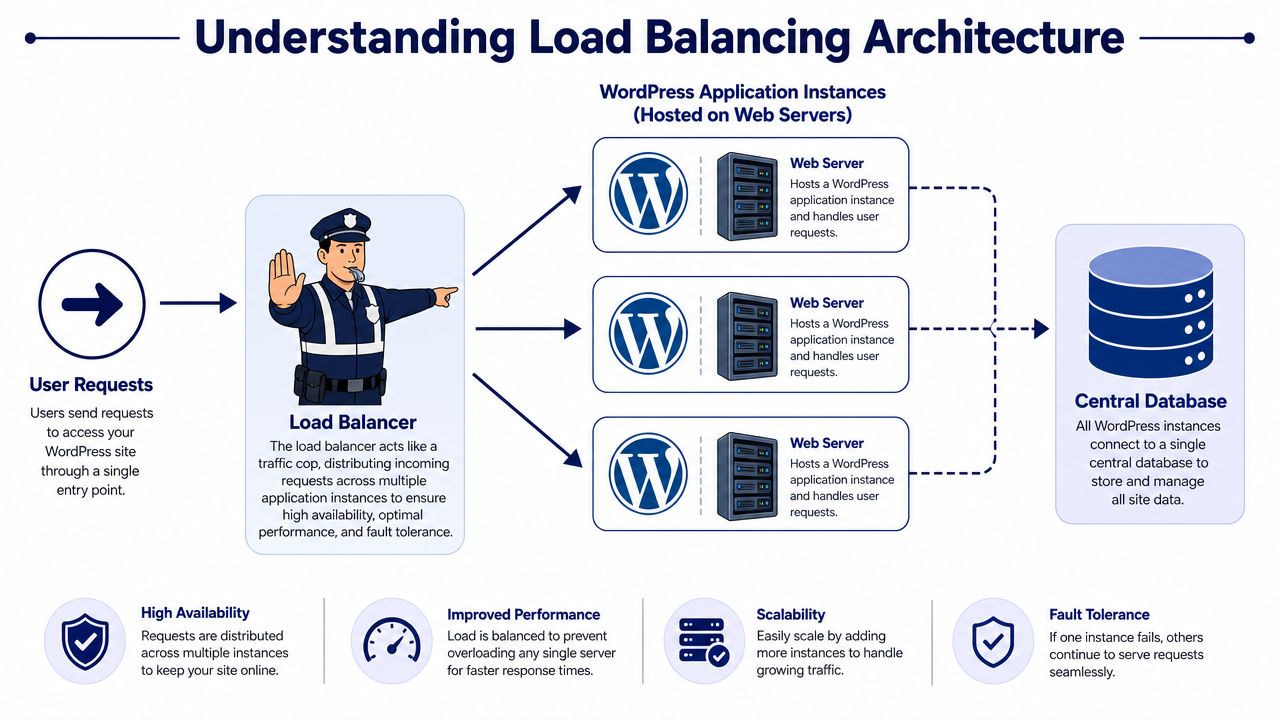
A production-ready WordPress load-balanced setup has four moving parts. A load balancer in front, multiple stateless application nodes behind it, shared access to uploads, and a central cache layer that every node can use.
That sounds straightforward, but this is also the point where smaller WordPress estates get slower, more fragile, and more expensive. The architecture only helps if each layer solves a real bottleneck. If traffic is still mostly cacheable and a single tuned node can handle it, adding distributed infrastructure creates network hops, more failure points, and more operational work without much gain.
The four parts that matter
Each component has a specific job:
- The load balancer or reverse proxy accepts incoming traffic, checks backend health, and sends requests to a node that can serve them.
- WordPress application nodes run PHP, process uncached requests, and should be treated as replaceable workers rather than long-lived pets.
- Shared storage or media offload makes uploads available to every node so files do not depend on local disk.
- A central object cache gives all nodes the same view of cached objects and transients instead of letting each server build its own isolated cache.
That last point gets missed often. Teams add a second or third web node, but leave cache and file handling local. The result is inconsistent behavior that only appears under load. One visitor gets a fresh object cache entry. Another hits a different node and misses it. An editor uploads a file and one server sees it before the others do. WordPress can run in that state, but it does not run predictably.
What each layer is really doing
The reverse proxy does more than round-robin traffic. In a serious setup, it handles health checks, preserves the right forwarding headers, terminates TLS if that fits your design, and removes unhealthy nodes before users notice. Nginx, HAProxy, and managed cloud balancers can all do this. The right choice depends less on feature lists and more on who will maintain it at 2 a.m.
Application nodes need discipline. They should not hold anything business-critical on local disk, and they should not depend on sticky state unless you have chosen that trade-off deliberately. If replacing a failed node requires manual file sync or special cleanup, the architecture is already working against you.
Storage is where rushed implementations usually break. WordPress expects a consistent view of wp-content/uploads, and some plugins still assume local filesystem access. You can solve that with shared network storage, or by offloading media to object storage and adjusting the stack around it. Neither option is free. Network filesystems can add latency and locking issues. Media offload reduces that risk, but plugin compatibility and editorial workflows need testing.
The same pattern shows up in larger shared platforms, especially in WordPress multisite architectures. Once multiple sites, editors, and plugins depend on the same platform, inconsistent file state and per-node cache drift turn into support incidents fast.
A healthy load-balanced WordPress stack is less about adding servers and more about removing local assumptions. That is the architectural shift that matters.
Choosing Your Load Balancing Architecture
There isn't one “best” architecture for WordPress load balancing. There are several valid patterns, and each one trades control, cost, and maintenance effort differently.
The wrong choice usually comes from optimizing for one variable only. Teams choose the cheapest setup and inherit heavy ops overhead. Or they choose the most managed option and later discover they can't tune routing or observability the way they need. The right design depends on who will run it after launch, not just who can build it.
The three common patterns
Most enterprise WordPress stacks land in one of these buckets:
| Architecture | Best For | Complexity | Cost | Control |
|---|---|---|---|---|
| Cloud-managed load balancer | Teams that want managed infrastructure and easier scaling | Moderate | Moderate to high | Moderate |
| Self-hosted proxy with Nginx or HAProxy | Teams with strong DevOps capability and custom routing needs | High | Variable | High |
| CDN-based traffic distribution | Content-heavy sites that can push most traffic to the edge | Lower at origin, but limited for full app balancing | Variable | Lower for origin behavior |
Cloud-managed load balancers
Managed cloud balancers are usually the safest default for enterprise teams. They give you health checks, TLS handling, backend pools, and integration with auto-scaling without asking your team to babysit another critical service.
They're especially useful when your infrastructure already depends on managed services for the database and storage layer. The upside is reduced operational burden. The downside is less granular tuning, especially if you need very specific routing logic, custom buffering behavior, or unusual header handling.
Self-hosted proxies
Nginx and HAProxy give you deep control. If you need custom upstream rules, advanced failover behavior, or specific rewrite and cache interaction, a self-hosted proxy layer gives your engineers room to shape the platform exactly the way they want.
That control comes with responsibility:
- You own patching: The proxy is now one more production service to update and secure.
- You own observability: Logs, metrics, alerts, and upstream debugging become your problem.
- You own resilience: If the proxy layer is underdesigned, it becomes a single point of failure.
For teams that already operate container platforms or custom WordPress hosting, this can be the right path. For teams without dedicated infrastructure support, it often becomes an expensive distraction.
CDN-based approaches
A CDN can absorb enormous amounts of static and cacheable traffic, which means fewer requests ever reach your origin. That's valuable, but it isn't the same thing as full application load balancing.
A CDN is strongest when your site is content-heavy, globally distributed, and aggressively cacheable. It's weaker when requests are dynamic, personalized, or tightly coupled to authenticated sessions. If your traffic profile is mostly logged-in WooCommerce customers or members, a CDN helps, but it won't replace good origin architecture.
Choose the architecture your team can operate on an average Tuesday, not just during a launch week.
Handling Sessions and Database State
State management is the failure point I see most often in WordPress load balancing projects.
A single-server WordPress build gets away with assumptions that stop working the moment you add a second app node. Requests bounce between servers. One node has a user's session data in memory, another does not. One node sees a recently cached object, another serves stale data. If uploads, cache entries, or session-like data live on local disk or local memory, the platform stops behaving like one application.
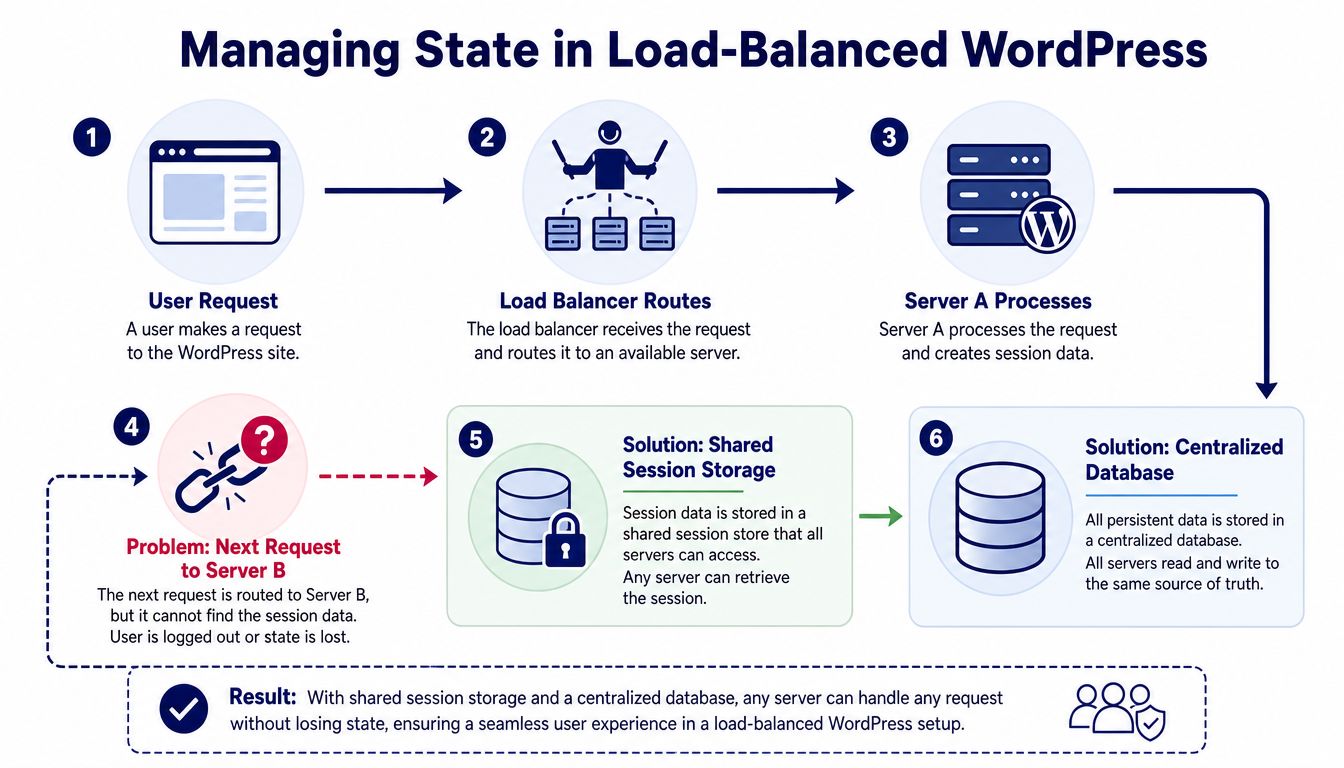
This is also why load balancing is often the wrong first move for smaller WordPress sites. Adding more web nodes before fixing cache strategy, database efficiency, and file storage usually adds latency and operational risk without solving the primary bottleneck.
Why sticky sessions are a temporary compromise
Sticky sessions can reduce user-facing breakage by sending the same visitor back to the same backend node. That can help with logged-in traffic, carts, membership flows, and older plugins that assume local session state.
It is still a compromise, not a clean design.
The trade-offs are predictable:
- Failover gets weaker: If the assigned node fails, the user may lose cart state, login continuity, or in-progress actions.
- Traffic distribution gets uneven: Busy users stay pinned to specific nodes, which creates hot spots.
- Troubleshooting gets harder: Intermittent issues become node-specific and harder to reproduce.
- Scaling gets less efficient: Adding more servers does not help much if a large share of traffic is still stuck to a few nodes.
I use sticky sessions only when the application cannot be made stateless in the short term. They are useful during migration. They are not the end state.
What a cleaner architecture looks like
For WordPress that needs real horizontal scaling, the better pattern is simple. Keep web nodes stateless. Put persistent data in shared systems designed for it.
In practice, that usually means:
- One primary database for writes so posts, orders, settings changes, and admin actions have a single source of truth.
- Read replicas where they help for read-heavy workloads that can tolerate replication lag.
- A shared object cache such as Redis so transient and object-cache data is available to every app node.
- Shared media storage so uploads are not tied to one server.
WP Farm makes the same point from a hosting angle. Shared cache and a clear database topology reduce the temptation to treat wp-content as a state layer, which usually creates more I/O pressure and more failure modes than teams expect (WP Farm on WordPress hosting load balancing).
Read replicas deserve one caution. They help on content-heavy sites with high read volume, but they can hurt commerce and membership workloads if replica lag causes stale reads after writes. A customer updates an address or places an order, then the next request reads from a lagging replica and shows old data. That is not a theoretical edge case. It is a common source of strange WooCommerce bugs.
For stores, database work should happen before or alongside any load-balancing rollout. WooCommerce database optimization usually produces more measurable gains than adding extra PHP nodes to an inefficient query pattern.
A practical test helps here. If terminating one app server would break logins, carts, uploads, or admin workflows, the platform is not ready for true load balancing yet.
A quick visual helps clarify the flow:
If one web node still carries unique session or application state, you have multiple servers, but not a properly distributed WordPress application.
Practical Implementation and Configuration
Load balancing does not fix a weak WordPress build. It adds another control plane, another failure point, and more operational work. On smaller sites, that extra layer can increase latency and complicate troubleshooting without solving the primary bottleneck. By the time you implement it, the stack should already be stateless enough that adding or removing a node changes capacity, not behavior.

A simple Nginx reverse proxy example
A reverse proxy should do a few things well. Keep the public hostname stable, pass the original request details upstream, and fail cleanly when a node goes unhealthy. The syntax below is intentionally simple, but it reflects the baseline pattern many teams use before they add TLS termination, active health checks, and stricter timeout policy.
upstream wordpress_backend {
    server wordpress-app-1;
    server wordpress-app-2;
}

server {
    listen 80;
    server_name example.com;

    location / {
        proxy_pass http://wordpress_backend;
        proxy_set_header Host $host;
        proxy_set_header X-Forwarded-For $proxy_add_x_forwarded_for;
        proxy_set_header X-Forwarded-Proto $scheme;
        proxy_set_header X-Real-IP $remote_addr;
    }
}
What matters is not the snippet itself. The proxy must preserve enough context for WordPress, PHP, logs, security tooling, and upstream caches to make correct decisions. If Host or X-Forwarded-Proto is wrong, WordPress starts generating bad URLs, redirects loop, and mixed-content problems show up fast after cutover.
WordPress-specific settings teams often miss
A multi-node WordPress setup usually fails in the boring places.
Set the site URL and home URL to the public domain behind the balancer, not to an individual app server or raw IP. In practice, many teams also define these values in wp-config.php so they cannot drift in the database during a rushed migration. That is especially useful when multiple environments share the same deployment process.
Uploads should not live only on local disk. Use object storage or a shared filesystem that you trust operationally. Object storage is usually the cleaner option because it removes file sync jobs and node-to-node drift, but it also adds plugin dependencies and changes how media URLs, cache headers, and image processing behave. Shared filesystems can work, though they often become the slowest and least predictable part of the stack under write-heavy workloads.
Cron needs the same discipline. Set define('DISABLE_WP_CRON', true); and run scheduled jobs from one controlled scheduler. If every web node can trigger cron from live traffic, duplicate jobs and race conditions become a routine production issue instead of an edge case.
A compact operating model looks like this:
| Area | Practical choice | Why it helps |
|---|---|---|
| Uploads | S3 or equivalent object storage | Keeps media consistent across nodes |
| Database | Managed relational service | Reduces admin overhead and improves recoverability |
| Cache | Shared Redis service | Prevents fragmented object state |
| Cron | External system scheduler | Avoids multi-node duplicate task execution |
Build and break it before production
The first real test is failure, not page speed. Drain one app node. Kill PHP-FPM on another. Purge cache during an editor publish flow. Run a plugin update and confirm that admin, logins, uploads, and asynchronous jobs still behave the same way. If those tests are hard to run, the architecture is still too fragile.
A proper WordPress staging site for testing load-balanced changes gives teams a place to rehearse cutover steps, rollback, cache purge behavior, and node replacement without putting revenue or publishing workflows at risk.
Treat deployment as configuration management, not hand-tuned server work. Bake the same Nginx, PHP, WordPress, and plugin versions into every node. If one server needs a manual fix to stay in rotation, the cluster is already drifting out of spec.
Optimizing for Performance Security and Cost
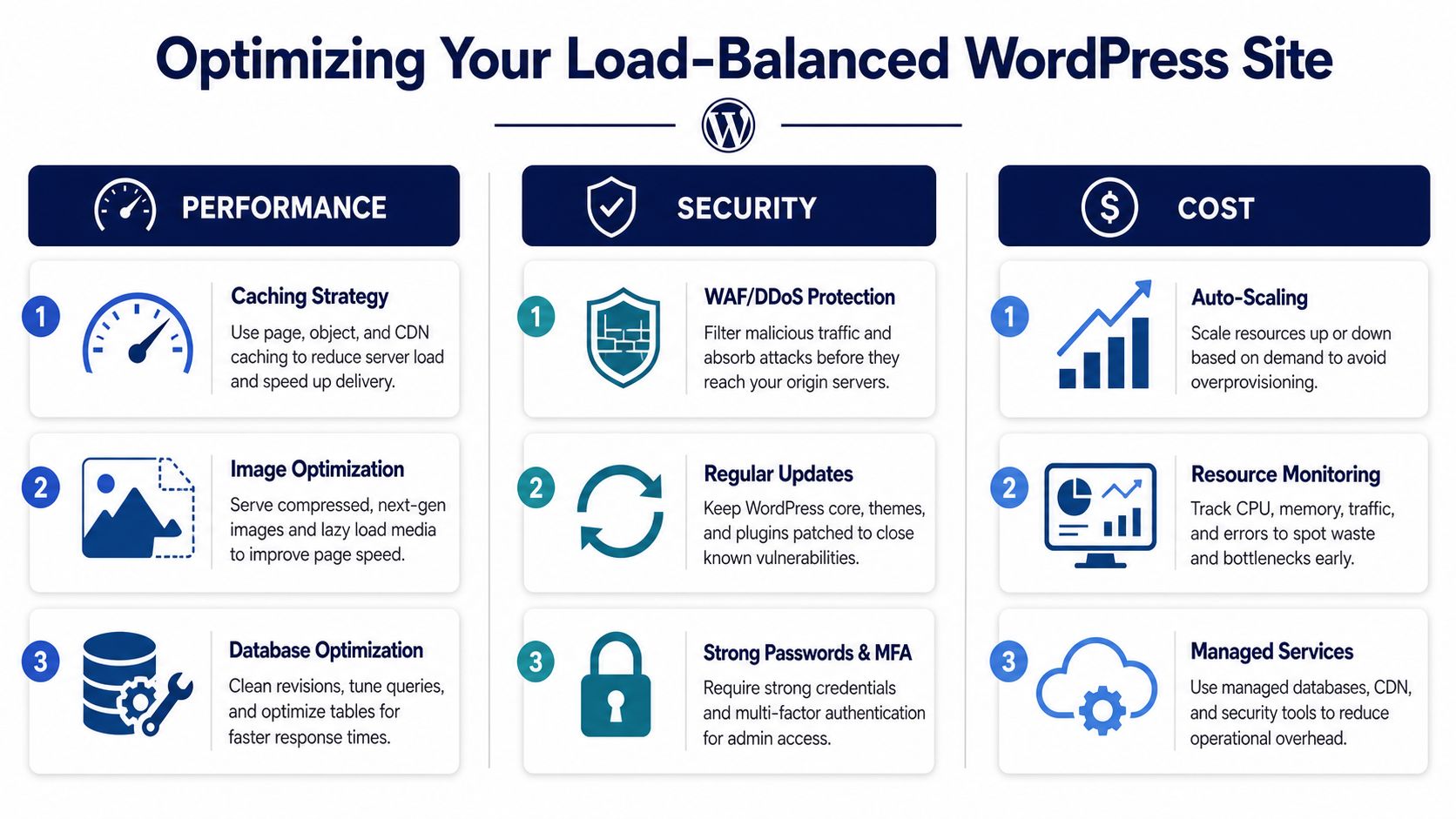
Load balancing does not make a WordPress stack efficient by default. On smaller or poorly tuned sites, it can add network hops, cache complexity, and operating cost before it fixes the primary bottleneck.
Performance discipline
Once a cluster is live, performance usually depends less on the balancer itself and more on cache behavior, PHP worker headroom, and database query patterns. That is why mature teams define cache rules explicitly instead of treating caching as a plugin setting.
A sensible default is simple. Cache static assets aggressively. Keep shorter TTLs for pages that change often. Purge on content updates, product changes, and key editorial events. The exact timings depend on the application, but the operating principle stays the same. Stable content should stay out of PHP and MySQL for as long as possible.
Monitoring needs the same level of discipline. Watch response time, CPU saturation, PHP worker exhaustion, cache hit rate, and database latency together. Uptime alone hides a lot of pain. A site can stay technically available while checkout slows down, admin actions stall, or logged-in traffic starts queueing behind uncached requests.
Set alert thresholds early enough that the team can act before users feel it. For many WordPress environments, that means alerting on sustained resource pressure and rising application latency, not waiting for a full outage.
Security posture
A load-balanced WordPress setup should narrow the attack surface. The public entry point is the balancer and security layer. App nodes should not accept direct internet traffic unless there is a specific operational reason and compensating controls in place.
Keep origin instances private where possible. Restrict management access. Terminate TLS cleanly. If the site has a meaningful exposure profile, put a WAF in front of the balancer and make sure origin access rules only trust that path. This matters even more for WooCommerce, membership platforms, and editorial teams working in wp-admin from many locations.
Centralized ingress also makes incident response cleaner. Logs, rate limits, IP controls, and bot filtering work better when traffic enters through one controlled path.
Cost control
Teams often overbuild. A three-node cluster with managed database, Redis, object storage, CDN, WAF, and autoscaling can be the right answer for a business-critical platform. It is also an expensive answer to a problem that might have been solved with full-page caching, better query tuning, or larger single-node capacity.
Cost control starts with matching the architecture to the workload. If traffic is spiky but mostly anonymous, invest in caching and CDN offload first. If traffic is consistently high and logged-in, spend more attention on PHP concurrency, object cache efficiency, and database capacity. If the platform has strict uptime requirements, redundancy may justify higher spend even before average utilization looks high.
A practical operating checklist looks like this:
- Track saturation, not just availability: Rising latency, full PHP worker pools, and low cache hit rates usually show up before downtime.
- Use managed services where they remove real toil: Managed database and cache layers are often worth the premium if the team does not want to own backups, failover, patching, and recovery.
- Keep the architecture honest: If shared storage, cross-node chatter, or cache misses are driving latency, adding more app nodes usually increases cost faster than performance.
- Review autoscaling behavior regularly: Bad thresholds can scale out too late during traffic spikes or scale out too often because the application is inefficient.
The best load-balanced WordPress platforms are not the largest ones. They are the ones where each added layer has a clear job, a measurable benefit, and an operating cost the team understands.
Your Migration Path to a Scalable Architecture
Treat migration as a phased engineering project, not a hosting switch.
Start by benchmarking the current platform so you know whether the underlying issue is CPU, PHP workers, database contention, cache misses, or file I/O. Then build the target environment in staging and validate the hard parts first: login behavior, media consistency, admin workflows, scheduled tasks, and cache invalidation.
After that, run controlled tests against the new stack and rehearse failure. Remove a node from rotation. Confirm the site stays healthy. Test content publishing and any checkout or membership flows under realistic conditions. Only then should you plan a cutover.
The cleanest migrations use a phased launch with close monitoring immediately after traffic moves. That gives the team room to catch state, cache, or routing issues before they become business incidents.
WordPress load balancing is worth doing when the platform has outgrown a single node. It's a mistake when used as a substitute for basic performance engineering. The difference is architectural discipline.
If your team is planning a move to clustered WordPress, high-traffic WooCommerce, or a more resilient enterprise stack, IMADO can help design the architecture, validate the migration path, and build a platform your editors and engineers can operate.
Let’s build something exceptional
Tell us about your project – we’ll help you launch a fast, scalable, SEO-optimized WordPress platform built for growth.