 Ask Chatgpt to summarize Mastering WordPress Multisite SEO: A 2026 Playbook
 Ask Grok to summarize Mastering WordPress Multisite SEO: A 2026 Playbook
 Ask Claude to summarize Mastering WordPress Multisite SEO: A 2026 Playbook
 Ask Perplexity to summarize Mastering WordPress Multisite SEO: A 2026 Playbook
 Ask Gemini to summarize Mastering WordPress Multisite SEO: A 2026 Playbook
You’re probably in one of two situations.
Either you’re planning a WordPress multisite rollout for regional brands, franchise locations, language sites, or separate business units, and you want to avoid painting yourself into an SEO corner. Or you’ve inherited a network that looked efficient on paper and now has overlapping content, muddled search signals, and performance issues that affect every site at once.
That’s where WordPress multisite SEO gets expensive. Not because the platform is weak, but because early architectural choices ripple outward into indexing, authority, editorial workflow, and infrastructure. WordPress itself still dominates the CMS space. It powers 43.5% of all websites globally as of March 2025, and there are 1.19 billion websites currently online, according to Pantheon’s WordPress statistics overview. That scale matters because WordPress is mature enough to handle complex multisite networks. It also means teams often underestimate how much strategy is required when one WordPress core controls many search-facing properties.
Table of Contents
Why WordPress Multisite SEO Demands a Strategy
Multisite problems usually don’t start in Google Search Console. They start in planning meetings.
A common pattern looks like this. A company launches one network to manage country sites, city pages, and partner microsites from a single dashboard. Operations loves it because updates are centralized. Marketing likes the speed. Then six months later, several subsites target the same search intent, reuse the same templates with minor copy changes, and send mixed geographic signals. The network is easier to manage, but harder to rank.
That’s why WordPress multisite SEO isn’t a plugin decision. It’s an operating model. The network structure decides whether search engines see your properties as one site, separate sites, or something in between. Your editorial governance decides whether subsites strengthen each other or compete against each other. Your infrastructure decides whether bots can crawl the network efficiently or stall on slow responses.
Teams that manage many properties from one admin often benefit from stronger process and visibility, especially when they’re using a disciplined approach to managing WordPress sites at scale. But centralization only helps when the SEO model is just as intentional as the engineering model.
Multisite makes publishing easier. It doesn’t make search strategy simpler.
The practical mistake is treating SEO as a post-launch cleanup task. By then, your URL structure is already live, your subsites have started building their own backlink patterns, and duplicate or overlapping content may already be indexed.
The better approach is to treat the network as an integrated system. Architecture, keyword ownership, canonical logic, and server capacity all interact. If one part is weak, the rest of the stack has to compensate. That usually costs more than getting the structure right up front.
Choosing Your Multisite Architecture for SEO Success
A company launches a multisite network for the US, UK, and Australia under one deadline. Six months later, the SEO team is sorting out overlapping country pages, mixed ranking signals, and reporting that does not match how the business is organized. The problem usually starts earlier than teams expect. It starts with the URL model.
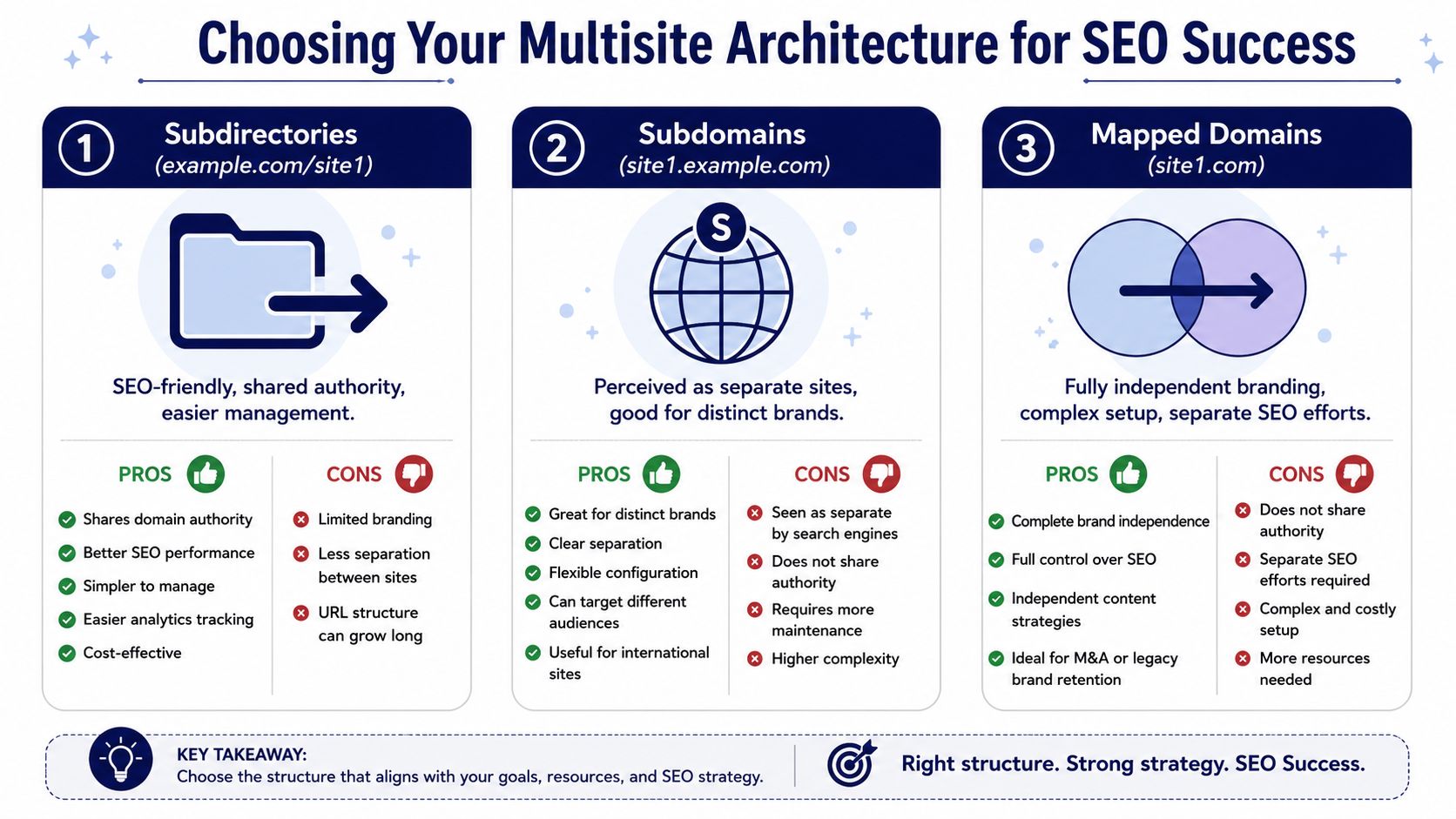
Architecture sets the rules for how authority flows, how clearly each site can target a market, and how much coordination your team will need every quarter. Change it later, and you are usually paying for redirects, reindexing, migration risk, and a long cleanup cycle. Choose it early, and the rest of the SEO stack has a fair chance to work.
Subdirectories work when the business wants one search entity
Subdirectories fit networks that should rank as one brand with one main authority profile. They work well for education centers, product families, campaign microsites, and regional sections that are closely aligned in offer and intent.
The SEO upside is clear. Links earned by one part of the site support the domain as a whole. Governance is simpler. Analytics and editorial oversight are easier to centralize.
The trade-off is market separation.
If regional or business-unit teams need their own positioning, their own backlink strategy, or meaningfully different keyword targets, subdirectories create friction fast. The stronger the parent domain gets, the easier it is for pages to overlap and compete unless ownership rules are strict. In practice, subdirectories only work well when centralization is a business decision, not just a technical convenience.
Subdirectories are usually the right call when:
- Brand authority should compound on one domain
- Content themes are closely related across sites
- A central team controls taxonomy, templates, and keyword ownership
- Regional variation is real, but not large enough to justify separate SEO programs
Subdomains fit teams that need partial independence
Subdomains create more distance between properties without forcing a full split at the brand and infrastructure level. That makes them useful for support centers, partner portals, training sites, or divisions with their own publishing cadence and audience.
They also expose a common mistake. Teams often choose subdomains because they want organizational flexibility, then run them with shared content, shared templates, and no clear SEO owner. That setup gives them the overhead of separation without the strategic discipline that separation requires.
A subdomain model works best when each property has a defined role in search and a team that owns performance. If that ownership is fuzzy, the network drifts into duplicated pages, inconsistent internal linking, and reporting that hides underperforming properties inside brand-level averages.
| Structure | Search engine interpretation | Best fit | Main risk |
|---|---|---|---|
| Subdirectory | One site | Unified brand ecosystems | Blurred market separation |
| Subdomain | Separate sites | Distinct units under one brand | Fragmented SEO ownership |
| Mapped domain | Fully separate indexing | Franchises, country sites, local brands | Highest complexity |
For technical teams, this is not just an SEO decision. It affects DNS, SSL, cache strategy, analytics configuration, and deployment patterns across the network. If the multisite foundation is still being planned, use a proven process for installing WordPress multisite correctly, because setup shortcuts tend to show up later as indexing and governance problems.
Mapped domains are the right choice when each site must win on its own
Mapped domains make sense when each subsite is effectively its own business in search. Franchise networks, multi-location brands with strong local competition, and international companies with separate country strategies usually fall into this category.
This structure gives each site the clearest boundary. That helps when markets need separate backlink profiles, local trust signals, region-specific content, and independent reporting. It also reduces ambiguity when two markets offer similar services but need to rank for different geographic intent.
The cost is operational. Every domain adds work across redirects, analytics, Search Console, QA, governance, and content review. You also lose the convenience of assuming authority will naturally flow across the network. It will not. Each mapped domain needs to earn its own visibility.
Use mapped domains when these conditions are true:
- Each site serves a distinct market with different search intent
- Each site needs its own authority and backlink growth
- Editorial teams have meaningful independence
- Leadership expects market-by-market SEO accountability
A simple rule helps here. If leadership wants each region, location, or franchise to be measured like an independent business unit, the architecture should reflect that from day one.
The strategic question is not which model is best in general. It is which model matches the level of SEO independence the business needs. Subdirectories favor shared authority and lower overhead. Subdomains give partial separation but demand stronger ownership. Mapped domains give the cleanest separation, with the highest long-term operating cost. In multisite SEO, those trade-offs shape everything that follows.
Configuring Your Technical SEO Foundation
A multisite launch can look healthy on the surface and still leak rankings. Pages load. Metadata exists. The XML sitemap resolves. Then six weeks later, Google indexes the wrong regional URL, two subsites compete for the same query, and the team is left debugging architecture problems through SEO symptoms.
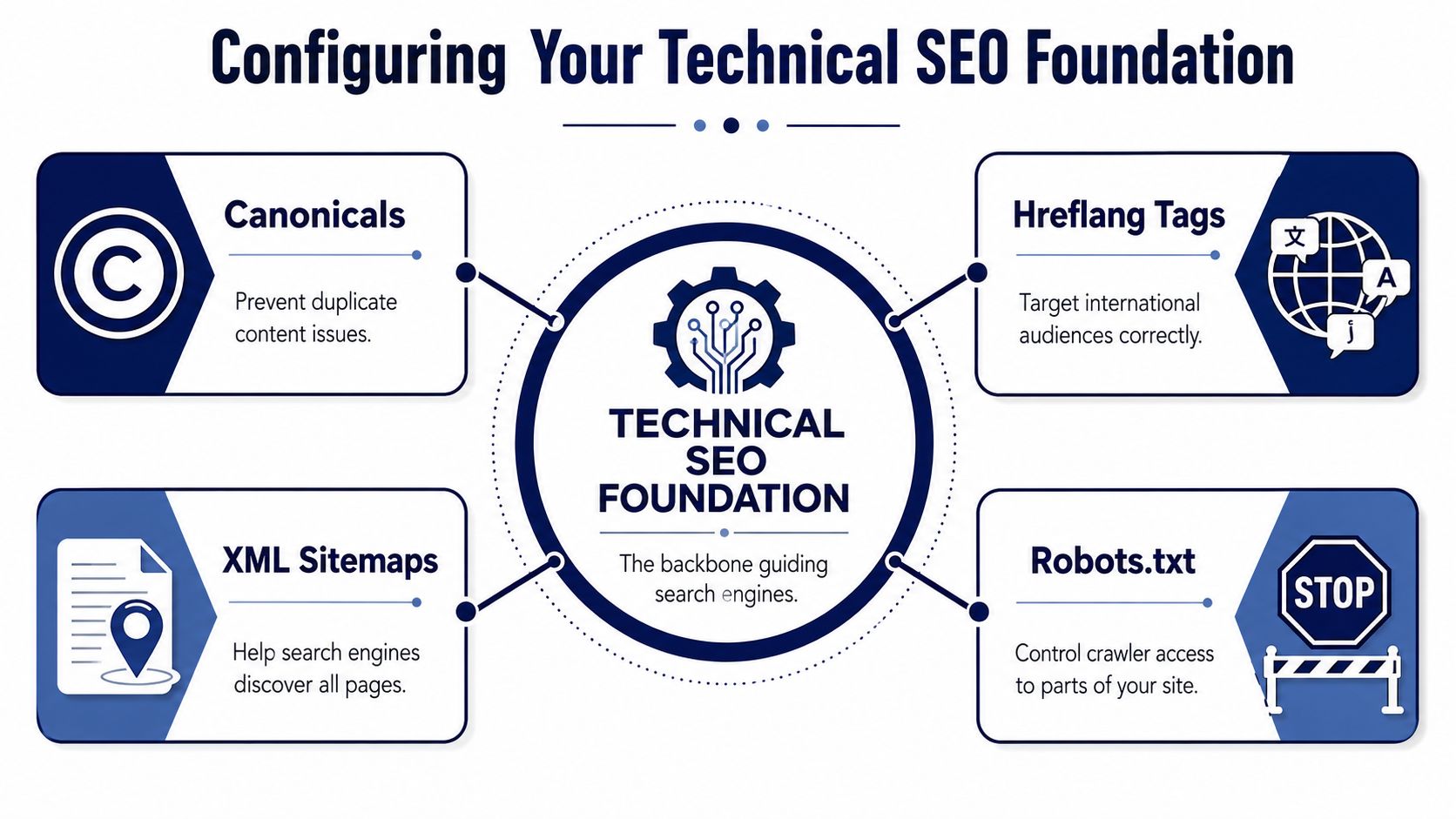
Technical SEO in multisite is a control system. Canonicals, hreflang, sitemaps, robots rules, and indexation settings need to reinforce the ownership model you chose earlier. If they conflict, search engines have to guess. That guess usually costs traffic.
Canonicals decide who owns a piece of content
Content overlap is common in multisite. Product teams reuse approved copy. Legal pages repeat across regions. Local editors clone a high-performing service page and change a few paragraphs.
The risk is not duplicate text by itself. The core problem is ambiguity about which URL should rank. As outlined in AIOSEO’s guide to WordPress multisite SEO, multisite networks run into trouble when subsites target the same terms without clear ownership, and canonical tags are one of the tools used to identify the preferred source.
Set canonical rules after you decide intent ownership. That order matters. A canonical tag can consolidate signals for intentionally duplicated material, but it will not fix a weak targeting model where three subsites are all trying to win the same query.
A practical standard looks like this:
- Assign topic ownership at the subsite level. Give each site a defined set of markets, services, or audience segments.
- Use canonicals for repeated supporting content. Policy pages, boilerplate product details, and approved corporate copy are common candidates.
- Audit template-generated URLs. Category archives, tag archives, filtered views, media attachment pages, and campaign variations often create duplication.
- Check canonicals against indexation intent. A canonical pointing to one URL while another version remains fully indexable creates mixed signals.
One rule saves a lot of cleanup later. If two subsites need nearly identical pages, confirm they serve different search intent before either page goes live. If the intent is the same, choose one owner and route internal links accordingly.
Hreflang must match your actual regional model
Hreflang works only when the pages in the cluster are true regional or language equivalents. It does not patch over weak localization. It does not explain major differences in offers, pricing, inventory, or service scope.
Use hreflang when the business wants multiple versions of the same page for different languages or regions. Skip it when each subsite operates like a different market proposition. In that case, clear content separation usually matters more than forcing a relationship between loosely related URLs.
For technical teams, the requirements are straightforward:
- Every hreflang reference must be reciprocal. If Site A references Site B, Site B needs to reference Site A.
- Canonical and hreflang targets must agree. A page should not declare one canonical target and a different regional equivalent pattern.
- Language and region codes must be valid. Small syntax errors are common and easy to miss in templates.
- Each cluster needs a fallback strategy. An
x-defaultURL is often useful when users do not match a specific regional version.
This video gives a useful visual overview before you audit your own implementation.
Sitemaps and robots.txt should reflect subsite boundaries
Sitemaps should mirror how the network is meant to be crawled and indexed. In most multisite builds, that means each subsite publishes its own XML sitemap for its own indexable content. A shared network can still maintain a top-level sitemap index if the tooling handles it cleanly, but the subsite remains the core unit.
That structure has a business benefit. It makes ownership clear during audits, migrations, and Search Console reviews. When a regional team sees a spike in excluded URLs or a drop in indexed pages, they can isolate the issue faster.
A clean setup usually includes:
- Per-subsite XML sitemaps for posts, pages, and the taxonomies that deserve indexation
- Consistent exclusion rules for thin archives, internal search results, staging areas, and utility paths
- Robots.txt directives aligned with crawl priorities rather than used as a workaround for duplication
- Routine validation to confirm new subsites are not exposing test content, author archives, or parameter-driven duplicates
Robots.txt is where teams often overcorrect. Blocking a problem URL can reduce crawl waste, but it does not transfer ranking signals or resolve duplicate ownership. Use robots rules to manage crawler access. Use canonicals, indexation settings, redirects, and editorial governance to define which URLs should rank.
The trade-off is simple. Tight controls reduce index bloat and reporting noise, but they also increase the need for network-level governance. Loose controls give editors more freedom, and they usually create more cleanup, more crawl waste, and weaker ranking signals across the network.
Essential Plugins and Tooling for Multisite SEO
The wrong plugin stack can turn WordPress multisite SEO into a maintenance trap. The right stack keeps rules centralized, limits drift between subsites, and reduces the number of places a mistake can hide.
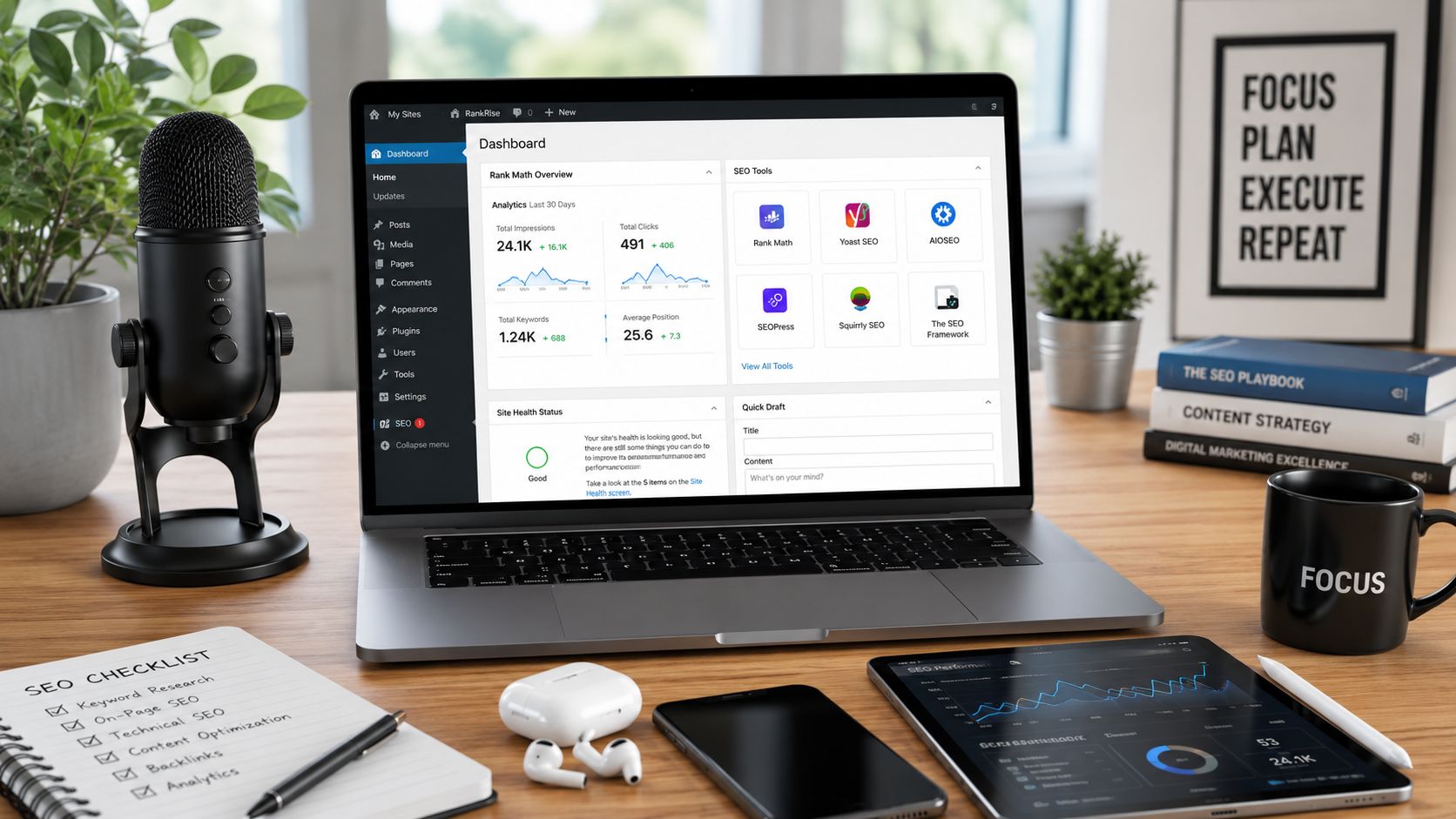
Less is better here. Every plugin you network-activate affects operational complexity. In shared environments, one bloated SEO, schema, redirect, or analytics plugin can create admin clutter, inconsistent settings, or unnecessary database activity across every site.
Build around network control, not plugin count
A strong multisite toolkit usually needs these capabilities:
- SEO management with multisite awareness. A plugin such as All in One SEO can be useful because it supports multisite workflows and centralized settings.
- Redirect management. Handle retired URLs, market-specific migrations, and legacy paths consistently.
- Caching and performance tooling. This belongs in the stack because SEO outcomes depend on the infrastructure layer, not just metadata.
- Monitoring and diagnostics. Your team needs visibility into indexing issues, duplicate title patterns, and crawl anomalies.
What doesn’t work is giving every subsite editor a different set of SEO plugins because “each market has its own preference.” That creates configuration drift. Soon one site outputs canonicals differently, another handles sitemaps differently, and a third injects conflicting schema.
Allow overrides only where business logic demands them
The cleanest setup is centralized defaults with selective per-site overrides.
That usually means:
- Network-level title and meta patterns
- Shared rules for indexing archives and utility content
- Per-site fields for local business details, localized metadata, and region-specific schema
- Strict plugin review before anything is activated across the network
AIOSEO also notes that the Import/Export feature in Network Tools can replicate SEO settings from a strong-performing site across the network. That’s useful operationally because it reduces setup inconsistency without forcing every subsite into identical content strategy.
The broader principle is simple. Standardize the framework. Localize the signal where it affects rankings.
Optimizing Performance and Core Web Vitals
A multisite network often looks healthy until traffic concentrates on a few subsites, editors install another plugin, and shared templates start missing performance targets at the same time. Rankings usually slip after that, not because keyword targeting changed, but because the network got slower to crawl, slower to render, and less reliable under load.
That is a core performance problem in WordPress multisite SEO. Every shared decision carries network-wide consequences. One inefficient query pattern, one oversized JavaScript bundle, or one weak caching layer can affect dozens of sites at once.
Shared infrastructure changes the SEO trade-off
On a standalone site, performance issues stay local. In multisite, the same stack serves every subsite, so the upside and downside both scale.
That changes how technical teams should prioritize work. Faster hosting, persistent object caching, cleaner shared templates, and disciplined plugin governance usually produce a bigger SEO return than page-by-page tuning across the network. The reason is simple. Search engines judge what they can fetch and render consistently. If origin response time is unstable, crawl efficiency drops. If mobile templates are heavy across many subsites, poor Core Web Vitals stop being an isolated UX issue and become a network-level visibility problem.
I have seen teams spend weeks shaving milliseconds off individual landing pages while the primary bottleneck sat in shared code and database load. That work rarely holds once the next subsite launches.
Fix the shared layers before the local ones
Start where one improvement benefits every site.
- Object caching. Persistent caching cuts repeated database queries and stabilizes response times across the network.
- Plugin audits. Remove overlapping plugins, especially tools that duplicate SEO output, schema, tracking scripts, image handling, or caching behavior.
- Theme and block controls. Shared templates need strict weight limits because every inefficient pattern gets multiplied across subsites.
- CDN and edge caching. Offloading static assets and caching cacheable responses protects the origin during spikes and improves global delivery.
- Database hygiene. Expired transients, autoload bloat, and noisy options tables create drag that affects every request path.
For teams building a repeatable process, this guide to improving WordPress site speed is a useful complement to the network-specific decisions outlined here.
Multisite performance problems usually come from repeated inefficiencies in shared systems, not one unusually heavy page.
Core Web Vitals should be managed as a platform decision
Core Web Vitals work best when handled at the network layer first, then validated on high-value templates and priority subsites.
A practical order looks like this:
| Priority | Focus area | Why it matters |
|---|---|---|
| 1 | Hosting and PHP stack | Sets the baseline for execution speed, concurrency, and stability under shared load |
| 2 | Object caching and database performance | Reduces query pressure across all subsites and improves response consistency |
| 3 | Shared codebase | Prevents one theme or plugin pattern from slowing every site in the network |
| 4 | Media and front-end delivery | Improves rendering speed, especially on mobile and across global regions |
This order matters because the wrong sequence wastes time. If the server tier is undersized, image compression alone will not recover rankings. If shared templates ship too much JavaScript, optimizing one article page will not fix poor field data across the rest of the network.
The business trade-off is straightforward. Standardizing performance controls at the network layer limits subsite autonomy, but it gives the organization a faster, more predictable platform that scales cleanly as more markets, brands, or locations come online. That trade is usually worth making.
Your Multisite Launch and Audit Checklist
Most multisite SEO failures are visible before launch. The problem is that teams often don’t check the right things in the right order.
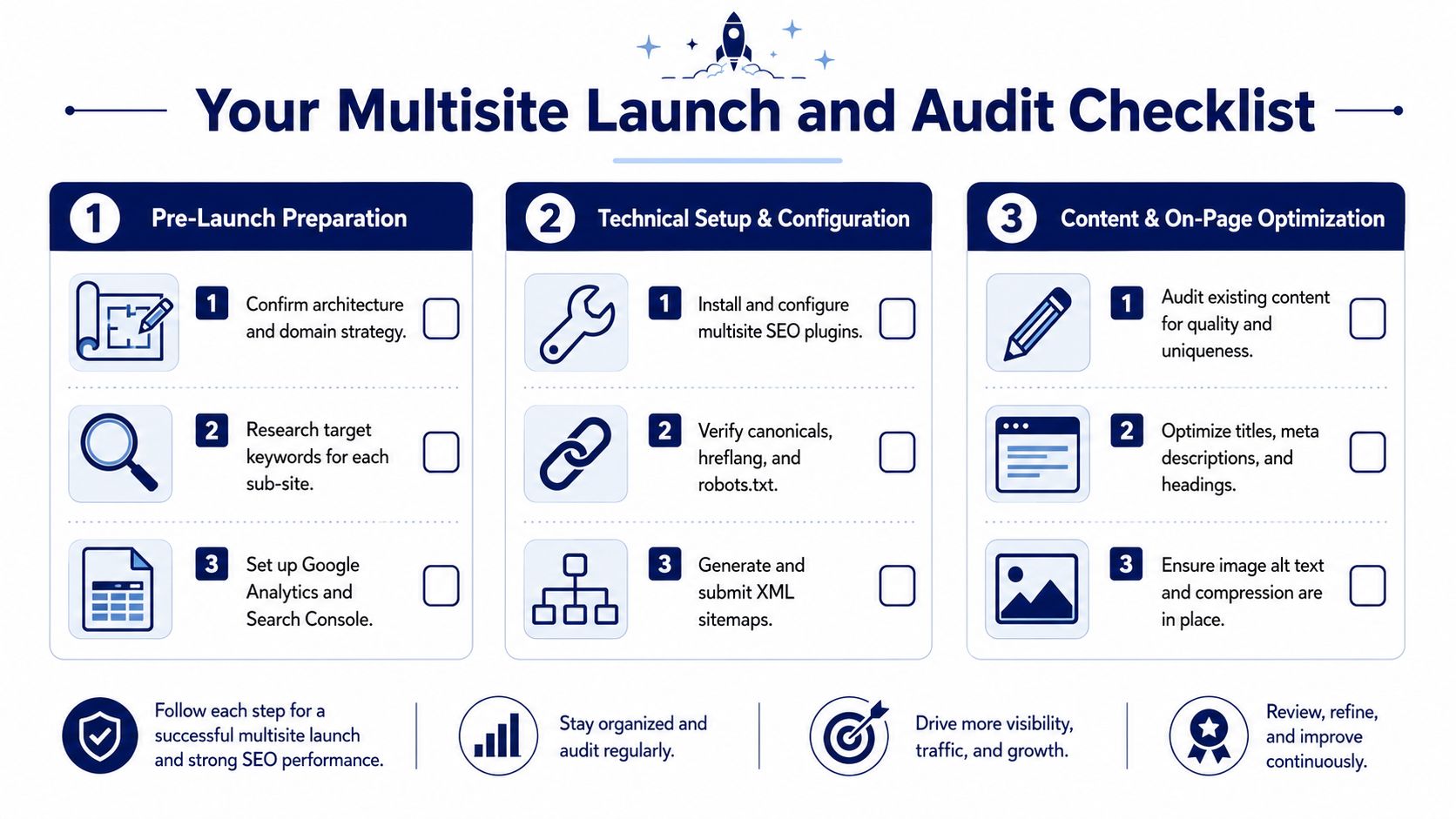
Pre-launch checklist for a new network
Before launch, confirm that the network structure matches business reality.
- Choose the right URL model. Don’t let convenience decide whether a market gets a subdirectory, subdomain, or mapped domain.
- Define keyword ownership per subsite. Each site needs a clear search territory.
- Set canonical rules before content migration. Don’t wait until duplicate pages are indexed.
- Implement hreflang only where equivalent regional or language pages exist
- Generate subsite-specific sitemaps and validate indexability
- Review robots.txt and noindex rules so utility paths don’t leak into search
- Test shared templates for speed and rendering consistency
- Set up analytics and search monitoring at both network and subsite levels
Audit checklist for an existing multisite setup
Inherited networks need a different lens. Start with separation, then move into duplication and performance.
- Map the architecture against actual business goals. Some networks use subdirectories where mapped domains would make more sense, or the reverse.
- Audit overlapping queries and page intent. Look for subsites targeting the same commercial terms.
- Review canonical output and cross-site duplication. Pay close attention to cloned legal, product, and location content.
- Check hreflang reciprocity and regional alignment
- Inspect sitemap quality. Thin, duplicate, or utility URLs often slip in.
- Test shared templates and plugin impact on performance
- Verify local signals on region-specific or location-specific sites
If you need a structured process for the investigation itself, a practical website audit workflow helps teams document issues consistently across large networks.
Audit multisite SEO in layers. Structure first, then signals, then speed. If you reverse that order, you’ll spend time fixing symptoms.
A good audit should end with decisions, not just findings. Which subsites need clearer positioning? Which content should be merged, localized, or canonicalized? Which technical settings belong at network level, and which should remain local? That’s the point where WordPress multisite SEO becomes a governance model instead of a patch list.
If your team is planning, rebuilding, or auditing a multisite platform and needs senior engineering support, IMADO helps brands, agencies, and in-house teams build fast, scalable WordPress systems with strong SEO foundations. Their work spans multisite architecture, multilingual implementations, performance optimization, custom development, and ongoing technical support for complex content platforms.
Let’s build something exceptional
Tell us about your project – we’ll help you launch a fast, scalable, SEO-optimized WordPress platform built for growth.