 Ask Chatgpt to summarize Best WordPress Plugins for Ecommerce: Advanced Agency Guide
 Ask Grok to summarize Best WordPress Plugins for Ecommerce: Advanced Agency Guide
 Ask Claude to summarize Best WordPress Plugins for Ecommerce: Advanced Agency Guide
 Ask Perplexity to summarize Best WordPress Plugins for Ecommerce: Advanced Agency Guide
 Ask Gemini to summarize Best WordPress Plugins for Ecommerce: Advanced Agency Guide

Most advice about the best wordpress plugins for ecommerce is built for clicks, not for stores that have to stay fast, stable, and maintainable after launch.
The usual pattern is predictable. A list ranks plugins by features, screenshots, and beginner friendliness. That sounds useful until a store hits plugin conflicts, slow category pages, checkout friction, bloated asset loading, and a maintenance backlog nobody priced in at the start.
A serious e-commerce stack shouldn’t be chosen like a shopping list. It should be chosen like infrastructure. The right plugin is the one that fits your architecture, your product model, your integrations, your team, and your tolerance for long-term complexity. A plugin that looks cheap on day one can become expensive once you factor in custom development, support time, update testing, and performance workarounds.
That matters even more on WordPress, where flexibility is both the advantage and the trap. You can build almost anything. You can also assemble a fragile system from individually reasonable decisions.
Table of Contents
Why Most ‘Best Ecommerce Plugin’ Lists Are Wrong
Most rankings treat plugin selection as a feature comparison problem. It isn’t. It’s an architecture and operations problem.
A typical article asks whether a plugin supports subscriptions, coupons, shipping, or digital products. Those are valid questions, but they come too late. The first question is whether the plugin’s architecture helps or hurts the store once traffic grows, content expands, and integrations pile up.
Feature lists hide the real cost
A plugin can look impressive in a comparison table and still be the wrong choice. That’s common with e-commerce because stores rarely stay “simple” for long. A merchant starts with a catalog and checkout, then adds filters, advanced search, analytics, multilingual content, marketing automations, ERP sync, and custom checkout rules. Every extra requirement increases coupling.
At that point, the problem isn’t whether the original plugin had the most features. The problem is whether it can support those requirements without turning WordPress into a slow, brittle control panel.
Practical rule: If a plugin solves a business need by forcing you to add three more plugins, it isn’t one plugin decision. It’s a stack decision.
The biggest flaw in listicle advice is that it rarely addresses performance trade-offs. WPBeginner’s comparison of WordPress ecommerce plugins notes a gap many articles miss. search results often rank WooCommerce as the default “best” option, but they rarely deal with the performance trade-offs of traditional WordPress e-commerce architecture. The same source also points out that headless e-commerce gets minimal coverage, even though reducing site bloat and improving loading times matters for Core Web Vitals.
The wrong lens creates technical debt
Technical buyers often get burned. A team chooses a plugin because it appears popular, easy, or feature-rich. Months later, developers are debugging cart fragments, trimming front-end assets, resolving extension conflicts, and trying to make analytics and SEO tools behave inside a stack that was never designed cleanly.
The better lens is simpler:
- Start with scale assumptions: catalog complexity, order logic, traffic patterns, editorial demands.
- Check integration shape: ERP, CRM, payments, shipping, POS, marketplace feeds.
- Review front-end expectations: off-the-shelf theme, custom theme, or decoupled front end.
- Estimate operational drag: update risk, plugin overlap, debugging load, support burden.
Best for whom
There is no universal winner. There is only the best fit for a store’s operating model.
A content-heavy brand with custom landing pages and aggressive performance targets may need a different stack than a digital goods seller. A franchise brand running multiple regional sites has different constraints than a single-store merchant. A headless front end changes the plugin shortlist immediately.
That is why most “best plugin” lists are wrong. They answer the easiest question, not the most important one.
A Modern Framework for Evaluating E-commerce Plugins
A good e-commerce plugin should earn its place in the stack. It shouldn’t stay because a team is already used to it.
The fastest way to evaluate a plugin is to stop asking whether it can do something and start asking how it does it, what else it forces into the system, and what it will cost to operate over time.

Performance and scalability
Performance starts with behavior, not marketing copy. Look at what the plugin loads on product pages, cart pages, account pages, and even non-commerce pages. Many plugins, often in the background, enqueue scripts and styles everywhere, expand database usage, and add AJAX processes that become painful under load.
Review these points before committing:
- Asset discipline: Does it load only where needed, or across the whole site?
- Database behavior: Does the plugin rely on heavy meta queries, broad option storage, or inefficient reporting queries?
- Caching compatibility: Can page caching, object caching, and CDN delivery work cleanly around the store logic?
- Checkout sensitivity: Does the plugin create brittle cart behavior when optimization layers are introduced?
A plugin can be “full featured” and still be a poor fit if every feature increases request weight and complexity.
Security and update reality
WordPress e-commerce doesn’t just expose content. It exposes accounts, order flows, payment logic, and business data. That changes the threshold for acceptable plugin quality.
Evaluate security in operational terms:
- How actively is the plugin maintained
- How quickly can your team test updates without breaking checkout
- How much custom code will sit on top of it
- How many third-party extensions are required for core business logic
A plugin with a small core and predictable extension footprint is often safer to run than a plugin stack stitched together from overlapping addons.
Fewer moving parts usually means fewer emergency patches, fewer surprise regressions, and less time spent recreating bugs across staging and production.
Extensibility and developer ergonomics
This is where agencies and in-house engineering teams should be strict. The plugin has to let you extend behavior cleanly. If common tasks require hacks, template overrides everywhere, or direct edits to plugin assumptions, the total cost climbs fast.
Check for:
- Hooks and filters that cover checkout, pricing, product data, emails, and account flows
- Usable APIs for orders, products, customers, and webhooks
- Documentation quality for custom integrations
- Predictable data structures that won’t make reporting and synchronization messy
Think of extensibility like access panels in a commercial building. If every repair requires opening a wall, the building was not designed well.
Headless and API readiness
Even if you’re not going headless today, you should care whether the plugin supports an API-first future. Businesses often outgrow the original front end before they outgrow the commerce engine.
A useful plugin in modern commerce should support:
- decoupled front ends
- mobile app or kiosk use cases
- external catalog consumption
- custom search and personalization layers
- middleware-driven integrations
If the API is incomplete or awkward, the business loses options later.
Total cost of ownership
“Free” is one of the most expensive words in WordPress.
The full cost includes more than licenses. It includes implementation time, custom development, testing, plugin conflict resolution, hosting pressure, update management, and performance remediation.
Use a simple scorecard:
| Criterion | What to test | Failure sign |
|---|---|---|
| Performance | Page weight, query behavior, cache friendliness | Store slows as features grow |
| Security | Update rhythm, extension dependency, code quality | Frequent urgent fixes |
| Extensibility | Hooks, APIs, docs, override complexity | Custom work becomes fragile |
| API readiness | REST support, decoupling options, external sync | Future channels become hard |
| Ownership cost | Licenses, support time, maintenance load | “Cheap” stack becomes expensive |
This framework filters out a lot of noise quickly. It won’t give you a universal winner. It will give you a plugin stack you can still live with a year from now.
Choosing Your Architecture Monolithic vs Headless
Most plugin decisions are downstream of one bigger decision. What kind of store architecture are you building?
If that isn’t settled first, teams end up debating plugins without agreeing on the shape of the system.
Monolithic architecture
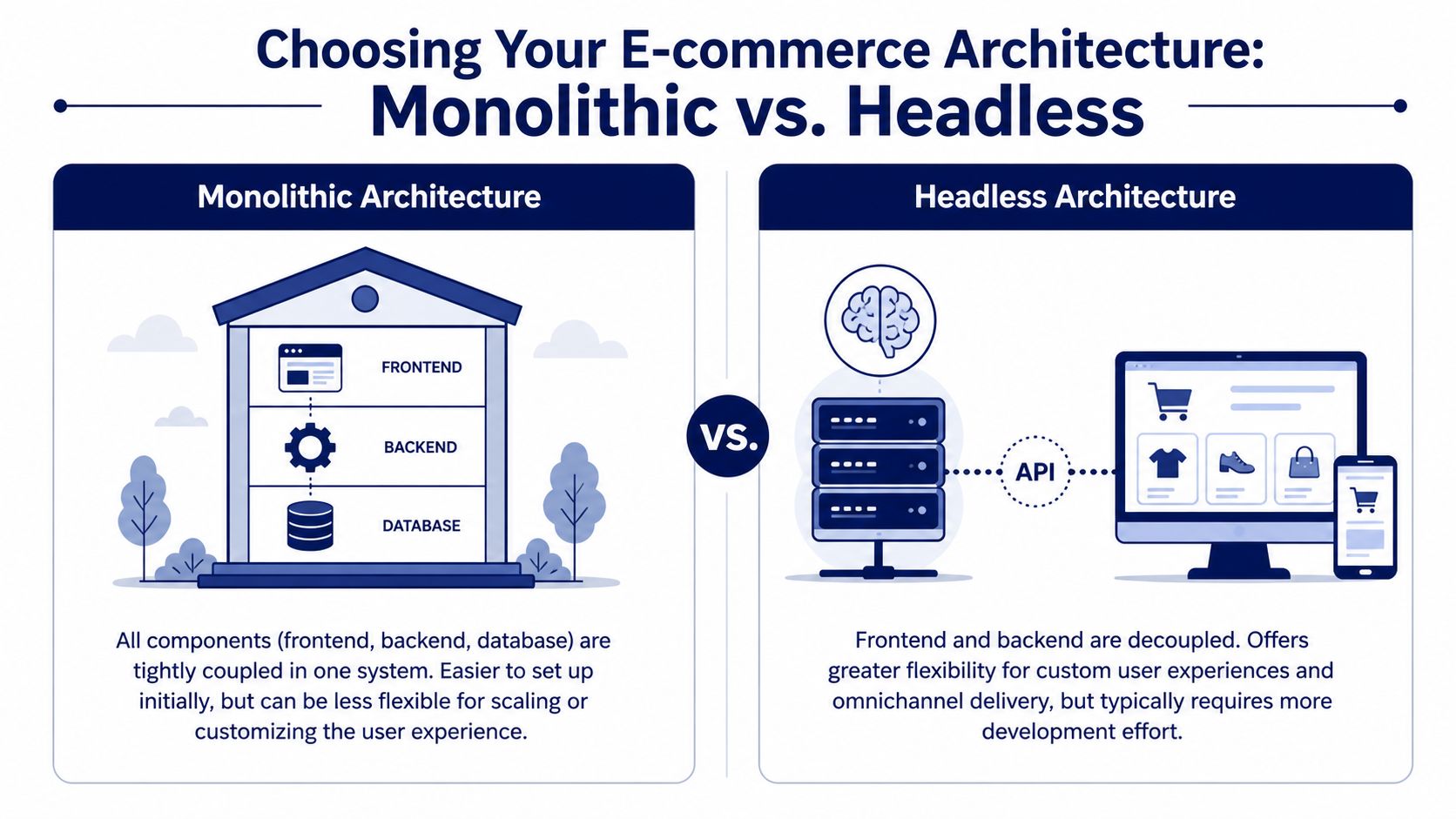
A monolithic WordPress store keeps the front end, application logic, and admin in the same environment. This is the classic WooCommerce pattern. WordPress renders the storefront, manages product data, runs checkout flows, and handles most plugin interactions directly.
That model still works well in many cases.
It fits teams that want:
- a faster launch path
- one admin environment
- broad theme and plugin compatibility
- lower initial engineering complexity
- a large talent pool for support and iteration
The strength of monolithic WordPress is practical advantage. The trade-off is that every major extension usually lives in the same runtime, touches the same database, and increases the chance of front-end and back-end performance affecting each other.
Headless architecture
A headless approach separates the storefront from WordPress or the underlying commerce back end. The front end may use a custom application layer, while WordPress handles content and commerce data through APIs.
That shift changes the plugin conversation. Instead of asking whether a plugin has the best templates or page builder widgets, you ask whether it exposes the right data cleanly and reliably.
For stores with demanding performance targets, custom UX, or omnichannel requirements, headless can be the right answer. It gives teams more control over rendering, caching strategy, interaction design, and front-end performance.
A short visual helps clarify the split.
House kit versus custom build
The simplest analogy is this.
A monolithic stack is like buying a well-designed prefabricated house with many available upgrades. You can move in faster, add practical improvements, and rely on a familiar construction model. But major structural changes become harder as the house gets more complicated.
A headless stack is like building a custom house around the exact experience you want. You get far more freedom, but you also take on more planning, engineering, and coordination.
A lot of teams don’t need headless. They need a cleaner monolithic build with fewer plugins and better front-end discipline.
When monolithic is the better choice
Choose monolithic if the business benefits more from speed of implementation and ecosystem maturity than from deep front-end control.
That usually applies when:
- the team edits heavily inside WordPress
- the storefront doesn’t require app-like interactions
- the budget favors proven patterns over custom engineering
- integrations are manageable through existing extensions or moderate custom work
For many merchants, this is still the most rational path.
When headless earns the complexity
Choose headless when the storefront is a product in itself, not just a themed website with checkout. That includes brands with advanced UX expectations, highly customized purchase journeys, cross-channel delivery, or strict performance requirements.
The earlier note from WPBeginner matters here. Traditional architectures often get discussed without enough attention to Core Web Vitals and front-end bloat. Headless isn’t automatically better, but it does give engineering teams more room to control those concerns if they have the skill and budget to support it.
The practical trade-off
| Architecture | Strongest advantage | Main trade-off | Best fit |
|---|---|---|---|
| Monolithic | Faster setup and broad plugin ecosystem | More plugin coupling and front-end weight | Standard commerce builds |
| Headless | Better control over UX and performance | More engineering effort and integration complexity | Custom, high-growth, multi-channel stores |
The wrong move is choosing headless because it sounds modern, or choosing monolithic because it’s familiar. The right move is matching the architecture to the business model and the team’s ability to maintain it.
Comparing the Core E-commerce Engines
Once the architecture is clear, the shortlist gets much smaller. At that point, the core question becomes which commerce engine deserves to sit at the center of the stack.
WooCommerce as the default benchmark
WooCommerce is the default benchmark for one reason. It powers over 43% of all online stores globally, according to Patchstack’s review of WordPress eCommerce plugins. That scale matters because it creates the largest WordPress e-commerce ecosystem for themes, payment support, checkout customization, fulfillment plugins, and custom development patterns.
For agencies and technical teams, WooCommerce’s market position matters less as a popularity contest and more as an infrastructure signal. There are proven ways to build around it. There are established extension paths. There are experienced developers almost everywhere.
That said, popularity doesn’t remove trade-offs. WooCommerce often becomes harder to operate when teams use it as a base layer for every business requirement without controlling plugin sprawl.
Where WooCommerce fits best
WooCommerce is still the strongest choice when you need flexible product models, rich content integration, custom checkout behavior, and broad extension compatibility inside a WordPress-native workflow.
It works especially well for:
- Content-led stores where editorial and commerce live tightly together
- Custom integration projects that need ERP, CRM, or operational syncing
- Non-standard catalogs that don’t fit a rigid SaaS commerce model
- Agencies building custom-built stores rather than fully off-platform experiences
The hidden cost is governance. WooCommerce rewards disciplined builds and punishes messy ones.
Where alternatives make more sense
Not every store should default to WooCommerce.
SureCart is worth attention if the priority is a more modern, lighter architectural direction. It comes up often in performance-first conversations because it pushes teams to think differently about what should happen inside WordPress and what shouldn’t. For stores that want less plugin burden in the application layer, that can be a meaningful advantage.
Easy Digital Downloads is usually the cleaner choice for digital-first selling. If the business doesn’t need shipping, inventory rules for physical products, or extensive physical commerce flows, a specialized digital commerce engine often produces a leaner build and simpler operations.
BigCommerce for WordPress can make sense when a team wants WordPress for content but prefers to offload more commerce-heavy concerns away from the core site runtime. That approach can reduce some of the operational pressure that monolithic WordPress builds often absorb.
For a broader platform-level comparison beyond plugins, this WooCommerce, PrestaShop, and Magento comparison is useful because it frames the decision at the system level, not just the extension level.
Use case mapping
| Plugin | Ideal Architecture | Best For | Key Consideration |
|---|---|---|---|
| WooCommerce | Monolithic, can support API-driven builds | Flexible WordPress-native stores | Requires discipline around extensions and performance |
| SureCart | Lighter, API-oriented direction | Teams prioritizing leaner architecture | Different workflow than traditional WooCommerce builds |
| Easy Digital Downloads | Monolithic specialist | Digital products and software delivery | Best when physical commerce features would be excess weight |
| BigCommerce for WordPress | Decoupled content and commerce responsibilities | Content-first sites with heavier commerce needs | More separation, less native WordPress control |
What usually works in practice
The best answer isn’t usually the plugin with the most features. It’s the engine that minimizes unnecessary system complexity for the business model.
If a store sells physical products with custom workflows and needs deep WordPress control, WooCommerce is often still the right answer. If a store sells digital goods only, forcing WooCommerce into that role often creates avoidable overhead.
That distinction matters more than another generic top-ten ranking. The core decision is not “which plugin is most popular.” It’s “which engine creates the least friction for the next phase of this business.”
Essential Plugins for Analytics Growth and SEO
The core engine handles transactions. It doesn’t tell you enough about why users convert, where they drop off, or which pages support revenue. That’s where the surrounding plugin layer matters.
Most stores don’t fail because they lacked one more feature. They fail because the stack became noisy. Good stores use a small number of high-impact plugins for analytics, SEO, performance, and trust.

Analytics that people actually use
In many WordPress stores, analytics data exists but decision-makers don’t look at it because the workflow is awkward. That is why dashboard-level reporting plugins remain so common.
MonsterInsights is the clearest example. It has over 3 million active installations, and WP Creative’s analytics plugin review also notes premium plans starting at $99.50/year. That combination says something important. WordPress teams are willing to pay for simpler access to e-commerce and behavior data when it improves day-to-day decision-making.
For WooCommerce stores, that matters because useful reporting isn’t just about traffic totals. It affects:
- Product decisions: which items attract interest but fail to convert
- Checkout diagnostics: where users abandon the process
- Campaign analysis: which landing pages support revenue, not just visits
- Merchandising choices: where category structure or internal linking needs work
SEO plugins should support the stack, not fight it
SEO plugins are easy to overvalue. Most of them overlap heavily on core tasks such as metadata, sitemaps, schema basics, and content-level controls. The better question is whether the SEO plugin stays out of the way, integrates cleanly with your editor setup, and avoids unnecessary admin clutter.
A few practical rules help:
- Choose one SEO plugin only: doubling up creates conflicts and duplicate behavior.
- Match the plugin to the editorial team: some teams need content guidance, others want automation and minimal UI.
- Avoid feature chasing: e-commerce SEO usually depends more on technical execution, internal linking, templates, category structure, and crawl control than on plugin novelty.
Build a lean growth layer
A high-performing store usually has these categories covered:
| Category | What the plugin should do | What to avoid |
|---|---|---|
| Analytics | Surface useful commerce and behavior data | Reporting bloat nobody reads |
| SEO | Manage technical basics and content metadata | Overlapping SEO suites |
| Performance | Cache smartly and reduce front-end overhead | Plugins that optimize by guesswork |
| Payments and security | Keep checkout trusted and maintainable | Too many gateway or fraud layers |
One growing consideration is how stores prepare for search experiences that are changing beyond classic blue links. Teams looking at product discovery, structured content, and automation should spend time with these AI strategies for e-commerce search, because search visibility increasingly depends on how well your catalog and content can be understood, not just indexed.
A store’s growth stack should explain behavior, support discoverability, and add as little front-end weight as possible.
The strongest plugin choices in this layer are usually the least dramatic ones. They make decisions easier without becoming the new source of complexity.
Solving for Scale Multilingual Multisite and APIs
Scale problems don’t show up as one dramatic failure. They show up as recurring friction. Regional teams need different catalogs. Franchise operators want controlled autonomy. The ERP team wants inventory consistency. Marketing wants local landing pages without breaking governance.
Plugin selection becomes a more serious matter. A plugin stack that works for one storefront can become hard to manage once the business spans languages, locations, or external systems.
Multilingual commerce without content chaos
A multilingual store is not just a translation project. Product data, checkout labels, transactional content, SEO metadata, and regional merchandising all need to stay consistent.
The common mistake is treating translation as a front-end layer only. In practice, you need to decide whether translated content will be centrally governed, locally edited, or mixed. That decision affects plugin choice immediately.
A stable multilingual setup usually requires:
- Clear ownership: who controls default product content and who can localize it
- Consistent URL strategy: language handling shouldn’t become an SEO afterthought
- Compatible commerce logic: taxes, shipping rules, and payment methods may vary by market
- Translation workflow discipline: not every field should be freely editable in every locale
Plugins like WPML or TranslatePress can support these builds, but the important part is operational design. The plugin won’t fix weak governance.
Multisite for franchise and network models
A multisite e-commerce setup changes the problem from store building to store governance. That often makes sense for franchise groups, regional operators, or organizations with multiple brands that share patterns but not identical operations.
A typical scenario looks like this: central leadership wants brand consistency, approved components, and shared integrations. Local operators need editorial flexibility, local inventory, or market-specific campaigns.
That setup can work well when the stack separates what must be shared from what can vary:
- Shared codebase and design system
- Controlled plugin set
- Defined roles for central and local teams
- Integration rules for catalog, CRM, and reporting
A useful reference for that broader build pattern is this look at WordPress ecommerce stores for growing businesses, especially for teams balancing scale with editorial control.
The bigger the store network gets, the less useful “best plugin” advice becomes. Governance, data ownership, and integration boundaries matter more.
APIs and operational systems
The moment a store depends on ERP sync, warehouse tools, CRM workflows, or third-party pricing logic, plugins stop being isolated features. They become integration surfaces.
The safest pattern is to keep business-critical sync logic explicit and predictable. Avoid burying essential operations inside a chain of plugins that all modify the same product or order events.
In practice, strong API-driven builds usually share these traits:
- One authoritative source for each data domain
- Documented sync direction, not guesswork about which system wins
- Retry and failure handling outside the front end where possible
- Custom integration code where business rules are unique
That’s why enterprise WordPress e-commerce often looks less like “install more plugins” and more like “use fewer plugins, with better-defined responsibilities.”
Building a Future-Proof E-commerce Technology Stack
A future-proof stack isn’t the one with the longest feature list. It’s the one your team can still reason about after the site has grown, staff has changed, and the business has added new channels, markets, and integrations.
That requires a different mindset from the start. Teams need to stop thinking in terms of plugin accumulation and start thinking in terms of system stewardship.
The stack is never finished
Every store changes after launch. Products evolve. Search behavior changes. Teams add campaigns, apps, regional content, automation tools, and reporting needs. A plugin stack that looked tidy at launch can drift into sprawl if nobody owns standards.
That is why the best wordpress plugins for ecommerce should be treated as a curated operating environment, not a one-time selection exercise.
A strong operating model usually includes:
- Scheduled plugin reviews: remove what the business no longer needs
- Performance monitoring: catch asset creep and query regressions early
- Update testing: treat checkout and account flows as critical paths
- Security discipline: reduce unnecessary extensions and keep dependencies current
- Integration audits: confirm external systems still behave as expected
Hosting and performance still shape plugin outcomes
Even a clean plugin stack struggles on weak infrastructure. Hosting quality changes how much margin you have for peak load, background jobs, object caching, and admin responsiveness.
For teams reviewing infrastructure options, Monro Cloud’s best WordPress hosting picks are a helpful starting point because managed hosting decisions directly affect how forgiving your e-commerce stack can be under pressure.
Performance work also shouldn’t be reduced to “install a caching plugin and hope.” Store performance usually improves when teams reduce front-end weight, audit third-party scripts, trim unused features, and control what each plugin adds to rendering and checkout paths. This practical guide on how to improve WordPress site speed is a solid reference for that process.
Choose fewer things, but choose them harder
This is the clearest pattern across stable e-commerce builds. The teams with the fewest recurring platform headaches usually do three things well:
| Decision area | Strong choice | Weak choice |
|---|---|---|
| Core engine | Match platform to business model | Default to popularity alone |
| Extension layer | Add only tools with a clear operational purpose | Install plugins for edge-case convenience |
| Maintenance | Budget for ongoing review and optimization | Assume launch quality lasts forever |
The stores that age well aren’t necessarily the stores with the most custom engineering. They’re the stores with the cleanest boundaries, the best maintenance habits, and the least unnecessary plugin overlap.
If you want a stack that survives growth, choose architecture first, evaluate plugins by operational cost, and protect the system after launch with the same seriousness you brought to the build.
If you’re planning a new store, untangling a bloated WooCommerce build, or need senior WordPress engineers for performance, integrations, or long-term maintenance, IMADO is a strong partner to bring in. They build fast, scalable WordPress and e-commerce platforms with the engineering discipline that keeps growth from turning into technical debt.
Let’s build something exceptional
Tell us about your project – we’ll help you launch a fast, scalable, SEO-optimized WordPress platform built for growth.