 Ask Chatgpt to summarize WooCommerce Plugin Development Services: The Complete Guide
 Ask Grok to summarize WooCommerce Plugin Development Services: The Complete Guide
 Ask Claude to summarize WooCommerce Plugin Development Services: The Complete Guide
 Ask Perplexity to summarize WooCommerce Plugin Development Services: The Complete Guide
 Ask Gemini to summarize WooCommerce Plugin Development Services: The Complete Guide
A lot of teams arrive at custom WooCommerce work the same way. An update lands, checkout starts behaving strangely, inventory sync lags behind reality, and the plugin stack that looked efficient six months ago now feels like a pile of private liabilities.
That’s usually the moment the conversation changes. You stop asking, “Which plugin can we add?” and start asking, “What should we own?”
That second question is the right one. For a growing store, WooCommerce plugin development services aren’t just about building features. They’re about deciding which parts of the commerce stack deserve custom control, how that code should be structured, and who will maintain it when WooCommerce, WordPress, payment gateways, and upstream business systems change.
Table of Contents
When Off-the-Shelf Plugins Are Not Enough
A familiar scenario plays out in scaling stores. The team starts with a solid base, then adds a subscription tool, a shipping rules plugin, a CRM connector, a product add-on module, and a checkout customization package. Nothing looks reckless in isolation. The trouble shows up in the interactions.
One plugin stores data in a way another plugin doesn’t expect. A theme update changes a template override. A checkout field extension breaks a tax workflow. Suddenly the store still “works,” but every release feels risky and every urgent fix touches three different vendors’ code.
That’s the point where buying convenience starts creating drag.
The hidden cost of plugin stacking
Off-the-shelf plugins are useful because they compress time. They’re often the right answer when the requirement is standard and the store can adapt its process to the software. They’re a poor answer when the software starts dictating operations, customer experience, or integration boundaries.
The problem isn’t just compatibility. It’s ownership.
- Operational mismatch: Your team changes internal processes to fit a generic plugin rather than building the workflow the business needs.
- Release risk: Every WooCommerce or WordPress update becomes a compatibility event.
- Support fragmentation: When something fails, each vendor can point to another plugin as the source of the issue.
- Performance drag: Redundant hooks, bloated admin screens, and repeated database work accumulate over time.
A practical way to think about it is this. If a capability is central to conversion, fulfillment, pricing, or customer data flow, it usually deserves tighter engineering control than a commodity plugin can offer.
WooCommerce is large enough that this problem isn’t niche. It holds 33.4% market share of all tracked global ecommerce sites as of August 2025, powering approximately 4.53 million active stores worldwide, and BuiltWith reports 6,774,190 live websites using WooCommerce, which shows the scale of the ecosystem and why generic solutions tend to optimize for broad compatibility rather than your exact operating model, according to this WooCommerce market share breakdown.
That scale is also why lists of the best WordPress plugins for ecommerce are useful starting points, not final architecture decisions.
Generic plugins are good at serving the median store. Competitive stores usually stop looking like the median store.
Custom development changes the conversation
A well-built custom plugin gives the business a controlled place to put rules that matter. That might be pricing logic, warehouse routing, role-based purchasing, marketplace listing workflows, or account-specific checkout behavior.
The value isn’t “custom” for its own sake. The value is stability around something the business can’t afford to delegate to a loosely coordinated plugin stack.
The Scope of Custom Plugin Development
When teams say they need WooCommerce plugin development services, they can mean very different things. Some need a customer-facing feature. Others need middleware between WooCommerce and an ERP. Some need a utility plugin that cleans up performance or admin workflow issues that no commercial extension solves cleanly.
This is the market most buyers are navigating:
Custom feature extensions
These plugins shape the storefront experience directly. They alter how products are configured, how customers buy, or what the checkout path looks like.
Examples include:
- Product configuration tools: Useful when products have complex options, dependencies, or pricing rules that standard variations can’t model well.
- Booking and scheduling layers: Common for service businesses, rentals, appointments, or hybrid commerce models.
- Account-specific purchasing logic: B2B portals often need quote flows, approval routing, restricted catalogs, or role-based pricing.
These projects require more than front-end polish. They usually touch cart rules, order data, emails, admin workflows, and reporting.
Integrations and business system connectors
Such systems often feature many high-value custom plugins. The plugin becomes the controlled connection point between WooCommerce and another business system.
That can include:
- ERP and inventory sync
- CRM and lifecycle automation
- Marketplace feeds and order ingestion
- PIM, DAM, or catalog enrichment workflows
If you’re mapping external product or order data into WooCommerce, implementation details matter. Rate limits, retry logic, field normalization, duplicate detection, and failure logging decide whether the integration becomes reliable or a recurring incident source. Teams evaluating marketplace connectivity often benefit from technical references like how to use the Walmart API, because it shows the practical shape of working with external commerce APIs before you decide whether to build a direct connector or use middleware.
For stores that need customer and sales workflows tied together, a dedicated WordPress CRM integration approach is often more durable than forcing multiple plugins to pass customer state among themselves.
Performance and utility plugins
These are less visible, but often more strategic. They solve narrow problems with high operational value.
A utility plugin might:
- Streamline admin tasks: Bulk order actions, warehouse views, returns workflows, custom exports.
- Improve data hygiene: Validation rules, order metadata normalization, duplicate prevention.
- Reduce overhead: Purpose-built background jobs, selective feature loading, or custom cache-aware endpoints.
Practical rule: If the requirement is unique to your process but invisible to customers, a small utility plugin can deliver more value than another large commercial extension.
The hidden administrative layer
There’s another issue most guides skip. Shipping code is only part of the lifecycle if you plan to distribute the plugin beyond one client install.
A hidden bottleneck in plugin development is marketplace vendor approval, which can introduce a 6–12 month administrative delay, and 70% of new plugin vendors fail initial approval due to incomplete documentation or restrictive terms, according to this discussion of marketplace approval hurdles.
That matters for agencies, product teams, and founders deciding whether a plugin should remain proprietary, be licensed privately, or be sold through a marketplace. Distribution strategy can change the build requirements long before the first line of code is written.
Technical Pillars of an Enterprise-Grade Plugin
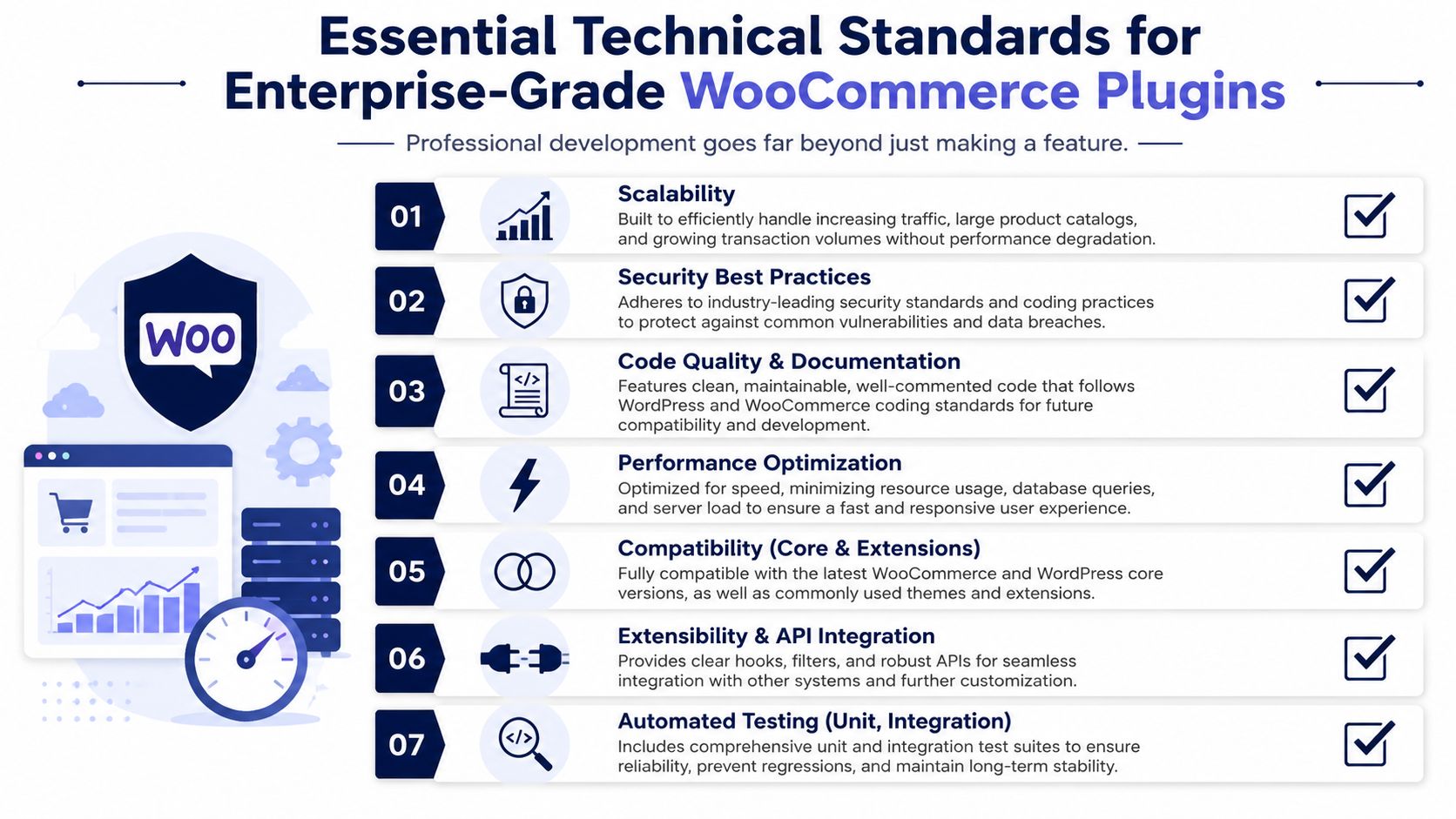
A plugin that merely works is easy to build. A plugin that remains safe, maintainable, and dependable through core updates, extension conflicts, and changing business requirements is a different class of work.
That’s where architecture matters more than features.
Separation of concerns
One of the clearest markers of serious plugin engineering is whether business logic and presentation logic are separated. WooCommerce’s own development guidance stresses that separation because it makes maintenance easier and allows UI changes without rewriting the core rules behind the plugin, as covered in WooCommerce extension development best practices.
In practical terms, that means order handling, pricing rules, eligibility checks, and sync logic should not be tangled inside template files or front-end rendering callbacks.
Why this matters to a CTO:
- Faster iteration: Product teams can change interface behavior without risking order logic.
- Lower update risk: Theme and frontend changes are less likely to break business-critical functions.
- Cleaner testing: Core logic can be validated independently from the presentation layer.
A lot of plugin debt starts with one shortcut here.
Performance and external dependencies
Many custom plugins rely on remote services. That might be a PIM, ERP, shipping provider, or marketplace API. If every request hits an external service live, the store becomes hostage to network latency and upstream instability.
WooCommerce’s guidance recommends using WordPress transients to cache remote API responses, which reduces redundant requests and lowers external service load. That’s not a cosmetic optimization. It’s often the difference between a stable storefront and a checkout or admin experience that degrades under normal usage.
For stores already wrestling with query overhead and heavy admin operations, plugin architecture should also align with broader WooCommerce database optimization practices, especially when custom code creates new tables, indexes, scheduled jobs, or reporting layers.
Observability and supportability
Production issues don’t announce themselves politely. Orders fail unnoticed, sync jobs stall, or edge-case products trigger errors no one saw in staging.
That’s why logging can’t be an afterthought. WooCommerce recommends opt-in logging via the WC_Logger class so teams can inspect issues through the System Status tools without turning the plugin into a data exhaust problem.
A mature plugin should answer these questions quickly:
| Concern | What good implementation looks like |
|---|---|
| Failure visibility | Errors are logged clearly and only when logging is enabled |
| Recovery | Jobs can retry safely without duplicating actions |
| Support workflow | Admins can identify what failed, where, and why |
| Change safety | Releases can be tested against known workflows |
If support needs direct database inspection every time something breaks, the plugin isn’t operationally finished.
Compatibility and future change
WooCommerce changes. WordPress changes. Payment providers deprecate endpoints. Themes and page builders load assets in unexpected ways. A plugin has to be built with that reality in mind.
That means compatibility work isn’t a one-time QA pass. It’s an architectural posture. Namespacing, defensive checks, action and filter discipline, and minimal assumptions about theme output all matter.
It also means accessibility, multilingual handling, and API readiness shouldn’t be bolted on late. They need to be considered where data structures, admin flows, and rendering decisions are first made.
The Professional Plugin Development Process
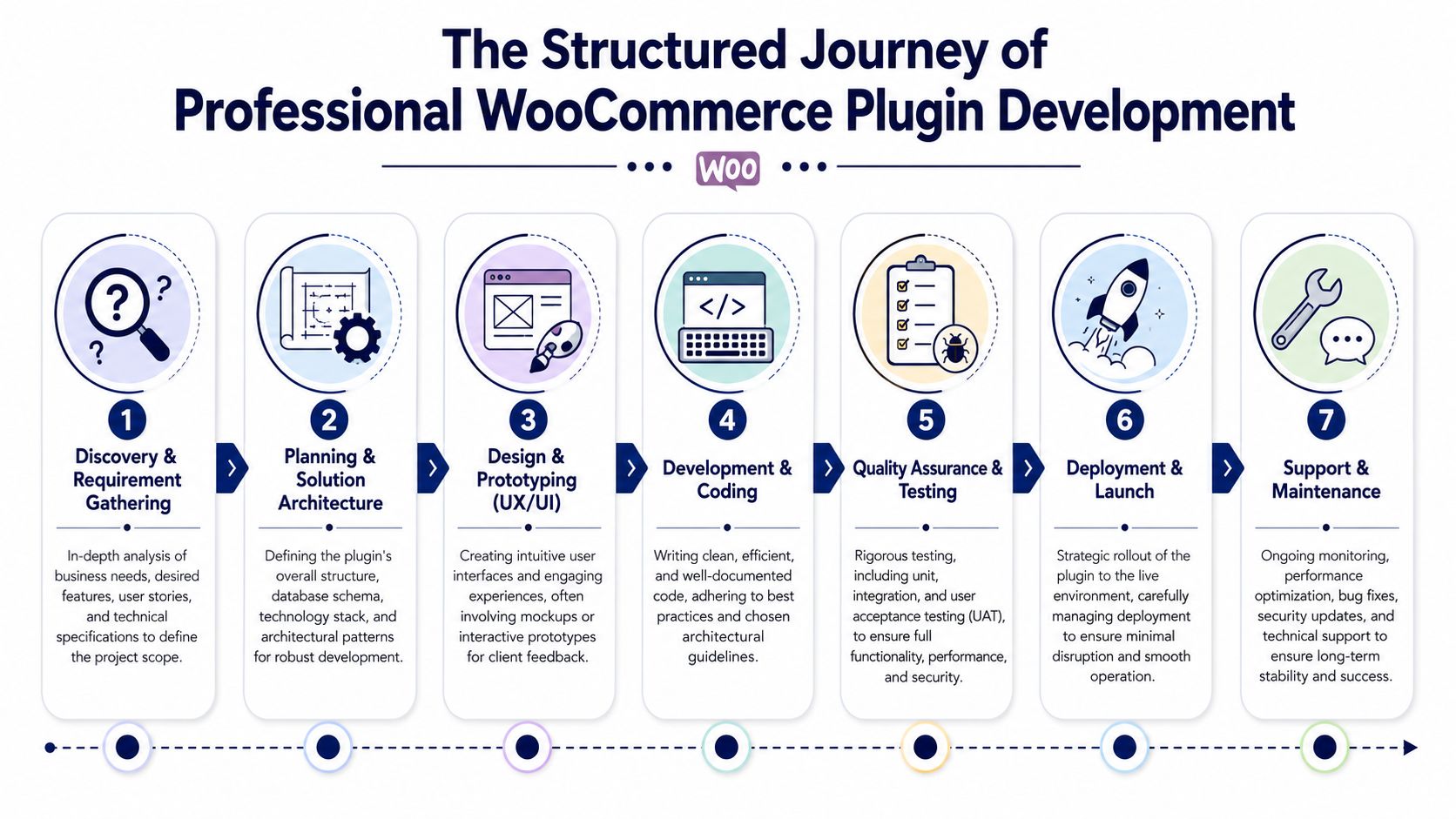
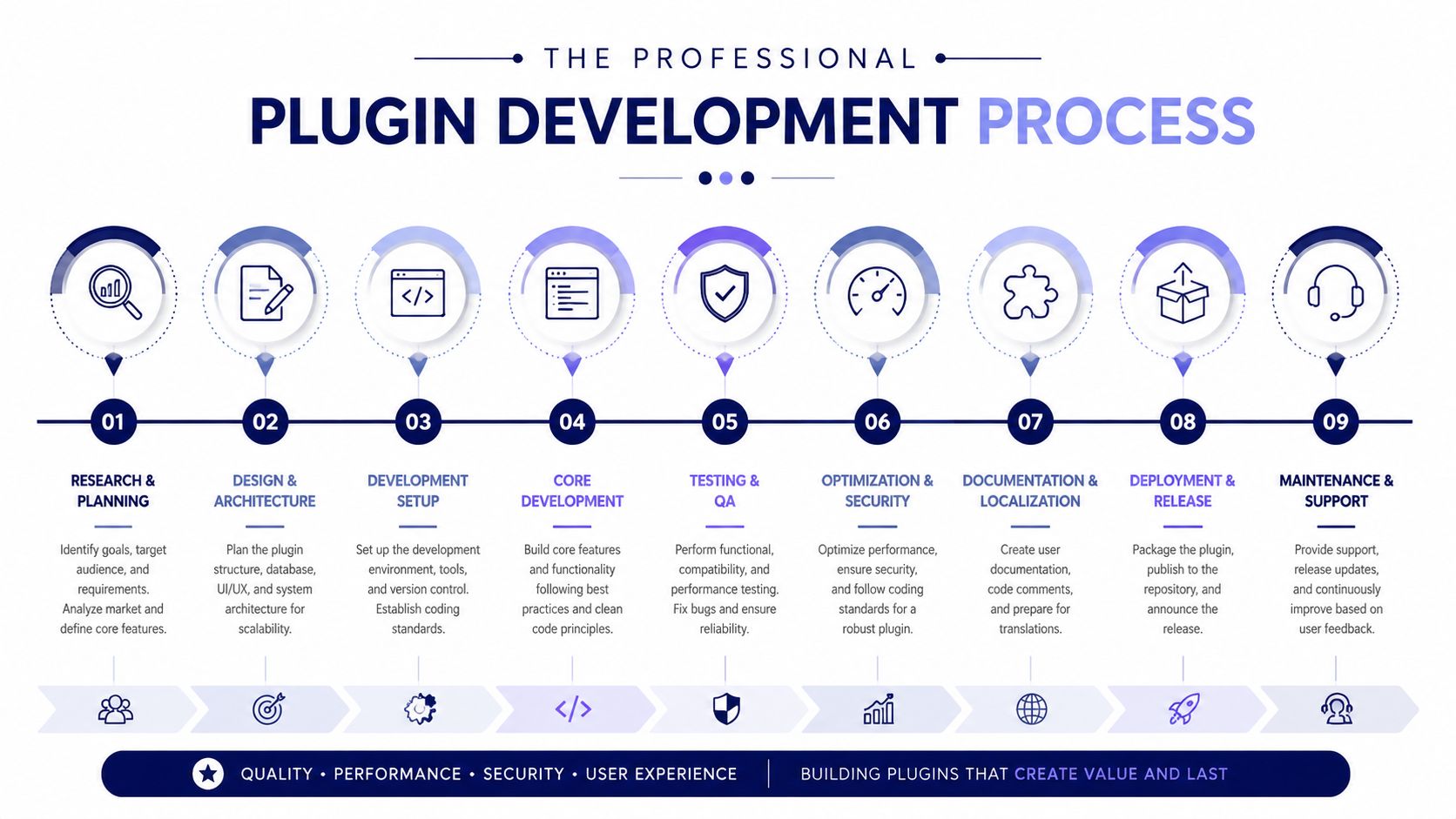
A plugin project usually looks healthy right up to the moment scope shifts, an integration behaves differently in production, or launch exposes a workflow no one modeled. The difference between ad hoc work and a professional engagement is not raw coding ability. It is the ability to make controlled decisions from the business case through maintenance, with fewer surprises in cost, release timing, and ownership.
That discipline keeps a custom plugin from becoming expensive code with no clear steward.
Discovery and requirement shaping
This phase decides whether custom development should happen at all.
A serious team starts by testing the business case, not by sketching admin screens. The questions are straightforward. What revenue, margin, operational savings, or control does the plugin create? What existing plugin, app, or workflow fails to cover the requirement? What has to be configurable by non-technical staff, and what should remain code-level policy?
The outputs should be specific enough to survive handoff:
- User stories: Who uses the plugin, in which workflow, and what result they need
- System boundaries: What belongs in WooCommerce, what belongs in an external service, and what should stay out of the plugin entirely
- Data map: Which system owns products, orders, customer records, pricing logic, and fulfillment state
- Failure scenarios: What happens when an API times out, a webhook arrives twice, or required data is missing
- Release constraints: Whether the plugin must pass marketplace review, support multisite, work with HPOS, or meet internal security review
Marketplace approval is a hidden challenge many teams miss. If the plugin is meant for public distribution, architecture and UX decisions may need to satisfy WordPress.org or WooCommerce marketplace expectations, not just internal preferences. That affects settings design, data handling, licensing, update delivery, and support commitments.
Architecture and estimation
After the problem is defined, technical design and commercial scoping need to line up. This is the point where weak vendors start speaking in vague effort ranges, while strong ones identify assumptions, risks, and what drives future maintenance cost.
A useful estimate explains more than budget:
| Deliverable | What it should define |
|---|---|
| Architecture outline | Plugin structure, service boundaries, data flow, dependencies |
| Assumptions | What external systems provide, what the client owns, what is excluded |
| QA scope | Test environments, supported scenarios, acceptance criteria |
| Deployment plan | Release method, rollback path, monitoring responsibility |
This level of detail matters for enterprise teams and lean operators alike. Smaller companies still need version control, acceptance criteria, rollback planning, and release ownership. If internal process is light, practical resources like SDLC guidance for solo founders help set a workable baseline.
Development and QA
Professionals do not just build. They control change during this phase.
That means short implementation cycles, code review, staging validation, and repeated testing against realistic store behavior. In WooCommerce, a feature can appear correct on the storefront and still create downstream problems in taxes, refunds, exports, subscriptions, or fulfillment. Good teams test the whole business workflow, not only the visible screen.
QA for plugin work usually covers:
- Functional testing: The feature behaves correctly across intended scenarios
- Integration testing: External systems send and receive expected data
- Regression testing: Existing store behavior remains intact after the plugin is introduced
- Operational testing: Logging, scheduled actions, retries, roles, and permissions behave as intended
Failure handling is the ultimate test. A plugin is easier to trust when the team can show what happens after an API rejection, duplicate event, partial sync, or interrupted checkout flow.
Deployment and long-term maintenance
A quiet launch is the result of planning, not luck.
Deployment should account for environment-specific configuration, data migration steps, rollback procedures, post-release monitoring, and ownership of incoming defects. If the plugin touches payments, checkout, pricing, or order routing, release windows and support coverage matter because the financial cost of a bad deploy is immediate.
At this point, one capable engineering partner can matter more than several disconnected freelancers. The work usually continues after release through compatibility updates, provider API changes, merchant feedback, and feature requests that were deferred to get the first version out safely.
The plugin lifecycle does not end at release. It becomes a maintained product inside the commerce stack, with operating cost, roadmap value, and technical debt that need active ownership.
Choosing Your Engagement and Pricing Model
Not every plugin project should be bought the same way. The right commercial model depends on how clear the requirements are, how much internal product ownership exists, and whether the plugin is a one-time deliverable or an evolving part of the commerce platform.
Many teams make a preventable mistake: they choose the cheapest structure, only to discover they bought the wrong level of flexibility.
The three most common models
A fixed-price project works well when the scope is stable. A retainer works when the plugin will evolve through feedback, integrations, and staged rollouts. Staff augmentation fits companies that already have technical leadership and need execution capacity inside an existing process.
Here’s a practical comparison:
| Model | Best For | Cost Structure | Flexibility |
|---|---|---|---|
| Fixed-price project | Well-defined plugin builds with clear requirements and acceptance criteria | Agreed project fee tied to scope | Lower flexibility once scope is locked |
| Monthly retainer | Ongoing plugin enhancement, maintenance, support, and roadmap work | Recurring monthly fee for reserved capacity | High flexibility within available capacity |
| Staff augmentation | In-house teams that need senior WooCommerce engineers embedded into their workflow | Time-based billing for dedicated or part-time engineers | High flexibility, but requires stronger internal management |
| White-label delivery | Agencies that need plugin development capacity under their own client relationship | Usually project-based or recurring capacity agreement | Flexible, but dependent on handoff clarity and partner process |
How to choose without overcomplicating it
Use scope clarity as the first filter.
If you know exactly what the plugin must do, what systems it touches, and what “done” means, fixed price can be efficient. It creates budget predictability, but it also punishes late discovery. If your team is still discovering edge cases, a fixed-price contract often turns into a negotiation machine.
Retainers work better when the plugin is part of a broader roadmap. That’s common with ERP integration, B2B features, custom checkout logic, or marketplace operations. Requirements emerge as users interact with the system, and the business needs room to refine.
Staff augmentation is strongest when your product or engineering leadership already knows how to direct the work. It gives control, but it also means your team owns prioritization, architecture oversight, and quality governance.
Financial trade-offs that matter
The cheapest proposal often excludes the expensive parts. Discovery is shallow. QA is thin. Documentation is minimal. Maintenance is treated as separate future work.
Look closely at what the commercial model includes:
- Requirement definition: Is analysis included, or are you expected to hand over complete specs?
- Testing responsibility: Who owns staging, edge-case validation, and release verification?
- Documentation: Will your team receive usable implementation notes and operational guidance?
- Post-launch support: Is there a warranty period, maintenance option, or update policy?
A plugin is a strategic asset when the delivery model supports its full lifecycle. Otherwise it’s just custom code with a delayed support problem.
How to Select the Right Development Partner
Most buyers don’t lose money on WooCommerce projects because development is impossible. They lose money because they hire a team that can code but can’t manage risk.
The right partner should be able to discuss architecture, testing, rollout, and maintenance with the same confidence they discuss features. If the conversation stays at the level of “yes, we can build that,” you still don’t know enough.
What to verify before signing
Start with evidence of similar complexity. Not identical industries. Similar technical shape.
Look for teams that can speak concretely about:
- Integration depth: Have they built plugins that connect to ERP, CRM, PIM, shipping, or marketplace systems?
- Operational awareness: Can they explain logging, retries, admin tooling, and failure handling?
- Compatibility discipline: Do they account for WooCommerce updates, theme interactions, and extension conflicts?
- Support model: Who maintains the plugin after launch, and how are incidents handled?
If you need outside help evaluating implementation depth, a service focused on hiring WordPress plugin developers can also serve as a benchmark for what senior plugin capability should look like in practice.
Questions worth asking in the sales process
Ask for specifics, not general reassurances.
A few useful prompts:
- How do you separate plugin business logic from UI rendering?
- How do you handle remote API failures and retries?
- What does your QA process cover beyond the happy path?
- What happens when WooCommerce releases a breaking change?
- What documentation do we receive at handoff?
The quality of these answers usually tells you more than a polished portfolio.
You’re not hiring a vendor to ship code. You’re hiring a team to reduce the probability and impact of future problems.
Red flags that deserve attention
Some warning signs are consistent:
- They skip discovery: Fast estimates with little technical questioning usually hide assumptions that reappear later as change orders.
- They promise broad compatibility without caveats: Serious teams know compatibility depends on environment, theme behavior, and extension mix.
- They treat maintenance as optional: Custom plugins always need stewardship.
- They can’t explain deployment: If launch planning is vague, risk hasn’t been managed.
Price still matters, but price without process is how technical debt gets outsourced back to you.
Frequently Asked Questions
How long does a custom WooCommerce plugin project usually take
It depends on the plugin’s role, not just the feature list.
A narrow utility plugin with clear requirements can move quickly. A plugin that touches checkout, pricing, fulfillment, or external systems takes longer because the work includes discovery, architecture, testing, deployment planning, and post-launch support. Integrations also add coordination overhead with third-party APIs, data mapping, and failure handling.
If a timeline sounds aggressive, ask what’s being compressed. Usually it’s discovery, QA, or documentation. Those are exactly the areas that determine whether the plugin remains maintainable after launch.
Can existing site code be turned into a standalone plugin
Sometimes, yes. Often, not cleanly without refactoring.
A lot of WooCommerce stores accumulate custom logic in theme files, snippets plugins, or scattered functions added during urgent launches. That code may work, but it usually isn’t organized as a proper productized plugin. Before it can become one, the team often has to separate business rules from template logic, isolate dependencies, normalize settings, and define how updates should be handled.
This is worth doing when the functionality is important enough to preserve independently of the theme or page builder. If the code controls order behavior, pricing, external syncs, or admin workflows, it usually belongs in a plugin rather than inside presentation code.
What’s the difference between a theme customization and a proper plugin
A theme customization changes how the storefront looks or renders. A proper plugin owns reusable functionality and business behavior.
That distinction matters because commerce logic shouldn’t disappear when a design changes. If your store relies on custom checkout rules, order metadata processing, warehouse routing, account-based pricing, or remote API sync, that logic should live in a plugin with its own structure, settings, and maintenance path.
The scale of the ecosystem is one reason discipline matters. WooCommerce has been downloaded more than 211 million times, with an average of 30,000 daily downloads, which means plugins have to be built for compatibility and performance if they’re going to survive in real-world stores, according to these WooCommerce statistics and trends.
A good rule is simple. If removing the theme should not remove the behavior, it shouldn’t be implemented as a theme customization.
If your store has reached the point where another plugin install feels riskier than helpful, IMADO can help you scope the business case, architect the right plugin approach, and support the code after launch so it stays maintainable as your WooCommerce stack evolves.
Let’s build something exceptional
Tell us about your project – we’ll help you launch a fast, scalable, SEO-optimized WordPress platform built for growth.